To reply to a comment on Instagram, open the post, tap Reply under the comment, type your answer and tap Post. Instagram adds the person's @username to the start of your reply, nests it under their comment and sends them a notification. It works the same on iPhone, Android and instagram.com, and on comments on your own posts or anyone else's (Instagram Help Center, checked 10 Nov 2026).
Below are the steps for each device, how to answer a Reel comment with a new Reel, what to do when Reply is missing, and what 164 public profiles audited by Instapect show about how many comments accounts actually get to answer.
Disclosure: Instapect publishes this guide and makes one of the tools mentioned below. Every step here happens in the Instagram app or on instagram.com and works without it.
TL;DR: how to reply to comments on Instagram in 2026
| What you want to do | What to tap | Rule or limit | Source |
|---|---|---|---|
| Reply to a comment | Open the post > Reply under the comment > type > Post | Works on any post you can comment on | Instagram Help Center, checked 10 Nov 2026 |
| Reply on a computer | instagram.com > open the post > Reply > Post | Same steps as the app | Same page ("Computer Help") |
| Reply to a Reel comment with a video | Reply > camera icon on the left > record or pick a video > Next > Share | App only; public Reels only | Help Center |
| Like a comment instead | Tap the heart next to it, or double tap the comment | Help Center | |
| Pin a good answer to the top | Swipe left (iPhone) or tap and hold (Android) > pin icon | Up to 3 per post | Pin guide |
| Delete your own reply | Tap and hold your reply > Delete | You can always delete your own comments | Help Center |
| Handle many comments at once | Comments > options > Select multiple comments | Up to 25 at a time; app only | Help Center |
| How many comments to expect | Median 2.4 comments per 100 likes; 25% of recent posts got none | Instapect, 164 accounts, 28 Aug to 10 Nov 2026 |
- Who gets notified: the person you reply to. Instagram's Help Center says they "get a notification to view the comment."
- Reply missing? The post's owner has probably turned comments off or limited who can comment. See the fixes below.
Replying to Instagram comments at a glance
| Surface | Can you reply in the thread? | Can you reply with a video? | Can you do it on a computer? |
|---|---|---|---|
| Feed photo or carousel | Yes | No | Yes |
| Reel | Yes | Yes, with a new Reel (public Reels) | Text replies only |
| Story | Story replies go to your DMs; answer them there | Yes, in DMs | Yes, in Messages |
| Note | Note replies arrive as DMs; answer them in Messages (Instagram Notes guide) | No | No, Notes are an app feature |
| Live video | Comments scroll past; reply with your voice on the stream | No | No |
The reply itself is a normal comment that starts with @username. That mention is what links it to the person and triggers their notification. If you delete the @username before posting, the reply still sits under their comment but they may not be told about it.
How to reply to a comment on Instagram (iPhone and Android)
- Open the post or Reel. For your own posts, tap the notification or go to your profile and tap the post.
- Tap the comment icon (the speech bubble) to open the comments.
- Find the comment and tap Reply under it. Instagram fills in @theirusername for you.
- Type your answer. You can add emojis, a GIF or another @mention.
- Tap Post (the arrow on some versions).
Your reply appears indented under the original comment. If the thread is collapsed, people see View replies under the first comment and tap it to expand.
To reply to a reply, tap Reply under that reply. Replies stay one level deep, so it lands in the same thread with the new person's @username.
How to reply to Instagram comments on a computer
- Go to instagram.com and log in.
- Open the post from your profile or feed. Comments show on the right.
- Click Reply under the comment.
- Type your answer and click Post.
This is the method the Help Center lists for "Computer Help" and "Mobile Browser Help" (Instagram Help Center, checked 10 Nov 2026). Two things are app-only: replying with a Reel and selecting multiple comments at once.
How to reply to a comment with a Reel
When a comment deserves a longer answer, you can reply with a new Reel. The Reel carries a sticker showing the comment, the commenter's username and profile picture.
- Tap Reply under the comment on your Reel.
- Tap the camera icon on the left of the comment box.
- Record your Reel, or tap the gallery icon to pick a video. Green Screen in the top right puts the comment behind you.
- Tap the comment sticker to change its color, or hold and drag it to move it.
- Tap Next, edit, tap Next again, then Share.
The commenter gets a notification (Instagram Help Center, checked 10 Nov 2026). Three rules from the same page are worth knowing before you spend time filming:
- If the original comment is deleted, your reply Reel is deleted too.
- If the original Reel is deleted, every reply Reel made from its comments is deleted.
- If the creator makes their account private, no new reply Reels can be made from that Reel.
How to answer comments without replying
Not every comment needs a written answer. These options are quicker and do different jobs.
| Option | How | When it fits |
|---|---|---|
| Like the comment | Tap the heart, or double tap the comment (Help Center) | Compliments and emoji-only comments |
| Pin it | Swipe left or hold > pin icon | A question you answered that others will ask too |
| Hide it | Tap Hide under it (your own posts, app only) | Rude comments you do not want to argue with |
| Delete it | Tap and hold > Delete | Spam or abuse on your post (Help Center) |
| Restrict the account | Tap and hold > Restrict | Someone who keeps commenting badly; their new comments only show to them |
| Move it to DMs | Reply "Sent you a DM" and message them from their profile | Orders, prices, account details |
Hidden comments stay out of view for everyone except you and the commenter, and the commenter is not told it was hidden (Instagram Help Center, checked 10 Nov 2026).
Why can't I reply to comments on Instagram?
| What you see | Likely cause | What to do |
|---|---|---|
| No Reply button and no comment box | The owner turned comments off for that post | Nothing to fix on your side. Send a DM instead |
| "Comments on this post have been limited" | The owner allows comments only from followers or people they follow | Follow the account, or reply by DM |
| You can see the comment but your reply fails to post | Too many hashtags or mentions, or a temporary action block | Keep it to 5 hashtags or fewer; wait and try again later |
| The comment you want to answer is gone | The commenter deleted it, or the owner hid or deleted it | You can't reply to a deleted comment |
| The reply posted but the person says they saw nothing | You removed the @username, or they restricted or limited you | Keep the @mention; you can't see if they restricted you |
| No camera icon for a video reply | It's not a Reel, the Reel is from a private account, or you're on a computer | Use the app, on a public Reel |
The comment controls come from the post owner's settings. Under Settings > How others can interact with you > Comments, owners of public accounts can allow comments from everyone, people they follow, their followers, or both, and can turn comments off for posts, Reels and Stories (Instagram Help Center, checked 10 Nov 2026). Owners can also temporarily limit interactions from recent followers or people who don't follow them. The 5-hashtag limit applies to comments as well as captions, which the caption limit guide covers.
Turned-off comments are common on big accounts. In Instapect's audits, 16 of 106 accounts with at least three posts over 100 likes had at least one post with 100 or more likes and zero visible comments, the pattern you'd expect when comments are switched off. On @taylorswift, all 12 recent posts showed zero comments. If you are the owner and want to close comments yourself, the steps for posts, Reels, Stories and the whole account are in how to turn off comments on Instagram.
How many comments will you actually need to reply to? What 164 profiles show
Instagram's public data shows each post's like count and comment count, not who replied. So this section can't measure whether replying raises engagement. What it can show is how much comment volume accounts of each size get, which is the real workload of replying.
Method. 164 public accounts audited by Instapect between 28 August and 10 November 2026, 1,411 recent posts, with pinned posts left out because they are older and stronger than the rest. Quality filter: report not delisted, at least 6 posts returned, no hidden like counts, followers above zero. Figures are medians per account, then the median across accounts in each tier. Comment counts include replies and hidden comments, since Instagram counts hidden comments in the total (Instagram Help Center).
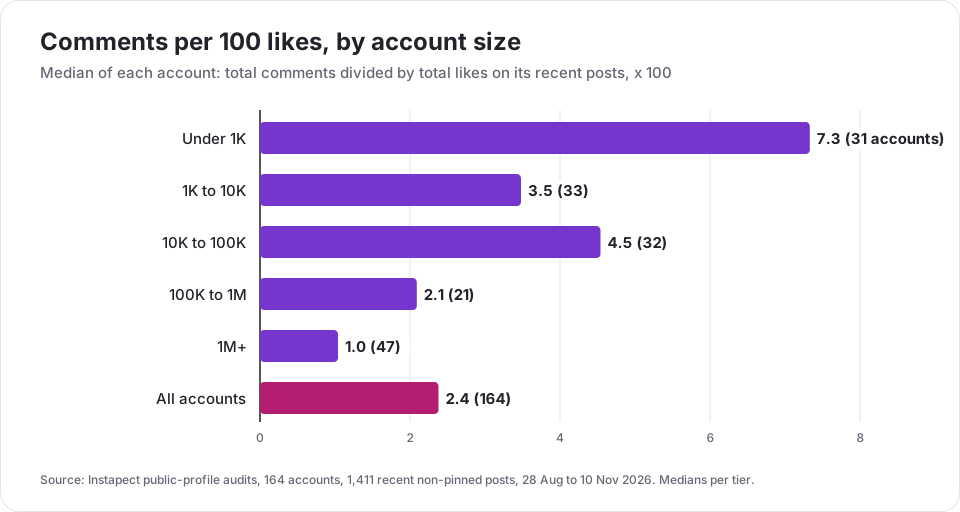
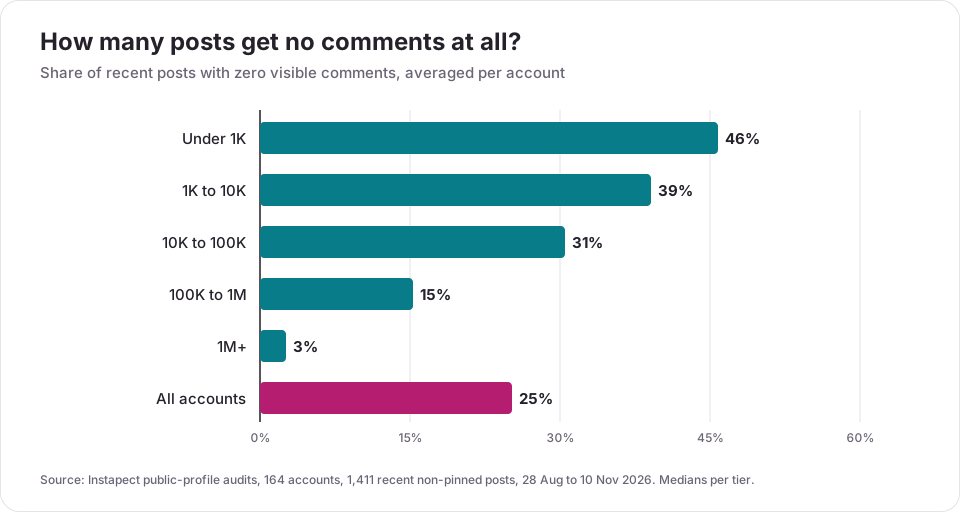
| Followers | Accounts | Median comments per post | Comments per 100 likes | Posts with zero comments |
|---|---|---|---|---|
| Under 1K | 31 | 1 | 7.3 | 46% |
| 1K to 10K | 33 | 2 | 3.5 | 39% |
| 10K to 100K | 32 | 2.3 | 4.5 | 31% |
| 100K to 1M | 21 | 17 | 2.1 | 15% |
| 1M+ | 47 | 636 | 1.0 | 3% |
| All accounts | 164 | 6 | 2.4 | 25% |
Finding 1: most accounts get a handful of comments per post
Below 100,000 followers, the typical post got one to three comments. Replying to every one of them takes a couple of minutes a post. The workload only becomes a real problem past 100K, where the median post had 17 comments, and in the 1M+ tier, where it had 636.
Finding 2: small accounts get the most comments per like
Accounts under 1K got 7.3 comments per 100 likes, seven times the 1M+ tier. A small audience tends to be friends and peers who talk back. Big accounts collect likes from people scrolling past. For a small account, each reply is a larger share of the whole conversation, which is why answering every comment is realistic there and impossible at the top. @leomessi is an outlier among the giants at 3.1 comments per 100 likes across its 12 most recent posts; @kyliejenner sits at 0.3.
Finding 3: a quarter of posts get no comments at all
Across all accounts, 25% of recent posts had zero comments, rising to 46% for accounts under 1K. If your post has none, you're in common company. A reply under your own post to start the thread doesn't count as engagement from others, so judge a post by the comments it gets from your audience.
Finding 4: comments bunch up on one post
For the median account, the single most-commented recent post held 36% of all comments across its recent posts. Replies come in bursts. Plan your reply time around the post that takes off rather than spreading it evenly.
Finding 5: Reels draw twice the comments per like
Per 100 likes, the median account got 2.95 comments on Reels, against 1.65 on single images and 1.46 on carousels (143, 51 and 89 accounts with at least two posts of each format). Reels also get the reply-with-a-Reel option, so they're where answering comments pays back twice: the reply is new content.
What this data can't tell you. Public counts don't show who wrote a comment, whether the owner replied, how fast, or what replying did to reach. Those live in the account's own Insights. The accounts were chosen by the people who audited them, so they aren't a random sample of Instagram.
Which reply method should you use? A quick decision guide
- A question others will have too → reply in the thread, then pin the comment.
- A long or visual answer on a Reel → reply with a Reel.
- A compliment or emoji → like it; a short reply is optional.
- Anything private (orders, prices, account details) → reply "Sent you a DM" and continue in Messages. If the same questions arrive in DMs every day, set up an Instagram auto reply so new messages get an instant answer.
- Rude but not abusive → hide it. Spam or abuse → delete, restrict or report.
- Too many to handle → answer the first hour's comments on your top post, like the rest, and use Select multiple comments to clear spam.
Mistakes to avoid when replying to Instagram comments
| Mistake | Why it hurts | Do this instead |
|---|---|---|
| Replying in a new top-level comment | The person may never see it, and the thread breaks | Tap Reply under their comment |
| Deleting the @username | No notification reaches them | Leave the @mention in place |
| Copy-paste replies ("Thanks!!") on every comment | Reads as automated; adds nothing to the thread | Answer the actual question, or just like it |
| Arguing in public | Pulls more attention to the comment | Hide it or move to DMs |
| Answering prices or order details in public | Exposes customer details | Reply that you sent a DM |
| Six or more hashtags in a reply | The reply won't post | Five or fewer |
| Counting your own replies as engagement | Inflates your comment count and engagement rate | Compare comments from others only |
That last point matters when you check performance. Comment counts on a post include your replies, so an account that answers every comment can roughly double its visible comment count. Keep that in mind when you compare engagement rates with the engagement rate calculator or by hand using the standard formula.
How to check your replies are working
- Check the thread. Tap View replies under the comment. Your reply should sit indented under it, starting with @username.
- Check the notification went out. Ask a friend to comment on a test post and reply to them; they should see it in their Notifications shortly after.
- Check what changed. Compare comments from others per 100 likes on posts where you replied against posts where you didn't, over at least 10 posts. To line up the public numbers for any account, the Instagram profile analyzer lists recent posts with their likes and comments, as do tools such as Meta Business Suite for your own account.
Frequently asked questions
How do I reply to a comment on Instagram?
Open the post, tap Reply under the comment, type your answer and tap Post. Instagram adds the person's @username so they get a notification, and your reply sits under their comment (Instagram Help Center).
How do you reply to a specific comment on Instagram?
Tap Reply directly under that comment, not the main comment box at the bottom. Using the main box posts a new top-level comment that isn't linked to anyone.
Can you reply to Instagram comments on a computer?
Yes. On instagram.com, open the post, click Reply under the comment, type and click Post. Replying with a Reel and selecting multiple comments only work in the app.
Why is there no Reply button on Instagram?
The post's owner has turned comments off or limited who can comment. You'll see no comment box, or a note that comments are limited. You can't change that from your side; send them a DM instead.
My Instagram reply won't post. What's wrong?
Check for more than 5 hashtags, which stops a comment from posting. If it still fails, you may be under a temporary action block for posting many comments quickly; wait a few hours and try again.
I replied but the person says they never got a notification. What happened?
Check that the reply still starts with their @username; if you deleted it, Instagram may not notify them. They might also have restricted your account or turned off comment notifications, which you can't see.
Does the person know when you reply to their comment?
Yes. Instagram sends them a notification when you reply with their @username, and when you reply with a Reel (Instagram Help Center).
Can I reply to a comment with a video?
Yes, on Reels. Tap Reply, then the camera icon on the left, record or choose a video, and share it as a new Reel. The comment appears on it as a sticker. It only works on public Reels and in the app.
Can I edit a reply on Instagram?
Instagram's Help Center doesn't describe editing comments. To change a reply, delete it (tap and hold > Delete) and post a new one.
Should you reply to every comment on Instagram?
At most sizes you can: in Instapect's audits the median post under 100K followers had one to three comments. Past 100K the median was 17, and 636 at 1M+, so big accounts like most comments and answer the questions.
Do replies count as comments on Instagram?
Yes. Your replies are added to the post's comment count, and so are hidden comments. That raises the visible engagement rate, so leave your own replies out when you compare posts.
How do I reply to an Instagram Story?
Story replies arrive in your Messages (DMs), so you answer them there like any chat. To reply to someone else's Story, tap Send message at the bottom of it.
Sources
- Instagram Help Center, Reply to a comment on Instagram, retrieved 10 Nov 2026.
- Instagram Help Center, Reply to a comment on your reel with a new reel, retrieved 10 Nov 2026.
- Instagram Help Center, Manage multiple comments on your Instagram posts (up to 25 at once, app only), retrieved 10 Nov 2026.
- Instagram Help Center, Hide comments or message requests you don't want to see (who can comment, hidden comments in the total count), retrieved 10 Nov 2026.
- Instagram Help Center, Like a comment, Delete a comment, Delete comments you've made and Temporarily limit interactions, retrieved 10 Nov 2026.
- Video: Trevor Nace, How To Reply To A Comment On Instagram (1:20).
- Instapect public-profile audits: 164 accounts, 1,411 recent non-pinned posts, 28 Aug to 10 Nov 2026.
- Search demand: Serpstat via Treg, United States, 10 Nov 2026 (how do i respond to an instagram comment 1,000/month, KD 14; how do you respond to a comment on instagram 1,000; how to reply comments on instagram 880; reply to instagram comment 260; instagram comment reply 210).
Reply where it counts
Tap Reply under the comment, keep the @username, and post. Answer questions in the thread and pin the best one, move private topics to DMs, and reply to Reel comments with a Reel when the answer needs showing. Most accounts get one to three comments a post, so answering all of them is realistic until you pass about 100K followers. To see how comments line up against likes on any public account, run its handle through the engagement rate calculator and compare its recent posts.