An Instagram Note is a short text update of up to 60 characters that sits above your profile picture at the top of your followers' inbox and on your profile for up to 24 hours. To post one, open Messages, tap your profile picture (or the + bubble) at the top of the inbox, type your note, choose who can see it (followers you follow back, or Close Friends) and tap Share. You can have only one note at a time: a new note replaces the old one, and you can delete it at any moment by tapping it and choosing Delete note (Instagram Help Center, checked 15 Nov 2026).
Below are the exact steps for posting from the inbox or your profile, changing and deleting a note, adding music, replying to and muting other people's notes, fixes for when Notes are missing, and a list of note ideas. The original part: 1,809 recent captions from 165 public accounts, measured against the 60-character limit, to show how much of a typical caption hook already fits in a Note.
Disclosure: Instapect publishes this guide and makes one of the tools mentioned below. Every step here happens in the Instagram app and works without it. Instapect reads public profile data only and cannot see anyone's Notes.
TL;DR: Instagram Notes in 2026
| What you want to do | What to tap | Rule or limit | Source |
|---|---|---|---|
| Post a note | Messages > your profile picture or + at the top > type > choose audience > Share | Up to 60 characters, text and emoji | Help Center, checked 15 Nov 2026 |
| Change a note | Tap your note > Leave a new note > type > Share | No edit button: the new note replaces the old one | Help Center |
| Delete a note | Tap your note > Delete note | Works any time before it expires | Help Center |
| Choose who sees it | Audience picker before Share | Followers you follow back, or Close Friends | Instagram blog |
| Reply to someone's note | Tap their note > Send message or Reply to [name] > Send | The reply arrives as a private DM | Help Center, checked 15 Nov 2026 |
| Stop seeing someone's notes | Messages > press and hold their note > Mute notes | They are not told | Help Center, checked 15 Nov 2026 |
| How long is a typical caption hook? | Median first line of a public caption: 46 characters; 63% fit in 60 | Instapect, 165 accounts, 28 Aug to 10 Nov 2026 |
- Notes are private, not public. Only the audience you pick sees your note, and only you see who liked or replied to it.
- Replies go to your inbox. A reply starts a one-to-one conversation, so Notes work as a conversation starter, not a broadcast.
- 24 hours, then gone. After a day the note disappears from Instagram on its own, though a reported note can still be reviewed after it expires.
Instagram Notes at a glance
| Question | Answer |
|---|---|
| What is a note? | A 60-character text update (emoji allowed) shown above your profile picture |
| Where does it appear? | At the top of the inbox in Instagram messaging and above your profile picture on your profile |
| How long does it last? | Up to 24 hours |
| How many can I have? | One. A new note replaces the current one |
| Who can see it? | Followers you follow back (mutuals) or your Close Friends list |
| Can I edit it? | No. Leave a new note or delete it |
| Can people like it? | Yes. Tap and like, or double-tap the note. Only you see the likes |
| Can people reply? | Yes, by direct message. Replies are private |
| Can I add music? | Yes, with the music icon when you create the note, including live Spotify listening |
| Can I see who viewed it? | No. You see likes and replies, not a viewer list |
Facts from the Instagram Help Center and Instagram's own Notes ideas article, both checked 15 Nov 2026.
How to post a note on Instagram
There are two starting points. Both end at the same composer, and both work on iPhone, iPad and Android.
From your inbox
- Tap Messages (the paper plane or chat icon) at the top or bottom of your feed, depending on your app version.
- At the top of the inbox, tap your profile picture. It shows Leave a note or a + bubble when you have no current note.
- Type your note. The counter stops you at 60 characters.
- Choose the audience: Followers you follow back or Close friends.
- Tap Share in the top right.
From your profile
- Tap your profile picture at the bottom right to open your profile.
- Tap the bubble above your profile photo.
- Type the note, pick the audience and tap Share.
Your note now shows above your photo on your profile and at the top of the inbox for everyone in the audience you picked, for up to 24 hours (Help Center).
Add music to a note
- Start a new note from the inbox.
- Tap the music icon (🎵) and pick a song, or tap Share from Spotify while music is playing after linking your Spotify account.
- Add a short caption if you want and tap Share.
With Spotify linked, the note updates to the song you are playing. If you stop listening, it updates the next time you play a song within 30 minutes (Instagram blog). The same music library works on posts, Reels, Stories and your profile: how to add music to Instagram covers each one.
How to change or delete a note on Instagram
Instagram has no edit button for Notes. To fix a typo or change the message, replace it:
- Tap your note at the top of the inbox or on your profile.
- Tap Leave a new note.
- Type the new text, choose the audience and tap Share. The new note replaces the old one, and the 24-hour clock starts again.
To remove a note before it expires, tap it and tap Delete note (Help Center). Likes and replies on the old note do not carry over to a new one, so if a note is getting replies, think twice before replacing it to fix a small typo.
Who can see your Instagram note?
You pick one of two audiences each time you share:
| Audience | Who sees the note | Best for |
|---|---|---|
| Followers you follow back | People who follow you and whom you follow | Everyday updates to friends and mutuals |
| Close friends | Only the people on your Close Friends list | Personal news, plans, inside jokes |
People outside the audience do not see the note, and a public account does not make a note public. That is the main difference from a Story or a post caption: a note is closer to a status message in a group chat than to content. This is also why Instapect, which reads only public profile data, cannot read Notes at all.
How to reply to, like, mute or report someone's note
Reply or like (Help Center):
- Tap the person's note at the top of your inbox or on their profile.
- Tap Like, or double-tap the note.
- To reply, tap Send message or Reply to [name], type and tap Send. Your reply is sent as a direct message, so only the two of you see it.
Mute (Help Center):
- Tap Messages.
- Press and hold the person's note.
- Tap Mute notes and confirm. They are not notified, and you still see their Stories and posts.
To unmute, open their profile, tap Following > Mute, and switch Notes back on.
Report: press and hold the note, tap Report, choose a reason and follow the prompts. Reports are anonymous unless they concern intellectual property (Help Center).
Notes on posts and Reels
Instagram also tested and then launched Notes on feed posts and Reels in July 2024. Mutual followers can leave a short note on a post or Reel, which other mutuals see, and those notes last three days (Social Media Today, 18 Jul 2024). These are different from the inbox note covered above: they are tied to one piece of content, not to your profile. Availability has varied by account and region since launch, so if you do not see the option on a post, your app may not have it.
Instagram Notes not showing? Fixes that work
| Problem | Likely cause | Fix |
|---|---|---|
| No Leave a note bubble in the inbox | Feature not available on your account yet, or an old app version | Update Instagram from the App Store or Google Play, then restart the app. The Help Center says the feature "isn't available to everyone" |
| Friends cannot see your note | They are outside the audience you chose | Check it was shared to followers you follow back, not Close Friends, and that you follow them back |
| You cannot see a friend's note | You muted their notes, or you are not in their audience | Unmute from their profile (Following > Mute > Notes) |
| The note vanished early | It reached 24 hours, you posted a new one, or it was removed after a report | Leave a new note |
| The text cuts off | 60-character limit reached | Shorten it: drop filler words, use one emoji instead of a phrase |
| On a headset or desktop the option is missing | Notes "aren't available on Meta Quest devices" and are built for the app | Use the Instagram app on a phone or tablet |
How to check your note worked
- Look at your inbox. Your note should show above your profile picture at the top of Messages.
- Look at your profile. The same bubble should appear above your profile photo.
- Check activity. Tap your note: you see the list of people who liked it and can start a chat with any of them from Messages next to their name (Help Center). No likes after a few hours usually means a small or Close Friends audience, not a broken note.
What 1,809 public captions say about writing in 60 characters
A note gives you 60 characters. To see how tight that is, I measured the first line of recent captions in Instapect's audit data, since the first line is the part of a caption people see before more and the closest public equivalent of a one-line note.
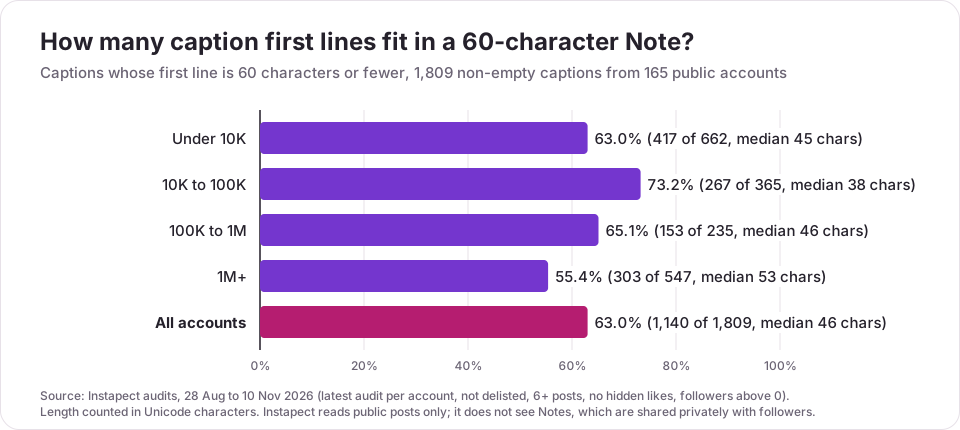
| Followers | Accounts | Captions (non-empty) | Median first line | First line fits in 60 | Whole caption fits in 60 |
|---|---|---|---|---|---|
| Under 10K | 65 | 662 | 45 characters | 63.0% | 23.0% |
| 10K to 100K | 32 | 365 | 38 characters | 73.2% | 13.7% |
| 100K to 1M | 21 | 235 | 46 characters | 65.1% | 16.2% |
| 1M+ | 47 | 547 | 53 characters | 55.4% | 27.2% |
| All accounts | 165 | 1,809 | 46 characters | 63.0% | 21.5% |
What it shows:
- Most hooks already fit. The median first line is 46 characters, and 63% of first lines are 60 characters or fewer. If you can write a caption hook, you can write a note.
- Whole captions rarely do. Only 21.5% of non-empty captions are 60 characters or shorter in total, which is why a note should carry one idea, not a summary.
- Bigger accounts write longer openers. Accounts with 1M+ followers had the longest median first line (53 characters), and 44.6% of their first lines would not fit in a note.
- Asking in public did not raise public comments. 7.7% of captions open with a question. Among accounts with comments, 44.7% of question-led posts beat the account's own median comment count, against 46.1% of other posts. A public question alone does not pull more comments. Notes route answers to private DMs instead, and Instagram's own advice is to end a note with a question (Instagram blog).
Method. Latest Instapect audit per public account, 28 Aug to 10 Nov 2026, keeping accounts that are not delisted, have at least 6 recent posts, show like counts and have more than 0 followers: 165 accounts and 1,912 posts, of which 1,809 have a caption. First line means the caption text before the first line break, counted in Unicode characters; Instagram's own counter may count some emoji differently. Comparisons use each account's own median, so large and small accounts weigh the same.
Limits. These are accounts people chose to audit on Instapect, not a random sample, and big brands are over-represented. Captions are not Notes: this is a proxy for how people write short public text, not a measurement of Notes, which are private and invisible to any public-data tool. You can look at any public account's recent captions and posting pattern with the free Instagram profile analyzer.
Instagram note ideas (all under 60 characters)
Each idea below fits the limit with room to spare.
Questions that start a chat
- Best thing you ate this week? 🍜 (31)
- Recommend me a show, I finished everything (42)
- Coffee or tea people, explain yourselves ☕ (42)
- Who's around this weekend? (26)
Status and plans
- In Lisbon till Sunday, tips welcome 🇵🇹 (38)
- Exam week. Send snacks and good vibes (37)
- Back on my morning runs, day 3 🏃 (32)
- New post is up, tell me what you think (38)
Funny and low effort
- My plants are thriving. I am not. (33)
- Professional overthinker, amateur sleeper (41)
- Typing... deleting... typing again (34)
For small businesses and creators
- Restock drops Friday 6pm. DM for early access (45)
- Behind the scenes on my Story today 🎬 (37)
- Free shipping until midnight, link in bio (41)
Character counts are in brackets. Keep questions open so a reply takes one line, and change the note when the moment passes: an old "in Lisbon" note is worse than none.
Common mistakes with Instagram Notes
- Writing a caption instead of a note. One idea per note. If it needs two sentences, it belongs in a post or Story.
- Sharing with the wrong audience. Personal news meant for Close Friends goes to all mutuals if you skip the picker.
- Replacing a note that is getting replies. A new note starts again with zero likes.
- Expecting public reach. Notes do not show to non-followers or in search, so they will not grow an account. Use posts, Reels and a clear Instagram bio for that.
- Posting links. A note is plain text and emoji; there is no clickable link. Point people to your bio or Story.
- Asking for replies and not answering. Replies land in your DMs. If you invite them, answer them, the same way you would reply to comments.
Frequently asked questions
How do you post a note on Instagram?
Open Messages, tap your profile picture or the + bubble at the top of the inbox, type up to 60 characters, choose followers you follow back or Close Friends, and tap Share. You can also start from the bubble above your photo on your profile.
How long do Instagram Notes last?
Up to 24 hours. After that the note is no longer visible on Instagram. You can delete it earlier by tapping it and choosing Delete note.
What is the character limit for Instagram Notes?
60 characters, including spaces and emoji. For comparison, a post caption allows up to 2,200 characters, covered in the Instagram caption limit guide.
Can you edit a note on Instagram?
No. Tap your note, choose Leave a new note and share the corrected text. The new note replaces the old one and resets the 24 hours, and likes on the old note do not carry over.
Who can see my Instagram note?
Only the audience you choose: followers you follow back, or your Close Friends list. Making your account public does not make your note public.
Can you see who viewed your Instagram note?
No. Instagram shows who liked your note and who replied, but not a list of viewers. Tools that claim to show note viewers cannot get that data.
Why can't I see Notes on Instagram?
Usually your app is out of date or the feature has not reached your account yet; the Help Center says it "isn't available to everyone." Update the app and restart it. If one friend's note is missing, you may have muted them or you may not be in their chosen audience.
My note disappeared before 24 hours. What happened?
Either you shared a new note, which replaces the old one, or the note was removed after a report for breaking Instagram's Community Standards.
Does someone know if I reply to or like their note?
Yes. Only the person who shared the note sees your like, and your reply arrives in their inbox as a direct message that starts a private conversation.
Can I mute someone's Instagram notes without unfollowing?
Yes. In Messages, press and hold their note and tap Mute notes. They are not notified, and you still see their posts and Stories.
Can you add music to an Instagram note?
Yes. Tap the music icon when creating a note and pick a song, or link Spotify and share what you are listening to. The Spotify note updates as you change songs.
Do Instagram Notes help you get more followers?
Not directly. Notes only reach people who already follow you back or are on your Close Friends list. They are useful for starting conversations with people you know; for growth, the guide to getting more followers covers what moves the numbers.