To see Instagram Insights, open the Instagram app, tap your Profile, then tap Professional dashboard (or Your dashboard on a public personal account) and open Insights. You get account-level numbers for any period in the past 90 days, and each post, Reel and story keeps its own insights for up to two years. Since Instagram's Help Center now lists any public account as eligible, you no longer need a business or creator account, but private accounts get nothing. Audience demographics appear only after your content reaches or engages more than 100 accounts.
The rest of this guide gives the exact taps for each account type, what every metric means, the fix for each "Insights not showing" error, and how to analyze accounts you don't own when Insights is not an option.
Disclosure: Instapect publishes this guide and makes one of the tools mentioned below. Every method here works without it: Instagram Insights is free inside the app, and the public-signal method needs only a spreadsheet.
All click paths below were checked against the Instagram Help Center on October 11, 2026. Instagram renames menus often, so if a label differs on your phone, the troubleshooting table covers the usual causes.
Key takeaways
| Question | Short answer (October 2026) |
|---|---|
| Where are Instagram Insights? | Profile > Professional dashboard > Insights (professional accounts) or Profile > Your dashboard (public personal accounts) |
| Do I need a professional account? | No. Instagram's Help Center says you need a public account, personal or professional. Private accounts lose access |
| How far back does it go? | Account insights: any range within the past 90 days. Posts, Reels and stories: up to two years |
| Why no audience demographics? | You need to reach or engage more than 100 accounts in a preset timeframe. Try Last 30 days or Last 90 days |
| Where did impressions go? | Meta replaced impressions and plays with Views (Graph API v22, announced January 21, 2025). Viewers is the closest thing to the old reach number |
| Can I see Insights for someone else's account? | No. Insights is owner-only. For other accounts you work from public signals: likes, comments, Reel play counts, posting cadence and follower count |
How do I see Instagram Insights? Exact steps by account type
Instagram calls the place where Insights lives a dashboard. There are two versions: the Professional dashboard for business and creator accounts and Your dashboard for public personal accounts. Both lead to the same core Insights screens. Pick the path that matches your account.
Path 1: Professional account (business or creator), Instagram app
Per Instagram's "About Instagram dashboards" page:
- Tap Profile or your profile picture in the bottom right.
- Tap Professional dashboard.
- If you don't see the dashboard on your profile, tap More (the menu icon) to open Settings and activity, then tap Insights below For professionals.
- On the dashboard, tap See all insights for the full screen. The dashboard itself shows a 30-day summary.
- Tap the date dropdown at the top to pick a preset or custom range within the past 90 days.
You will land on the overview with Views, Interactions, New followers and Content you shared. Tap any of them for detail, and tap the (i) in the top right corner for Instagram's own definition of each metric.
Path 2: Public personal account, Instagram app
This is the path most older guides miss. Instagram's Help Center now states: "You need to have a public (personal or professional) account on Instagram to view insights."
- Make sure your account is public. Private accounts cannot see Insights.
- Tap Profile or your profile picture in the bottom right.
- Tap Your dashboard.
- If it isn't on your profile, tap More to open Settings and activity, then tap Your dashboard below Your insights and tools.
Personal accounts get the same core metrics. What they don't get is ad tools, boosting and monetization insights, which stay with professional accounts.
Path 3: On a computer (instagram.com)
From Instagram's "View account and content insights" page:
- On instagram.com, select Dashboard from the left-hand menu.
- Professional account: select Insights below For professionals. Personal account: select Your dashboard below Your insights and tools.
- From the Insights dropdown, select Account or Content.
- Use the date dropdown to choose Last 7, 14, 30 or 90 days, or set a custom start and end date. They must be at least one day apart and inside the past 90 days.
Desktop is the easier place to take screenshots for a client report, because the account and content views sit side by side.
Path 4: Insights for a single post, Reel, story or live video
| Content | Exact steps | How long insights last |
|---|---|---|
| Feed post | Profile > tap the post > View Insights | Up to two years |
| Reel | Profile > Reels tab > tap the Reel > View insights | Up to two years; only Reels posted on or after May 14, 2021 |
| Active story | Open your story, then swipe up or tap the insights icon. On desktop: Options (three dots) > View insights | Up to two years, even though the story expires after 24 hours |
| Past story | Profile > View insights > find it under Top content based on engagement | Up to two years |
| Live video | Open the saved live video and swipe up or tap to view insights | See Instagram's live insights page |
Sources: Instagram Help Center pages for posts, Reels and stories, checked October 11, 2026.
Prefer to watch? The video embedded with this guide (GuideWise, March 2025) walks through the same screens. Menu labels may have shifted slightly since; the written steps above follow the October 2026 Help Center.
Which path are you on?
- Private account → You can't see Insights at all. Switch to public first. If you go private again later, you lose access, but Instagram says you can get past data back if you return to public within 90 days.
- Public personal account → Path 2. Enough for most people who just want to know what's working.
- Business or creator account → Path 1. Pick this if you want to boost posts, run ads, see monetization insights or connect a scheduling tool through Meta's API.
- You manage someone else's account → Ask for access to their account or their Meta business tools. Insights is never visible from the outside.
- You want to study a competitor or an influencer → Skip to analyzing accounts you don't own.
Action: to check your account type, go to Profile > More > Settings and activity > Account type and tools. If you're offered Switch to professional account, you're on a personal account.
Should you switch to a professional account just for Insights?
Usually not anymore. A public personal account already sees views, viewers, interactions, follower trends and per-post insights. Switch if you need ads, boosting, branded content tools or a connected analytics tool. To switch, Instagram's setup page gives this path: Profile > More > Settings and activity > Account type and tools > Switch to professional account > pick a category > Creator or Business > Next.
Two things to know first. A private account becomes public when you switch, and Instagram auto-accepts all pending follow requests. And if you later switch back to personal, you lose in-app Insights, though Instagram keeps the data for 90 days.
What does Instagram Insights show?
Here are the metrics Instagram lists today, with its own definitions from the "About Instagram insights" page and the Reels page.
| Metric | What it counts | Where you see it |
|---|---|---|
| Views | Times your content was played or displayed, repeats included. Covers Reels, posts, stories, live videos and ads | Account overview and every piece of content |
| Viewers | Unique accounts that saw your content on screen at least once, plus top countries, cities, age ranges and gender | Account overview, Reels, stories |
| Interactions | Likes, comments, saves, shares and other actions on your content | Account overview and every piece of content |
| Accounts engaged | Unique accounts that interacted, split into followers and non-followers for posts, stories and live | Account overview |
| Total followers | Growth (gained and lost), top locations, age range and most active times. Needs at least 100 followers | Account overview |
| Profile activity | Profile visits, follows and link taps that came from a post or story | Post and story insights |
| Watch time and Average watch time | Total time your Reel played, and watch time divided by initial views | Reel insights |
| Follows | Accounts that followed you after viewing a Reel | Reel insights |
| Content you shared | How many posts, stories and Reels you published in the range, with a filterable content library | Account overview |
Instagram labels several of these, including Viewers and Accounts engaged, as "estimated and in-development," so expect small revisions after the fact.
Where did impressions and reach go?
They were folded into Views. In its Graph API v22 announcement on January 21, 2025, Meta said it was "introducing the views metric on all API versions" to align the API with the Instagram app, deprecating Reel plays and deprecating impressions for media created on or after July 2, 2024.
So if a 2024 guide tells you to look for "Impressions" or "Accounts reached," those labels are gone. Use this mapping:
| Old label | Closest 2026 metric | Difference |
|---|---|---|
| Impressions | Views | Same idea: counts every display, repeats included |
| Plays (Reels) | Views | Reel views count starts and replays |
| Accounts reached | Viewers | Unique accounts. For Reels, it counts accounts that saw the Reel on screen even if it didn't play |
What Insights shows that public data cannot
Insights is the only place to see who your content reached. A visitor looking at your profile, or any third-party tool reading public data, sees a much thinner slice.
| Signal | In your Insights | Visible to the public | Measured by Instapect |
|---|---|---|---|
| Views on posts and stories | Yes | No | No |
| Play count on Reels | Yes (as Views) | Yes, shown on the Reel | Yes, as published plays |
| Viewers (reach) | Yes | No | No |
| Audience age, gender, city, country | Yes (100+ accounts reached or engaged) | No | No |
| Story views and story viewers | Yes | No | No |
| Saves, profile visits, link taps, watch time | Yes | No | No |
| Followers vs non-followers split | Yes | No | No |
| Likes and comments per post | Yes | Yes, unless the owner hides like counts | Yes |
| Captions, hashtags, mentions, posting times | Yes | Yes | Yes |
| Follower count | Yes, with daily growth | Current number only | Yes, plus change between its own snapshots |
| Private accounts | Owner only, and only after going public | No | No |
That gap is why reach, demographics and story views can never come from an outside tool. Any site that claims to show them for an account you don't own is guessing or asking you to log in as that account.
How to analyze an Instagram account you don't own
When Insights is not available, five public signals still tell you a lot. This works for competitor research, influencer vetting or checking a brand before a deal.
- Collect the last 12 feed posts. Skip pinned posts, since they are often old hits. Note likes, comments, format (Reel, carousel, image) and date for each.
- Work out engagement rate by followers. Engagement rate = (likes + comments) ÷ followers × 100, per post, then take both the average and the median. A big gap between the two means one viral post is carrying the account. The step-by-step calculation guide has a template, and the engagement rate benchmarks tell you what counts as good for the account's size.
- Check comments per like. Comment-to-like ratio = comments ÷ likes × 100. In Instapect's audits the median was 6.0 comments per 100 likes for accounts with 10K to 100K followers and 1.1 for accounts above 1M (see the micro vs nano influencer data). A sudden run of generic one-word comments is worth a closer look.
- Compare Reel play counts to followers. The play count on a Reel is the only reach-like number Instagram shows in public. Divide it by followers to see whether Reels travel beyond the follower base. The next section shows what's normal by account size.
- Track the follower count over time. One number tells you little. Write it down weekly, or use a tool that takes repeated snapshots, and look for steady growth versus sudden jumps.
Tools that read public signals
| Method | Cost | What it gives you | Limits |
|---|---|---|---|
| Manual spreadsheet | Free | Everything in steps 1 to 5, with full control | About 15 minutes per account; you must repeat it to see trends |
| Social Blade | Free tier | Public follower count history | Focused on follower and following counts over time rather than post-level engagement |
| Instapect | Free audit | Engagement rate (average and median), comment-to-like ratio, posting cadence, hashtags, Reel plays, follower change between snapshots | Public signals only: no reach, impressions, demographics, story views or private accounts, and it does not detect fake followers |
| Engagement rate calculator | Free | Quick engagement rate for any public handle | One metric, not a full review |
What public Reel play counts reveal: data from 134 audited accounts
To put step 4 into numbers, Instapect looked at every Reel play count in its audit database. These are play counts Instagram publishes on each Reel, not private Insights data.
Method. 140 public profiles audited between August 28 and October 11, 2026, that passed the quality bar: at least 6 usable recent posts, no hidden like counts and a follower count above zero. 134 of them had Reels with published play counts, 917 Reels in total. For each account we took its median Reel's plays as a share of followers, then the median across accounts in each follower tier.
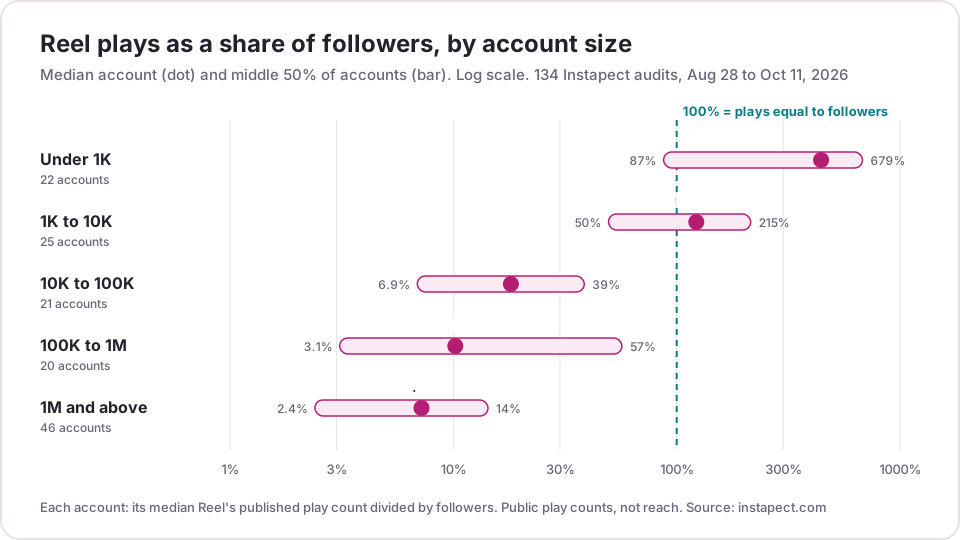
| Follower tier | Accounts | Median Reel plays as % of followers | Middle 50% of accounts | Reels that out-played the follower count |
|---|---|---|---|---|
| Under 1K | 22 | 443% | 87% to 679% | 71.6% of 183 Reels |
| 1K to 10K | 25 | 122% | 50% to 215% | 52.7% of 169 Reels |
| 10K to 100K | 21 | 18% | 6.9% to 39% | 17.0% of 165 Reels |
| 100K to 1M | 20 | 10% | 3.1% to 57% | 22.3% of 148 Reels |
| 1M and above | 46 | 7.2% | 2.4% to 14% | 2.8% of 252 Reels |
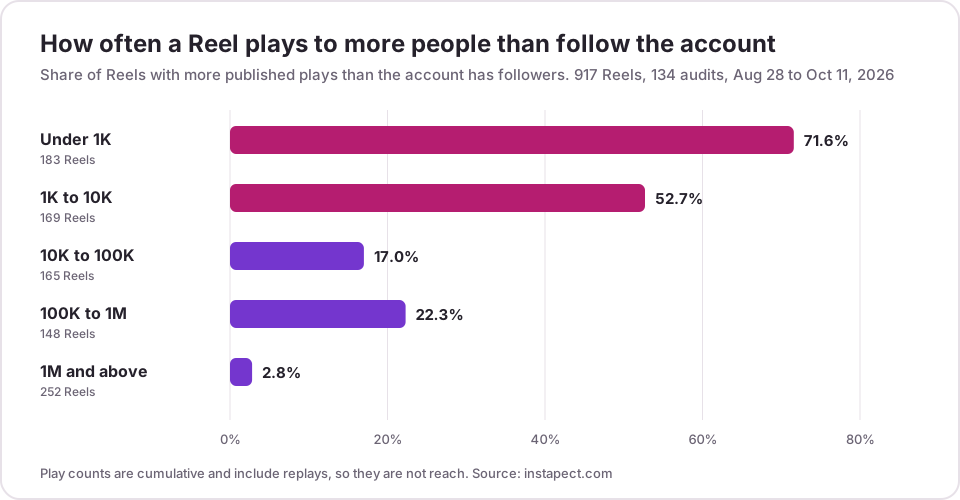
What this tells you. Small accounts routinely get more Reel plays than they have followers, so most of their audience comes from people who don't follow them yet. Past 10K followers that flips: the typical Reel plays to a fraction of the follower base, and above 1M only 2.8% of Reels out-played the follower count. When you vet an account, a Reel play rate far below its tier's range is a hint that the follower count is bigger than the active audience.
Two worked examples (public reports, retrieved September 5 and August 28, 2026):
- @nasa: 104.4M followers, median Reel about 3.62M plays, or roughly 3.5% of followers. Engagement rate 0.14% (median 0.13%) on about 13.8 posts a week. A high-volume publisher whose individual posts each reach a small slice of followers.
- @khaby00: 78.0M followers, median Reel about 20.5M plays, roughly 26% of followers, and an engagement rate of 1.46%. Far above the 1M+ middle range, which is what a Reels-first creator looks like from the outside.
More examples sit in the creator reports hub.
Limits. These are accounts that people chose to audit on Instapect, so big public accounts are over-represented (46 of 134 have 1M+ followers) and each small tier has only 20 to 25 accounts. Play counts are cumulative, so newer Reels look lower. And a play count is not reach: one person can replay a Reel many times, which is why Instagram reports Viewers separately inside Insights. Treat the table as a rough yardstick, not a benchmark to grade anyone on.
Hidden likes. Public data also has gaps. Of all 308 profiles in the audit database over the same period, 41 (13%) had at least one recent post with its like count hidden. Those accounts drop out of the sample above, and for them only the owner's Insights shows the real number.
How to check you're reading the right numbers
- Confirm the date range first. The dropdown at the top of Insights controls everything below it. A "drop" is often just a shorter range.
- Match one post by hand. Open a post's insights and compare Interactions with the likes and comments you can see. Interactions should be equal or higher, because it also counts saves and shares.
- Check the thresholds. Demographics need more than 100 accounts reached or engaged in a preset range. Follower trends need at least 100 followers. If either is blank, widen the range to Last 90 days before assuming something is broken.
Instagram Insights not showing? Fixes for each error
| What you see | Likely cause | Fix |
|---|---|---|
| No dashboard or Insights anywhere | The account is private | Make the account public. Insights requires a public account |
| Dashboard is there but past data is empty | You recently went public or recently switched to professional | Wait; Instagram may not show insights from before the change |
| Insights vanished after changing account type | You switched from professional back to personal | Switch back within 90 days to regain past data, or use Your dashboard if the account is public |
| Audience demographics are blank | Fewer than 100 accounts reached or engaged in that range, or a custom range is selected | Choose a preset: Last 30 days, Previous month or Last 90 days |
| "Total followers" shows no breakdown | Fewer than 100 followers | No fix until you pass 100 |
| No View insights on an old Reel | Reel posted before May 14, 2021, or more than two years ago | Not available; use the public play count instead |
| Messaging metrics missing | Account or audience in Europe or Japan | Meta lists some messaging metrics as unavailable there |
| Menu labels don't match this guide | App out of date, or a staged rollout | Update the app; check instagram.com Dashboard as a backup |
Who doesn't need to check Insights often
If you post a few times a month for friends, a monthly look at the 30-day summary on the dashboard is enough. Weekly checks pay off when you post three or more times a week, sell something, or work with brands. If you manage clients, export or screenshot the 90-day account view each month, because Instagram only keeps account-level data for 90 days. Per-post insights last two years, but the account totals do not.
To act on what you find, pair Insights with the best time to post data and, if you work with creators, the micro vs nano influencer benchmarks.
Frequently asked questions
How do I see my Instagram Insights?
Tap Profile, then Professional dashboard (business or creator) or Your dashboard (public personal account), then See all insights. On instagram.com, select Dashboard in the left menu, then Insights or Your dashboard. For a single post, open it and tap View Insights.
Can I see Instagram Insights without a professional account?
Yes, as long as the account is public. Instagram's Help Center (checked October 11, 2026) says you need "a public (personal or professional) account" to view insights. Personal accounts use Your dashboard. Ad tools, boosting and monetization insights still need a professional account.
My Instagram Insights are not showing. What went wrong?
The usual cause is a private account, since Insights requires a public one. Next most common: you recently changed account type, so older data isn't shown yet, or you switched from professional to personal, which removes in-app insights (Instagram keeps the data for 90 days if you switch back). Updating the app fixes cases where the menu simply moved.
Why can't I see audience demographics in Insights?
Demographics only appear when your content reaches or engages more than 100 accounts in a preset timeframe. If Last 7 days is blank, switch to Last 30 days, Previous month or Last 90 days. Custom date ranges don't show demographics.
Where did impressions go on Instagram Insights?
Impressions were replaced by Views. Meta announced the change for its API on January 21, 2025 (Graph API v22) to match the Instagram app, deprecating impressions for media created on or after July 2, 2024. The old "Accounts reached" maps most closely to Viewers.
How far back can I see Instagram Insights?
Account-level insights cover any range within the past 90 days. Individual posts, Reels and stories keep their insights for up to two years. Reels posted before May 14, 2021 have no insights at all.
Can I see Instagram Insights for someone else's account?
No. Insights is only visible to the account owner and people the owner gives access to. For other accounts, you can work from public signals: likes, comments, Reel play counts, posting cadence and follower count. See how to analyze an account you don't own.
Can I see who viewed my Instagram Insights or my profile?
No. Insights reports counts such as views, viewers and profile activity, not the names of people who visited your profile. No outside tool can add that, and apps that promise a "who viewed my profile" list are not using real Instagram data.
How many followers do you need to see Instagram Insights?
None for the basics: any public account sees views, interactions and per-post insights. The Total followers breakdown (growth, locations, ages, active times) needs at least 100 followers, and demographics need more than 100 accounts reached or engaged.
Can Instapect show my reach, impressions or demographics?
No. Instapect reads only public signals: posts, visible likes and comments, captions, hashtags, Reel play counts, posting times, follower count and the change between its own snapshots. Reach, views on posts and stories, demographics and story views exist only in the owner's Instagram Insights.