An Instagram profile analyzer reads a public account's profile and recent posts and turns them into numbers you can compare: engagement rate, posting frequency, format mix, top posts and a bio check. The box above does that for any public handle in about ten seconds. The detail most analyzers skip is pinned posts: in 145 public profiles audited on Instapect between August 28 and October 16, 2026, 69 (48%) had pinned posts, and counting them in stretched the typical gap between posts from 2.4 days to 22.6 days and lifted engagement rate by a median 1.20x.
Disclosure: Instapect publishes this page and makes the analyzer on it. Every check below can also be done by hand from the profile itself, and five other free analyzers are compared further down.
TL;DR: what an Instagram profile analyzer can and cannot tell you
| If you want to know... | Short answer (October 2026) | Source |
|---|---|---|
| What a profile analyzer measures | Followers, engagement rate by followers, median engagement, comments per 100 likes, posts per week, format mix, top posts, hashtags, bio and link | Public profile data |
| Whether it works on any account | Public accounts only. Private accounts show no posts to analyze | |
| Why two analyzers disagree | Different post windows, average vs median, views vs followers, and whether pinned posts are excluded | Instapect audits |
| How often pinned posts distort a naive read | 69 of 145 audited accounts (48%) had 1 to 3 pinned posts; including them lifted engagement rate on 49 of those 69 | Instapect, 145 accounts |
| What it cannot see | Reach, impressions, saves, shares, Story views, demographics, who viewed a profile | Owner-only in Instagram Insights |
| Whether it can prove fake followers | No public tool can; it can only flag patterns worth a closer look | FTC, Instapect |
| Cost | Free profile summary with no login; 2 free detailed scans after signup; $5 for a PDF plus one extra scan, or $19 a month for 50 reports | Instapect pricing, checked October 26, 2026 |
- Best for checking a creator before a deal: a profile analysis that shows the median next to the average, plus comments per 100 likes.
- Best for your own account's reach and audience: Instagram Insights, which is free and sees owner-only data no outside tool can.
- Best for follower history over months: a tracker that snapshots the account daily, such as Social Blade.
What the Instagram profile analyzer shows
| Output | Formula or source | Why it matters |
|---|---|---|
| Engagement rate (average) | (average likes + average comments) ÷ followers × 100 | The standard public formula, comparable with most benchmarks |
| Median engagement rate | Middle post's (likes + comments) ÷ followers × 100 | What a typical post earns, so one viral post cannot inflate the read |
| Comments per 100 likes | Average comments ÷ average likes × 100 | Separates an audience that talks from one that only taps |
| Posts per week and average gap | Posts in the window ÷ weeks covered, pinned posts removed | Real publishing rhythm, not one manufactured by an old pinned post |
| Format mix | Count of Reels, carousels and single images in the window | Shows what the account actually publishes |
| Reel plays | Public play count on each Reel | Lets you judge Reels by views as well as by followers |
| Top posts, hashtags and mentions | Ranked from the sampled posts | What already worked, as a template |
| Bio and link check | Bio length, whether a clear next action appears, the external link | What a new visitor learns in five seconds |
| Instapect Score (0 to 100) | Weighted sub-scores: engagement 35, engagement quality 25, content 15, consistency 15, growth 10; follower reach shown but weighted 0 | One graded summary, graded against the account's own follower tier |
The sample is the account's most recent feed items (usually 12), with pinned posts removed from every average, gap and format count. Pinned posts still appear in the post list, badged as pinned. Instagram lets an account pin up to three posts to the top of its grid (Instagram Help Center, checked October 26, 2026), and those posts can be years old. Every report prints its own sample line: posts used, date range, pinned posts excluded and hidden likes.
How to analyze an Instagram profile in 5 steps
You can run the same analysis by hand. It takes about 15 minutes per account with a spreadsheet.
- Open the public profile and note followers. Write down the follower count and the date. Private accounts stop here.
- List the last 12 feed posts and skip pinned ones. Pinned posts sit first in the grid with a pin icon. Record likes, comments, format and post date for the rest.
- Work out the average and the median. Engagement rate = (average likes + average comments) ÷ followers × 100. Then sort the posts and take the middle one for the median. The engagement rate calculation guide has a worked spreadsheet.
- Compare with the follower tier. A 2% rate is ordinary at 3,000 followers and strong at 3 million. The good engagement rate benchmarks list the medians and quartile cut-offs by tier.
- Read the pattern, not one number. Average more than 1.5 times the median means a few posts carry the account. Fewer than 1 comment per 100 likes on a large account means passive scrolling. Fewer than one post a week means any number is a thin baseline.
How to verify: run the same handle through the box above. Your hand-made rate should match within a rounding difference if you used the same posts and left pinned posts out.
Why pinned posts break most Instagram profile analysis
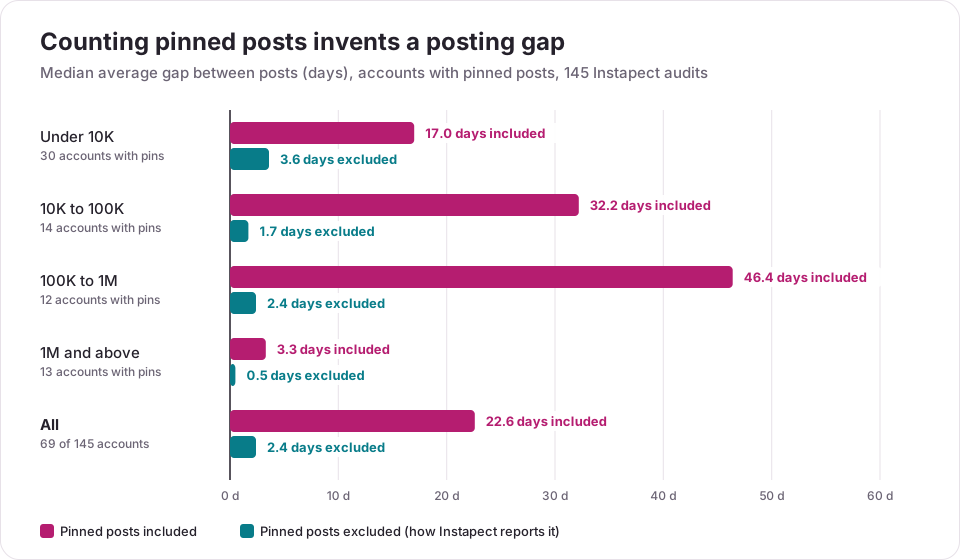
A pinned post is often months or years older than the rest of the grid, so a tool that counts it reports a posting gap that never happened and, usually, a higher engagement rate. Pinned posts tend to be an account's best performers, and they keep collecting likes while they sit on top. To measure the effect, the 145 audited profiles were recalculated twice: once with pinned posts included, once without.
| Follower tier | Accounts | With pinned posts | Median gap between posts, pinned included | Median gap, pinned excluded | Engagement rate, included ÷ excluded (median) |
|---|---|---|---|---|---|
| Under 10K | 54 | 30 (56%) | 17.0 days | 3.6 days | 1.17x |
| 10K to 100K | 25 | 14 (56%) | 32.2 days | 1.7 days | 4.10x |
| 100K to 1M | 20 | 12 (60%) | 46.4 days | 2.4 days | 1.06x |
| 1M and above | 46 | 13 (28%) | 3.3 days | 0.5 days | 1.15x |
| All | 145 | 69 (48%) | 22.6 days | 2.4 days | 1.20x |
Across the 69 accounts with pins (167 pinned posts in all), including them doubled the average gap or worse on 58 accounts and raised engagement rate on 49, by 25% or more on 32. On 27 of the 69, the oldest pinned post was more than a year older than the newest post. The 10K to 100K row has only 14 accounts with pins, so its 4.10x figure is a small-sample median; read it as a warning, not a rate.
Method and limits. Sample: public reports in the Instapect directory that are not delisted, have at least six recent posts with visible likes, no hidden like counts and followers above zero; 145 accounts, audited August 28 to October 16, 2026, queried October 26, 2026. These are accounts people chose to audit, weighted toward celebrities, media brands and small creators, so treat the shares as a description of this set rather than of all of Instagram.
Worked example: @mrbeast and @garyvee
Two public reports, both retrieved September 5, 2026, show how far a pinned post can move the numbers.
| Account | Followers | Pinned posts (oldest) | Engagement rate, pinned included | Engagement rate, pinned excluded | Average gap, included | Average gap, excluded |
|---|---|---|---|---|---|---|
| @mrbeast | 89,246,550 | 3 (November 2024) | 4.15% | 1.05% | 58.4 days | 3.2 days |
| @garyvee | 11,911,627 | 3 (August 2022) | 1.31% | 0.16% | 134.3 days | 0.5 days |
On @mrbeast, counting the pinned posts would quadruple the engagement rate. On @garyvee it would make an account that posts about 14 times a week look like it posts every four months. The published reports use the excluded figures: 1.05% and 2.2 posts a week for @mrbeast, 0.16% and 13.9 posts a week for @garyvee.
What 145 Instagram profile audits flagged most often
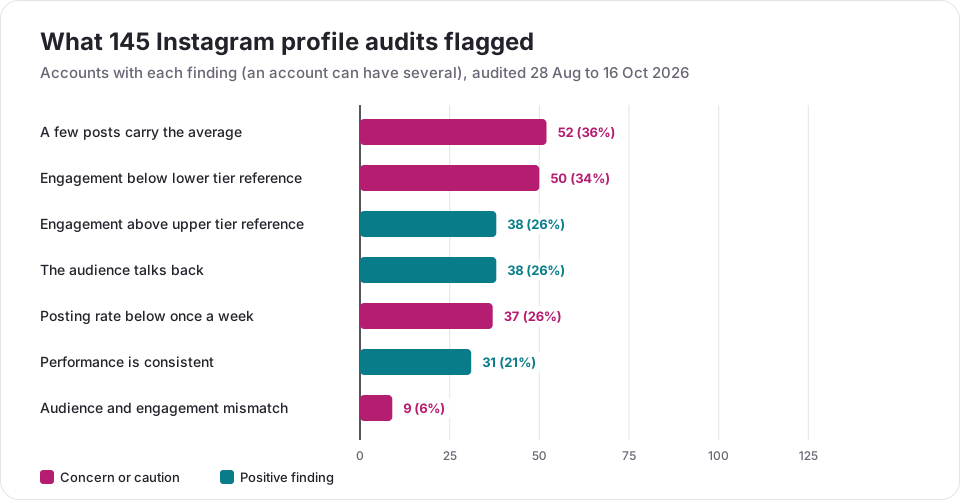
The most common finding was that a few posts carried the average (52 of 145 accounts), followed by engagement below the tier's lower reference (50). Each audit attaches plain-language findings to the score. Counted across the same 145 accounts:
| Finding in the report | What triggers it | Accounts | Share |
|---|---|---|---|
| A few posts carry the average | Median likes well below average likes | 52 | 36% |
| Engagement below the lower model reference | Rate under the tier's bottom-quartile anchor | 50 | 34% |
| Engagement above the upper model reference | Rate at or above the tier's top-decile anchor | 38 | 26% |
| The audience talks back | 1 to 3 comments per 100 likes | 38 | 26% |
| Posting rate below once a week | Fewer than one post a week in the sample | 37 | 26% |
| Performance is consistent | Median close to the average | 31 | 21% |
| Audience and engagement mismatch | Large following, very low rate and few comments | 9 | 6% |
Grades spread widely: 5 accounts scored in the A range, 37 B, 42 C, 20 D and 41 F, with a median score of 56 out of 100. Accounts with 1M+ followers had the highest median score (58) and those with 10K to 100K the lowest (45). The scoring model and its anchors are documented on the scoring changelog.
What this profile analyzer cannot measure
Instapect only reads what any visitor can see on a public profile. It does not show:
- Reach, impressions, saves or shares. Only the owner sees these, in Instagram Insights. The Insights guide has the exact steps.
- Story views, audience demographics or audience interests. Also owner-only. A tool that shows demographics for someone else's account is estimating them.
- Private accounts. No public posts, nothing to analyze.
- Who viewed a profile. Instagram does not expose this to anyone, including the owner.
- Fake followers. A very low rate with few comments is worth a closer look, but it is not proof. See how to spot fake followers from public signals.
- Follower history. Growth appears only between two detailed audits of the same account run at least seven days apart.
Other free Instagram profile analyzers compared
Each tool below analyzes public profiles and has a free option. Details checked on each vendor's page on October 26, 2026.
| Tool | Free access | Main outputs | Honest strength | Watch for |
|---|---|---|---|---|
| Instapect (this page) | Summary with no login; 2 detailed scans after free signup | Average and median engagement, cadence with pinned posts removed, format mix, bio check, 0 to 100 score with formulas | Shows the maths and the sample behind every number | No demographics or follower history |
| HypeAuditor | Free audit tool | Engagement rate, followers, Audience Quality Score (15 metrics), category and country ranks, 4-week follower change | Audience Quality Score and rankings for influencer vetting | AQS is a proprietary estimate |
| Inflact | Free, no login; 1 account view a day (7 total) | Engagement rate, posts per day/week/month, top hashtags, most popular posting time | Activity charts and caption word analysis | Lists audience demographics and impressions on its free page; treat them as estimates |
| Postana | No signup; 1 free report a week | Engagement rate, posts per week, format mix, top 3 posts, a 200-word strategy summary | Readable strategy write-up | One report a week on the free tier |
| InstMe | A few guest analyses; free account raises the daily limit | Engagement rate, audience quality, content and growth signals, AI insights | Brand-match and creator comparisons | Audience quality is an estimate from public patterns |
| Instagram Insights | Free, own account only | Reach, views, interactions, followers, demographics (100+ reached or engaged) | The only source of owner-only data | Cannot analyze anyone else's profile |
A wider comparison, including Metricool, Social Blade and Socialinsider with prices, is in the Instagram analytics tool comparison. If you only need the engagement number, the engagement rate calculator is the shortest path.
Mistakes that make an Instagram profile analysis misleading
| Mistake | What goes wrong | What to do instead |
|---|---|---|
| Counting pinned posts | Fake posting gaps and an inflated engagement rate (median 1.20x in 69 accounts) | Remove pinned posts from every average and gap |
| Quoting only the average | One viral post sets the number; true on 36% of audits | Quote the median beside it |
| Comparing across tiers | Small accounts always look better | Compare within the same follower tier |
| Mixing views and followers | Rates differ by up to 10 times on large accounts | Use one denominator per comparison |
| Trusting demographics for another account | Outside tools cannot see them; they are modelled | Ask the creator for an Insights screenshot |
| Judging from 3 or 4 posts | Too few posts to separate pattern from luck | Use 9 to 12 recent posts and note the dates |
Frequently asked questions
Is there a free Instagram profile analyzer?
Yes. The box at the top of this page gives a free profile summary with no login, and a free account adds two detailed scans with the median, cadence, format mix and post table. HypeAuditor, Inflact, Postana and InstMe also have free tiers with daily or weekly limits.
How do I analyze someone's Instagram profile?
Enter their public handle in an analyzer, or do it by hand: take the last 12 feed posts, skip pinned ones, average likes and comments, divide by followers and multiply by 100. Then compare the result with the median post and with accounts of the same size.
What is the difference between an Instagram profile analyzer and Instagram Insights?
Insights is Instagram's built-in analytics for your own professional or public account and shows reach, views and demographics. A profile analyzer works on any public account but sees only public signals: followers, likes, comments, Reel plays, captions and posting dates.
Can an Instagram profile analyzer see private accounts?
No. A private account shows no posts to people who do not follow it, so there is nothing to analyze. Any tool claiming to show private posts or stories is either wrong or breaking Instagram's terms.
Can a profile analyzer show who viewed my Instagram profile?
No. Instagram does not share profile viewers with anyone, and no outside tool can see them. Insights shows how many accounts you reached, not who they were.
Why does the analyzer show a different engagement rate than another tool?
Usually one of four reasons: a different post window, average versus median, dividing by views instead of followers, or counting pinned posts. In 145 audits, pinned posts alone moved the median account's rate by 1.20x.
The analyzer says "account not found." What went wrong?
The handle is probably misspelled, changed recently, or the account was deleted or deactivated. Copy the handle from the profile URL (instagram.com/handle) and try again.
The report says likes are hidden. Can it still analyze the profile?
Partly. Posts with hidden like counts stay in for comments, cadence and format mix, but are left out of like-based maths. If every post hides likes, no follower-based engagement rate can be calculated from public data.
Can an Instagram analyzer detect fake followers?
Not reliably. The FTC warns that you "can't be sure" from the outside, and Instapect does not label followers as fake. A rate below the tier's bottom quartile with under 1 comment per 100 likes is a reason to look closer, not a verdict.
How accurate is an Instagram profile analysis?
As accurate as the sample. A 12-post window describes the last few weeks, not the account's whole history, so check the dates on the sample line. Rerun the analysis monthly with the same tool to see a trend.
How often should I analyze an Instagram profile?
Monthly for your own account or a competitor, and once before any paid partnership. Use the same tool and post window each time so the numbers compare.