To set up an auto reply on Instagram, switch to a professional (business or creator) account, connect it to Meta Business Suite, then open Inbox > Automations and turn on an Instant reply for Instagram. That message goes out by itself the first time someone DMs you. For more, add an Away message for off hours, up to four Frequently asked questions in the Instagram app, and keyword automations on desktop that answer set words in DMs or comments (Meta Business Help Center, checked 18 Nov 2026).
Personal accounts get none of these. Below are the steps for each native tool, the limits that trip people up (keywords must match exactly, keyword replies wait 15 minutes, one private reply per comment), what to do when an automation won't send, and what 165 public profiles audited by Instapect show about when replying by hand stops being realistic: at 100K to 1M followers, the median account gets about 69 comments a week.
Disclosure: Instapect publishes this guide and makes one of the tools mentioned below. Instapect does not send messages, read DMs or automate anything on your account. Every setup here happens in Instagram or Meta Business Suite and works without Instapect.
Updated on 18 November 2026.
TL;DR: Instagram auto reply in 2026
| If you want to... | Use this | Where | Limit to know |
|---|---|---|---|
| Greet everyone who DMs you for the first time | Instant reply | Meta Business Suite > Inbox > Automations | Sends once, on the first message of a new conversation |
| Tell people you're away nights or weekends | Away message | Same place, with a schedule | Only runs inside the hours you set |
| Give people tap-to-ask questions before they write | Frequently asked questions | Instagram app > Messages > menu > Tools | Up to 4 questions in the Instagram app |
| Answer one word ("PRICE", "LINK") automatically | Custom keyword automation | Meta Business Suite on desktop | Up to 5 keywords per automation, exact match, sent after 15 minutes if you haven't replied |
| DM someone who comments a word on your post | Comment to message | Meta Business Suite on desktop, or a Meta-approved app using the API | One private reply per comment, within 7 days of the comment |
| Type the same answer faster yourself | Saved replies | Instagram app, hold a sent message > More > Save | Not automatic: you insert it with a shortcut |
| Who can use any of this | Professional accounts (business or creator) | Settings > Account type and tools | Personal accounts have no automations |
Best first step for most accounts: an Instant reply plus four FAQs. Both take under ten minutes and cover the "is this available?" and "how much?" messages that make up most inboxes. Keyword and comment automations are worth the setup once you post a call to action that asks people to comment or DM a word.
Which Instagram auto reply do you need? A quick decision guide
- You get a few DMs a week (most accounts under 10K followers): skip automation. Turn on FAQs so people can tap a question, and use Saved replies for answers you type often.
- You run a shop or service and get the same questions daily: Instant reply + FAQs + an Away message. That is the native setup most guides from Meta and inbox tools start with.
- You post "comment WORD and I'll DM you" content: add a Comment to message automation, or use a Meta-approved automation app if you need more than the native options.
- You're a team answering for a brand: run everything from the Meta Business Suite inbox (or a connected inbox tool) so automations and human replies sit in one place.
How to tell which one you are: open your profile, tap Professional dashboard. No dashboard means you're on a personal account and need to switch first (Meta Business Help Center).
Before you start: the requirements
- A professional account. On your profile tap the menu, then For professionals (or Account type and tools) > Switch to professional account, and pick Business or Creator. A private account becomes public when it switches (Meta Business Help Center, checked 18 Nov 2026).
- Meta Business Suite access for Instant replies, Away messages and keyword automations. Log in at business.facebook.com or in the Meta Business Suite app and connect your Instagram account. Meta lists inbox automations for Facebook Pages, Instagram business accounts and WhatsApp Business accounts; creator accounts may not see every option.
- Message access turned on. In the Instagram app, Settings > Messages and story replies > Message controls decides who can message you. Automations can't answer people who can't reach your inbox.
How to set up an Instagram instant reply (auto reply to new DMs)
An Instant reply is the message most people mean by "Instagram auto reply". It sends once, when someone messages you for the first time.
On a computer (Meta Business Suite):
- Go to business.facebook.com and pick your business.
- Click Inbox, then Automations.
- Click Create automation, then choose Instant reply (some accounts see it called Auto reply).
- Under Platforms, turn on Instagram.
- Write the message. Keep it short and say when a human will answer: "Thanks for your message. We reply within one business day. Prices and hours are in the questions below."
- Save it and check the Status toggle is on.
On a phone (Meta Business Suite app):
- Open the app and tap Inbox.
- Tap the icon in the top right, then Automations.
- Tap Instant reply, turn on Instagram under Platforms, write the message, tap Save.
Meta's desktop and mobile steps are on its desktop and mobile setup pages (titles checked 18 Nov 2026). Menu names move around between app versions, so look for Automations if a label differs.
How to set up an away message on Instagram
- In Meta Business Suite, open Inbox > Automations.
- Choose Away message.
- Turn on Instagram and write the message ("We're closed until 9am Monday. Leave your question and we'll answer first thing.").
- Click Schedule, pick your time zone, then Add to schedule and set the days and hours you're away.
- Click Save.
The away message only runs during the hours you set. If an away message and a keyword automation both match a new message, Meta sends the template message (the away message) and not the keyword reply (Kanal's reading of Meta's inbox automation pages, October 2026).
How to set up tap-to-ask questions in Instagram DMs
FAQs show up as tappable questions when someone opens a chat with you. They're the closest thing to an auto reply inside the Instagram app itself.
- Open Instagram and tap the Messages icon.
- Tap the menu icon in the top right, then Tools.
- Tap Frequently asked questions and turn on Show questions.
- Tap Add question, type the question and an automatic response (optional), and tap Save.
- Repeat for up to four questions.
Meta's page is Set Up Frequently Asked Questions on Chats (checked 18 Nov 2026); the four-question cap in the Instagram app is quoted from it by CreatorFlow (updated 10 Nov 2026). Good FAQ questions are the ones you already answer most: price, delivery or turnaround time, location and hours, how to book.
How to set up keyword auto replies (DMs and comments)
Keyword automations answer when a message or comment contains a word you choose. They run on desktop Meta Business Suite only.
Custom keyword reply to DMs:
- In Meta Business Suite on a computer, open Inbox > Automations > Create automation.
- Choose Start from scratch (or the Custom keywords template).
- Set the channel to Instagram.
- Add up to five keywords or phrases. Match them exactly, including capitals: "Price" and "price" are different keywords.
- Write the reply. It can include photos, videos, buttons and links.
- Save and turn it on.
Two rules catch people out. A keyword reply is sent after 15 minutes unless you reply yourself first, and each keyword can live in only one automation (CreatorFlow, citing Meta's Business Help Center, November 2026).
Comment to message (DM people who comment a word):
- In the same Automations screen, choose Comment to message (desktop only).
- Pick the posts or Reels it should watch.
- Add the keyword or phrase people will comment.
- Write the DM they'll receive, then save.
Under the hood this uses Instagram's private replies feature. Meta's developer documentation says a business can send one message to each person who commented, within 7 days of the comment on a post, ad or Reel (Live comments only while the broadcast is live). The DM lands in their main inbox if they follow you and in Requests if they don't, and the conversation can only continue after they reply (Meta for Developers: Private Replies, checked 18 Nov 2026).
Saved replies: the fast manual option
Saved replies are not automatic, but they solve the same problem for small inboxes: typing the same answer twenty times.
- In a chat, hold a message you've sent.
- Tap More > Save.
- Give it a shortcut, like "hours".
- Next time, type the shortcut in a chat and tap the speech-bubble icon to insert the full reply.
Meta lists saved replies among the professional features of the Instagram Direct inbox (checked 18 Nov 2026).
Third-party Instagram auto reply apps: when they're worth it
The native tools cover greetings, FAQs, simple keyword replies and comment-to-DM. Apps built on Meta's Instagram API, such as Manychat, CreatorFlow and inbox platforms like SleekFlow, add multi-step flows, tagging, follow-up sequences and reporting. They work inside the same Meta rules:
| Rule (Meta Messaging policy) | What it means for automation |
|---|---|
| 24-hour window | For most user actions you can message someone for 24 hours after their last message (Meta for Developers, checked 18 Nov 2026) |
| Human Agent tag | A person (not a bot) can reply manually within a separate 7-day period |
| One private reply per comment | A comment-to-DM tool can DM a commenter once, within 7 days |
| Bot disclosure | Where the law requires it, an automated chat must say people are talking to a bot |
Avoid any tool that asks for your Instagram password instead of connecting through Facebook/Meta login. Password-based "auto DM" bots and mass-DM tools work outside Meta's API, and Instagram limits or blocks accounts that use them.
Is auto reply worth it at your size? Data from 165 public profiles
DMs are private, so no outside tool can count them. Comments are public, and they're a fair proxy for how busy an inbox gets: the same people who comment are the ones who message. Instapect looked at the comment load on 165 public profiles to see when replying by hand stops being realistic.
Method. 165 public accounts audited by Instapect between 28 August and 10 November 2026, 1,723 recent posts, pinned posts left out. Quality filter: report not delisted, at least 6 posts returned, no hidden like counts, followers above zero. Weekly comments are estimated per account as median comments per recent post times posts per week, then the median is taken across accounts in each tier.
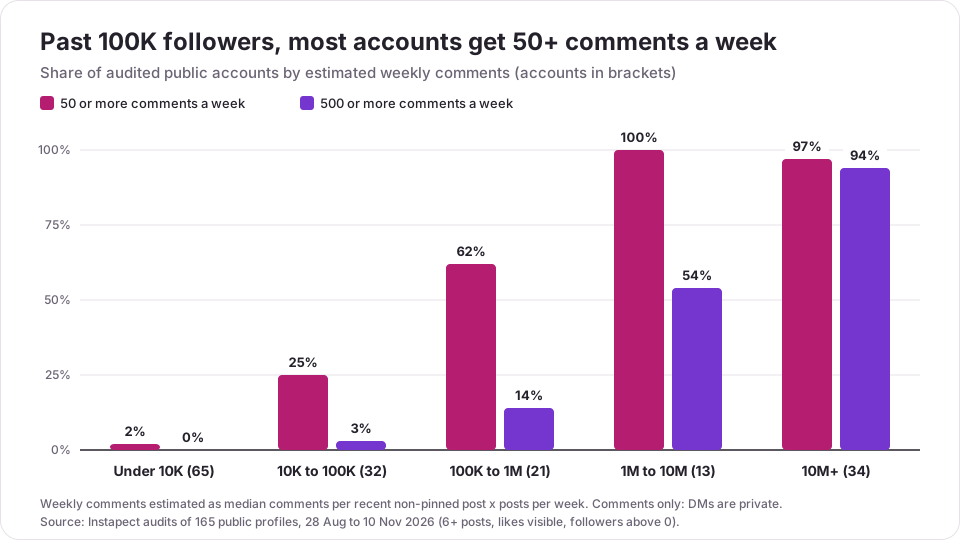
| Followers | Accounts | Median comments per post | Median posts per week | Median comments per week | Accounts with 50+ a week | Accounts with 500+ a week |
|---|---|---|---|---|---|---|
| Under 10K | 65 | 1 | 1.7 | 1 | 2% | 0% |
| 10K to 100K | 32 | 2 | 4.2 | 12 | 25% | 3% |
| 100K to 1M | 21 | 17 | 2.9 | 69 | 62% | 14% |
| 1M to 10M | 13 | 38 | 6.0 | 778 | 100% | 54% |
| 10M+ | 34 | 2,012 | 1.8 | 7,167 | 97% | 94% |
| All | 165 | 5 | 2.5 | 18 | 41% | 26% |
The weekly median is the median of each account's own estimate, so it is not the product of the two columns before it.
Finding 1: under 10K followers, automation is optional
The median account under 10K followers got about one comment a week, and only 2% passed 50. At that volume an Instant reply and FAQs are a courtesy, not a necessity. Answer by hand: it reads better.
Finding 2: 100K followers is where the workload changes
From 100K to 1M followers, the median account got about 69 comments a week and 62% passed 50. That is the size where an Instant reply, an Away message and FAQs pay for themselves, and where a keyword automation for your most-asked question starts to make sense.
Finding 3: "comment WORD and I'll DM you" is still rare
Only 3 of 165 accounts (under 2%), on 3 of 1,723 posts, used a caption that asked people to comment a set word to get a DM. Where it was used, the post drew far more comments per like than the account usually gets: @garyvee's "reply with the word phone" post had 5,828 comments, 3.6 times his usual comments per like, and a 1,077-follower construction firm (@srbinfradevelopers) got 17.5 times its usual rate with "Comment SRB for details". Three posts are examples, not a trend, but they show why comment-to-DM is popular with the accounts that try it.
Finding 4: "DM me" in the caption doesn't add comments
21 posts from 8 accounts asked people to DM or message them in the caption. Their comments per like matched the accounts' own medians (1.0 times). Asking for a DM moves the conversation to the inbox, which is exactly when an Instant reply helps.
What this data can't tell you. Instapect reads public profile data only. It can't see DMs, whether an account uses automations, how fast anyone replies or what automation did to sales. The accounts were chosen by the people who audited them, so they aren't a random sample of Instagram, and the 1M to 10M tier has only 13 accounts.
Mistakes to avoid with Instagram auto replies
- Pretending the bot is you. Say it's an automatic message and when a person will answer. Meta's policy asks for bot disclosure where the law requires it, and people forgive a bot faster than a fake "Hey!!" that turns out to be a script.
- Keywords that don't match how people type. Keyword matching is exact and case-sensitive, so add the variants people use ("price", "Price", "PRICE", "how much").
- Forgetting the 15-minute delay. Keyword replies wait 15 minutes unless you answer first. Don't promise an "instant" link in your caption.
- Overlapping automations. An away message beats a keyword reply when both match. Check your schedule before you blame the keyword.
- Comment-to-DM without a follow-up plan. You get one private reply per comment. Put everything the person asked for in that first DM.
- Password-based bots. Tools that log in with your password instead of Meta's API risk action blocks and account restrictions.
- Never reading the automated threads. Automation answers the first message. The second message ("great, how do I pay?") still needs a person.
- Treating the inbox as your only record. Instagram has no Recently deleted folder for DMs, and unsent messages are gone for everyone. Forward order details to email or run a monthly Messages download; see how to recover deleted Instagram messages.
How to check your Instagram auto reply is working
- Test from a second account. Message your business from a personal account that has never messaged it. You should get the Instant reply within a few seconds, and the FAQs should show above the message box.
- Test the keyword. Send the exact keyword from the test account, then wait 15 minutes without replying. The keyword reply should arrive.
- Test comment to message. Comment the keyword on a watched post from the test account. If the test account doesn't follow you, look in Requests.
- Check the Status toggle for each automation in Inbox > Automations. If something didn't send, the most common causes are an automation that's switched off, a keyword that doesn't match exactly, or a test account that already had a conversation with you (Instant replies only fire on a first message).
Frequently asked questions
How do I set up an auto reply on Instagram?
Switch to a professional account, connect it to Meta Business Suite, then go to Inbox > Automations and turn on Instant reply for Instagram. It sends your message automatically the first time someone DMs you. Add an Away message and up to four FAQs for more coverage.
Can you set up auto reply on a personal Instagram account?
No. Instant replies, away messages, FAQs and keyword automations need a professional account (business or creator). Switching is free and you can switch back, but a private account becomes public when it switches.
Is there a way to auto send a message on Instagram?
Yes, for incoming messages. Instagram can auto-send an Instant reply to new conversations, an Away message during set hours, a keyword reply, or a DM to someone who comments a set word. It can't cold-message people who never contacted you, and tools that claim to mass-DM strangers break Meta's rules.
Why is my Instagram auto reply not working?
Check four things in this order: the automation's Status toggle is on; Instagram is turned on under Platforms; your test account is messaging you for the first time (Instant replies only send once per conversation); and, for keywords, the message matches the keyword exactly. Keyword replies also wait 15 minutes unless you answer first.
Why can't I see Automations in Meta Business Suite?
Your Instagram account probably isn't a business account connected to Meta Business Suite, or your role in the business doesn't allow inbox settings. Creator accounts and some regions (Meta mentions Europe and Japan for certain features) may not see every option. Connect the Instagram account in Meta Business Suite's settings, then reopen Inbox.
My keyword auto reply didn't send. What went wrong?
Most often the keyword didn't match exactly: matching is case-sensitive, so "price" doesn't trigger "Price". The other causes: you replied within 15 minutes (the automation stands down), an Away message matched first, or the same keyword sits in another automation.
How do I turn off auto reply on my Instagram business account?
Open Meta Business Suite, go to Inbox > Automations, and switch off the Status toggle on the Instant reply or Away message. For FAQs, go to Instagram Messages > menu > Tools > Frequently asked questions and turn off Show questions.
What is a good automatic reply message for Instagram?
One that says it's automatic, when a person will answer, and where the common answers are. For example: "Thanks for your message! This is an automatic reply. We answer within a day, Monday to Friday. Prices and booking are in the questions below." Keep it under three sentences.
Can Instagram auto reply to comments?
Not with a public comment reply natively. The Comment to message automation sends a DM to people who comment a set word, once per comment, within 7 days. Public comment replies are still manual; see how to reply to comments on Instagram.
Are Instagram auto reply apps like Manychat allowed?
Yes, if they connect through Meta's official Instagram API with a Facebook/Meta login. They follow the same 24-hour messaging window and one-private-reply-per-comment rules. Apps that ask for your Instagram password are not official integrations and put the account at risk.
Do auto replies hurt your Instagram reach?
Meta hasn't published anything saying approved automations reduce reach, and the ranking signals Instagram describes are about posts, not your inbox (see how the Instagram algorithm works). What can hurt is spam: unofficial mass-DM bots and repetitive messages that people report.
How many FAQs can I add to Instagram DMs?
Up to four in the Instagram app. Meta Business Suite's mobile app has been reported to allow five. Pick the four questions you answer most often.
Sources
- Meta Business Help Center: About Automated Responses in Meta Business Suite Inbox, Set up Inbox Automations on Meta Business Suite Desktop and mobile; page titles checked 18 Nov 2026 (Meta blocks automated reading of these pages, so limits are cross-checked against the two guides below).
- Instagram Help Center: Set Up Frequently Asked Questions on Chats and About Professional Features in Instagram Direct, checked 18 Nov 2026. Meta Business Help Center: setting up a professional account, checked 18 Nov 2026.
- Meta for Developers: Instagram Private Replies and Messenger Platform and IG Messaging API policy, checked 18 Nov 2026.
- Kanal: Instagram Automatic Messages: Native Setup Guide (2026), 11 Oct 2026.
- CreatorFlow: Instagram Built-In Automation: What Meta Gives Free, updated 10 Nov 2026.
- Instapect first-party data: 165 public Instagram accounts audited 28 Aug to 10 Nov 2026, 1,723 recent non-pinned posts (quality bar: 6+ posts, likes visible, followers above zero).
Automate the first message, answer the rest yourself
Set up the Instant reply and four FAQs today; add keyword and comment automations when your captions start asking people to comment or DM. Then look at the public side of the conversation: run your profile through the free Instagram profile analyzer to see your comments per post and posting cadence next to accounts your size, and read how to reply to comments on Instagram for the replies that still need a person. If brand deals are the reason your inbox is filling up, the Creator Marketplace guide covers how brands reach creators inside Instagram.