To add a sticker on an Instagram Story, take or upload a photo or video in the Story camera, tap the Stickers icon (the square smiley face) at the top of the screen, and tap the sticker you want. Drag it into place, pinch with two fingers to resize or rotate it, then share. The same tray works when you record a Reel, although Instagram says not every sticker is available to everyone or on Reels (Instagram Help Center, checked 22 Nov 2026).
Below: the steps, a table of all 17 stickers Instagram lists and what each one does, how to make your own sticker with Cutouts, fixes for missing stickers, and one original data point. Instapect cannot see Stories, so it cannot count sticker taps. It can read the feed versions of the same jobs, and 1,906 recent posts on 165 public profiles show that writing a question in a caption did not bring more comments.
Disclosure: Instapect publishes this guide and makes one of the tools mentioned below. Every step here happens inside the Instagram app and works without it. Instapect reads public profile data only; it does not see Stories, sticker votes or replies.
TL;DR: adding stickers on Instagram
| Question | Short answer | Source |
|---|---|---|
| Where is the sticker button? | Story or Reel editor > Stickers icon at the top | Instagram Help Center, 22 Nov 2026 |
| How do I move or resize a sticker? | Drag it; pinch with two fingers to resize or rotate | Instagram app |
| How do I delete a sticker before sharing? | Drag it to the trash icon at the bottom of the editor | Instagram app |
| How many sticker types are there? | 17 listed: Add Yours, Captions, Countdown, Time or weather, Cutouts, Donation, GIF, Hashtag, Link, Location, Mention, Music, Poll or emoji slider, Product, Questions, Quiz, Selfie | Instagram Help Center |
| Can I make my own sticker? | Yes: Stickers > Cutouts, then pick a photo or video with a clear subject | Instagram Help Center |
| Who saw or voted on my poll? | Swipe up on your own Story to see votes and who voted | Instagram Help Center |
| A sticker is missing. Why? | Update the app; some stickers are not available to everyone, on Reels, or in some regions | Instagram Help Center |
| Can Instapect show sticker results? | No. Instapect reads public profile signals; Story stickers are not among them | Instapect product |
How to add a sticker to an Instagram Story, step by step
These steps work in the iPhone and Android apps. Instagram describes the sticker tray in its Using stickers article (checked 22 Nov 2026).
- Open Instagram and swipe right from the feed, or tap + (Create) and choose Story.
- Take a photo or video, or swipe up to pick one from your camera roll.
- Tap the Stickers icon at the top of the screen. It looks like a square smiley face with a folded corner.
- Scroll the tray or type in the search bar at the top, then tap a sticker.
- Fill in what the sticker asks for (a poll question, a URL, a song, a username). Tap Done.
- Drag the sticker where you want it. Pinch with two fingers to resize or rotate it. Tap some stickers, like time or weather, to cycle through styles.
- Tap Your story or Close Friends to share.
Check before you share: tap the arrow or the preview to see the Story as viewers will. Keep stickers out of the top and bottom edges, where your profile name and the reply bar sit on top of the image.
On a Reel: start a Reel, record or upload your clip, tap Next to reach the editor, then tap the Stickers icon. Instagram notes that stickers added to Reels are saved as a separate layer, which is what lets features like translated captions work.
On a computer: use the phone app. The Help Center articles for Add Yours and Cutouts say those features are not available on computers and point to the iPhone, Android and iPad apps.
Every Instagram sticker and what it does
Instagram's Help Center lists 17 sticker types (checked 22 Nov 2026). The table keeps its wording close to the source, so you know exactly what each one does for the people watching.
| Sticker | What you set up | What viewers can do | Where |
|---|---|---|---|
| Add Yours | A prompt, or tap Random for a suggestion | Tap Add yours to post their own Story or Reel on the prompt | Stories and Reels |
| Captions | Auto transcript of your video's audio; edit words, color, font | Read along | Video Stories and Reels |
| Countdown | Name, end date and time | Tap to get a reminder or share it to their Story; everyone who set a reminder is notified at the end | Stories |
| Current time or weather | Nothing; tap to change style | See the time or temperature | Stories |
| Cutouts | A custom sticker cut from your photo or video | See it | Stories and Reels |
| Donation | A fundraiser | Donate | Stories |
| GIF | A trending or searched GIF | See it | Stories and Reels |
| Hashtag | One hashtag | Tap to open that hashtag page | Stories |
| Link | A URL; tap See Preview to check it | Tap to visit the link | Stories |
| Location | A nearby or searched place | Tap to open the location page | Stories |
| Mention | A username | Tap to open that profile | Stories |
| Music | A song and the part that plays; lyric styles when available | Tap to see the artist or hear more | Stories |
| Poll or emoji slider | Your question and answers, or an emoji to slide | Vote and see live results | Stories and Reels |
| Product | Products from a shop | Tap to view tagged products | Stories |
| Questions | Your question; text or music answers | Send you a reply (Stories) or reply publicly under the sticker (Reels) | Stories and Reels |
| Quiz | A multiple choice question with one right answer | Pick an answer and learn if they were right | Stories |
| Selfie | A photo from your front camera | See it | Stories |
Source: Using stickers on Instagram, checked 22 Nov 2026. The Help Center also has separate articles for the Reveal sticker, which blurs an image until a viewer replies, and for Frames and AI generated stickers. Your tray can show these extra stickers, and it can also hide some from the list above.
Action: pick the sticker by the job you want done. Want a tap to a website? Link. Want quick feedback? Poll or Quiz. Want words back? Questions. Want people to post with you? Add Yours.
How to use the most popular stickers
Link sticker: add a website to a Story
Tap Stickers > Link, paste the URL, and tap See Preview to check what opens. If your app shows an option to change the sticker text, swap the raw URL for a short label like "Read the guide". Anyone who can see your Story can tap it to visit the page (Instagram Help Center). A link sticker lasts as long as the Story: 24 hours, or longer if you save the Story to a Highlight. For a link that stays put, use the website field in your profile (see the Instagram bio guide).
Poll, quiz and emoji slider: get quick answers
Tap Stickers > Poll (or Quiz, or the emoji slider), type your question and edit the answers. After you share, swipe up on your own Story to see how many votes each option got and how each person voted. Results show live to voters.
Questions sticker: collect replies
Tap Stickers > Questions, write your prompt and choose Text or Music answers. On a Story, replies come only to you; swipe up on your Story to read them, and tap one to share it as a new Story. Instagram does not show the sender's photo or username when you share a reply. On a Reel, replies show publicly under the sticker.
Music sticker: add a song
Tap Stickers > Music, search a song, drag the waveform to pick the part that plays, and choose a lyrics or album card style. The full walkthrough, with clip lengths and what to do when music is missing, is in how to add music to Instagram.
Mention, hashtag and location stickers
Tap Mention and type a username. It appears underlined on your Story, and anyone who can see the Story can tap it to open that profile. Hashtag and location stickers link to those pages. For when a tag is better than a mention, see how to tag someone on Instagram.
Add Yours: start a chain
Tap Stickers > Add Yours, write a prompt or tap Random, then Done. Viewers tap Add yours to post their own Story or Reel, and anyone can tap the prompt to see every response. On your own Story, tap Options to turn off notifications or hide your username from the "Started by" credit (Instagram Help Center).
How to make your own sticker with Cutouts
Cutouts turns any clear subject in a photo or video into a reusable sticker. Steps from the Instagram Help Center (iPhone, checked 22 Nov 2026):
- Start a Story or Reel and tap the Stickers icon.
- Tap Cutouts.
- Pick a photo or video with a clear subject. Instagram cuts the subject out automatically.
- Not the right object? Tap Select manually in the bottom left and tap the one you want. You can pick only one object per sticker.
- Use it now, or save it. Saved stickers sit at the top of the tray under Your stickers.
From someone else's post: open the photo, tap the three dots in the top right, then Create a cutout sticker. This works only if the account is public and the owner allows reuse. If that post is later deleted, your Stories or Reels that used the sticker are deleted too.
To delete a Cutouts sticker: open the sticker tray, press and hold the sticker under Your stickers, and tap Delete. Instagram warns that Reels and Stories made with that sticker are deleted as well.
To stop others making stickers from your posts: turn off reuse in your account settings, or per post from the three dots menu.
Why can't I find a sticker on Instagram?
Instagram's Help Center gives the first four reasons below; the music one comes up often too:
| Problem | Likely cause | Fix |
|---|---|---|
| A sticker is missing from the tray | Old app version | Update Instagram in the App Store or Google Play, then restart the app |
| A sticker is missing on Reels but not Stories | Not every sticker works on Reels | Use it on a Story instead (Link, Countdown, Quiz and Mention are Story stickers) |
| A sticker is missing for you but a friend has it | Instagram says not all stickers are available to everyone | Wait for the rollout, or check the app is updated |
| Stickers missing in Japan or Europe | The sticker article says the feature may be unavailable in Japan and European countries | No fix in the app; this is a regional limit |
| Music sticker missing or greyed out | Music availability can differ by region and account | Try a different song, or see the music guide's fixes |
Source: Instagram Help Center, checked 22 Nov 2026.
What 1,906 feed posts say about asking for replies
Instapect cannot see Stories, so it cannot measure sticker taps, votes or replies. It can read the feed captions where people do the same jobs by hand: asking a question, or telling followers to tap the link in their bio. If those feed habits fall flat, it is a reason to hand the job to a sticker that gives people a button to tap.
Method: 165 public Instagram accounts audited by Instapect between 28 Aug and 10 Nov 2026, 1,906 recent posts. Quality bar: not delisted, at least 6 recent posts, likes not hidden, followers above 0. For each post, comments and likes are divided by that account's own median post, so a 1.00x post is normal for that account and big and small accounts compare fairly. "Asks a question" means the caption contains a question mark; "link in bio" means it says link in bio, link in profile or #linkinbio.
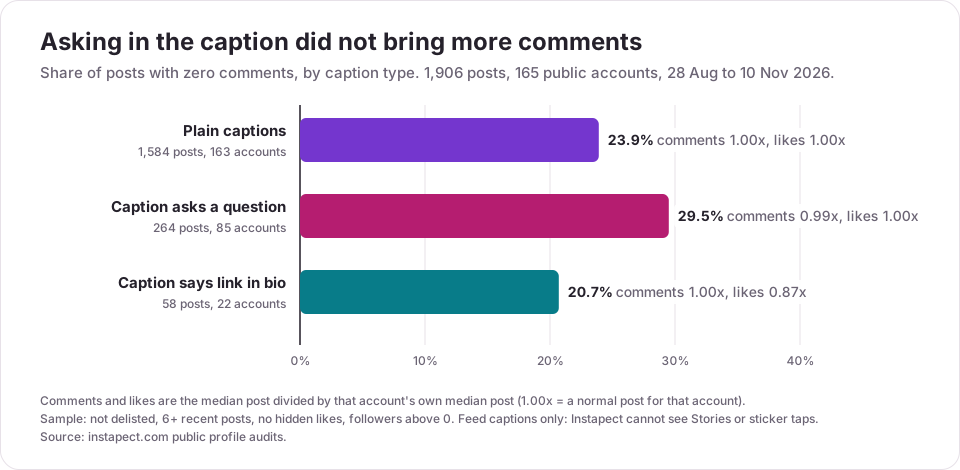
| Caption type | Posts | Accounts | Zero-comment posts | Median comments vs account | Median likes vs account |
|---|---|---|---|---|---|
| Plain caption | 1,584 | 163 | 23.9% | 1.00x | 1.00x |
| Asks a question | 264 | 85 | 29.5% | 0.99x | 1.00x |
| Says link in bio | 58 | 22 | 20.7% | 1.00x | 0.87x |
What the numbers show:
- A question mark alone did not bring replies. Half the accounts (85 of 165) asked questions in captions, yet those posts drew 0.99x their usual comments, and more of them (29.5%) got no comment at all. Typing a reply on a feed post takes effort; a poll or quiz sticker takes one tap.
- "Link in bio" posts got fewer likes. The 58 posts that sent people to the bio drew a median 0.87x the account's usual likes. Two in three accounts (110 of 165) had a website link on their profile. A link sticker skips the trip to the profile for Story viewers.
Website link on the profile, by follower tier:
| Followers | Accounts | With a profile link |
|---|---|---|
| Under 10K | 65 | 40 (61.5%) |
| 10K to 100K | 32 | 24 (75.0%) |
| 100K to 1M | 21 | 11 (52.4%) |
| 1M+ | 47 | 35 (74.5%) |
| All | 165 | 110 (66.7%) |
Limits: these are feed posts, not Stories. The accounts are ones Instapect users chose to audit, so they skew toward creators and brands. Smaller accounts ask more questions and also get fewer comments overall, which can push the zero-comment share up; the within-account ratio (0.99x) is the fairer read. This shows a pattern, not cause and effect.
To see these numbers for any public profile, run the handle through the Instapect profile analyzer. It shows each post's likes, comments and engagement against the account's own median.
Mistakes to avoid with Instagram stickers
- Covering the safe zones. The profile name sits at the top and the reply bar at the bottom. Stickers there get hidden or tapped by accident.
- Stacking too many interactive stickers. One poll or one question per frame is easier to answer than three.
- Sending people to a link without saying why. Add a line of text next to the link sticker that says what they get when they tap.
- Building a Cutouts sticker on someone else's post you don't control. If they delete the post, your Story or Reel goes with it.
- Expecting sticker results to show up in third-party audits. Votes, replies and link taps are visible only to you in the app. Public audit tools, Instapect included, cannot read them.
- Writing "link in bio" on a Story. On a Story, the link sticker does that job with one tap.
Frequently asked questions
How do I add stickers to my Instagram Story?
Take or upload a photo or video in the Story camera, tap the Stickers icon at the top (the square smiley face), and tap a sticker. Drag to move it, pinch to resize, then share. Instagram documents the tray in its Using stickers article.
Where is the sticker button on Instagram?
It is at the top of the Story or Reel editor, after you take or pick a photo or video. Look for a square smiley face with a peeled corner. It does not appear in the feed post editor.
How do I add a sticker from my camera roll?
Use Cutouts: tap Stickers > Cutouts and pick a photo or video with a clear subject. Instagram cuts the subject out and saves it under Your stickers for later.
How do I make my own sticker on Instagram?
Use Cutouts for a sticker from a photo, or the AI generated sticker option if it appears in your tray. Cutouts can also use a public post if the owner allows reuse: tap the three dots on the post and Create a cutout sticker.
Can I add stickers to an Instagram Reel?
Yes. Record or upload the Reel, tap Next, then the Stickers icon. Instagram says not every sticker is available on Reels, so Link, Countdown and Quiz may only show for Stories.
How do I add a link sticker to my Instagram Story?
Tap Stickers > Link, paste the URL, and tap See Preview to check it. Add a line of text saying what they get, then share. Anyone who can see the Story can tap it.
How do I see who voted on my Instagram poll?
Open your own Story and swipe up. Instagram shows the vote count for each option and how each person voted. Quiz and emoji slider results show the same way.
Why can't I see the link sticker or music sticker?
Update the Instagram app first. Instagram says some stickers are not available to everyone, not available on Reels, or unavailable in Japan and European countries. Music availability can also differ by region and account.
My sticker disappeared from a Story I already posted. What happened?
If it was a Cutouts sticker made from someone else's post, and that post was deleted, Instagram deletes your content that used the sticker too. You cannot add or edit stickers on a Story after sharing it.
Can I add a sticker after posting a Story?
No. Stickers go on in the editor before you share. To change one, delete the Story and post it again with the sticker you want.
How do I delete a sticker I created?
Open the sticker tray in a new Story, press and hold the sticker under Your stickers, and tap Delete. Stories and Reels that used it are deleted too.
Do Instagram stickers increase engagement?
Instagram does not publish sticker engagement figures, and Instapect cannot see Stories. In feed posts, asking a question in the caption did not lift comments (0.99x the account's usual, 1,906 posts on 165 profiles), which is one reason creators move questions to a tap-to-answer sticker.
Sources
- Instagram Help Center: Using stickers on Instagram, checked 22 Nov 2026.
- Instagram Help Center: Create your own stickers on Instagram with Cutouts, checked 22 Nov 2026.
- Instagram Help Center: Use the Reveal sticker on your Instagram story, checked 22 Nov 2026.
- Instagram Help Center: Add Yours sticker on Instagram, checked 22 Nov 2026.
- Instapect public profile audits: 165 accounts, 1,906 posts, 28 Aug to 10 Nov 2026.
Check how your feed posts compare
Stickers handle the Story side. For the feed, run any public handle through the Instapect audit to see likes, comments and engagement rate post by post, and which caption habits sit above or below the account's own median.