To tag someone on Instagram, tap Tag people on the screen before you share a post or Reel, tap the photo, type their username and pick them from the list. To tag someone in a post you already shared, open it, tap ... (Options) > Edit, then tap the photo and add the name. In a Story, tap Aa (Text), type @ plus their username, or add the Mention sticker. In a caption or comment, type @username with no space.
Below is every place you can tag, the limits (20 mentions per Story), why a tag sometimes fails, how to remove a tag of yourself, and what 1,669 public posts audited by Instapect show about whether tagging changes a post's likes and comments.

Disclosure: Instapect publishes this guide and makes one of the tools mentioned below. Every step here happens in the Instagram app or on instagram.com and works without it.
TL;DR: how to tag someone on Instagram in 2026
| Where you want to tag | What to tap | Limit | Source |
|---|---|---|---|
| New photo, carousel or Reel | Share screen > Tag people > tap the photo > type the name > Done | About 20 people per post (widely reported; Meta does not publish it) | Instagram Help Center, checked 6 Nov 2026 |
| A post you already shared | Post > ... (Options) > Edit > tap the photo > add the name > Done | Same | Same page |
| Story | Aa (Text) > type @username, or the Mention sticker | 20 people per photo or video | Instagram Help Center: "up to 20 people" |
| Caption | Type @username, no space after @ | 20 @mentions per caption | Meta Graph API reference: "20 @ tags" |
| Comment | Type @username in the comment box | No published limit | Instagram Help Center |
| Co-author (collab post) | Tag people > Invite collaborators | Up to 5 collaborators | Instagram Help Center |
| Someone else's post | Not possible. Mention them in a comment instead | Instagram Help Center: "you can't tag people in someone else's post" | |
| Does tagging lift a post? | Posts with 1 to 3 caption mentions did 1.00x to 1.07x the account's typical post | Instapect, 160 accounts, 28 Aug to 4 Nov 2026 |
- Tag vs mention: a tag links an account to the photo itself and can put the post on their Tagged tab. A mention is an @username in text (caption, comment, Story) and sends a notification.
- Tag not working? The person has probably limited who can tag them, or your account is private and they do not follow you.
- Tagged in something you don't want? Tap the post, tap your username, then Remove Me From Post.
Where you can tag people on Instagram at a glance
| Place | Tag or mention? | They get notified? | Shows on their profile? | Can you add it after posting? |
|---|---|---|---|---|
| Feed photo or carousel | Tag (on the image) | Yes | Yes, on the Tagged tab, unless they hide it | Yes, through Edit |
| Reel | Tag (Tag people screen) | Yes | Yes, on the Tagged tab | Yes, through Edit |
| Caption | Mention (@username) | Yes, per Meta's API reference | No | Yes, edit the caption |
| Comment | Mention (@username) | Yes, for accounts that follow you | No | Write a new comment |
| Story | Mention (text or sticker) | Yes, plus a DM with a preview | No, but they can reshare it to their Story | Yes, tap the Story > Mention |
| Collab post | Collaborator invite | Yes, they must accept | Yes, on their main grid | Yes, through Edit on a post or Reel |
How to tag someone on an Instagram post before you share it
This works for photos, carousels and Reels on iPhone and Android.
- Tap + (Create), pick your photo or video, and tap Next until you reach the screen with the caption box.
- Tap Tag people.
- Tap the spot on the photo where the person is. On a Reel, you go straight to a search box.
- Type their name or username and tap them in the list. Their name now sits on the photo; drag it if it covers a face.
- Repeat for anyone else, then tap Done.
- Tap Share.
On a carousel, swipe to each slide on the Tag people screen and tag people slide by slide. If the person has a creator or business account, you can also tap Show profile category under their name to show it on the tag (Instagram Help Center).
On a computer (instagram.com)
- Click Create in the left menu and upload the photo or video.
- On the caption screen, click the photo.
- Type the name or username and click it in the menu.
- Click Share.
How to tag someone on Instagram after posting
You can add or change tags at any time on your own posts.
- Go to your profile and open the post.
- Tap ... (Options) in the top right.
- Tap Edit.
- Tap Tag people (or tap the photo).
- Tap the photo, type the name or username and tap them in the list.
- Tap Done, then Done again to save.
On a computer, the same path is ... > Edit > click on the post > type the name > Done. These steps match the Instagram Help Center page Tag people in your posts, checked 6 November 2026.
How to tag someone on an Instagram Reel
When you share a Reel, the screen with the caption has a Tag people row. Tap it, search for the account, tap their name and tap Done. To tag someone on a Reel you already shared, open the Reel, tap ... > Edit > Tag people. You can also mention people in the Reel caption with @username.
If the person helped make the Reel, consider Invite collaborators instead of a plain tag. A collaborator's name appears next to yours at the top of the Reel, and the Reel shows on their grid too once they accept. Instagram allows up to 5 collaborators on a post (Instagram Help Center, checked 6 November 2026).
How to tag someone on an Instagram Story
Instagram calls this a mention. You can mention up to 20 people in each photo or video you add to your Story (Instagram Help Center, checked 6 November 2026).
With the Text tool:
- Open the Story camera and pick or take a photo or video.
- Tap Aa (Text).
- Type @ followed by their username, then tap them in the suggestions.
- Tap Done, then Your story.
With the Mention sticker: tap the sticker icon, choose @Mention, type the username and place the sticker. (Every other Story sticker, from links to polls, is covered in how to add stickers on Instagram Stories.)
On a Story you already posted: open the Story and tap Mention at the bottom. The person gets a notification, but their username does not appear on the Story.
What happens next, according to the same Help Center page: the person gets a notification and a direct message with a preview of your Story, which disappears from the chat after 24 hours. They can reshare your Story to their own unless you turn off Let people you mention add this to their story on the mention screen. (Reposting works differently for feed posts and Reels: see how to repost on Instagram for the Repost button and Story sharing rules.) If you mention two or more people you follow back, you can also start a group chat from the Story.
How to tag someone in an Instagram comment or caption
Type @ and then the username, with no space between them (for example, "great shot, @natgeo"). Instagram suggests accounts as you type; tap the right one so you don't link the wrong person. This works in captions, comments and replies (Instagram Help Center). When you tap Reply under a comment, Instagram adds the @username for you; see how to reply to comments on Instagram.
- Caption limit: 20 @mentions per caption, inside the 2,200-character limit. Meta's Graph API reference states "20 @ tags", and a caption over the limit fails to post. More on that in the Instagram caption limit guide.
- Comment on someone else's post: this is the only way to "tag" a friend on a post that is not yours. You cannot add a photo tag to another person's post.
- Hashtags are different. A hashtag (#travel) files your post under a topic. A mention (@name) points at an account. For how many hashtags to use, see do hashtags work on Instagram.
How to tag a brand on Instagram
Tag a brand the same way as a person: Tag people on the photo, or @brandname in the caption. Check the handle first, since brands often run separate accounts per country or product line. If the post is paid or gifted, add the Paid partnership label from the post's settings too; it is separate from a tag. In Instapect's data, posts carrying that label mentioned another account in the caption twice as often as other posts (40.7% vs 20.5%).
To tag a product from a shop rather than the brand account, use Tag products, which works for items from an Instagram shop (Instagram Help Center).
Which way should you tag? A quick decision tree
- The person is in the photo → photo tag (Tag people). It lands on their Tagged tab.
- The person made the post with you → Invite collaborators. Shared credit and the post shows on both grids.
- You want them to see it, but they're not in it → @mention in the caption.
- It's a Story → Text tool @mention or the Mention sticker.
- It's someone else's post → @mention them in a comment.
- Business deal or gifted product → tag the brand and add the Paid partnership label.
How to know which applies: ask whether the person should get credit on their own profile. If yes, tag or collaborate. If you only want them to see it, mention.
Why can't I tag someone on Instagram?
| What you see | Most likely cause | What to do |
|---|---|---|
| Their name doesn't appear in the search | You're typing a display name, or the account is new | Search the exact username; check spelling, dots and underscores (why handles with several separators get mistyped) |
| "[Name] doesn't allow mentions" or tags | They limited tags or mentions to people they follow, or turned them off | Nothing to fix on your side. Mention them in a comment or ask them to change the setting |
| You can tag some people but not others | Your account is private, so you can only tag your followers | Ask them to follow you, or switch to a public account |
| You blocked them, or they blocked you | Blocked accounts can't tag or mention each other | Unblock if you meant to |
| The tag saved but the post isn't on their profile | They approve tags manually, or Instagram flagged it as possible spam | Wait for their approval |
| Caption won't post | More than 20 @mentions, or more than 5 hashtags | Cut the mentions and tags |
Sources: Instagram Help Center pages Who can mention or tag you and Tag people in your posts, checked 6 November 2026.
How to control who can tag you, and how to remove a tag
Change who can tag or mention you: Settings > under How others can interact with you, tap Tags and mentions. Under Who can tag you and Who can @mention you, pick Allow from everyone, people you follow, or Don't allow. By default, posts you're tagged in go straight to your profile unless Instagram flags them as possible spam. The same screen lets you approve tagged posts manually instead (Instagram Help Center).
Remove yourself from one post (Instagram Help Center):
- Tap the post.
- Tap your username on the photo.
- Tap Remove Me From Post.
Remove many tags at once:
- Tap your profile picture at the bottom.
- Tap Menu (three lines) > Your activity.
- Tap Tags, then Select.
- Select the posts and tap Remove, then Remove again to confirm.
Removing a tag takes your name off the photo. It does not delete the other person's post. Blocking someone also stops them from tagging or mentioning you.
How to check your tag worked
- Look at the post. Tap the photo. A small person icon in the bottom left means it has tags; tap it to see the names.
- Check their Tagged tab. Open their profile and tap the tagged icon. If your post is missing, they may approve tags manually or have hidden it.
- For Stories: after sharing, the username should be underlined on your Story. A mention added later to an existing Story does not show on screen; it only sends the notification.
- For captions: the @username turns into a link. If it stays plain text, there was a space after the @ or a typo.
Does tagging people on Instagram get you more likes? What 1,669 posts show
Plenty of guides say tagging boosts reach. We checked what it does to the public numbers, using Instapect's own audit data.
Method. 160 public Instagram accounts audited by Instapect between 28 August and 4 November 2026, 1,669 recent posts. Quality bar: account not delisted, at least 6 usable posts, no hidden like counts, followers above zero. Pinned posts are excluded because they sit at the top of a profile and collect interactions for longer. We counted @mentions in each caption (an @ followed by a valid username, not part of an email address). We compared each post's interactions (likes plus comments) with the median post of the same account, so a big account's numbers never get compared with a small one's.
Limits. We can only read caption @mentions. Photo tags, collaborator invites and Story mentions are not in public post data, and we have no reach or impression numbers, so this measures interactions, not exposure. The accounts were audited because someone chose to look them up, so they are not a random sample of Instagram.
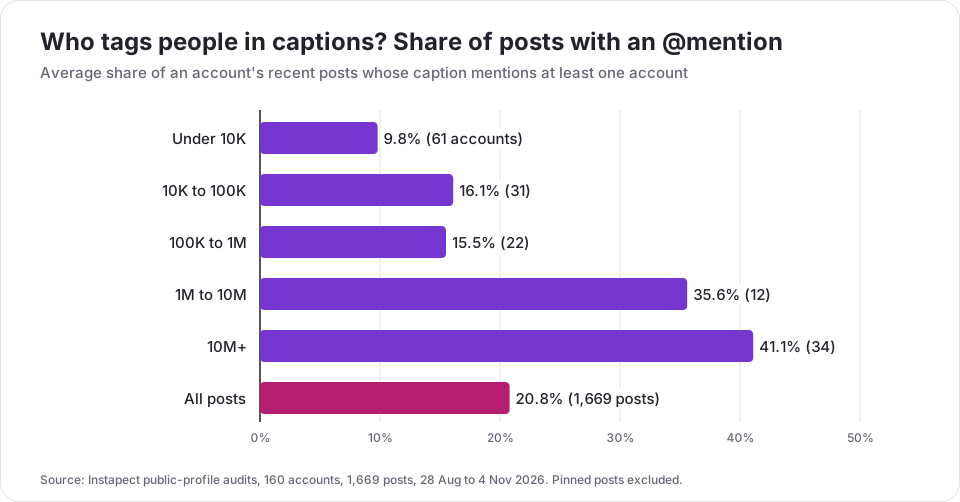
| Followers | Accounts | Posts with a caption @mention (average per account) | Accounts that mention anyone at least once |
|---|---|---|---|
| Under 10K | 61 | 9.8% | 36% |
| 10K to 100K | 31 | 16.1% | 52% |
| 100K to 1M | 22 | 15.5% | 45% |
| 1M to 10M | 12 | 35.6% | 83% |
| 10M+ | 34 | 41.1% | 100% |
| All | 160 | 20.8% of 1,669 posts | 92 of 160 (58%) |
Source: Instapect public-profile audits, 28 Aug to 4 Nov 2026.
Finding 1: one post in five tags someone, and big accounts tag far more
20.8% of the posts carried at least one caption mention. Accounts under 10K followers tagged in about 1 post in 10; accounts over 10M followers in about 2 posts in 5, and every one of the 34 accounts over 10M mentioned someone at least once. Large accounts credit photographers, stylists, brands and co-stars as a matter of routine. Carousels carried mentions most often (24.6% of 471), then Reels (20.6% of 939) and single images (14.7% of 259).
Finding 2: tagged posts performed like any other post
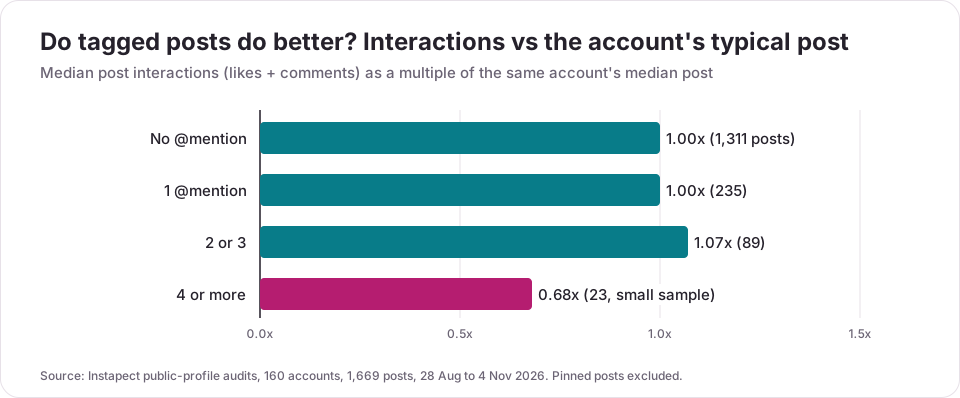
| Caption @mentions | Posts | Accounts | Median vs the account's typical post |
|---|---|---|---|
| None | 1,311 | 155 | 1.00x |
| 1 | 235 | 83 | 1.00x |
| 2 or 3 | 89 | 39 | 1.07x |
| 4 or more | 23 | 16 | 0.68x |
The cleaner test is inside the same account. Among the 61 accounts with at least two posts with mentions and two without, posts with mentions got a median 0.99x the interactions of their untagged posts (middle half of accounts: 0.57x to 1.72x). Tagged posts came out ahead in 49% of accounts and behind in 51%. Comments specifically were slightly lower on tagged posts (0.90x). Tagging, on its own, was a coin flip.
Finding 3: the swing is large in both directions
@priyankachopra (93 million followers, public report, audited 5 Sep 2026) is the upside case: the 6 recent posts with a caption mention had a median of about 1.1 million interactions, against about 221,000 for the posts without, roughly 5x. @therock (382 million followers, public report, audited 28 Aug 2026) runs the other way: 10 of his 12 recent posts mention someone, and their median of about 105,000 interactions sits well below the 373,000 of the two untagged posts. In both cases, what the post is about explains far more than the @ in the caption.
Finding 4: four or more mentions tended to do worse
The 23 posts that mentioned four or more accounts had a median of 0.68x the account's typical post. The sample is small (16 accounts), and these are often credit-heavy production posts or sponsored posts, so read it as a warning sign, not a rule.
What to do with it: tag people because they are in the post, made it, or should see it. Do not tag strangers or big accounts hoping for reach; the public numbers show no lift, and unwanted tags are the fastest way to get people to restrict who can tag them. To see how often any public account mentions others and how its tagged posts compare, run it through the Instagram profile analyzer.
Mistakes to avoid when tagging on Instagram
- Tagging people who aren't in the post to get attention. It shows no lift in the data above, and it is the kind of unwanted tag that pushes people to limit tags to accounts they follow.
- Putting a space after the @. "@ natgeo" stays plain text and nobody is notified.
- Tagging a lookalike account. Check the blue badge or follower count before you tap, especially for brands and celebrities.
- Using a tag when you mean a collaboration. A plain tag does not put the post on their grid; Invite collaborators does. See how to do a collab post on Instagram for the full steps.
- Stuffing 20 mentions into one caption. It is allowed, but the first 125 characters show in the feed, so a wall of @names pushes your actual message out of view.
- Forgetting the Paid partnership label. A tag is not a disclosure.
- Assuming a removed tag deletes the post. It only removes your name. Ask the owner, or report the post if it breaks the rules.
Frequently asked questions
How do I tag someone on Instagram?
On a new post or Reel, tap Tag people on the share screen, tap the photo, type their username and pick them from the list, then tap Done and Share. In a caption, comment or Story, type @ followed by their username with no space. The Instagram Help Center describes both paths on its Tag people in your posts page.
How do I tag someone on Instagram after posting?
Open your post, tap ... (Options) > Edit, then tap Tag people or the photo, add the name and tap Done. You can only edit tags on your own posts.
How do I tag someone on an Instagram Story?
Tap Aa (Text) and type @ plus their username, or add the @Mention sticker. You can mention up to 20 people per photo or video. To add someone to a Story you already posted, open it and tap Mention at the bottom; they are notified, but their name does not show on the Story.
How many people can you tag on Instagram?
Up to 20 per Story photo or video (Instagram Help Center) and 20 @mentions per caption (Meta's Graph API reference). For photo tags on a feed post, about 20 per post is widely reported, for example by Social Media Examiner, but Meta does not publish that number. A collab post can have up to 5 collaborators.
What is the difference between tagging and mentioning on Instagram?
A tag attaches an account to the photo or video itself and can add the post to their Tagged tab. A mention is an @username written in a caption, comment or Story; it links to their profile and notifies them, but it does not put the post on their profile.
Why can't I tag someone on Instagram?
Usually because they limited who can tag them (everyone, people they follow, or nobody) under Settings > Tags and mentions. If your account is private, you can only tag your followers. Blocking in either direction also stops tags. If the name doesn't come up at all, search the exact username instead of the display name.
I tagged someone but the post isn't on their profile. What went wrong?
Nothing on your side. They may approve tags manually, they may have hidden the post from their profile, or Instagram may have held the tag as possible spam. The tag is still on your post: tap the photo to check the person icon.
My caption won't post after I added mentions. How do I fix it?
Count the @mentions and hashtags. Captions allow 20 @mentions, 5 hashtags and 2,200 characters, and going over any of them stops the post from sharing. Remove a few mentions, or move the credits into a comment.
How do I untag myself on Instagram?
Tap the post, tap your username on the photo, then tap Remove Me From Post. To clear several at once, go to Menu > Your activity > Tags > Select, pick the posts and tap Remove twice. Your name comes off the photo; the post itself stays up.
Can I tag someone in someone else's Instagram post?
No. The Instagram Help Center says you can't tag people in someone else's post. Mention them in a comment instead, or share the post to your Story and mention them there.
Does tagging people on Instagram increase engagement?
Not by itself in public data. Across 61 accounts in Instapect's audits, posts with caption mentions got a median 0.99x the likes and comments of the same account's untagged posts, and won in 49% of accounts. Tags help when the tagged person reshares the post, which depends on them, not on the tag.
How do I tag someone in an Instagram comment?
Type @ and the first letters of their username in the comment box, tap the right account in the suggestions, finish the comment and post it. Accounts that follow you get a notification.
Sources
- Instagram Help Center, Tag people in your posts on Instagram, retrieved 6 Nov 2026.
- Instagram Help Center, Mention someone in your Instagram story, retrieved 6 Nov 2026.
- Instagram Help Center, Mention someone on Instagram, retrieved 6 Nov 2026.
- Instagram Help Center, Who can mention or tag you on Instagram, retrieved 6 Nov 2026.
- Instagram Help Center, Remove yourself from a post someone tagged you in, retrieved 6 Nov 2026.
- Instagram Help Center, Create collaborative posts on Instagram, retrieved 6 Nov 2026.
- Meta for Developers, IG User Media reference ("20 @ tags"), retrieved 6 Nov 2026.
- Social Media Examiner, How to Use Instagram Tagging for More Exposure (20 people per post), retrieved 6 Nov 2026.
- Search demand: DataForSEO, United States, October 2026 (how to tag someone on instagram 9,900/month; how to tag people on instagram 9,900; how to tag someone on instagram story 3,600; how to tag on instagram 2,400; how to untag yourself on instagram 1,000; how to tag someone in instagram comment 880).
- Instapect public-profile audits: 160 accounts, 1,669 posts, 28 Aug to 4 Nov 2026.
Tag the right way, then check the numbers
Tag people who are in the post or made it, mention people you want to see it, invite collaborators when the work is shared, and keep captions under 20 mentions. In 1,669 public posts, tagging on its own neither helped nor hurt. To compare how any public account's tagged posts perform against its typical post, open it in the Instagram profile analyzer, or check its overall numbers in the engagement rate calculator.