To pin a post on Instagram, go to your profile, tap the post or Reel you want at the top, tap ... (Options) in the top right, then tap Pin to main grid. You can pin up to 3 posts at once, and pinning only works in the Instagram app on a phone or tablet, not on a computer. To unpin, repeat the steps and tap Unpin from main grid; the post goes back to its original spot in your grid (Instagram Help Center, checked 9 Nov 2026).
Below are the steps for posts, carousels and Reels, what to do when the option is missing, how pinned comments differ, and what 158 public profiles audited by Instapect show about how accounts actually use their three pinned slots.
Disclosure: Instapect publishes this guide and makes one of the tools mentioned below. Every step here happens in the Instagram app and works without it.
TL;DR: how to pin a post on Instagram in 2026
| What you want to do | What to tap | Limit or rule | Source |
|---|---|---|---|
| Pin a photo, carousel or Reel | Profile > tap the post > ... (Options) > Pin to main grid | Up to 3 pinned posts | Instagram Help Center, checked 9 Nov 2026 |
| Unpin a post | Profile > tap the pinned post > ... > Unpin from main grid | Post returns to its original spot | Same page |
| Pin on a computer | Not possible | App only (iPhone, iPad, Android) | Same page: "This feature isn't available on computers" |
| Pin a comment | Swipe left on the comment (iPhone) or tap and hold it (Android), then tap the pin icon | Up to 3 comments per post | WeRSM, retrieved 9 Nov 2026 |
| Pin a Story | Not possible. Add it to a Highlight instead | Instagram app | |
| Pin someone else's post | Not possible. Pinning only applies to posts on your own grid | Help Center describes pinning "posts you share" | |
| Do people use it? | 47% of 158 audited accounts had at least one pinned post; half of those used all three slots | Instapect, 28 Aug to 8 Nov 2026 |
- The pin icon: a pinned post shows a small pin in the top-right corner of its grid thumbnail, so visitors can tell it is not your newest post.
- Option missing? Update the app, check you are on your own profile, and make sure you opened a feed post or Reel, not a Story, Highlight or Threads post.
- Pinning changes nothing else. The post keeps its likes, comments and date. It only moves to the first row of your grid.
Pinned posts on Instagram at a glance
| Question | Answer |
|---|---|
| How many posts can you pin? | 3 |
| Which formats can be pinned? | Photos, carousels and Reels on your main grid. In Instapect's audits, 85 of 164 pinned posts were Reels |
| Where do pinned posts show? | First row of your profile grid, before your newest posts |
| Can you pin from a computer? | No, app only |
| Does anyone get notified? | Instagram's Help Center describes no notification. Pinning your own post involves no one else |
| Does it change the post's date or engagement? | No. Unpinning returns the post to its original position |
| Can you reorder pinned posts? | Not directly. Unpin and re-pin in the order you want; Meta does not document which slot a new pin takes |
How to pin a post on Instagram (iPhone and Android)
The steps are the same on iPhone, iPad and Android (Instagram Help Center).
- Open Instagram and tap Profile or your profile picture in the bottom right.
- Tap the post you want to pin. It can be any post on your grid, including one from years ago.
- Tap ... (Options) in the top right of the post.
- Tap Pin to main grid. On some app versions the label reads Pin to your profile.
- Go back to your profile. The post now sits in the first row with a pin icon on its thumbnail.
To pin a second or third post, repeat the steps. Once three are pinned, unpin one before you add another (some app versions swap out a pin for you, so check the grid afterwards).
How to pin a Reel on Instagram
Reels pin the same way as photos, as long as the Reel is on your main grid.
- Go to your profile and tap the Reel, either on the grid or in the Reels tab.
- Tap ... in the bottom right (or top right on some versions).
- Tap Pin to main grid.
Older guides, such as Metricool's 2022 article, say Reels can't be pinned. That is out of date: of the 164 pinned posts in Instapect's audits, 85 were Reels. If a Reel doesn't show the option, it was probably shared with Also share to feed turned off, so it lives only in the Reels tab. Open the Reel, tap ... and look for the option to show it on your profile grid (the label varies by app version); once it is on the grid, it can be pinned.
How to unpin a post on Instagram
- Go to your profile and tap the pinned post (it has the pin icon).
- Tap ... (Options).
- Tap Unpin from main grid.
The post drops back to its original date position in your grid. Nothing else changes: likes, comments, tags and the caption stay as they were (Instagram Help Center).
How many posts can you pin on Instagram?
Three. Instagram's Help Center says "You can pin up to 3 posts you share on Instagram to the top of your profile." The limit is the same for personal, creator and business accounts.
In Instapect's audits, accounts that pinned anything tended to fill the row: 38 of the 74 accounts with a pin (51%) used all three slots, 14 used two and 22 used one.
How to pin a comment on Instagram
Pinned comments are a different feature. They sit at the top of the comment section of one post, not on your profile grid.
- Open your post and tap the comment icon.
- On iPhone, swipe left on the comment. On Android, tap and hold it.
- Tap the pin icon.
You can pin up to three comments per post, a feature Instagram introduced in 2020, and you can now pin your own comments as well as other people's (WeRSM, retrieved 9 Nov 2026). To unpin, swipe or press on the comment again and tap the pin icon. A common move is to answer a question in the thread and then pin that exchange; the steps for answering are in how to reply to comments on Instagram.
What you can't pin on Instagram
| Item | Can you pin it? | Closest alternative |
|---|---|---|
| Stories | No | Add to a Highlight, which stays on your profile |
| Someone else's post | No | Save it to a collection, or share it to your Story |
| Posts on a computer | No | Use the phone or tablet app |
| Threads posts | Not from Instagram | Pin it in the Threads app (Help Center) |
| More than 3 posts | No | Rotate your pins every few weeks |
Why can't I pin a post on Instagram?
| Symptom | Likely cause | Fix |
|---|---|---|
| No Pin to main grid in the menu | Old app version | Update Instagram from the App Store or Google Play and reopen it |
| No pin option at all | You are on instagram.com | Pinning is app only |
| Option missing on one Reel | Reel isn't on your main grid | Turn on Also share to feed for that Reel, or pin a different post |
| Option missing on a post you see on a profile | It's not your post, or you are logged into a different account | Switch to the account that owns the post |
| A pinned post vanished | It was archived or deleted, or someone with access to the account unpinned it | Check Archive, then re-pin |
| You can't add a fourth pin | The limit is 3 | Unpin one first |
Which posts should you pin? A quick decision guide
- New visitors don't know what you do → pin one post that explains it (who you are, what you post, how to work with you). It backs up your Instagram bio.
- You sell something → pin your offer, your reviews or a how-to-buy post, and swap it when the offer changes.
- One post went far beyond your usual reach → pin it so profile visitors see your strongest work first.
- You run a campaign or launch → pin it for the length of the campaign, then unpin it.
- Your newest posts already show who you are → you don't need to pin anything. Half the audited accounts didn't.
How do accounts actually use pinned posts? What 158 profiles show
Instagram's public data doesn't label pinned posts, so this section uses what Instapect sees from outside: which posts sit in the pinned row ahead of the date order, how old they are, and their public likes and comments. It says nothing about reach, profile visits or follows, which only the account owner can see in Insights.
Method. Public-profile audits run on Instapect between 28 August and 8 November 2026. An account counts if the audit captured at least 6 recent posts with visible likes and more than 0 followers: 163 accounts. Five were removed because more than three posts were flagged as pinned, which is a detection error, leaving 158 accounts. Pinned posts are detected by position: Instagram serves them before the newest post. Medians are reported next to averages where the spread is wide. The accounts are ones Instapect users chose to audit, so they lean toward well-known profiles; the 100K to 1M tier has only 19 accounts.
Finding 1: about half of accounts pin something, and the biggest accounts pin least
| Followers | Accounts | With at least one pinned post | Share | Avg pins (if any) | Using all 3 |
|---|---|---|---|---|---|
| Under 10K | 61 | 32 | 52% | 2.1 | 14 |
| 10K to 100K | 31 | 19 | 61% | 2.5 | 14 |
| 100K to 1M | 19 | 9 | 47% | 2.2 | 5 |
| 1M+ | 47 | 14 | 30% | 2.1 | 5 |
| All | 158 | 74 | 47% | 2.2 | 38 |
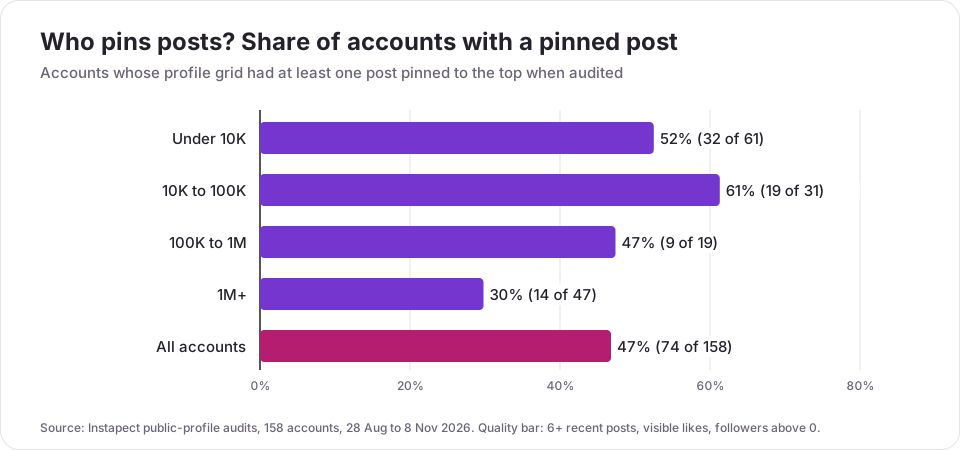
Accounts between 10K and 100K followers pinned most often (61%). Accounts over 1 million pinned least (30%): many of the largest profiles in the sample, such as @cristiano and @kingjames, had nothing pinned when audited, while @leomessi and @mrbeast used all three slots.
Finding 2: most pinned posts are old
Across the 74 accounts with pins, the median pinned post was 148 days old when audited. The same accounts' unpinned posts in the sample had a median age of about 10 days. 29% of pinned posts were a year old or more, and two thirds (108 of 164) were older than 90 days.
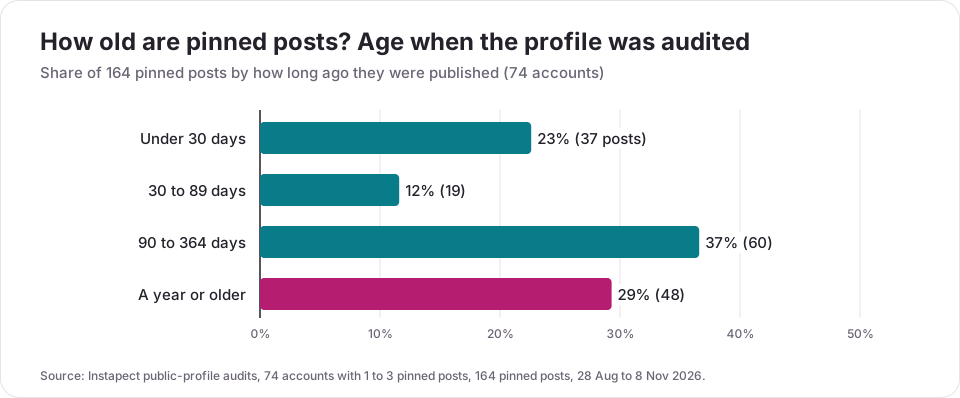
Examples from public reports: @billieeilish had one photo pinned from April 2024 (audited 5 Sep 2026); @mrbeast's oldest pin was a carousel from November 2024; @leomessi pinned three carousels, the oldest from November 2025. @nasa did the opposite and pinned three posts from the previous four weeks.
Finding 3: people pin their best posts
The median pinned post had 3.08x the likes and comments of the same account's median unpinned post, and 126 of 164 pinned posts (77%) beat that median. This is selection, not proof that pinning boosts a post: accounts pick posts that already did well, and an old post has had months to collect likes. Public data can't show whether the pin itself added views.
Finding 4: pinned posts lean slightly toward photos
| Format | Share of pinned posts (164) | Share of the same accounts' unpinned posts (696) |
|---|---|---|
| Reels | 52% | 60% |
| Carousels | 23% | 24% |
| Single photos | 25% | 16% |
Photos are over-represented among pins, which fits the age finding: many pins date from before these accounts switched most of their output to Reels.
Finding 5: pinned posts distort engagement rate
Because pinned posts are older and stronger, counting them inflates an account's engagement rate. In the 74 accounts with pins, including the pinned posts raised the average likes and comments per post by a median 1.17x, and by more than 25% in 33 accounts (45%). That is why the engagement rate calculator and the steps in how to calculate Instagram engagement rate skip the pinned row.
Mistakes to avoid with pinned posts
- Pinning and forgetting. A pinned sale that ended in March tells visitors the account is stale. Check your pins once a month.
- Pinning three posts that say the same thing. Use the three slots for different jobs: who you are, proof, and what to do next.
- Pinning only your viral post. If it is off-topic for what you post now, it sets the wrong expectation for new followers.
- Judging an account by its pinned row. When you vet a creator, the pinned posts are their best work, often months old. Look at the posts after them.
- Counting pinned posts in engagement rate. It inflated the figure by more than 25% in 45% of the accounts above that had pins.
- Pinning a Reel that's hidden from the grid. If Also share to feed is off, there is nothing on the grid to pin.
How to check your pinned posts are working
You can't see whether a pin changed anything from the outside, but you can from inside the account. In Insights, compare profile visits and follows in the weeks before and after you changed your pins (see how to see Instagram insights). To see how any public account's pinned row compares with its recent posts, open it in the Instagram profile analyzer, which marks pinned posts and leaves them out of the averages. Other tools that read public profile data, such as Social Blade or HypeAuditor, can help with the same check.
Frequently asked questions
How do I pin a post on Instagram?
Go to your profile, tap the post, tap ... (Options) in the top right, then tap Pin to main grid. The post moves to the first row of your grid with a pin icon. This works in the Instagram app on iPhone, iPad and Android (Instagram Help Center).
How many posts can you pin on Instagram?
Three. Instagram's Help Center says you can pin up to 3 posts to the top of your profile. In Instapect's audits, 51% of accounts that pinned anything used all three slots.
Can you pin a Reel on Instagram?
Yes. Open the Reel from your profile, tap ... and tap Pin to main grid. It has to be on your main grid; a Reel shared with Also share to feed turned off can't be pinned. Reels made up 85 of the 164 pinned posts in Instapect's audits.
How do I unpin a post on Instagram?
Tap the pinned post on your profile, tap ... (Options), then Unpin from main grid. The post returns to its original spot in your grid.
Why can't I pin a post on Instagram?
The usual causes are an old app version, trying on a computer (pinning is app only), opening someone else's post, or a Reel that isn't shared to your grid. Update the app, open the post from your own profile and look for Pin to main grid under ....
My pinned post disappeared. What happened?
It was most likely archived, deleted or unpinned by someone else who manages the account. Check Menu > Archive; if the post is there, restore it to your profile and pin it again. If you tried to pin a fourth post, one of the others may have been unpinned to make room.
Can you pin posts on Instagram from a computer?
No. The Instagram Help Center says pinning "isn't available on computers". Use the app on a phone or tablet.
Does pinning a post get more views?
Instagram doesn't say, and outside data can't measure it. Pinned posts in Instapect's audits had a median 3.08x the likes and comments of the account's typical post, but they were picked because they already did well and are often months old. Check your own Insights before and after you change pins.
Do people know if you pin their comment on Instagram?
Instagram's Help Center doesn't describe a notification for pinned comments. Anyone who opens the comments will see it at the top, marked as pinned.
Can you pin a Story on Instagram?
No. Stories disappear after 24 hours, and the closest thing to pinning one is adding it to a Highlight, which stays on your profile under your bio.
Can I pin someone else's post on Instagram?
No. Pinning only works on posts on your own grid. To keep someone else's post handy, save it to a collection or share it to your Story.
What is the point of pinning a post on Instagram?
To control what a new visitor sees first. Your grid normally starts with your latest post; pinning puts up to three chosen posts ahead of it, such as an introduction, an offer or your strongest work.
Sources
- Instagram Help Center, Pin a post to the top of your profile on Instagram (iPhone and Android versions), retrieved 9 Nov 2026.
- Instagram Help Center, Pin a post on Threads, retrieved 9 Nov 2026.
- WeRSM, Instagram Will Now Let You Pin Your Own Comments (pinned comments since 2020, up to three), retrieved 9 Nov 2026.
- Metricool, How to Pin a Post on Instagram (2022, updated 2024; states Reels can't be pinned), retrieved 9 Nov 2026.
- Agorapulse, How to Pin Instagram Posts (EASY TUTORIAL!), YouTube, 21 Oct 2025.
- Search demand: DataForSEO, United States, October 2026 (how to pin a post on instagram 720/month, rising to 1,000 in September 2026; how to pin posts on instagram 390; how to pin a comment on instagram 390; how to unpin a post on instagram 320; instagram pinned posts 140; how to pin a reel on instagram 110; how many pinned posts on instagram 90).
- Instapect public-profile audits: 158 accounts, 164 pinned posts, 28 Aug to 8 Nov 2026.
Pin with a purpose, then rotate
Pin up to three posts from the app (... > Pin to main grid), give each one a different job, and look at them again every month. About half of the 158 profiles audited pinned something, usually a post that was months old and far above their typical numbers. To see how any public account's pinned row compares with what it posts now, run it through the Instagram profile analyzer.