To become a content creator on Instagram, switch your profile to a Creator account (Profile > More > Account type and tools > Switch to professional account > Creator), pick one topic you can post about every week, and publish 2 to 4 posts a week, mostly Reels. You need 0 followers to call yourself a creator; Instagram starts paying through Gifts at 500 followers and opens Subscriptions at 10,000 (Instagram Help Center, checked 10 Nov 2026).
Below are the exact setup steps, what to post, what changes at each follower milestone, and what 163 public profiles audited by Instapect show about how creators of each size actually post and perform.
Disclosure: Instapect publishes this guide and makes one of the tools mentioned below. Every step here happens in the Instagram app and works without it.
TL;DR: how to become a content creator on Instagram
| Step | What to do | Why it matters | Source |
|---|---|---|---|
| 1. Switch to a Creator account | Profile > More > Account type and tools > Switch to professional account > pick a category > Creator | Opens Insights, the professional dashboard and monetization checks | Instagram Help Center, checked 10 Nov 2026 |
| 2. Pick one niche | One topic a stranger can name after seeing 3 posts | People follow a promise, not a person they don't know yet | |
| 3. Post 2 to 4 times a week | About half Reels, plus carousels | Median audited account posted 2.5 times a week; 58% of recent posts were Reels | Instapect, 163 accounts |
| 4. Build the profile | Name field with your topic, bio with what you post, a link | 67% of audited accounts had a link in bio | Instapect, 163 accounts |
| 5. Reply and track | Answer comments, check Insights monthly | Comments per 100 likes is a trust signal brands check | |
| 6. Monetize in stages | Gifts at 500 followers, Subscriptions at 10,000, brand deals from about 1,000 | Each tool has its own rules | Gifts, Subscriptions |
- No minimum to start. Any public Instagram account can switch to Creator. If your account is private, switching makes it public and accepts all pending follow requests.
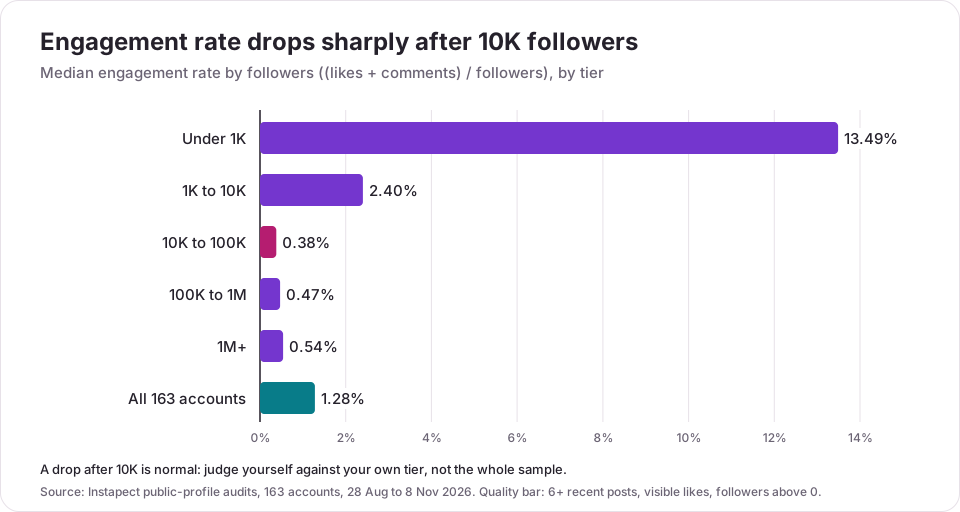
- Expect your engagement rate to fall as you grow. The median audited account had 2.40% at 1K to 10K followers and 0.38% at 10K to 100K. That drop is the tier, not a failure.
Becoming an Instagram creator at a glance
| Question | Answer |
|---|---|
| How many followers do you need to be a content creator? | None. A Creator account is open to any account. Followers decide which money tools you can use, not the label |
| Creator or Business account? | Creator for people, artists and influencers; Business for shops, brands and services (Instagram's own guidance) |
| Does the category you pick decide the account type? | No. Instagram says the category "does not determine whether you'll set up a business or creator account" |
| When can Instagram pay you? | Gifts on Reels from 500 followers; Subscriptions from 10,000; both need 18+, a professional account and an eligible country |
| How often do creators post? | Median 2.5 posts a week across 163 audits; 4.2 at 10K to 100K followers |
| Which format do creators post most? | Reels: a median 58% of recent posts, 54% to 67% in every tier below 1M |
| What is a good engagement rate for a new creator? | Around 2.4% at 1K to 10K followers; about 1% or more past 10K (see the tier table below) |
| Can you go back to a personal account? | Yes, anytime. You lose ads and some tools, and any linked Facebook Page is disconnected (how to switch to a personal account) |
How to become a content creator on Instagram: 8 steps
1. Pick a niche you can post about for a year
Choose a topic narrow enough that a stranger knows what they will get if they follow, and wide enough for 100 posts: "budget meal prep for students" beats "food", and "Excel tips for accountants" beats "productivity". Write 20 post ideas before you start. If you run out at 8, the niche is too narrow or not one you care about.
2. Switch to a Creator account
A Creator account gives you Insights, the professional dashboard, a category label and access to monetization checks. The steps below are from the Instagram Help Center, retrieved 10 Nov 2026. They are the same on iPhone and Android.
- Tap Profile or your profile picture in the bottom right.
- Tap More (the three lines) to open Settings and activity.
- Below For professionals, tap Account type and tools.
- Tap Switch to professional account.
- Pick the category that best describes what you do, such as Digital creator, Artist or Blogger.
- Tap Switch to professional account, then choose Creator and tap Next.
- Finish the optional profile steps, or tap X to skip them.
On a computer at instagram.com: More > Settings > Account type and tools > Switch to professional account > Creator > Next, pick a category, then Done and Continue.
To hide or show the category label later, go to Edit profile > Profile display.
3. Set up a profile that explains you in 5 seconds
- Name field: your name plus your topic ("Maya | Budget Meal Prep"). It sits above your bio, so visitors see your topic first.
- Bio: who it is for, what you post, and what to do next. The Instagram bio guide has length data from 336 audits.
- Link: 110 of 163 audited accounts (67%) had a link in their bio. Use it for a newsletter, a portfolio or a link page.
- Pinned posts: pin up to three posts that show what the account is about. See how to pin a post on Instagram.
4. Make Reels your main format, carousels your second
In the 163 audited accounts, the median account's recent posts were 58% Reels. Reels reach people who don't follow you yet; carousels tend to hold the attention of people who already do. For lengths and sizes, see how long Instagram Reels can be and the Instagram post size guide.
5. Post on a schedule you can keep
Start at 2 to 3 posts a week. The median audited account posted 2.5 times a week, and the 10K to 100K tier posted the most at 4.2. Consistency matters more than volume: a creator who posts twice a week for a year beats one who posts daily for a month and stops. The how often to post on Instagram analysis shows what more posts do to reach and per-post engagement.
6. Talk to the people who comment
Reply to comments in the first hour, ask a question in captions, and answer DMs (an Instagram auto reply covers the first message when you can't). Brands look at comments as well as likes: the median audited account earned 2.3 comments per 100 likes, and 3.3 to 3.5 at 1K to 100K followers.
7. Check your numbers once a month
Use Instagram Insights for reach, plays and follower growth (see how to see Instagram Insights). To compare your public numbers with other creators your size, run your handle through a public profile tool such as Instapect's Instagram profile analyzer, Social Blade or HypeAuditor's free checker.
8. Add income in stages
Gifts from 500 followers, Subscriptions from 10,000, and brand deals once you have a clear niche and steady engagement, often from about 1,000 followers. The full breakdown is in the money section below, in how many followers you need to get paid on Instagram and in how much Instagram influencers make.
Creator account vs business account: which one should you pick?
| Creator account | Business account | |
|---|---|---|
| Instagram says it is best for | "Public figures, content producers, artists and influencers" | "Retailers, local businesses, brands, organizations and service providers" |
| Insights and professional dashboard | Yes | Yes |
| Ads and boosted posts | Yes | Yes |
| Category label on profile | Yes, can be hidden | Yes, can be hidden |
| Contact buttons | Optional | Optional, with business contact details |
| Switching later | Anytime, between Creator, Business and personal | Anytime |
Source: Instagram Help Center, Set up a professional account, retrieved 10 Nov 2026. If you are one person making content, pick Creator. If you sell products from a shop, pick Business.
How many followers do you need to be a content creator on Instagram?
None to start, 500 to get paid by Instagram, and 10,000 for Subscriptions. Brands pay smaller accounts too: Hootsuite's 2026 pricing guide puts a sponsored post at $20 to $200 at 1,000 to 10,000 followers (Hootsuite, updated 14 Oct 2026).
| Milestone | What changes | Requirement | Source |
|---|---|---|---|
| 0 followers | You can switch to a Creator account and see Insights | Public account | Help Center |
| 500 followers | Eligible for Gifts on Reels: viewers send Stars, you get $0.01 per Star | Professional account, 18+, payout account, eligible country, Partner Monetization Policies | Help Center |
| About 1,000 followers | Small brand deals become realistic | Clear niche and steady engagement | Hootsuite |
| 10,000 followers | Eligible for Subscriptions (monthly paid content) | Professional account, 18+, eligible country, Subscriptions terms | Help Center |
Both Gifts and Subscriptions are limited to listed countries, including the United States, the United Kingdom, Canada, India and most of the EU. Accounts that mainly post content focused on children can't use either, and collab posts can't earn Gifts. You can check what you qualify for in Professional dashboard; if you are eligible for Subscriptions, you'll see Set up subscriptions there.
What 163 creator profiles show about each stage
Instapect audits public Instagram profiles: visible likes and comments, posting dates, formats, follower counts and profile fields. We looked at 163 accounts audited between 28 August and 8 November 2026 that passed a quality bar (at least 6 recent posts, visible like counts, more than 0 followers, not delisted), split by follower tier. All figures are medians unless stated.
| Follower tier | Accounts | Median followers | Median engagement rate | Top quarter starts at | Posts per week | Reels share | Comments per 100 likes |
|---|---|---|---|---|---|---|---|
| Under 1K | 31 | 269 | 13.49% | 24.11% | 1.9 | 67% | 6.1 |
| 1K to 10K | 32 | 3,850 | 2.40% | 7.08% | 1.6 | 54% | 3.3 |
| 10K to 100K | 32 | 22,635 | 0.38% | 2.06% | 4.2 | 55% | 3.5 |
| 100K to 1M | 21 | 143,086 | 0.47% | 1.50% | 2.9 | 67% | 2.9 |
| 1M+ | 47 | 52.0M | 0.54% | 1.22% | 2.2 | 42% | 1.1 |
| All accounts | 163 | 25,586 | 1.28% | 5.90% | 2.5 | 58% | 2.3 |
Engagement rate here is (average likes + average comments) ÷ followers × 100, with pinned posts excluded. "Reels share" is the share of each account's recent posts that were Reels.
Finding 1: engagement rate falls by about 6x when you pass 10K
The median rate was 2.40% at 1K to 10K and 0.38% at 10K to 100K. Above 10K it stayed below 0.6% in every tier. A likely reason: at that size more followers arrive through Reels recommendations and collabs, and they interact less than the friends and early fans who followed first. Compare yourself with your tier, using the engagement rate benchmarks, not with the whole sample.
Finding 2: the 10K to 100K tier posts the most
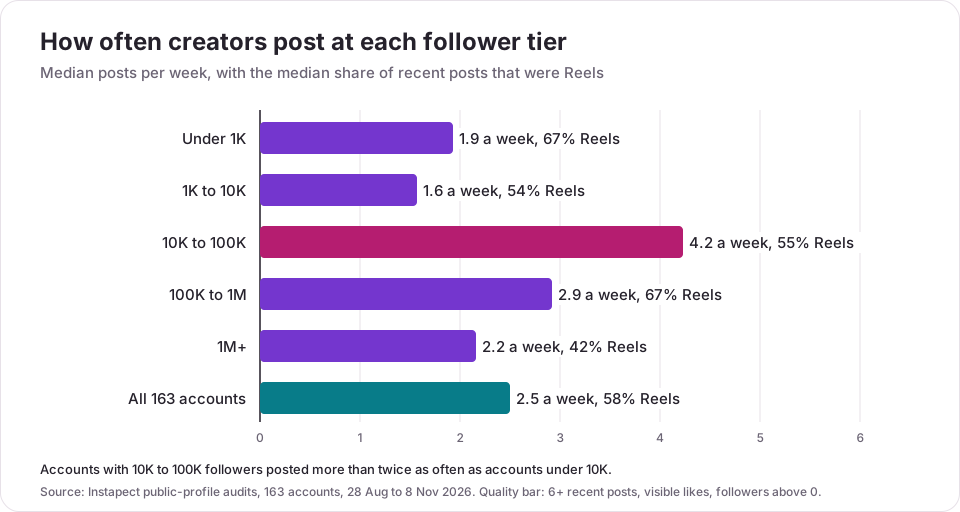
Accounts with 10K to 100K followers posted a median 4.2 times a week, more than twice the 1.6 at 1K to 10K. This is the tier where accounts are trying to grow into full-time creators, and it shows in their volume. Accounts under 10K posted less than twice a week, so a beginner who keeps to 3 a week is already ahead of the typical small account.
Finding 3: Reels are more than half of what creators post
Below 1M followers, Reels made up 54% to 67% of the median account's recent posts. Only the 1M+ tier, which includes many brands and celebrities with photo-heavy grids, dropped to 42%. Two of the best-known Reel-first creators in the sample show the pattern at scale: @khaby00 (78.0M followers, label "Gaming video creator", 1.46% engagement rate, 1.6 posts a week) and @zachking (31.8M, "Digital creator", 0.94%, 1.4 posts a week). Neither posts daily.
Finding 4: visible paid partnerships are rare below 1M followers
Only 13 of 163 accounts had a post with Instagram's Paid partnership label among their recent posts, and 11 of those 13 had more than 1M followers (11 of 47 in that tier). Across 1,699 recent posts, 27 carried the label (1.6%). This does not mean smaller creators earn nothing from brands: many deals are Stories, affiliate links or posts without the label. It does mean a new creator should not expect sponsored posts to fill their grid.
Finding 5: the category label is your choice, not a status
76 of the 163 accounts (47%) displayed a category label. "Digital creator" was the most common single label (9 accounts), but labels are self-chosen: @gulfnews, a news publisher, also shows "Digital creator". Pick the label that tells a new visitor what you make; it does not change your reach or which tools you get.
Limits of this data. These are accounts people chose to audit on Instapect, so the set leans toward celebrities, media brands and small creators checking their own numbers. Tiers hold 21 to 47 accounts. Instapect reads public signals only, so this table has no reach, saves, Story views or audience demographics; use Instagram Insights for those on your own account.
What to expect at each stage
| Stage | Typical numbers (Instapect medians) | Focus |
|---|---|---|
| Under 1K followers | 13.5% engagement, 6 comments per 100 likes | Find your niche and format. Engagement is high because most followers know you |
| 1K to 10K | 2.4% engagement, 1.6 posts a week | Post more often than the typical account (it is easy to beat 1.6). Gifts open at 500 |
| 10K to 100K | 0.38% engagement, 4.2 posts a week | Subscriptions open at 10K. Brand deals pay more; engagement per follower drops |
| 100K to 1M | 0.47% engagement, 67% Reels | Build a team or system; keep comments per 100 likes near 3 |
| 1M+ | 0.54% engagement, 1.1 comments per 100 likes | Paid partnerships became visible: 11 of 47 accounts had one |
How do content creators make money on Instagram?
| Income source | Who pays | When it opens | What to know |
|---|---|---|---|
| Brand deals | Brands | From about 1,000 followers | $20 to $200 a post at 1K to 10K, $200 to $2,000 at 10K to 50K (Hootsuite) |
| Gifts on Reels | Viewers, via Instagram | 500 followers | $0.01 per Star; Apple and Google take an in-app fee, "typically 30%", when viewers buy Stars (Help Center) |
| Subscriptions | Followers, via Instagram | 10,000 followers | Monthly fee you set, for subscriber-only content (Help Center) |
| Affiliate links | Retailers | Any size | Commission per sale; use your bio link or Stories |
| Your own product | Customers | Any size | Courses, presets, services, merch |
Instagram has no standing payment per view. For full rate tables by tier, see how much Instagram influencers make.
Mistakes to avoid as a new Instagram creator
| Mistake | Why it hurts | Do this instead |
|---|---|---|
| Posting about everything | Visitors can't tell what they will get by following | One niche for at least 3 months |
| Staying private | Strangers can't see your posts or follow without approval | Switch to Creator, which makes the account public |
| Daily posting, then quitting | Burnout; the account goes quiet | 2 to 3 posts a week you can keep for a year |
| Judging yourself by big-account engagement rates | Rates above 10K followers are much lower (0.38% median at 10K to 100K) | Compare with your own tier |
| Buying followers | Fake followers don't interact, so your engagement rate falls; brands check | Grow with Reels and collabs. See how to spot fake followers |
| Ignoring comments | Comments per 100 likes is one of the signals brands check when vetting | Reply in the first hour |
| Paying a third party to get you verified | Instagram can remove the badge or disable the account for it | Use Meta Verified or a free notability request. See how to get verified on Instagram |
| Expecting Instagram to pay per view | It doesn't | Plan on brand deals, affiliates and your own products |
Why can't I switch to a creator account on Instagram?
- The option is missing: update the Instagram app, then look under Settings and activity > For professionals > Account type and tools. Older guides point to "Account" or "Switch account type" in different places.
- You are on the web: the computer path starts at More > Settings; the switch then asks for a category and confirmation.
- You switched but see no monetization tools: a Creator account does not make you eligible on its own. Open Professional dashboard to see what you qualify for; Gifts need 500 followers and Subscriptions 10,000, plus age and country rules.
Frequently asked questions
How do I become a content creator on Instagram?
Switch to a Creator account (Profile > More > Account type and tools > Switch to professional account > Creator), choose one niche, set up your bio and name field around it, and post 2 to 4 times a week, mostly Reels. Reply to comments and check Insights monthly. Add income as you pass 500 and 10,000 followers.
How many followers do you need to be a content creator on Instagram?
None. Any account can switch to a Creator account. Followers matter for money: Gifts need at least 500 followers and Subscriptions need 10,000, according to the Instagram Help Center. Brands pay accounts from about 1,000 followers.
Is it free to become a content creator on Instagram?
Yes. A Creator account is free. You may spend money on a phone tripod, lighting or editing apps, but none is required to start.
Should I use a creator or business account on Instagram?
Use Creator if you are a person making content: influencers, artists, public figures and content producers. Use Business if you are a shop, brand, local business or service. Both get Insights and ads, and you can switch anytime.
How often should a new Instagram creator post?
2 to 3 times a week to start. The median account in Instapect's 163 audits posted 2.5 times a week, accounts under 10K posted less than twice a week, and the 10K to 100K tier posted 4.2 times.
How long does it take to become a content creator on Instagram?
You become one the day you switch accounts and post. Growing to 1,000 or 10,000 followers usually takes months, and depends on niche, Reels reach and how consistently you post. Plan in 90-day blocks and check your numbers at the end of each.
Do Instagram creators get paid for views?
No. Instagram has no standing payment per view. It pays through Gifts ($0.01 per Star, from 500 followers), Subscriptions (from 10,000) and invite-only bonus programs. Most creator income comes from brands. A million-view Reel pays $0 by default; see what 1 million views is worth for the audit numbers.
I switched to a creator account and my account became public. Why?
Professional accounts are always public. Instagram's Help Center says switching a private account to professional makes it public and automatically accepts all pending follow requests. To go private again, switch back to a personal account first.
Why don't I see Gifts or Subscriptions in my professional dashboard?
You probably don't meet one of the rules yet: 500 followers for Gifts or 10,000 for Subscriptions, 18 or older, a supported country, a payout account, and compliance with Instagram's monetization policies. Accounts focused on children's content are not eligible.
What is a good engagement rate for a new Instagram creator?
About 2.4% is typical at 1K to 10K followers, and 7% or more puts you in the top quarter of that tier in Instapect's audits. Past 10K, about 1% or more is good, and 2% is top quarter at 10K to 100K.
Can I be a content creator on Instagram without showing my face?
Yes. Faceless formats such as tutorials, screen recordings, voiceovers, illustrations and product close-ups work on Instagram. The rules for Gifts and Subscriptions do not require a face on camera.
Sources
- Instagram Help Center, Set up a professional Instagram account to access business or creator tools and controls, retrieved 10 Nov 2026.
- Instagram Help Center, How to earn money on Instagram Gifts (500 followers, $0.01 per Star, eligible countries), retrieved 10 Nov 2026.
- Instagram Help Center, Eligibility requirements for Instagram Subscriptions (10,000 followers, 18+, eligible countries), retrieved 10 Nov 2026.
- Hootsuite, Influencer pricing, updated 14 Oct 2026.
- Search demand: Serpstat via Treg, United States, 9 to 10 Nov 2026 (how to become a content creator on instagram 2,900/month, KD 16; how do you become a content creator 210; content creation on instagram 170; how do i become a content creator 140; content creation for instagram 90).
- Instapect public-profile audits: 163 accounts, 1,699 recent non-pinned posts, 28 Aug to 8 Nov 2026, queried 10 Nov 2026.
Start small, then post for 90 days
Switch to a Creator account today, write 20 post ideas for one niche, and post 2 to 3 times a week for 90 days, mostly Reels. Then compare your numbers with creators your size: the medians above are the bar for each tier. To see how any public account, including yours, compares on engagement, posting rhythm and format mix, run it through the Instagram profile analyzer.