The best Instagram post size in 2026 is 1080 x 1350 pixels (4:5 portrait). Instagram also keeps photos up to 1080 x 1440 pixels (3:4) at full resolution, the tallest shape the feed accepts, and 1080 x 1080 (square) and 1080 x 566 (landscape) still work. Reels and Stories use 1080 x 1920 pixels (9:16), and your profile grid now shows every post as a 3:4 rectangle, so keep text inside that center area.
Which size you need most depends on what you post. In Instapect's audits of 155 public accounts, Reels made up a median 58% of recent posts, so most accounts design at 9:16 more often than at 4:5.
Disclosure: Instapect publishes this guide and makes one of the tools mentioned below. Every size here comes from Instagram's Help Center or named design guides, and you can check all of them inside the Instagram app.
TL;DR: Instagram post sizes in 2026
| Question | Answer | Source |
|---|---|---|
| Best size for a feed photo | 1080 x 1350 px (4:5 portrait) | Buffer image size guide, checked 3 Nov 2026 |
| Tallest photo Instagram keeps | 1080 x 1440 px (3:4) | Instagram Help Center, checked 3 Nov 2026 |
| Widest photo Instagram keeps | 1080 x 566 px (1.91:1) | Same Help Center page |
| Width Instagram stores | 320 to 1080 px; wider photos are scaled down to 1080 | Same Help Center page |
| Reels and Stories | 1080 x 1920 px (9:16) | Buffer, Adobe Express |
| Profile grid preview | 3:4 rectangle (since January 2025) | Adam Mosseri's announcement, reported by UNN, 18 Jan 2025 |
| Profile picture | 320 x 320 px, shown as a circle | Buffer |
| Format you will size for most | Reels: median 58% of posts per account; carousels 20%; single photos 8% | Instapect, 155 accounts, 1,622 posts |
What the sources agree on: Instagram's Help Center, Buffer, Adobe, Canva and Figma all give 1080 pixels as the width to design at. They split on the tall format. The Help Center now lists 3:4 (1080 x 1440) as the upper limit, and Buffer lists both 4:5 and 3:4 as vertical feed sizes. Your Social Team's sizing guide (22 July 2026) still advises 4:5 for regular posts and 3:4 for grid banners, saying 4:5 is "stable, universally supported by every scheduler, and the visual difference in the grid is minimal."
- Best default for photos and carousels: 1080 x 1350 (4:5).
- Best for the most feed height: 1080 x 1440 (3:4), with nothing important near the top or bottom edge.
- Best for Reels and Stories: 1080 x 1920 (9:16), with text inside the middle 1080 x 1440 so the grid crop does not cut it.
Instagram sizes at a glance
| What you post | Size in pixels | Aspect ratio | Notes |
|---|---|---|---|
| Portrait photo | 1080 x 1350 | 4:5 | The standard feed size |
| Tall portrait photo | 1080 x 1440 | 3:4 | Tallest Instagram keeps without cropping |
| Square photo | 1080 x 1080 | 1:1 | Safe for logos and product shots |
| Landscape photo | 1080 x 566 | 1.91:1 | Smallest on screen; widest Instagram keeps |
| Carousel slide | Same as the first slide | 1:1, 4:5 or 3:4 | Every slide follows the first slide's shape |
| Reel | 1080 x 1920 | 9:16 | Shown as 3:4 on the profile grid |
| Reel cover | 1080 x 1920 | 9:16 | Grid shows the middle 3:4 area |
| Story | 1080 x 1920 | 9:16 | Leave about 250 px clear at top and bottom |
| Profile picture | 320 x 320 | 1:1 | Displayed as a circle |
| Profile grid tile | Preview of your post | 3:4 | Not uploaded separately |
What is the best Instagram post size?
For a photo or a carousel, use 1080 x 1350 pixels. It is the size Buffer calls the format Instagram recommends for feed posts, it fills more of a phone screen than a square, and it sits inside the range Instagram keeps at full quality.
Instagram's Help Center explains the rule behind every photo size: "When you share a photo that has a width between 320 and 1080 pixels, we keep that photo at its original resolution as long as the photo's aspect ratio is between 1.91:1 and 3:4 (a width of 1080 pixels with a height between 566 and 1440 pixels)." A photo outside that range "will be cropped to fit a supported ratio". A photo wider than 1080 pixels is sized down to 1080, and one narrower than 320 is enlarged to 320.
So any photo that is 1080 pixels wide and between 566 and 1440 pixels tall is a valid Instagram post size. The four sizes in the table above are the common points on that range.
Instagram feed post sizes: portrait, tall portrait, square and landscape
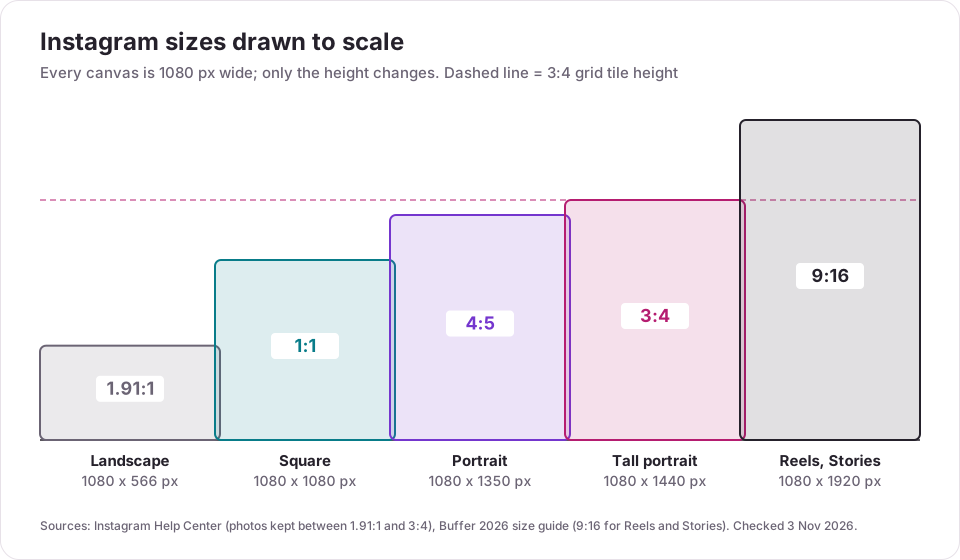
Portrait: 1080 x 1350 (4:5)
The default for most feed photos and carousel slides. It takes 25% more screen height than a square, so the post stays on screen longer as people scroll. Portraits, outfits, food, quotes and infographics all fit it well.
Tall portrait: 1080 x 1440 (3:4)
The tallest photo Instagram keeps without cropping, and the same shape as the profile grid tile, so what you post is what shows on your grid. Your Social Team's 2026 sizing guide reserves 1080 x 1440 for multi-post banners and grid puzzles and keeps 4:5 for everyday posts, because 4:5 is supported by every scheduler and "the visual difference in the grid is minimal". If you use 3:4 for a single photo, keep faces, text and logos away from the top and bottom 45 pixels so the post still works if a scheduler or view trims it to 4:5.
Square: 1080 x 1080 (1:1)
Still a safe choice for logos, product shots and graphics with centered text. On the 3:4 grid a square post is shown with its left and right edges trimmed, so leave about 135 pixels clear on each side.
Landscape: 1080 x 566 (1.91:1)
The widest shape Instagram keeps. It takes the least space in the feed and gets cut heavily on the 3:4 grid (only about the middle 40% of the width shows). Use it only when the scene really is wide, such as a panorama or a group shot.
Instagram carousel size
Carousel slides use the same feed sizes, and the first slide sets the shape for every slide. Instagram lets you keep the first slide's shape for all of them, convert them to squares, or keep mixed shapes, according to Buffer. If you upload a video in a carousel, the whole post switches to portrait.
Use 1080 x 1350 for every slide unless you need squares. The full rules, including the 20-slide limit and how to design a panorama that flows across slides, are in the Instagram carousel guide.
Instagram Reel size: 1080 x 1920
Reels are full-screen vertical video at 1080 x 1920 pixels (9:16). Buffer notes that every video posted to the feed is now shown as a Reel, so 9:16 is the video size to design for.
A Reel appears in three shapes:
| Where it shows | Shape | What gets cut |
|---|---|---|
| Reels tab, Explore, full screen | 9:16 | Nothing, apart from the caption and buttons that sit on top |
| Profile grid | 3:4 | About 240 px from the top and bottom |
| Reels tab on your profile | 9:16 | Nothing |
That is why text on a Reel or its cover belongs inside the middle 1080 x 1440 area. Keep captions and on-screen text clear of the bottom 300 or so pixels too, where Instagram places the caption, audio and buttons. Length is a separate limit: Reels can run up to 20 minutes, but only Reels of 3 minutes or less are recommended to non-followers (see how long Instagram Reels can be).
Instagram Story size: 1080 x 1920
Stories use the same 1080 x 1920 (9:16) canvas. Instagram puts your profile name, the progress bar and the reply box on top of every Story, so Buffer advises leaving roughly 250 pixels free at the top and bottom for text and logos. A square or landscape photo can still go in a Story: it sits in the middle of the 9:16 frame with space around it, which you can fill with text or stickers.
Instagram profile picture size
Upload a square image of at least 320 x 320 pixels. Instagram shows it as a circle everywhere (profile, Stories tray, comments, DMs), so anything in the corners is cut. Canva's size guide gives 110 x 110 as the smallest it will display well. Keep your face or logo centered with space around it. Your bio sits right below the photo; the Instagram bio guide covers what to put there.
Instagram grid size: why your posts now look like 3:4 rectangles
In January 2025 Instagram replaced the square profile grid with taller rectangles. Adam Mosseri, head of Instagram, explained that "most of what's being uploaded, both photos and videos, are in a vertical format" and that people would prefer to see them on their profile as intended rather than "aggressively" cropped (UNN report, 18 January 2025). Every grid tile is now a 3:4 preview of the post.
What that means for each size:
| Post size | How it shows on the 3:4 grid |
|---|---|
| 1080 x 1440 (3:4) | In full |
| 1080 x 1350 (4:5) | A thin strip trimmed from the left and right |
| 1080 x 1080 (1:1) | About 135 px trimmed from each side |
| 1080 x 566 (1.91:1) | Only about the middle 40% of the width |
| 1080 x 1920 (9:16) | Top and bottom trimmed to the middle 1080 x 1440 |
You can adjust the grid crop for a Reel when you post it (tap Edit cover, then Profile grid), as Buffer describes, and change a Reel cover later from the post's menu.
What Instapect's audit data shows about which size you need
Size guides list every format as if you use them equally. You don't. The format mix decides which canvas you open most often, so Instapect counted the formats of recent public posts.
Method: 155 public accounts audited between 28 August and 2 November 2026, after a quality filter: not delisted, at least 6 recent posts in the sample, no posts with hidden likes, follower count above zero. Pinned posts are excluded. That leaves 1,622 posts. Shares are worked out per account, then summarized by tier with the median account (the middle value) and the mean.
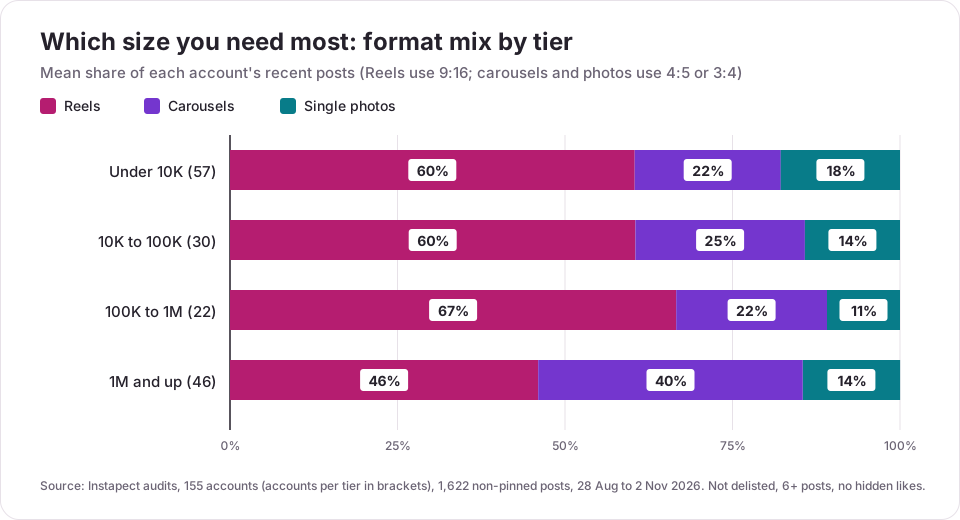
Finding 1: most accounts post Reels more than anything else
| Follower tier | Accounts | Posts | Reels (median account) | Carousels (median) | Single photos (median) | Reels (mean) | Carousels (mean) | Single photos (mean) |
|---|---|---|---|---|---|---|---|---|
| Under 10K | 57 | 580 | 67% | 11% | 0% | 60% | 22% | 18% |
| 10K to 100K | 30 | 298 | 55% | 14% | 4% | 61% | 25% | 14% |
| 100K to 1M | 22 | 222 | 68% | 21% | 0% | 67% | 23% | 11% |
| 1M and up | 46 | 522 | 42% | 41% | 8% | 46% | 40% | 15% |
| All accounts | 155 | 1,622 | 58% | 20% | 8% | 57% | 28% | 15% |
Below a million followers, the typical account posts Reels in more than half of its slots, so 1080 x 1920 is the size it uses most. The largest accounts split almost evenly between Reels and photo posts. Carousels plus single photos make up a mean 55% of posts at 1M+, against 33% to 40% in the smaller tiers, so big accounts need the 4:5 or 3:4 photo canvas as often as the 9:16 one.
Two public reports show the range. @cristiano posted 6 carousels, 4 single photos and 2 Reels in his 12 sampled posts (28 Aug 2026), so 10 of 12 were photo-size posts. @titovman posted 11 Reels and 1 carousel in 12 (28 Aug 2026), so almost everything was 9:16.
Finding 2: carousels hold up against Reels on engagement
Within each account, Instapect compared every post with that account's own median post (likes plus comments, where 1.00x means typical):
| Format | Posts | Accounts | Median vs the account's typical post |
|---|---|---|---|
| Carousel | 456 | 103 | 1.10x |
| Reel | 918 | 145 | 1.00x |
| Single photo | 237 | 81 | 0.92x |
A carousel post ran 10% above the same account's typical post, while single photos ran 8% below. If you are deciding which canvas deserves a template, the 4:5 carousel is worth setting up even on a Reels-first account. The carousel guide breaks this down by tier.
Limits of this data
- The accounts were chosen by the people who audited them, not at random, and the 100K to 1M tier has only 22 accounts.
- Public data shows the format of a post but not its pixel dimensions, so this data cannot say how many posts use 4:5 versus 3:4.
- Likes and comments are public signals. Reach, saves and shares are visible only in the account's own Insights.
How to make a picture fit on Instagram without cropping
- Pick the shape first. Portrait 4:5 for most photos, 3:4 for the most height, 9:16 for Reels and Stories.
- Export at 1080 pixels wide. 1080 x 1350, 1080 x 1440 or 1080 x 1920. Larger exports are scaled down anyway.
- Add borders instead of cropping if the photo is a shape Instagram doesn't keep (for example a 2:3 phone photo, which is taller than 3:4). Canva, Snapseed and Adobe Express all have Instagram presets.
- Tap the expand icon in the bottom-left corner of the Instagram crop screen. Buffer notes that a correctly sized photo can look square in the preview until you tap it.
- Check the grid. Before posting a Reel, open Edit cover, then Profile grid, and move the crop so text stays in view.
- Use JPG or PNG for photos and MP4 or MOV for video, the formats Buffer lists as supported.
Check: after posting, open your profile and the post itself. If text is cut on the grid, move it toward the center next time; if the post is blurry, the export was narrower than 1080 pixels.
Instagram post size in inches and centimeters
Instagram works in pixels, so inches only matter when you print or design in a tool set to inches. At 300 dpi (print quality), the common sizes are:
| Size in pixels | Inches at 300 dpi | Centimeters at 300 dpi |
|---|---|---|
| 1080 x 1080 | 3.6 x 3.6 | 9.1 x 9.1 |
| 1080 x 1350 | 3.6 x 4.5 | 9.1 x 11.4 |
| 1080 x 1440 | 3.6 x 4.8 | 9.1 x 12.2 |
| 1080 x 1920 | 3.6 x 6.4 | 9.1 x 16.3 |
For screen design at 72 dpi, set the canvas to the pixel size directly.
Mistakes to avoid with Instagram sizes
| Mistake | What happens | Fix |
|---|---|---|
| Uploading a 2:3 or 9:16 photo to the feed | Cropped to 3:4 | Export at 1080 x 1440 or add borders |
| Exporting narrower than 1080 px | Soft or blurry post | Always export 1080 px wide |
| Text near the edge of a Reel | Cut off on the 3:4 grid and under the buttons | Keep text inside the middle 1080 x 1440 |
| Mixed shapes in a carousel | Instagram crops later slides to match the first | Use one shape for every slide |
| Landscape photos for important posts | Smallest on screen, heavily cut on the grid | Re-crop to 4:5 or 3:4 |
| Logo in the corners of a profile picture | Cut by the circle | Center it with clear space |
| Designing only for 4:5 on a Reels-first account | The template you use most is missing | Build a 9:16 template first if Reels are over half your posts |
Frequently asked questions
What is the best Instagram post size in 2026?
1080 x 1350 pixels (4:5 portrait) is the best default for feed photos and carousels. Instagram also keeps photos up to 1080 x 1440 (3:4) at full resolution, which is the tallest option and matches the profile grid. Reels and Stories use 1080 x 1920 (9:16).
What is the new Instagram post size?
The new size is 1080 x 1440 pixels (3:4). Instagram's Help Center now lists 3:4 as the tallest photo shape it keeps without cropping, up from 4:5 before. The profile grid also switched to 3:4 rectangles in January 2025.
Is the Instagram grid 4:5 or 3:4?
The grid is 3:4. Your posts can still be 4:5, 1:1 or 1.91:1, but the grid tile shows a 3:4 preview, so keep the important part of each post in the center.
Should I post 3:4 or 4:5 on Instagram?
Both work. 3:4 (1080 x 1440) shows in full on the grid and takes the most feed height. 4:5 (1080 x 1350) is the long-standing standard and is safe in every view. If you choose 3:4, keep text away from the top and bottom edges.
Is Instagram 5x7 or 4x5?
Instagram's standard portrait is 4:5 (the same shape as an 8 x 10 print). A 5 x 7 photo is taller than 3:4, so Instagram crops it to 3:4; resize it to 1080 x 1440 or add borders to keep the whole image.
Is 4:3 or 16:9 better for Instagram?
Neither, for the feed: both are landscape shapes that take less screen space than portrait. 4:3 and 16:9 both fall inside Instagram's 1.91:1 limit, so they post without cropping, but a 4:5 or 3:4 portrait is more visible. For Reels and Stories, the vertical version of 16:9, which is 9:16, is the right shape.
What size is an Instagram Reel?
1080 x 1920 pixels at 9:16. On your profile grid it is shown as a 3:4 preview, so keep text inside the middle 1080 x 1440 area.
What size is an Instagram Story?
1080 x 1920 pixels at 9:16. Leave about 250 pixels clear at the top and bottom, where Instagram shows your name, the progress bar and the reply bar.
What size should an Instagram profile picture be?
At least 320 x 320 pixels, square. Instagram displays it as a circle, so center the subject.
Why is Instagram cropping my photo?
Your photo is outside the range Instagram keeps: wider than 1.91:1 or taller than 3:4. Most phone photos are 3:4 or 9:16, and 9:16 photos are cropped in the feed. Resize to 1080 x 1350 or 1080 x 1440, or add borders, before uploading.
Why does my Instagram post look blurry after uploading?
Usually the image was narrower than 1080 pixels, so Instagram enlarged it, or it was compressed several times before upload. Export at exactly 1080 pixels wide from the original file, and turn on "Upload at highest quality" in the app's media quality settings if your phone offers it.
Why is the text on my Reel cut off on my profile?
The grid shows only the middle 3:4 part of a 9:16 Reel, which trims about 240 pixels from the top and bottom. Move text toward the center, or adjust the grid crop with Edit cover, then Profile grid.
Sources
- Instagram Help Center, Image resolution of photos you share on Instagram: widths of 320 to 1080 pixels kept at original resolution "as long as the photo's aspect ratio is between 1.91:1 and 3:4 (a width of 1080 pixels with a height between 566 and 1440 pixels)". Retrieved 3 November 2026.
- Buffer, Instagram Image Size Guide 2026 (published 17 March 2026): feed, carousel, Story (250 px safe zone), Reel, profile photo (320 x 320) and file format guidance. Retrieved 3 November 2026.
- Adobe Express, Instagram image sizes; Canva, Instagram sizes (profile photo minimum 110 x 110). Retrieved 3 November 2026.
- Your Social Team, The Ultimate Instagram Sizing Guide for 2026, 22 July 2026.
- UNN, "Square is the legacy of Instagram": social network changes the format of the profile grid, 18 January 2025, reporting Adam Mosseri's announcement.
- Instapect public-profile audits: 155 accounts audited 28 August to 2 November 2026 (not delisted, 6+ posts, no hidden likes, followers above zero), 1,622 non-pinned posts; format comparison on 1,611 posts from accounts with a nonzero median. Queried 3 November 2026.
Summary
Use 1080 x 1350 (4:5) for feed photos and carousels, 1080 x 1440 (3:4) when you want the tallest post and a full grid tile, and 1080 x 1920 (9:16) for Reels and Stories. Keep text inside the center 3:4 area, export at 1080 pixels wide, and give the profile picture a centered 320 x 320 square. Most accounts post Reels in more than half their slots, so set up the 9:16 template first, then a 4:5 carousel template, since carousels ran 10% above each account's typical post. To see the format mix of any public account, run its handle through the Instagram profile analyzer.