There are two ways to get verified on Instagram in 2026: subscribe to Meta Verified, a paid plan that gives an eligible personal or creator profile the blue badge after an ID check, or apply for free as a notable public figure, celebrity or brand through Professional dashboard > Settings > Request verification. Meta Verified reviews take up to 3 business days; free notability requests get an answer in Activity within 30 days (Instagram Help Center, checked 11 Nov 2026).
There is no follower minimum on either route. In 190 public profiles audited by Instapect, 12% of accounts with 1K to 10K followers already showed the badge, and every account above 1 million did. Below are the exact steps for both routes, the requirements Meta lists, why requests get denied, and what the badge does and does not change.
Disclosure: Instapect publishes this guide and makes one of the tools mentioned below. Instapect cannot verify any account or speed up a request. Every step here happens in the Instagram app and works without it.
TL;DR: how to get verified on Instagram in 2026
| Question | Answer | Source |
|---|---|---|
| Ways to get the badge | 1) Subscribe to Meta Verified. 2) Apply as a notable public figure, celebrity or brand | Help Center, checked 11 Nov 2026 |
| Free route path (app only) | Profile > Menu > Professional dashboard > Settings > Request verification > name + ID > Submit | Help Center |
| Free route bar | Authentic, unique, complete (public, bio, photo, active) and notable: featured in multiple news sources, paid media not counted | Help Center |
| Free route answer time | Notification in Activity within 30 days; reapply 30 days after a denial | Help Center |
| Meta Verified bar | 18+, supported country, government photo ID, personal or creator profile, Advanced Protection on, minimum activity | Help Center |
| Meta Verified review time | Within 3 business days; finish the process within 3 days or the subscription is canceled and refunded | Help Center |
| Follower minimum | None listed by Meta. Instapect saw the badge on accounts from 1,221 followers up | Instapect, 190 accounts, 28 Aug to 10 Nov 2026 |
| Does the badge lift engagement? | Not on its own: verified and unverified accounts at 10K to 1M had the same median engagement rate, 0.27% | Instapect, 53 accounts |
- The free route needs news coverage, not followers. Instagram says it reviews "accounts that are featured in multiple news sources" and does not count "paid or sponsored media content."
- Meta Verified is the predictable route. If you meet the eligibility list and pay, you get the badge once your ID check passes.
- Lock your username first. Once verified, you can't change it (Help Center).
Instagram verification at a glance
| Meta Verified (paid) | Request verification (free) | |
|---|---|---|
| Who it's for | Creators and individuals on personal or creator profiles; businesses use Meta Verified for businesses | Public figures, celebrities and brands that are well known and widely searched |
| Main test | Identity: your ID matches your profile | Notability: coverage in multiple news sources |
| Cost | Monthly subscription; Meta shows the price in the app before you pay | Free |
| Where to start | Profile > Menu > Meta Verified (or Accounts Center, Meta Verified) | Profile > Menu > Professional dashboard > Settings > Request verification |
| What you submit | Payment, government-issued photo ID, Advanced Protection on | Full name and ID (government photo ID or official business documents) |
| Decision time | Within 3 business days | Up to 30 days |
| Extras | Enhanced support, impersonation protection | Badge only |
| If you stop | The badge goes with the subscription | Badge stays unless removed for a rule breach |
| Works on a computer? | Yes, Meta lists Instagram desktop steps | No, app only |
Sources: Instagram Help Center pages on requirements, requesting a badge, Meta Verified eligibility and subscribing, all checked 11 Nov 2026.
How to get verified on Instagram for free (notability request)
This is the original route and it costs nothing. It is also the one most people are turned down on, because the bar is fame, not effort.
Before you apply, check you meet all four requirements (Instagram Help Center, checked 11 Nov 2026):
- Authentic. The account represents a real person, registered business or entity.
- Unique. One account per person or business. Language-specific accounts are the only exception, and Instagram doesn't verify general interest accounts such as meme pages.
- Complete. The account is public, has a bio and a profile photo, and is active when you apply.
- Notable. The person, brand or entity is "well-known, highly searched for," and appears in multiple news sources. Paid or sponsored articles don't count.
Steps on iPhone and Android:
- Log in to the account you want verified.
- Tap Profile or your profile picture in the bottom right.
- Tap Menu (three lines) in the top right.
- Below Your insights and tools, tap Professional dashboard, then Settings in the top right.
- Tap Request verification.
- Enter your full name and add the required ID: a government-issued photo ID for a person, or official business documents for a brand.
- Follow the on-screen instructions, then tap Submit.
The request option isn't available on computers (Help Center). If you don't see Professional dashboard, switch to a professional (creator or business) account first in Settings > Account type and tools.
What happens next. Instagram sends a notification to Activity (the heart icon) within 30 days saying whether the account was verified. If the answer is no, you can apply again after 30 days. Applying again before you hear back cancels the pending request (Help Center, checked 11 Nov 2026).
How to get verified on Instagram with Meta Verified (paid)
Meta Verified swaps the fame test for an identity test. Instagram describes it as "a paid subscription that comes with benefits like the verified badge, enhanced support, impersonation protection, and more" (Help Center).
Eligibility for creators (Help Center, checked 11 Nov 2026):
- At least 18, or the age of majority where you live.
- Living in a country where Meta Verified is available.
- A government-issued photo ID.
- An Instagram personal or creator profile, with a profile picture and a name that meet Meta Verified naming standards.
- Advanced Protection turned on.
- Minimum activity on the profile.
- Not too many recent changes to your profile name, picture, username, location or profile type before applying.
Steps:
- In the Instagram app, open your profile and tap Menu.
- Tap Meta Verified. If you've moved to a Meta Account, you may find it in Accounts Center or Meta Account settings instead.
- Choose the profile (or one Instagram plus one Facebook profile for the bundled, discounted price).
- Set up payment. The price shows here before you confirm.
- Confirm your identity with your government-issued photo ID, and a selfie video if asked.
- Submit. Meta reviews it and sends an update within 3 business days (Help Center, checked 11 Nov 2026).
Two rules catch people out. If you don't finish verification within 3 days, Meta cancels the subscription and you can get a refund. While the application is in review, you may not be able to change your profile name, username, category, location or date of birth.
Business accounts go through Meta Verified for businesses, which has its own Help Center and requirements.
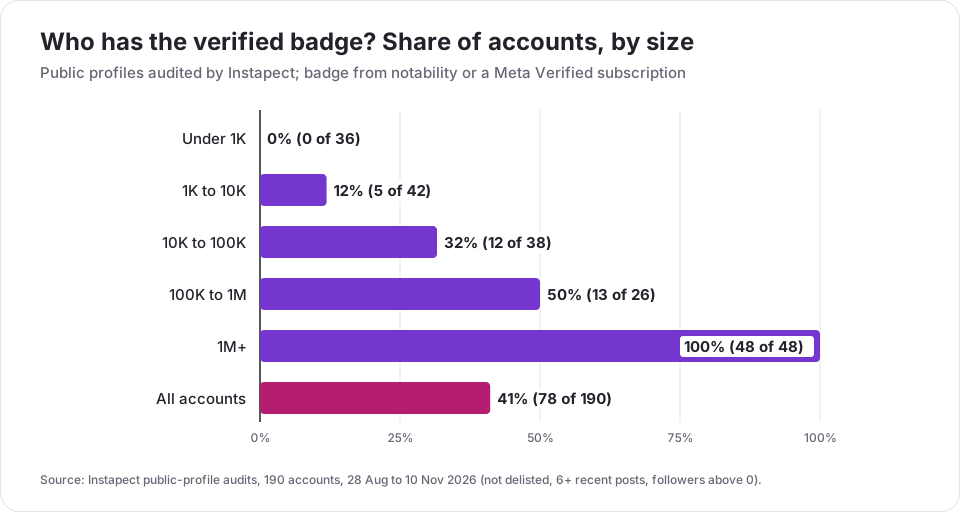
Who actually has the verified badge? What 190 public profiles show
Meta publishes the rules but not the numbers. To see how common the badge is at each size, Instapect counted it across the public profiles people have audited.
Method. 190 public Instagram accounts audited between 28 August and 10 November 2026. Quality bar: not delisted, at least 6 recent posts, more than 0 followers. The verified flag is the public badge on the profile, so the data can't tell a notability badge from a Meta Verified one. Engagement comparisons use only the 165 accounts that showed likes on every recent post; engagement rate is likes plus comments divided by followers, taken as each account's median post.
| Followers | Accounts | With the badge | Share |
|---|---|---|---|
| Under 1K | 36 | 0 | 0% |
| 1K to 10K | 42 | 5 | 12% |
| 10K to 100K | 38 | 12 | 32% |
| 100K to 1M | 26 | 13 | 50% |
| 1M+ | 48 | 48 | 100% |
| All | 190 | 78 | 41% |
Finding 1: the badge starts well below "famous"
Five accounts with fewer than 10K followers carried the badge, the smallest at 1,221 followers. With no follower rule in Meta's requirements, small verified accounts like these most likely come through Meta Verified, since a notability review asks for news coverage most small accounts don't have.
Finding 2: by 100K followers, half of accounts are verified
The share climbs with size: 12% at 1K to 10K, 32% at 10K to 100K, 50% at 100K to 1M. Brands in the middle band are often verified, for example @flydubai (about 379K followers), @jumeirah (about 260K) and @dubaicustoms (about 103K).
Finding 3: every account above 1 million had the badge
All 48 accounts with 1M+ followers were verified. At that size, an unverified profile is the exception, which is also why a missing badge on a "celebrity" account is a reason to check you've found the real one.
Finding 4: the badge doesn't raise engagement
Among accounts with 10K to 1M followers, the median engagement rate was 0.27% for both groups: 20 verified accounts and 33 without the badge. The middle half ran from 0.05% to 1.07% for verified accounts and 0.07% to 1.18% for the rest. Verified accounts did get more comments per like (a median 5.6 comments per 100 likes against 2.6), so treat the badge as a trust signal for people who already found you, not a reach boost.
What this data can't tell you. Public profiles don't show which route an account took, when it got verified, or whether a request was ever denied. The accounts were chosen by the people who audited them, so they aren't a random sample of Instagram, and the 1K to 10K verified group is only five accounts.
Which route should you choose? A quick decision guide
| Your situation | Best route | Why |
|---|---|---|
| You're a creator with no press coverage | Meta Verified | The free route needs multiple news sources |
| You're being impersonated | Meta Verified, plus a report to Instagram | It includes impersonation protection and support |
| You've had real press (not paid) in several outlets | Request verification, free | You can meet the notability test |
| You run a registered business | Meta Verified for businesses, or the free route if the brand is widely covered | Business profiles aren't eligible for the creator plan |
| You're under 18 | Request verification only, if notable | Meta Verified requires 18+ |
| You were denied in the last 30 days | Wait, build coverage, then reapply | Reapplying earlier isn't allowed |
Mistakes that get verification denied or removed
- Applying with a meme, fan or general interest account. Instagram says it won't verify these.
- Counting paid press as coverage. Sponsored articles and paid placements are excluded from the notability review.
- Applying more than once while waiting. A second request before a decision cancels the first.
- Changing your username right before or after. Meta Verified limits recent profile changes, and a verified account can't change its username.
- Using a "verification service." Instagram can remove the badge or disable the account if you "attempt to verify your account through a third party," and it removes badges that are advertised, transferred or sold (Help Center). Instagram may contact you about verification itself; nobody can sell you a badge.
- Flipping between public and private. Switching too many times is listed as a reason to lose the badge, and a notability request needs a public account anyway.
- An incomplete profile. No bio or profile photo fails the "complete" rule. The Instagram bio guide covers what to put there.
How to check if an Instagram account is really verified
The badge is a blue check next to the username on the profile and in search. To confirm you're looking at the real account:
- Open the profile itself, not a screenshot. A check mark typed into a name, bio or profile picture is not the badge.
- Search the handle and make sure the badge also shows in search results.
- Compare the handle with the one linked from the brand's official website, which Instagram itself suggests as a way to show an account is authentic.
For a side-by-side look at public numbers on any account, the Instagram profile analyzer shows the badge, follower count, recent posts and engagement, and Instagram's own profile shows the same badge for free. Lookalike accounts often give themselves away through followers that don't engage, which the fake follower guide walks through.
How to check verification is working for you
Give it a few weeks after the badge appears, then compare before and after on things the badge can plausibly affect:
- Impersonation reports. With Meta Verified, use the support channel and note how fast lookalikes come down.
- Search and profile visits. In your own Instagram Insights, compare profile activity for the 30 days before and after.
- Engagement rate. Compare your median post before and after with the engagement rate calculator. Based on the audits above, don't expect it to move because of the badge alone.
If none of these changed and you're on the paid plan, you can cancel. If you need the badge to land brand deals, the content creator guide covers what brands check first.
Frequently asked questions
How do you get verified on Instagram?
Either subscribe to Meta Verified (18+, eligible personal or creator profile, government photo ID, Advanced Protection on) or, if you're a notable public figure, celebrity or brand, go to Profile > Menu > Professional dashboard > Settings > Request verification, add your name and ID, and submit. Both routes are in the Instagram app.
How many followers do you need to get verified on Instagram?
None. Meta's requirements don't mention a follower count. In Instapect's audits, the smallest verified account had 1,221 followers, and 12% of accounts with 1K to 10K followers had the badge. For the free route, news coverage matters far more than followers.
Is Instagram verification free?
The notability request is free. Meta Verified is a monthly subscription, and the app shows the price before you pay. Both give the same blue badge.
How long does Instagram verification take?
Meta Verified reviews take up to 3 business days. A free request gets an answer in your Activity notifications within 30 days.
Why was my Instagram verification denied?
Usually because the account didn't meet the notability bar: Instagram wants coverage in multiple news sources, and paid or sponsored articles don't count. Other causes are an incomplete profile, a general interest account, or a second account for the same person. You can reapply after 30 days.
I don't see "Request verification" in my settings. What's wrong?
The option sits under Professional dashboard > Settings, and it isn't available on a computer. Open the app, switch to a creator or business account if you don't see Professional dashboard, update the app, and look again. Meta Verified has its own entry under Menu or Accounts Center.
Can I get verified on Instagram without being famous?
Yes, through Meta Verified, which checks identity rather than fame. You still need to meet the eligibility list: 18+, a supported country, a government photo ID, a personal or creator profile, Advanced Protection and minimum activity.
Does the verified badge increase reach or engagement?
Instagram doesn't promise reach. In Instapect's audits of accounts with 10K to 1M followers, verified and unverified accounts had the same median engagement rate, 0.27%. Verified accounts did get more comments per like.
Can I change my username after getting verified?
No. Instagram says a verified account may not change its username, and the badge can't move to another account. Pick the final username before you apply.
What happens to the badge if I cancel Meta Verified?
The badge is one of the subscription's benefits, so it ends with the subscription. A badge granted through a notability review isn't tied to a payment.
Does verifying Instagram also verify my Facebook account?
No. A free Instagram verification doesn't carry over to Facebook. Meta Verified can cover one Instagram and one Facebook profile together if both are in the same Meta Account, at a bundled price.
Someone offered to get me verified for a fee. Is that real?
No. Instagram can remove the badge or disable the account if you try to verify through a third party, and selling or transferring badges breaks its rules. The only paid route is Meta Verified inside the app.
Sources
- Instagram Help Center, Requirements to apply for a verified badge, retrieved 11 Nov 2026.
- Instagram Help Center, Request a verified badge for your Instagram profile, retrieved 11 Nov 2026.
- Instagram Help Center, What happens when you apply for a verified badge, retrieved 11 Nov 2026.
- Instagram Help Center, Eligibility requirements for Meta Verified creator subscriptions, retrieved 11 Nov 2026.
- Instagram Help Center, Subscribe to Meta Verified for creators, retrieved 11 Nov 2026.
- Instapect public-profile audits: 190 accounts, 28 Aug to 10 Nov 2026 (not delisted, 6+ recent posts, followers above 0); engagement comparisons on 53 accounts with 10K to 1M followers and no hidden likes.
Get the badge the right way
Pick the route that matches your situation: Meta Verified if you need identity protection and support now, a free request if real news outlets already cover you. Set your final username, fill in your bio and photo, apply once, and wait for the answer in Activity. The badge proves who you are; it won't lift engagement by itself. To see how your public numbers compare with verified accounts your size, run your handle through the Instagram profile analyzer.