To increase engagement on Instagram, first measure your typical post, then change one thing at a time and measure again. The changes with the best evidence are more carousels, captions that ask a specific question, replying to comments, and a steady rhythm of about 3 to 5 posts a week. In 195 public accounts audited on Instapect between August 28 and November 25, 2026, an account's carousels beat its own typical post for 63% of accounts, against 34% for Reels and 27% for photos.
TL;DR: how to increase Instagram engagement
| Step | What to do | Evidence |
|---|---|---|
| 1. Measure a baseline | Record your median post engagement rate, comments per 100 likes and posts per week | Instapect method |
| 2. Compare with your tier | Check where you sit against accounts your size, not against everyone | 195 Instapect audits |
| 3. Post more carousels | Test 1 to 2 carousels a week against your Reels | Carousels beat the account's own median for 63% of accounts (Instapect); 12% more engagement than Reels (Buffer, 4 million posts) |
| 4. Ask a specific question | End captions with a question that has a short, concrete answer | Comments per 100 likes falls from 7.0 under 1K followers to 1.1 above 1M (Instapect) |
| 5. Reply to comments | Answer early comments so the thread keeps going | Recommended by Buffer, Later, Shopify and Adobe |
| 6. Keep a steady rhythm | Aim for 3 to 5 feed posts a week | Buffer, 2.1 million posts; Instapect, 141 audits |
| 7. Study your top post | Find what your best post did that your median post did not | Your own audit |
| 8. Collaborate | Use Collab posts with accounts your size | Recommended by Buffer and Later |
| 9. Re-measure after 30 days | Audit again on the same formula | Instapect method |
- Fastest start: run your handle through the Instagram engagement rate calculator to get your average and median rate with tier benchmarks.
- Biggest single lever in our data: carousels, especially for accounts under 1K and above 1M followers.
- What not to do: buy followers or join engagement groups. Both add followers or likes that don't come from your audience and pull your rate down over time.
Step 1: Measure your baseline before you change anything
Every tip below is a test, and a test needs a number to beat. Write down four figures from your last 10 to 12 posts:
| Figure | How to get it | Why it matters |
|---|---|---|
| Median engagement rate | (likes + comments) ÷ followers × 100 for each post, then take the middle value | The typical post, not pulled up by one viral hit |
| Average engagement rate | The mean of the same per-post rates | Shows how much a few posts carry the account |
| Comments per 100 likes | Total comments ÷ total likes × 100 | Conversation, which the caption steps below target |
| Posts per week | Number of posts ÷ weeks covered | The effort behind the numbers |
Use one formula and keep it. The top-ranking guides each use a different one: some divide by followers, others by reach, so their benchmarks are not comparable with each other. Follower-based figures are the only ones you can also compute for other accounts, which is why we use them here. The engagement rate calculation guide walks through both the average and the median.
Step 2: Compare yourself with accounts your size
Engagement rate falls as accounts grow, so a 2% rate is weak for a 500-follower account and strong for a 50,000-follower one. Here is where accounts sat in our sample.
Sample and method. 195 public Instagram profiles audited on Instapect between August 28 and November 25, 2026, with 2,038 recent posts. Quality filter: report not delisted, full report, at least 6 posts with visible like counts, no posts with hidden likes, followers above zero; pinned posts excluded from post-level numbers. Values are each account's median post engagement rate by followers. Read November 26, 2026.
| Follower tier | Accounts | Bottom quarter | Median account | Top quarter | Comments per 100 likes (median) | Posts per week (median) |
|---|---|---|---|---|---|---|
| Under 1K | 37 | 2.52% | 10.58% | 21.19% | 7.0 | 1.7 |
| 1K to 10K | 46 | 0.75% | 2.07% | 3.34% | 5.5 | 1.6 |
| 10K to 100K | 34 | 0.07% | 0.27% | 1.68% | 2.6 | 4.1 |
| 100K to 1M | 28 | 0.08% | 0.46% | 1.68% | 3.0 | 3.8 |
| 1M+ | 50 | 0.07% | 0.33% | 0.78% | 1.1 | 2.3 |
If your median sits below the bottom quarter of your tier, start with steps 3 and 4. If you are already in the top quarter, gains will come slower, and step 7 (studying your top post) usually pays off more than general tips. For the full benchmark tables by tier and industry, see what counts as a good engagement rate.
Step 3: Post more carousels, and test them against your Reels
Reels are the format accounts post most, yet in our audits they were not the format most likely to beat an account's typical post. For each account we compared the median post of each format with the account's own median post.
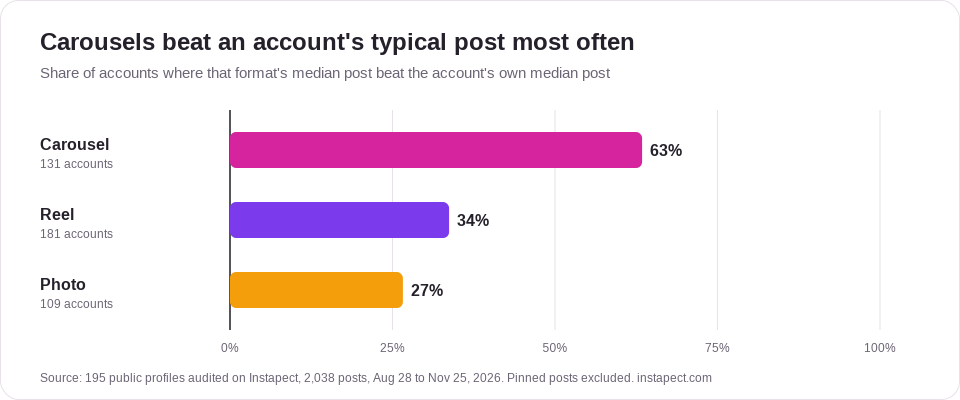
| Follower tier | Carousel beat own median | Reel beat own median | Photo beat own median |
|---|---|---|---|
| Under 1K | 62% (21 accounts) | 36% (33) | 15% (20) |
| 1K to 10K | 52% (29) | 41% (39) | 22% (27) |
| 10K to 100K | 48% (21) | 45% (31) | 6% (18) |
| 100K to 1M | 47% (15) | 36% (28) | 33% (12) |
| 1M+ | 84% (45) | 18% (50) | 47% (32) |
| All tiers | 63% (131) | 34% (181) | 27% (109) |
Buffer reports the same direction from a larger set: in its study of over four million Instagram posts, carousels got 12% more engagement than Reels (Buffer, read November 26, 2026). Our numbers measure likes and comments only, so they say nothing about how far a Reel travels to non-followers. Keep Reels for discovery, and use carousels for the posts you want your existing followers to act on. The Instagram carousel guide covers sizes, the 20-slide limit and how to post one.
Step 4: End captions with a specific question
Comments are the part of engagement that drops fastest as an account grows: the median account under 1K followers got 7.0 comments per 100 likes, the median account above 1M got 1.1. A caption question is the cheapest way to move that number, but "Thoughts?" rarely works. Ask something a follower can answer in one or two words:
- Choice: "Carousel or Reel for the next tutorial?"
- Experience: "What was your first camera?"
- Fill in: "My most-used app this month is ___."
Put the question in the first line or the last line, not in the middle of a long caption, and answer the first replies yourself (step 5). Giveaways also lift comments, but they inflate comments per 100 likes for one post; leave giveaway posts out when you compare against your baseline.
Step 5: Reply to comments while the post is fresh
Replying turns one comment into a thread, and every reply from a follower counts as a new comment on your post. All four of the top-ranking guides we read (Buffer, Later, Shopify and Adobe Express, read November 26, 2026) list it among their core tips. Answer in the first hour where you can, pin a good comment, and reply to questions with a question back so the conversation continues.
Step 6: Keep a steady rhythm of about 3 to 5 posts a week
Posting more lowers each post's rate a little and raises the total. Buffer's analysis of 2.1 million posts from 102,000 accounts found that moving from 1 to 2 posts a week up to 3 to 5 lifts reach per post by about 12%. In 141 public accounts Instapect audited between August 28 and October 11, 2026, accounts under 10,000 followers posting 3 to 7 times a week collected a median 13.7 interactions per 100 followers each week, against 1.2 for accounts posting less than once a week. The details are in how often to post on Instagram.
Note the middle tiers in the table above: the median account with 10K to 100K followers already posts about 4 times a week. For those accounts, posting more is less likely to help than steps 3 and 4.
Step 7: Study your top post against your median post
Your best recent post shows what your audience reacts to. Compare it with your median post on four points: format, topic, the first line of the caption, and the hour it went out. If the top post is a carousel with a how-to topic and your median post is a single photo, that is your next test. If the top post is one viral outlier with a topic you can't repeat, ignore it and look at your second and third posts instead.
The Instapect audit lists top posts next to the median, so the gap is visible in one screen.
Step 8: Collaborate with accounts your size
Collab posts appear on both profiles and share one set of likes and comments, so both audiences see the same post. Buffer and Later both list creator collaborations among their engagement tips. Pick partners within about 0.5x to 2x your follower count and with a median rate near or above yours; audit each one first so you know what their typical post earns.
Step 9: Re-measure after 30 days, on the same formula
Run the same four figures from step 1 a month later. Change one thing at a time where you can: if you add carousels, caption questions and a new posting schedule in the same week, you won't know which one worked. A single month is a small sample, so look for a move in the median, not in the best post.
Mistakes that lower engagement
- Buying followers. Bought accounts don't like or comment, so every one of them lowers your engagement rate.
- Engagement groups and follow-for-follow. The likes come from people who are not your audience, and they stop when you stop trading.
- Copying a larger account's tactics. Accounts above 10K followers in our sample post more often and earn fewer comments per like; what works for them may not work under 1K.
- Judging a change by one post. One post can be lifted or sunk by timing alone; compare medians over 10 or more posts.
- Hiding likes and then measuring. Posts with hidden likes can't be measured by any public tool, including yours on another account.
What public engagement data can't tell you
The numbers in this guide come from public signals: likes, comments, follower counts and post dates. They cannot show reach, impressions, saves, shares, Story views or who your audience is; those are visible only to the account owner in Instagram Insights. Check Insights alongside your public baseline for your own account.
Frequently asked questions
How can I increase my engagement on Instagram fast?
Measure your median post, then post 1 to 2 carousels a week and end each caption with a specific question for the next 30 days. In our audits carousels beat the account's own typical post for 63% of accounts, the highest of any format.
What is a good engagement rate on Instagram?
It depends on follower count. In 195 Instapect audits the median account had 10.58% under 1K followers, 2.07% at 1K to 10K and 0.27% to 0.46% above 10K. Being in the top quarter of your tier is a strong result.
Do Reels or carousels get more engagement?
Carousels, on likes and comments from existing followers. In our audits carousels beat the account's own median post for 63% of accounts against 34% for Reels, and Buffer's study of over four million posts found 12% more engagement for carousels. Reels may still reach more non-followers.
How do I get more comments on Instagram?
Ask a question with a short, concrete answer in the first or last line of the caption, reply to the first comments yourself, and pin a good comment. Track comments per 100 likes to see whether it works.
How often should I post to increase engagement?
About 3 to 5 feed posts a week for most accounts. Each post's rate dips a little as you post more, but total interactions per week rise.
Why is my Instagram engagement so low?
The most common causes are comparing against the wrong tier, followers who no longer see or care about your posts, long gaps between posts, and a format mix that leans on single photos. Bought or inactive followers also lower the rate. Measure your median and compare it with accounts your size first.
Why did my engagement suddenly drop?
Check for a gap in posting, a change in format or topic, a giveaway that brought in followers who don't engage, or one viral post that lifted your average before. Compare medians over 10 or more posts before deciding it is a real drop.
Why does my engagement rate look different in Instagram Insights?
Insights reports reach and interactions, including saves and shares, which public tools cannot see. A rate divided by reach instead of followers is usually higher. Compare numbers only when they use the same formula.
Do hashtags still increase engagement on Instagram?
They help people find a post, but they are not an engagement lever on their own. Instagram now allows up to 5 hashtags per post, so use specific, relevant ones; see whether hashtags still work on Instagram for the limit and data from 1,631 posts.
Can I see another account's engagement rate?
Yes, for public accounts. Likes, comments and follower counts are public, so you can calculate any public account's rate by hand or with a free audit. Reach, saves and Story views stay private.