An Instagram carousel is a single feed post that holds up to 20 photos or videos, which people swipe through one by one (Instagram Help Center, checked October 25, 2026). Every slide shares one orientation: square (1080 x 1080), portrait (1080 x 1350, or up to 1080 x 1440 at 3:4) or landscape (1080 x 566).
Carousels are also the format with the highest engagement rate by followers: 0.50% in Q3 2026, against 0.48% for Reels and 0.35% for single images (Socialinsider, updated October 22, 2026). In 1,686 recent posts from 145 public profiles audited by Instapect, the typical carousel drew 1.12x its own account's usual post, while the typical Reel drew 0.99x and the typical single image 0.88x.
Disclosure: Instapect publishes this guide and makes one of the tools mentioned below. Every step here works inside the Instagram app, and the engagement checks work with a calculator and a spreadsheet.
TL;DR: Instagram carousels in one table
| If you want to know... | Short answer (October 2026) | Source |
|---|---|---|
| What a carousel is | One feed post with 2 to 20 photos or videos that viewers swipe through | Instagram Help Center |
| The slide limit | 20 photos and videos per post (it was 10 until August 2024) | Instagram Help Center |
| The best size | 1080 x 1350 px (4:5) is the standard portrait size; Instagram keeps photos at full resolution between 1.91:1 and 3:4 (1080 x 1440) | Instagram Help Center |
| Whether you can mix sizes | No. The orientation you pick applies to every slide | Instagram Help Center |
| Whether you can add slides later | No. You can reorder or remove slides, edit the caption and tags, but not add new ones | Instagram Help Center |
| Whether carousels beat Reels | By followers, slightly: 0.50% vs 0.48% (brands). By views, Reels win because carousels show no public view count | Socialinsider Q3 2026; Instapect |
| How carousels did in audits | Median 1.12x the account's usual post; 58.5% of 465 carousels beat it | Instapect, 145 accounts |
| Same account, carousel vs Reel | Carousels won on 64 of 101 accounts that posted both (63%) | Instapect |
What the sources agree on: Socialinsider, Sprout Social and Instapect's audits all rank carousels first on engagement per follower and single images last. They also agree on the catch: Reels are how new people find an account, because they are recommended to non-followers and measured on views.
- Best for teaching, lists and before-and-afters: a carousel of 5 to 10 slides, one idea per slide.
- Best for reaching people who do not follow you yet: a Reel, judged on views, not followers.
- Best for a single announcement: a single image, accepting that it is the weakest format on engagement.
Instagram carousel specs at a glance
| Spec | Value | Notes |
|---|---|---|
| Slides per post | 2 to 20 | Photos, videos or a mix |
| Square | 1080 x 1080 px (1:1) | Safe default for grids and product shots |
| Portrait | 1080 x 1350 px (4:5) | Takes more feed height; the size most guides recommend |
| Tall portrait | 1080 x 1440 px (3:4) | The tallest ratio Instagram keeps at full resolution |
| Landscape | 1080 x 566 px (1.91:1) | Smallest in the feed; rarely worth it |
| Width Instagram keeps | 320 to 1080 px | Wider photos are scaled down to 1080 px, narrower ones enlarged to 320 px |
| Orientation per slide | One for the whole post | You cannot mix square and portrait slides |
| Caption | One per post (2,200 characters) | Likes and comments count for the whole post, not per slide |
| Hashtags | Up to 5 per post | See do hashtags work on Instagram |
| Videos inside a carousel | Not Reels | They do not appear in the Reels tab or get Reels features |
What is an Instagram carousel?
An Instagram carousel is one post that holds several photos or videos in a swipeable row. In the feed it shows the first slide with a row of dots below it; on the profile grid it shows the first slide with a stacked-squares icon in the corner. Instagram's Help Center calls it "a post with multiple photos or videos".
Three details from the Help Center matter more than they look:
- Engagement is counted for the whole post. "Comments and likes appear on the entire post, rather than on the individual photos and videos." You cannot see which slide earned the likes, publicly or in Insights.
- A video inside a carousel is not a Reel. It "will not show up in the Reels tab or have reels features", so a carousel full of video does not get Reels distribution.
- The first slide does most of the work. It is the only slide shown in the feed and on the grid, so it acts as the cover.
Brands use the format less than its results suggest. Socialinsider's 2026 benchmark puts carousels behind Reels and images in how often brands post, and Sprout Social reports that multi-image posts are about 25% of branded Instagram content (Sprout Social, updated October 21, 2026). In Instapect's audits, carousels were 465 of 1,686 recent posts (27.6%); 106 of 145 accounts had posted at least one.
Instagram carousel size: which dimensions to use
Use 1080 x 1350 pixels (4:5 portrait) for every slide unless you need square. Instagram uploads photos "up to a width of 1080 pixels" and keeps them at original resolution when the aspect ratio is "between 1.91:1 and 3:4", which means a height between 566 and 1440 pixels at 1080 wide (Instagram Help Center, image resolution, checked October 25, 2026). Anything outside that range is cropped.
| Goal | Size | Why |
|---|---|---|
| Most feed space | 1080 x 1350 (4:5) or 1080 x 1440 (3:4) | Taller slides fill more of the phone screen |
| Product or logo shots | 1080 x 1080 (1:1) | Nothing is cut off in any view |
| Panorama split across slides | 1080 x 1350 per slide, laid out side by side | Design one wide canvas (for 3 slides, 3240 x 1350) and cut it into equal panels |
Check: export each slide at exactly 1080 px wide, set the same ratio for all of them, and keep text at least 60 px away from every edge so the crop on the grid does not cut it.
How to post a carousel on Instagram
Posting a carousel takes about a minute in the app or on a computer.
In the Instagram app (iPhone or Android):
- Tap + at the bottom (or swipe right from the feed) and choose Post.
- Tap the select multiple icon (two stacked squares) above your camera roll.
- Tap up to 20 photos and videos in the order you want them. The numbers on each thumbnail show the order.
- Tap Next. Pick one filter for every slide, or tap a single slide to edit it on its own.
- Tap Next, write one caption, add a location, and tap a slide to tag people on that slide.
- Tap Share.
On a computer (instagram.com):
- Click Create on the left, then Post, then Select from computer.
- Click the stacked-squares icon, then +, and select up to 20 photos and videos.
- Pick square, portrait or landscape once; it applies to every slide. Drag slides to reorder them and click x to remove one.
- Click Next, add filters, then your caption, location and tags, and click Share.
Check: after posting, open the post from your profile and swipe to the last slide. If a slide is missing, it was cut by the 20-item limit or failed to upload, and you will need to post it again because slides cannot be added later.
How to edit a carousel after posting
Tap the three dots on the post, then Edit. Instagram lets you reorder slides, remove slides, edit the caption, change the location and change tags. You cannot add new photos or videos to a carousel that is already posted; the only fix is to delete the post and share it again (Instagram Help Center).
How many slides should an Instagram carousel have?
Use as many slides as the idea needs, up to Instagram's limit of 20, and stop when the content does. Instagram has published no ideal number. Sprout Social's 2026 guide recommends "one idea per slide" and building momentum toward a call to action on the last slide. For most tips, lists and tutorials that works out to roughly 5 to 10 slides, though no published study has tested slide counts against engagement.
Two practical limits apply. Every slide must share the first slide's orientation, and every extra video slows the upload; Instagram notes that "posts containing multiple videos may take longer to upload". Instapect's audit data does not record how many slides each carousel had, so it cannot say whether 5 slides beat 15.
Do carousels get more engagement than Reels?
Measured against followers, yes, narrowly: carousels lead Reels by a small margin in every large study and in Instapect's audits. Measured against views, Reels look better, because carousels do not show a public view count. The answer depends on the denominator.
| Source | Carousels | Reels | Single images | What is divided by what |
|---|---|---|---|---|
| Socialinsider, Q3 2026 (brands, 1K to 1M+ followers) | 0.50% | 0.48% | 0.35% | Likes + comments ÷ followers, average per post |
| Instapect audits, 145 accounts (median post) | 1.03% | 0.86% | 0.48% | Likes + comments ÷ followers, median per post |
| Instapect audits, Reels by views | Not public | 2.55% | Not public | Likes + comments ÷ plays, median per Reel |
Socialinsider's sample is 67.5 million organic brand posts, and its rates are averages by followers (Socialinsider, retrieved October 25, 2026). The same report suggests a mix of "around 60 to 70% Reels" for discovery and "about 20 to 30%" carousels "built for saves".
The practical reading: carousels get more out of the followers you already have, and Reels are how people who do not follow you find you. The best time to post guide shows the same pattern by weekday: carousels beat their account's usual post on every day of the week.
What Instapect's audit data shows about carousels
Instapect reads public profile signals: each post's format, likes, comments and, for Reels, plays. It does not see reach, saves, shares or which slide people stopped on, so everything below is engagement by followers.
Sample and method. 145 public Instagram profiles audited between August 28 and October 16, 2026, with 1,686 recent posts (465 carousels, 948 Reels, 273 single images). Quality filter: report not delisted, at least 6 usable posts, no posts with hidden likes, followers above zero. Engagement rate per post = (likes + comments) ÷ followers × 100. To remove the size effect, each post is also compared with its own account's median post (1.00x means a typical post for that account). All figures are medians.
Finding 1: carousels beat the account's usual post more often than any other format
| Format | Posts | Accounts | Median engagement rate | Median vs own account's usual post | Posts above the account's median |
|---|---|---|---|---|---|
| Carousel | 465 | 106 | 1.03% | 1.12x | 58.5% |
| Reel | 948 | 139 | 0.86% | 0.99x | 46.0% |
| Single image | 273 | 83 | 0.48% | 0.88x | 38.5% |
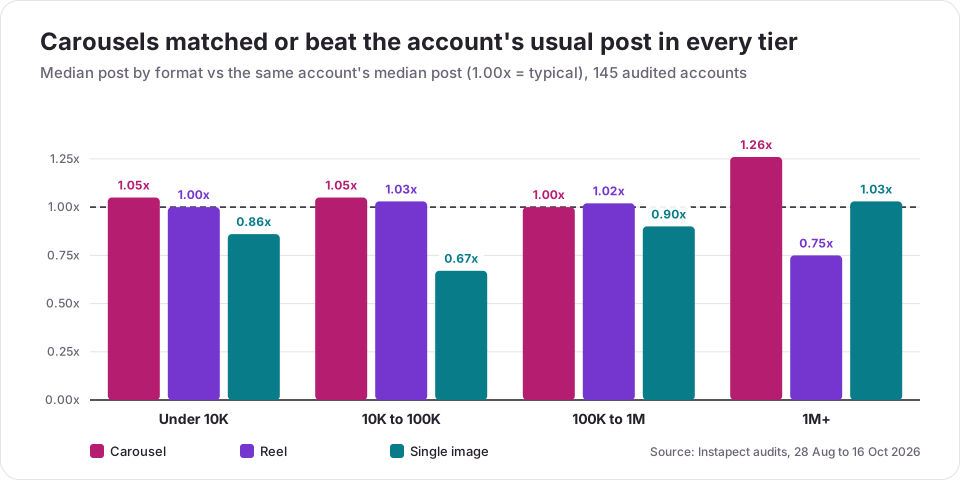
By follower tier, carousels matched or beat the account's usual post in every tier, and single images fell below it in three of four:
| Tier | Carousel vs own median | Reel vs own median | Image vs own median | Median carousel engagement rate |
|---|---|---|---|---|
| Under 10K (49 accounts) | 1.05x (131 posts) | 1.00x (363) | 0.86x (120) | 5.56% |
| 10K to 100K (24) | 1.05x (62) | 1.03x (185) | 0.67x (41) | 0.93% |
| 100K to 1M (20) | 1.00x (54) | 1.02x (148) | 0.90x (32) | 0.22% |
| 1M+ (46) | 1.26x (218) | 0.75x (252) | 1.03x (80) | 0.54% |
Finding 2: inside the same account, carousels beat Reels on 63% of accounts
The cleanest test compares formats inside one account, so audience size and niche are the same. For every account that posted at least one carousel and one Reel, Instapect compared the median carousel with the median Reel.
| Tier | Accounts with both | Carousel won | Median carousel ÷ Reel | Accounts with carousels and images | Carousel beat image |
|---|---|---|---|---|---|
| Under 10K | 31 | 16 (52%) | 1.05x | 20 | 13 (65%) |
| 10K to 100K | 16 | 7 (44%) | 0.92x | 11 | 8 (73%) |
| 100K to 1M | 13 | 6 (46%) | 0.95x | 8 | 5 (63%) |
| 1M+ | 41 | 35 (85%) | 2.47x | 28 | 15 (54%) |
| All | 101 | 64 (63%) | 1.39x | 67 | 41 (61%) |
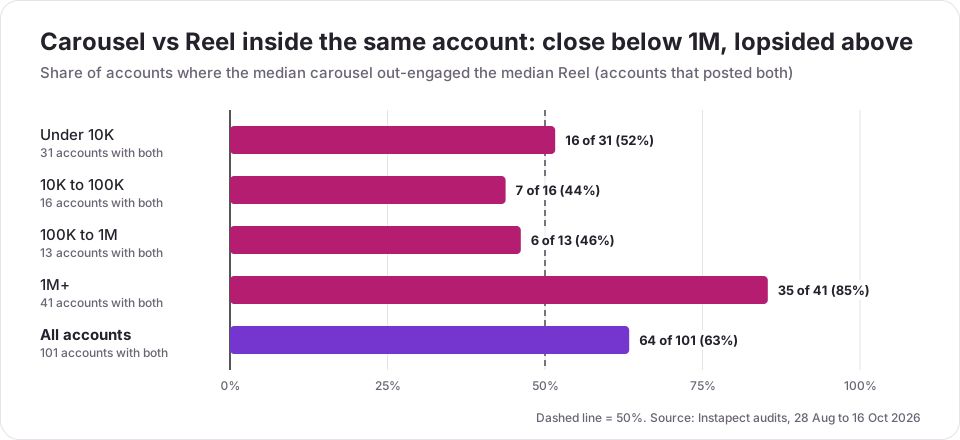
Below 1 million followers, carousels and Reels finished close to even: 29 of 60 accounts (48%) got more from carousels. The overall lead comes from the 1M+ tier, where 35 of 41 accounts did better with carousels. Examples from public reports, as of each report's retrieval date:
- @zendaya (retrieved September 5, 2026): median carousel 4.32% vs median Reel 1.24% (5 carousels, 6 Reels).
- @kingjames (September 5): 0.44% vs 0.03% (4 carousels, 7 Reels).
- @nike (September 5): 0.022% vs 0.024%, one of the few big accounts where Reels edged ahead.
- @emirates (August 28): 0.41% vs 0.48%, Reels ahead.
Finding 3: Reels reach past followers, carousels cannot show it
At 1M+ followers, the median Reel drew plays equal to only 7.3% of followers, yet 3.19% of those viewers liked or commented, against 0.22% of followers. Across all 948 Reels, the median engagement rate by plays was 2.55%. A carousel has no public view count, so the same comparison is impossible from outside the account. Carousels winning on followers and Reels winning on views are both true at once.
Limits of this data
- Who chose these accounts. These are profiles that Instapect users chose to audit, not a random sample of Instagram. The 1M+ tier is mostly celebrities, whose carousels are often personal photo sets; that may explain part of their large carousel lead.
- Small tiers. The 10K to 100K and 100K to 1M head-to-head rows rest on 16 and 13 accounts.
- Public signals only. Saves and shares, which Socialinsider and Sprout Social both link to carousels, are private. So is the slide count, which the data does not capture.
- Correlation. Accounts may save their best material for carousels. The comparison shows what each format delivered, not that the format caused it.
To run the same check on one account, enter any public handle in the engagement rate calculator: it shows the average and the median post, and the detailed report lists each post with its format. The method for doing it by hand is in how to calculate Instagram engagement rate.
Carousel vs Reels vs single image: which to post
| Your goal | Best format | Why (with the evidence) |
|---|---|---|
| Engage current followers | Carousel | 1.12x own median, 58.5% above it (Instapect); 0.50% by followers (Socialinsider) |
| Reach people who do not follow you | Reel | Reels are recommended beyond followers; median 2.55% engagement by plays (Instapect) |
| Teach a process or list | Carousel | One step per slide; Sprout Social's "one idea per slide" |
| Show a product from several angles | Carousel | Up to 20 photos in one post under one caption (Instagram Help Center) |
| Post a quick update | Single image | Fastest to make, but 0.88x own median and 38.5% above it (Instapect) |
| Repurpose video | Reel, not a carousel video | Videos inside a carousel do not get Reels features (Instagram Help Center) |
For how often to rotate formats, the posting frequency guide has cadence data from the same audits, and the engagement rate benchmarks show what counts as good for each follower tier.
Instagram carousel ideas that suit the format
The format works best when each swipe adds something. Sprout Social's 2026 guide lists storytelling, tutorials, product launches, user-generated content, event recaps, before-and-afters, behind-the-scenes and data or infographics. Each maps to a simple slide plan:
| Carousel type | Slide plan | Last slide |
|---|---|---|
| Step-by-step tutorial | Cover with the promise, one step per slide, result | "Save this for later" |
| List or tips | Cover with the number ("7 ways to..."), one tip per slide | Ask which tip readers will try |
| Before and after | Before, process, after | Link in bio or product tag |
| Product range | Hero shot, one product per slide, price or detail in text | Shop prompt |
| Event recap or photo dump | Best photo first, then in time order | Thank-you or next date |
| Data or myth-busting | Claim, evidence slides, conclusion | Source and a question |
Mistakes to avoid with Instagram carousels
| Mistake | What goes wrong | Do this instead |
|---|---|---|
| A weak first slide | It is the only slide shown in the feed and on the grid | Put the promise or the best image first |
| Mixing orientations | Instagram crops every slide to the first one's ratio | Design every slide at 1080 x 1350 |
| Planning to add slides later | Instagram does not allow adding slides after posting | Check all slides before tapping Share |
| Putting your best video in a carousel | Carousel videos do not get Reels features or the Reels tab | Post it as a Reel, then reuse stills in a carousel |
| Text near the edges | The grid and feed crop it | Keep text 60 px inside each edge |
| Judging carousels and Reels on the same metric | Reels are measured on views, carousels only on followers publicly | Compare carousels with your other feed posts, Reels with your other Reels |
| Using the average engagement rate | One viral post skews it | Compare each format's median post |
| Only carousels | Fewer chances to reach non-followers | Mix in Reels; Socialinsider suggests about 20 to 30% carousels |
Why can't I post a carousel on Instagram?
Most carousel problems come from an outdated app, a file Instagram cannot process, or the 20-item limit. Work through these in order:
- Update the Instagram app. The 20-slide limit and the select multiple button need a current version; Instagram's own resolution guidance starts with "Download the most recent version of the Instagram app."
- Count your items. More than 20 selected photos and videos will not go into one post. Split them into two carousels.
- Check your connection. Instagram warns that "posts containing multiple videos may take longer to upload". Switch to Wi-Fi and keep the app open until it finishes.
- Re-export problem files. If one slide keeps failing, export that photo as a JPG or that video as an MP4 and select it again.
- Look for the button in a different place. If the select multiple icon is missing, swipe right from the feed, tap Post, and look above the camera roll on the right. On a computer, it is the stacked-squares icon after you pick the first photo.
If none of these work, restart the phone, log out and back in, and report the problem to Instagram from the Help section of the app's settings.
Frequently asked questions
How many photos can you put in an Instagram carousel?
Up to 20 photos and videos in one post. Instagram's Help Center says you "can share a post with up to 20 photos and videos as a single post, also known as a carousel". The limit was 10 until Instagram raised it in August 2024 (Adam Mosseri, head of Instagram, posted a 20-slide carousel on August 14, 2024), so older guides still say 10.
What size should an Instagram carousel be?
1080 x 1350 pixels (4:5 portrait) is the standard size. Instagram keeps photos at full resolution when they are 1080 pixels wide and between 1.91:1 and 3:4, so 1080 x 1080 square and 1080 x 1440 tall portrait also work. Every slide must use the same orientation.
Can you add photos to an Instagram carousel after posting?
No. After posting you can reorder slides, remove slides, and edit the caption, location and tags, but Instagram does not let you add new photos or videos. To add a slide, delete the post and share it again with all the slides.
Do carousels get more engagement than Reels?
Measured by followers, carousels lead narrowly: 0.50% vs 0.48% in Socialinsider's Q3 2026 brand data, and in Instapect's audits carousels beat Reels inside the same account on 64 of 101 accounts. Reels are measured on views and reach people who do not follow you, which carousels cannot show publicly.
Are carousels better than single photo posts?
Yes, on engagement. In Socialinsider's 2026 data carousels averaged 0.50% against 0.35% for single images. In Instapect's audits the median carousel drew 1.12x the account's usual post and the median single image 0.88x, and carousels beat images inside the same account on 41 of 67 accounts.
Should I post Reels or carousels on Instagram?
Post both. Use Reels to reach new people and carousels to engage followers and teach something step by step. Socialinsider's 2026 report suggests a mix of about 60 to 70% Reels, 20 to 30% carousels and around 10% single images for brands.
Can you mix photos and videos in a carousel?
Yes. A carousel can hold any mix of photos and videos up to 20 items. Videos inside a carousel are not treated as Reels, so they do not appear in the Reels tab or get Reels features.
Why is my carousel cropping my photos?
Instagram applies the first slide's orientation to every slide, and crops anything outside 1.91:1 to 3:4. Resize every slide to the same ratio before uploading, 1080 x 1350 for portrait, so nothing gets cut.
My carousel got fewer likes than my single photos. What went wrong?
Usually the first slide. It is the only slide people see in the feed, so a weak cover loses the swipe. Compare the carousel with the median of your recent posts rather than your best photo; in Instapect's audits 41.5% of carousels did not beat their account's median, so one weak carousel is not unusual.
Why does my carousel video not show up in the Reels tab?
Because Instagram does not treat videos inside a carousel as Reels. The Help Center says they "will not show up in the Reels tab or have reels features". Post the video on its own as a Reel if you want Reels distribution.
Can you see which carousel slide got the most likes?
No. Likes and comments count for the whole post, not for individual slides, both publicly and in Instagram Insights. The account owner can see how many people saw a post and how they interacted in Instagram Insights.
How do I check if carousels work for my account?
Compare your median carousel with your median Reel and median single image over your last 20 to 30 posts. Divide likes + comments by followers for each post, take the middle value per format, and repeat after a month of posting each format.
Sources
- Instagram Help Center, "Share a post with multiple photos or videos on Instagram", retrieved October 25, 2026: https://help.instagram.com/269314186824048/
- Instagram Help Center, "Image resolution of photos you share on Instagram", retrieved October 25, 2026: https://help.instagram.com/1631821640426723/
- Socialinsider, Elena Cucu, "2026 Instagram Organic Engagement Benchmarks", 67,541,436 organic brand posts, published February 20, 2026, updated October 22, 2026, retrieved October 25, 2026: https://www.socialinsider.io/social-media-benchmarks/instagram
- Sprout Social, Jacqueline Zote, "A guide to crafting seamless Instagram carousel posts", updated October 21, 2026, retrieved October 25, 2026: https://sproutsocial.com/insights/instagram-carousel/
- Adam Mosseri (@mosseri), Instagram post with a 20-slide carousel, August 14, 2024: https://www.instagram.com/p/C-sJcErv8z-/
- Instapect public-profile audits, 145 accounts and 1,686 posts, August 28 to October 16, 2026, queried October 25, 2026