The best free Instagram analytics tool depends on whose account you are measuring. For your own account, Instagram Insights is free, built into the app and the only source of reach, views and audience demographics. For anyone else's account, every tool works from public data (followers, likes, comments and Reel play counts), and that is why they disagree. In 119 accounts audited on Instapect between August 28 and October 11, 2026, accounts with over 1 million followers had a median Reel engagement rate of 0.30% by followers but 3.61% by views: the same posts, a 10.9x gap, just from the formula.
Disclosure: Instapect publishes this guide and makes one of the tools mentioned below. Every method here works without it.
Instagram analytics tools at a glance
| If you want to... | Free option that fits | What you get free |
|---|---|---|
| See reach, views and demographics for your own account | Instagram Insights | Up to 90 days of account data in the app |
| Track your own account plus a few competitors | Metricool (free plan) | 1 brand, 30 days of analytics, 5 competitor profiles |
| Check whether an influencer's audience looks real | HypeAuditor (free audit) | Engagement rate, followers, Audience Quality Score |
| Watch any public account's follower count over time | Social Blade | Followers, engagement rate, averages, grade |
| Get one engagement number with a stated benchmark formula | Socialinsider (free calculator) | Engagement rate per post, last 30 days, business accounts |
| Audit any public profile with average and median side by side | Instapect | Free profile summary; 2 detailed scans after free sign-up |
Start with Insights for anything you own; add a third-party tool only for accounts you do not own.
Free Instagram analytics tools compared
Prices and free-tier limits below were checked on each vendor's own site on October 12, 2026. Plans change often, so check before you buy.
| Tool | Whose accounts | Main metrics | Free tier | Paid from | Best for |
|---|---|---|---|---|---|
| Instagram Insights | Your own only | Views, viewers (reach), interactions, followers, demographics | Free | Free | Owners who want real reach numbers |
| Metricool | Yours (connected) + competitors | Growth, post performance, competitor benchmarks | 1 brand, 30 days, 5 competitors, 20 scheduled posts a month | About $20/month | Small brands that also schedule |
| HypeAuditor | Any public account | Engagement rate, Audience Quality Score | Free audit and calculator | Price on request | Brands vetting influencers |
| Social Blade | Any public account | Followers, engagement rate, averages, grade | Free with ads | $5/month billed yearly | Follower history |
| Socialinsider | Yours + competitors | Engagement rate, competitor benchmarks | Free calculator; 14-day trial | $82/month billed yearly | Agencies reporting on several brands |
| Instapect | Any public account | Average and median engagement, cadence, hashtags, Reel plays, 0 to 100 score | Free summary; 2 detailed scans with sign-up | $5 per report, or $19/month for 50 scans | One-off audits with the formula shown |
Connected tools (Insights, Metricool and Socialinsider for your own profiles) read Meta's own data, so they see reach and views. Public-data tools (HypeAuditor, Social Blade, Instapect, and the competitor views in Metricool and Socialinsider) see only what any visitor sees, so none of them can show another account's reach.
What each free Instagram analytics tool does
Instagram Insights: best for your own reach and audience
Insights shows up to 90 days of account data, free, for any public account. Instagram's Help Center lists Views, Viewers (unique accounts reached), Interactions (likes, comments, saves, shares) and follower growth. Demographics appear only once you reach or engage over 100 accounts. Professional accounts open it at Profile > Professional dashboard; personal accounts tap Your dashboard, which Instagram's Help Center says shows the past 30 days of views, interactions, new followers and content shared. The Insights guide has every click path.
| Pros | Cons |
|---|---|
| ✅ Exact: Meta's own numbers | ❌ Only your own account |
| ✅ Only free source of reach, saves, shares and demographics | ❌ 90-day window; no export in the app |
Metricool: best free plan for your account plus competitors
Metricool's free plan covers 1 brand, 30 days of analytics and 5 competitor profiles, plus 20 scheduled posts a month, per its pricing page. Your own numbers come from Meta through a connected professional account; competitor numbers come from public data.
| Pros | Cons |
|---|---|
| ✅ Analytics and a scheduler in one free plan | ❌ Free history stops at 30 days |
| ✅ Side-by-side competitor tracking | ❌ Needs a connected professional account |
HypeAuditor: best for vetting influencers
HypeAuditor's free audit shows engagement rate, followers and an Audience Quality Score (AQS). Its free engagement calculator takes the 30 latest pieces of content, uses the median, and divides by views when an account has enough recent Reels, otherwise by followers. Paid plans are priced on request.
| Pros | Cons |
|---|---|
| ✅ Audience-quality signals aimed at fake-follower risk | ❌ Paid pricing only on request |
| ✅ Median-based, so one viral post does not skew it | ❌ Views-based rate is not comparable with follower-based benchmarks |
Social Blade: best for follower history
Social Blade is free with ads and lists followers, following, posts, engagement rate, average likes and comments, and a grade for any public account. Paid tiers remove ads and extend history, from $5/month billed yearly ($59.99/year).
| Pros | Cons |
|---|---|
| ✅ Free, no sign-up, any public account | ❌ History exists only for accounts it has tracked |
| ✅ Simple growth charts | ❌ No per-post breakdown on the free page |
Socialinsider: best for agency benchmarking
Socialinsider's free calculator gives engagement rate per post by followers over the last 30 days, for business accounts. Paid plans start at $82/month billed yearly ($990/year) with a 14-day free trial. Its yearly benchmark report uses the same formula, which makes the calculator handy next to published engagement benchmarks.
| Pros | Cons |
|---|---|
| ✅ Formula matches a large public benchmark | ❌ Paid plans aimed at teams and agencies |
| ✅ Several networks on paid plans | ❌ Free calculator works for business accounts only |
Instapect: best for a one-off public audit with the maths shown
Instapect audits any public profile from its 12 most recent posts, pinned posts excluded, and reports engagement rate by followers with the median beside the average, posting cadence, hashtags, Reel play counts and a 0 to 100 score graded against the account's follower tier. The summary is free without an account; free sign-up adds 2 detailed scans; after that it is $5 per report or $19/month for 50 scans. Reports already in the public directory are free to read.
| Pros | Cons |
|---|---|
| ✅ Formula and sample stated on every number | ❌ Public signals only: no reach, impressions or demographics |
| ✅ No account connection needed | ❌ No fake-follower detection and no private accounts |
Paid suites you will also see recommended
Scheduling suites add analytics on top of publishing, at roughly $6 to $299 a month. Pengu Insights' comparison (updated September 12, 2026) lists Buffer from about $6 per channel, Later from about $25 a month, Hootsuite about $99 per user a month on annual billing and Sprout Social $199 to $299 per seat a month. They earn their price on team workflows and multi-network reports; for your own account they read the same Meta data as Insights.
Which Instagram metrics can each tool see?
Only the account owner can see reach, saves, shares and demographics; everyone can see followers, likes, comments and Reel plays.
| Metric | Your own account (Insights) | Another public account (any tool) |
|---|---|---|
| Followers and follower change | ✅ | ✅ (between snapshots) |
| Likes and comments per post | ✅ | ✅ (when likes are not hidden) |
| Reel plays | ✅ | ✅ (public play count) |
| Posting times and cadence | ✅ | ✅ |
| Reach, impressions, views by follower vs non-follower | ✅ | ❌ |
| Saves, shares, profile visits, link taps | ✅ | ❌ |
| Audience age, gender, location | ✅ (100+ accounts reached) | ❌ |
| Story views | ✅ | ❌ |
For traffic from your bio link, add UTM tags to the link and read them in Google Analytics; no Instagram tool tracks what visitors do after they leave the app.
Why do Instagram analytics tools show different engagement rates?
Because they divide by different things: in 119 Instapect audits, Reel engagement for accounts over 1 million followers was 0.30% by followers and 3.61% by plays. Social Blade, Socialinsider and Instapect divide by followers; HypeAuditor divides by views when it can. The sample is every audit that met Instapect's quality bar (at least 6 recent posts with visible likes, pinned posts excluded) and had 3 or more Reels: 119 accounts and 896 Reels, retrieved August 28 to October 11, 2026.
| Follower tier | Accounts | Median rate by followers | Median rate by Reel plays | Views ÷ followers (median) | Views-based higher |
|---|---|---|---|---|---|
| Under 1K | 20 | 17.69% | 2.92% | 0.18x | 3 of 20 |
| 1K to 10K | 20 | 6.37% | 2.14% | 0.42x | 4 of 20 |
| 10K to 100K | 22 | 0.82% | 1.64% | 1.91x | 12 of 22 |
| 100K to 1M | 18 | 0.39% | 2.20% | 6.07x | 13 of 18 |
| 1M+ | 39 | 0.30% | 3.61% | 10.87x | 39 of 39 |
| All | 119 | 1.39% | 2.62% | 2.27x | 71 of 119 |
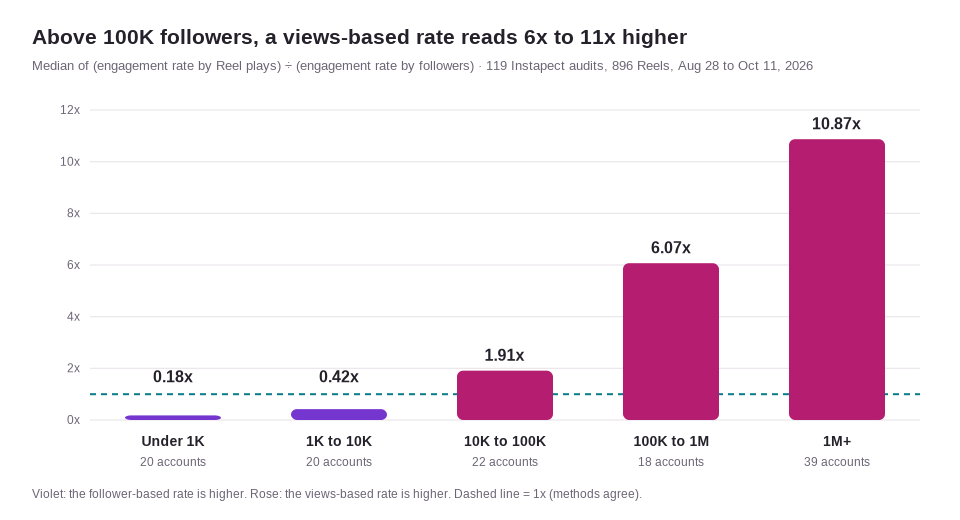
The direction flips with size. Small accounts rarely get more plays than they have followers, so dividing by plays shrinks their rate. Big accounts reach a small slice of their followers per Reel, so dividing by plays inflates it: all 39 accounts over 1 million followers had a higher views-based rate. Neither number is wrong; one asks "how much of my audience reacts?" and the other "how many viewers react?"
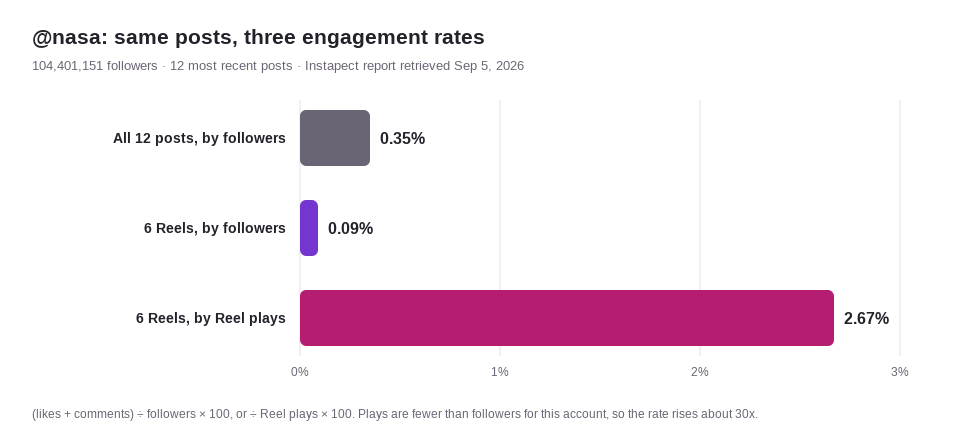
One account shows the effect clearly. The public @nasa report, retrieved September 5, 2026 (104,401,151 followers, 12 posts, 6 of them Reels), gives 0.35% across all 12 posts by followers, 0.09% for the 6 Reels by followers, and 2.67% for the same Reels by plays.
Limits: these are accounts people chose to audit, and plays are public counts, not Meta's internal views. Read the table as proof that two tools can both be right and still disagree, not as platform-wide benchmarks. The engagement rate calculator explains the follower-based formula.
What can't a free Instagram analytics tool show?
For accounts you do not own, no legitimate tool can show reach, impressions, saves, Story views, demographics or private accounts.
- Reach, impressions, saves and shares: only the owner sees them, in Insights.
- Story views and audience demographics: owner-only as well.
- Private accounts: there is no public data to read.
- Who viewed a profile: Instagram does not expose it to anyone, so any app claiming to list visitors is guessing.
Tools also differ on fake followers: HypeAuditor sells audience-quality scoring built for that question; Social Blade and Instapect do not detect bots. A very low engagement rate plus very few comments per 100 likes is worth a closer look, not proof.
How to choose an Instagram analytics tool in 4 steps
- Decide whose account. Your own: open Insights first (Profile > Professional dashboard). Someone else's: you need a public-data tool.
- Check the formula. Look for "by followers", "by views" or "by reach". If a tool does not say, its number cannot be compared with anything.
- Check the sample. Note the post count and date range (12 posts, 30 posts, last 30 days), and use the same tool and window each time.
- Verify with an account you know. Run your own handle and compare with Insights. If the follower count and recent likes match the app, the tool reads the right data; a gap of more than a day or two of posts means a stale snapshot.
Frequently asked questions
What is the best free Instagram analytics tool?
For your own account, Instagram Insights: it is free and the only source of reach, views and demographics. For other accounts, pick by job: HypeAuditor for influencer vetting, Social Blade for follower history, Metricool for a few competitors, Instapect for a one-off audit with average and median side by side.
How do I see my Instagram analytics?
Open your profile and tap Professional dashboard (professional accounts) or Your dashboard (personal accounts). Instagram's Help Center says personal dashboards show the past 30 days of views, interactions, new followers and content shared.
Is there a free Instagram analytics tool for other accounts?
Yes. Social Blade, HypeAuditor's free audit, Socialinsider's free calculator (business accounts) and Instapect's profile summary all work on public accounts without connecting them. They see only public data: followers, likes, comments, post times and Reel plays.
Why can't I see analytics on Instagram?
Usually the account is too new or too small, or the screen is in a different place. Demographics need over 100 accounts reached or engaged, and personal accounts find insights under Your dashboard rather than Professional dashboard. Professional dashboards cover up to 90 days; personal dashboards show 30.
My engagement rate in HypeAuditor is ten times higher than in Social Blade. Which is right?
Both, probably. HypeAuditor divides by views when an account has enough recent Reels, and large accounts get far fewer views per Reel than they have followers. In Instapect's data, accounts over 1M followers had a median rate 10.9x higher by views. Compare follower-based rates only with follower-based benchmarks.
A tool says my account has no data. What went wrong?
Usually the account is private, was renamed, or hides like counts on every post. Public-data tools need a public profile with visible likes.
The follower count in a tool does not match Instagram. Why?
Third-party tools read a snapshot that can be hours or days old. Instapect states the retrieval date on every report, and Social Blade updates on its own daily cycle, so compare against the date shown.
Can ChatGPT analyze my Instagram?
Not directly: it cannot log in to your Insights. You can export or screenshot your numbers and paste them in for interpretation, or paste a public audit report. The numbers still have to come from Insights or a public-data tool.
Can any Instagram analytics tool show who viewed my profile?
No. Instagram does not share profile visitors with anyone, so tools that claim to list them are guessing. Insights shows how many accounts you reached, not who they are.
Do I need a paid Instagram analytics tool?
Most single accounts do not. Insights covers your own numbers free, and the free tiers above cover occasional checks on others. Paid plans pay off when you report on several brands, need more than 30 to 90 days of history, or run influencer campaigns at volume.