To mute someone on Instagram, open their profile, tap Following, tap Mute, then turn on Posts, Stories or both. Their posts and Stories stop showing in your feed, you keep following them, and Instagram does not tell them (Instagram Help Center, read 25 Nov 2026). Messages and Notes have their own mute switches, covered below.
How much quieter does your feed get? Across 243 public profiles audited by Instapect, the median account put about 9.6 feed posts out every 30 days, and 1 in 5 posted daily or more. Below: every way to mute and unmute (profile, feed post, Story bar, chat and Notes), what the other person can and can't notice, how Mute compares with Restrict, Block and Unfollow, and the mistakes that make people think mute "didn't work".
Disclosure: Instapect publishes this guide and makes one of the tools mentioned below. Every step here happens inside the Instagram app and works without it. Instapect reads public profile data only: it cannot mute anyone, see who you muted, or tell you whether someone muted you.
TL;DR: how to mute someone on Instagram
| Question | Short answer | Source |
|---|---|---|
| Fastest way | Their profile > Following > Mute > toggle Posts and/or Stories | Instagram Help Center, 25 Nov 2026 |
| From a post in your feed | Options (three dots) > Hide > Mute [username] > Mute Posts or Mute Posts and Story | Instagram Help Center |
| Stories only | Tap and hold their picture in the Story bar > Mute > Mute stories | Instagram Help Center |
| Messages and calls | Open the chat > tap their name > Mute > toggle Mute messages or Mute calls | Instagram Help Center |
| Notes | Messages > tap and hold their note > Mute notes > confirm | Instagram Help Center |
| Are they notified? | No, for posts, Stories, messages and Notes | Instagram Help Center |
| Do you still follow them? | Yes. Muting is different from unfollowing | Instagram Help Center |
| Undo it | Same place: profile > Following > Mute > toggle off | Instagram Help Center |
| Works on a computer? | Messages yes; Story muting is phone and tablet only | Instagram Help Center |
What happens when you mute someone on Instagram?
Muting is a filter on your own screen. Nothing changes on their side: they still follow you (if they did), you still follow them, and their content still exists. You just stop being shown it in the places you pick.
| What you mute | What disappears for you | What stays |
|---|---|---|
| Posts | Their posts in your Feed | Their Stories, Notes and messages; their profile when you visit it |
| Stories | Their Story circle in the bar at the top of your feed | Their feed posts and Notes |
| Posts and Stories | Both of the above | Notes, messages, their full profile |
| Messages | Notifications for new messages in that chat | The chat itself; you can still open and read it |
| Calls | Call notifications from that chat | Messages, unless you mute those too |
| Notes | Their Notes at the top of your inbox | Posts and Stories |
Instagram's Help Center is explicit on two points people get wrong. First, Instagram "won't let them know you muted them". Second, muting messages, posts or Stories "will not apply to notes they share", so Notes need their own mute. The articles describe Feed posts and the Story bar; they don't say whether a muted account's Reels can still reach you in the Reels tab or Explore, so expect that they might.
How to mute someone on Instagram: 5 ways
Pick the route that matches what is bothering you:
- Everything they post → Method 1 (profile), turn on both toggles.
- One annoying post right now → Method 2 (from the feed post).
- Only their Stories → Method 3 (Story bar).
- A chat that won't stop buzzing → Method 4 (messages and calls).
- Their Notes → Method 5.
Method 1: from their profile (posts, Stories or both)
- Tap their username on a post or Story, or tap Search and type their username.
- Tap Following below their profile info.
- Tap Mute.
- Turn on the toggle next to Posts, Stories, or both.
This is the one screen that shows every mute setting for that person, so it's also where you check and undo them. You only see the Following button on accounts you follow; for someone you don't follow, their posts aren't in your feed in the first place, apart from suggested posts.
Method 2: from a post in your feed
- Tap Options (the three dots) next to their post.
- Tap Hide.
- Tap Mute [username], then tap Mute Posts or Mute Posts and Story.
Use this when a post is on your screen and you want the next ones gone too. If you only want to see less of that kind of content rather than that person, use Not interested on the post instead.
Method 3: from the Story bar (Stories only)
- At the top of your feed, tap and hold the profile picture of the person whose Story you want to mute.
- Tap Mute, then tap Mute stories.
Their circle leaves the Story bar. You still see their feed posts and Notes. The Help Center says this feature "isn't available on computers", so do it from the iPhone, Android, iPad or Instagram Lite app.
Method 4: mute someone's messages or calls
On the Instagram app:
- Tap Messages at the bottom.
- Open the chat with the person.
- Tap their name at the top of the chat, then tap Mute.
- Turn on Mute messages, Mute calls, or both.
On a computer (instagram.com):
- Click Messages on the left.
- Open the chat.
- Click Information (the i icon) in the top right.
- Turn on Mute messages or the call notification toggle.
The chat stays in your inbox and messages still arrive; you just stop getting notified. If you open their messages, normal read receipts still apply. To read without a Seen, Restrict is the tool, not Mute (see the comparison below).
Method 5: mute someone's Notes
- Tap Messages at the bottom.
- Tap and hold their note at the top of your inbox.
- Tap Mute notes, then confirm.
Instagram says people "won't be notified when you mute their notes". More on how Notes work in our Instagram Notes guide.
How to unmute someone on Instagram
| What you muted | How to unmute |
|---|---|
| Posts or Stories | Their profile > Following > Mute > turn the toggle off |
| Stories (alternative) | Their profile > tap their profile picture to open their Stories > Options > Unmute story |
| Messages or calls | Open the chat > tap their name > Mute > turn the toggle off (on a computer: Information > toggle off) |
| Notes | Their profile > Following > Mute > turn off Notes |
Unmuting doesn't notify them either. Posts they shared while muted don't come flooding back into your feed as new; scroll their profile if you want to catch up.
How to check that mute worked
- Open the Mute screen. Their profile > Following > Mute should show the toggles you turned on. This is the only certain check.
- Watch the Story bar. A muted Story circle disappears from the bar right away. If their circle is still there, you muted Posts only.
- Check the chat. Open the chat, tap their name and tap Mute: the Mute messages and Mute calls toggles should be on. New messages from them should arrive without a notification.
- Give your feed a day. Posts already loaded in your feed may stay on screen until it refreshes. New posts from them should stop appearing in Feed after that.
Mute vs Restrict vs Block vs Unfollow
| What changes | Mute | Restrict | Block | Unfollow |
|---|---|---|---|---|
| You still follow them | Yes | Yes | No | No |
| You see their posts in Feed | No (if muted) | Yes | No | Only as suggestions, if at all |
| You see their Stories | No (if muted) | Yes | No | No |
| They can see your profile and posts | Yes | Yes | No | Yes (if your account is public or they follow you) |
| Their comments on your posts | Unchanged | New ones hidden from others unless you approve | Old likes and comments removed | Unchanged |
| Their messages | Still arrive; notifications off if you mute the chat | Move to Message Requests; no read receipts | Not delivered | Unchanged |
| They are notified | No | No | No | No, but your name disappears from their followers list |
| Best for | Someone you like but whose posting is too much | Someone you can't openly block | Anyone you want gone | Someone you are done with and don't mind them noticing |
Sources: Mute or unmute someone on Instagram and Restrict or unrestrict someone (Instagram Help Center, read 25 Nov 2026); Block, Mute, Restrict, Report: what's the difference? (About Instagram, 22 Nov 2024). Full details: what restricting someone on Instagram does and how to block someone on Instagram.
Why do people mute instead of unfollow? Because unfollowing is visible. The other person can see you're gone from their followers, and on a private account you lose access to their content. Muting keeps the relationship and the access and only changes your feed, which is why it is the usual choice for relatives, coworkers, friends who post a lot, and brands you follow for deals.
How much does muting one account remove? Data from 243 public profiles
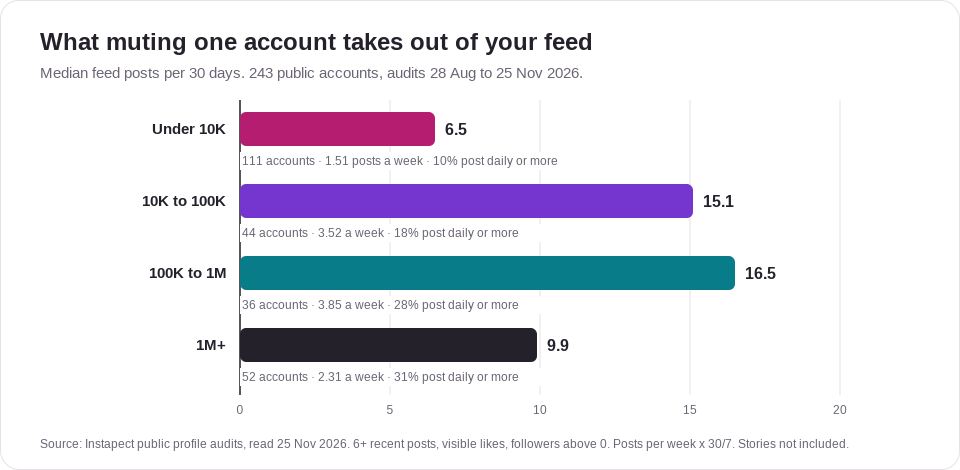
Muting posts hides an account's feed posts, so the effect depends on how often that account posts. To put numbers on it, Instapect looked at its public audit reports.
Method. 243 public Instagram accounts from Instapect's public report directory, each with at least 6 recent feed posts in the audit sample, visible like counts and more than 0 followers. Audits ran from 28 Aug to 25 Nov 2026 and were read from the public report pages on 25 Nov 2026. Posting pace is each report's posts per week over its recent-post window (pinned posts excluded); "per 30 days" is posts per week times 30/7. Stories are not public audit data and are not counted.
| Follower tier | Accounts | Median posts per week | Median feed posts per 30 days | Post 7+ times a week | Post 14+ times a week | Post less than once a week |
|---|---|---|---|---|---|---|
| Under 10K | 111 | 1.51 | 6.5 | 11 (10%) | 4 | 47 (42%) |
| 10K to 100K | 44 | 3.52 | 15.1 | 8 (18%) | 5 | 8 (18%) |
| 100K to 1M | 36 | 3.85 | 16.5 | 10 (28%) | 5 | 4 (11%) |
| 1M+ | 52 | 2.31 | 9.9 | 16 (31%) | 9 | 13 (25%) |
| All | 243 | 2.25 | 9.6 | 45 (19%) | 23 (9%) | 72 (30%) |
What this tells you:
- Muting a friend changes little; muting a heavy poster changes a lot. The typical small account (under 10K followers) posts about 1.5 times a week, and 42% post less than once a week. Muting them is a courtesy, not a cleanup.
- The accounts worth muting are the daily posters. 45 of 243 accounts (19%) posted 7 or more times a week, and 23 posted 14 or more. Most of the very high posters are news and city media accounts. At the time of its audit, @gulfnews was posting at a pace of about 54 feed posts a day over its recent window, and @khaleejtimes about 29. One mute there removes more from your feed than muting dozens of friends.
- Mid-size creators post the most per person. Accounts from 10K to 1M followers have the highest median pace (15 to 17 posts a month). These are often the creators and brands people follow for one reason and then mute when they turn into a daily ad stream.
- Most of what you'd hide is video. Across the 2,556 recent posts in the sample, 54% were Reels, 29% carousels and 17% single images. Check whether the account still reaches you through the Reels tab after muting, because the Help Center only describes Feed.
Limits. These are accounts people chose to audit on Instapect, not a random cut of Instagram. Posting pace comes from each report's recent window of about 6 to 12 posts, so very fast posters are measured over hours or days and can look faster than their monthly average. Stories, Notes and messages are private or temporary and are not part of any public audit. Instapect never sees who muted whom. To see one account's own pace, run its public handle through the Instapect audit, or read how often to post on Instagram for the full cadence data.
Can someone tell if you muted them on Instagram?
Not directly. Instagram sends no notification and shows no "muted" label anywhere. But muting changes your behavior, and people can notice that:
| What they might notice | Why it happens | How likely |
|---|---|---|
| You stopped appearing in their Story viewers | Muted Stories don't show in your bar, so you stop watching them | The most common giveaway, on small accounts especially |
| You stopped liking or commenting on their posts | Their posts no longer reach your feed | Noticeable if you used to engage often |
| You reply late to their messages | A muted chat gives you no alerts | Easy to put down to being busy |
| You're still in their followers list | Muting keeps the follow | This is what keeps mute low-key, unlike unfollowing |
If staying invisible matters (a coworker who checks their viewer list), open their Story from their profile once in a while; muting doesn't stop you watching on purpose.
Mistakes to avoid when muting someone
- Muting Posts and expecting Stories to go too. They are separate toggles. Turn on both, or use Mute Posts and Story from the feed menu.
- Forgetting Notes. Posts and Stories mutes don't cover Notes. Mute them from your inbox.
- Using Mute to stop someone seeing you. Mute is one-way: it only changes what you see. They can still view your profile, posts and Stories. Use Restrict, Block, a private account or Hide story from for that.
- Muting a chat and missing something important. Muted messages still arrive silently. Check muted chats now and then, especially work or family groups.
- Looking for Mute on a computer. Story muting is phone and tablet only. On instagram.com you can mute message notifications.
- Muting someone who is harassing you. Muting hides the problem from you and leaves it in place. For harassment, block and report, and save evidence.
Frequently asked questions
What happens when you mute someone on Instagram?
Their posts, their Stories, or both stop appearing in your feed and Story bar, depending on which toggles you turn on. You keep following each other, they are not notified, and you can still visit their profile. Muting a chat turns off notifications for that chat; muting Notes hides their Notes in your inbox.
Does Instagram notify someone when you mute them?
No. Instagram's Help Center says Instagram "won't let them know you muted them", and the same applies to muting Notes and unmuting.
Can you mute someone on Instagram without unfollowing them?
Yes, that is the point of Mute. You stay a follower, they keep seeing you in their followers list, and only your feed changes.
How do I mute someone's Story on Instagram?
At the top of your feed, tap and hold their profile picture in the Story bar, tap Mute, then Mute stories. Or go to their profile, tap Following > Mute and turn on Stories.
How do I unmute someone on Instagram?
Go to their profile, tap Following, tap Mute and turn off the toggles. For a muted Story you can also open their Stories from their profile picture, tap Options and tap Unmute story. They are not notified.
How do I see who I muted on Instagram?
The certain check is per person: their profile > Following > Mute shows which toggles are on. Many app versions also list muted accounts in Settings and activity, but the Help Center articles read on 25 Nov 2026 only document the profile route.
Can you mute someone's messages on Instagram?
Yes. Open the chat, tap their name, tap Mute and turn on Mute messages (and Mute calls if you want). On a computer, click Information in the chat and use the same toggles. Messages still arrive, just without notifications.
What is the difference between muting and restricting on Instagram?
Mute changes what you see: their posts, Stories or Notes leave your feed. Restrict changes what they can do: their new comments on your posts are hidden from others, their messages move to Message Requests, and they can't see when you've read them. Neither notifies them.
I muted someone but I still see their Notes. Why?
Posts and Stories mutes don't apply to Notes. Tap Messages, tap and hold their note, tap Mute notes and confirm.
I muted their posts but their Story is still in my bar. What went wrong?
Posts and Stories are separate switches. Go to their profile > Following > Mute and turn on Stories too, or tap and hold their Story circle and choose Mute stories.
I can't find the Mute option. What's wrong?
You only get Following > Mute on accounts you follow, so check you follow them. Story muting doesn't exist on computers, so switch to the phone app, and update the app if the menu looks different from these steps.
I muted a chat but my phone still rings when they call. Why?
Mute messages and Mute calls are separate toggles. Open the chat, tap their name, tap Mute and turn on Mute calls.
Sources
- Instagram Help Center: Mute or unmute someone on Instagram, Mute or unmute someone's Instagram story and Mute or unmute notes from someone on Instagram, all read 25 Nov 2026 (app and computer versions).
- Instagram Help Center: Restrict or unrestrict someone on Instagram, read 24 Nov 2026.
- About Instagram: Block, Mute, Restrict, Report: what's the difference?, 22 Nov 2024.
- Search demand: DataForSEO, United States, November 2026 (how to mute someone on instagram 18,100 a month, 27,100 in Oct 2026; how to unmute someone on instagram 2,900; what happens when you mute someone on instagram 1,300; how to mute stories on instagram 1,300; what does mute do on instagram 590).
- Instapect public profile audits: 243 accounts, 2,556 recent posts, audits 28 Aug to 25 Nov 2026, read 25 Nov 2026.
See how often an account posts before you mute it
Muting makes the most sense for accounts that post more than you want to see. Run any public handle through the Instapect audit to see its posts per week, average gap between posts and format mix, or compare it with the benchmarks in how often to post on Instagram.