To repost on Instagram, open a public post or Reel in the app, tap the Repost button (the two-arrow icon under the post), optionally tap the bubble next to your profile picture to add a note, then tap Save. The post lands in a Reposts tab on your profile, may be shown to your followers in their feeds, and stays credited to the original creator. It works only in the phone and tablet app, only on public content whose creator allows reposts, and you cannot repost a repost (Instagram Help Center, checked 14 Nov 2026).
Below are the steps for each way to share someone else's content (the Repost button, sharing to your Story, resharing a Story, and the permission-based manual repost), how to undo or bulk delete reposts, how to stop others reposting your posts, fixes when the button is missing, and what 1,912 recent posts from 165 public profiles show about how accounts credit the people whose work they share.
Disclosure: Instapect publishes this guide and makes one of the tools mentioned below. Every step here happens in the Instagram app and works without it.
TL;DR: how to repost on Instagram in 2026
| What you want to do | What to tap | Rule or limit | Source |
|---|---|---|---|
| Repost a post or Reel to your profile | Repost under the post > (optional) tap the bubble, type a note > Save | Public content only, creator must allow reposts, app only, no reposting a repost | Instagram Help Center, checked 14 Nov 2026 |
| Share a post or Reel to your Story | Share (paper plane) > Add to story > Next > Share | Creator's account must be public and allow resharing | Help Center, checked 14 Nov 2026 |
| Share someone's Story to your Story | Share on the Story > Add to story > Next > Share | Their account must be public; you can be public or private | Help Center, checked 14 Nov 2026 |
| Undo a repost | Tap Repost again on the same post | Bulk delete: Profile > Menu > Your activity > Reposts | Help Center |
| Stop others reposting your content | Profile > Menu > Sharing and reuse > toggle Reposts on posts and reels | Separate toggles for Story sharing | Help Center |
| Repost something with no Repost button | Ask the creator for permission and the original file, upload it, credit them in the caption | The only route that copies the content to your own grid | Practice, not an Instagram feature |
| How do big accounts credit shared work? | 7.1% of recent posts from 1M+ accounts carry a credit line such as "📸 @name" or "Video by @name"; 0 captions in the sample used the word "repost" | Instapect, 165 accounts, 28 Aug to 10 Nov 2026 |
- A repost is not a copy. It points to the original post, so likes and comments on the content go to the creator. Comments people leave on your repost reach you as direct messages.
- Reposts reach new people. Meta says reposted content "may be recommended to that person's followers, even if those people don't follow you" (Meta newsroom, 6 Aug 2025).
- The creator stays in control. If they switch off reposts or make their account private, the Repost button disappears for everyone.
Instagram reposting at a glance
| Question | Answer |
|---|---|
| Can you repost on Instagram? | Yes. Instagram added a native Repost button for public posts and Reels in August 2025 |
| What can be reposted? | Public feed posts (photos, carousels) and Reels. Stories are shared to Stories instead |
| Where do reposts show? | In a separate Reposts tab on your profile, and possibly in your followers' feeds |
| Who gets the credit? | The original creator. "Reposts are credited to the original poster" (Meta, 6 Aug 2025) |
| Can you add a caption? | Yes, a short note in the bubble by your profile picture before you tap Save |
| Can you repost from a computer? | No. The feature "isn't available on computers" (Help Center) |
| Can you repost a private account's post? | No |
| Can you repost a repost? | No. "Only content posted by the original creator can be reposted" (Help Center) |
| Does reposting copy the post to your grid? | No. Your grid only shows posts you uploaded |
Which way to repost should you use?
Instagram now has four ways to share someone else's content, and they do different things. Pick by where you want it to appear and how long it should stay.
- You want it on your profile, permanently, with credit → use the Repost button. It sits in your Reposts tab until you remove it.
- You want your followers to see it today, with your own text, music or stickers → share to your Story. It disappears after 24 hours unless you add it to a Highlight.
- Someone mentioned you in their Story → use Add to story from the mention in your messages, or the Share button on their Story if their account is public.
- You want it in your own grid, as your post → only with the creator's permission: get the original file from them, upload it as a new post and credit them. If you made it together, a collab post is the better fit, because it shows on both profiles with one shared count.
Action: if you cannot tell which options you have, open the post. A visible Repost button means the creator allows reposts. If the paper plane menu shows Add to story, they allow Story sharing. If neither appears, the account is private or the creator turned sharing off, and the only respectful route is to ask them.
How to repost a post or Reel on Instagram (Repost button)
The steps are the same on iPhone, iPad and Android, and on posts and Reels. They follow Instagram's own instructions (Help Center, checked 14 Nov 2026).
- Open the Instagram app and find the public post or Reel you want to share.
- Tap Repost. On feed posts it sits in the row of icons under the photo, next to the comment and share icons; on Reels it sits in the column on the right. It looks like two arrows forming a loop.
- To add text, tap the bubble by your profile picture at the bottom left of the post.
- Type your note: why you are sharing it, a thank-you to the creator, or context for your followers.
- Tap Save.
The post now shows in the Reposts section of your profile. Instagram notes that the feature "may not be available to everyone", which matters for the fixes section below.
What your followers see
Followers who come across the post may see that you reposted it, with your profile picture and note on the bottom left. The post itself keeps the creator's name, caption and counts. If someone comments on your repost, Instagram delivers that comment to you as a direct message rather than adding it under the creator's post (Help Center).
Repost a carousel
A carousel reposts as one item with all its slides. You cannot pick one slide. If you only want one image, ask the creator for that file and post it yourself with credit, or share the carousel to your Story, where the first slide shows.
How to share a post or Reel to your Instagram Story
Sharing to your Story was the main way to "repost" before the Repost button existed, and it is still the best choice when you want to add your own text, music or stickers. Steps from the Help Center, checked 14 Nov 2026:
- Tap Share (the paper plane icon) below the photo or video in your feed.
- Tap Add to story.
- Add text, a sticker, music or a drawing if you like.
- Tap Next (the arrow icon on iPhone or iPad, Next on Android) in the bottom right.
- Tap Share, or choose Close Friends to limit who sees it.
Anyone who views your Story can see who originally posted the content and tap through to their account. The creator cannot see who reshared their Reel or where. In the Help Center's words: "You won't be able to see who has reshared your reel or where they have shared it to, regardless of whether you have a private or public account."
How to repost an Instagram Story
There is no Repost button on Stories. You share them to your own Story instead.
When someone mentioned you in their Story
- Open the message Instagram sends you about the mention.
- Tap Add to story (or Add this to your story).
- Edit the draft if you want, then tap Your story to post.
When you were not mentioned
You can share any Story from a public account to your own Story, whether your account is public or private (Help Center, checked 14 Nov 2026):
- Tap Share in the bottom right of the Story.
- Tap Add to story.
- Tap Next in the bottom right.
- Tap Share.
If the Share option is missing, the creator limited Story sharing. Public accounts allow anyone to reshare their Stories by default, but they can change it in Settings > Sharing and reuse > Stories to stories to Everyone, Followers you follow back or Off. Teen accounts have Story-to-Story sharing turned off by default.
How to repost when there is no Repost button (with permission)
Some content cannot be reposted natively: posts from private accounts, posts whose creator switched off reposts, and older content you want on your own grid. The honest route is manual and needs the creator's yes.
- Ask first. Send the creator a direct message saying where you want to post it and how you will credit them.
- Get the original file from them. A screenshot loses quality and crops badly; the creator's own export does not.
- Upload it as a new post or Reel from +.
- Credit them in the first line of the caption, for example "📸 @creatorname" or "Video by @creatorname", and tag them on the image with Tag people.
- If you made the content together, use Invite collaborators instead so it appears on both profiles. The collab post guide has the steps.
Instapect does not recommend third-party "repost" or downloader apps. Many ask for your Instagram login, and copying content without the creator's consent is the problem the native tools were built to avoid. For a Reel you want to react to, Instagram's Remix feature builds on the original without copying it.
How to undo a repost or delete reposts in bulk
- One repost: open the post or Reel you reposted and tap Repost again. The highlighted icon turns back to normal and the post leaves your Reposts tab.
- Many reposts: tap your profile picture > Menu (three lines, top right) > Your activity > Reposts, select each post you want to remove and tap Delete (Help Center).
- A Story share: open your Story, tap More (three dots) > Delete.
How to stop people reposting your Instagram posts
Each kind of sharing has its own switch, all under Profile > Menu > Sharing and reuse (listed under "How others can interact with you"):
| Toggle | What it controls |
|---|---|
| Reposts on posts and reels | Whether anyone can use the Repost button on your content |
| Posts and reels to stories | Whether people can share your posts and Reels to their Stories |
| Stories to stories | Everyone, Followers you follow back, or Off |
The simplest switch of all is a private account: none of your content can be reposted or shared to Stories while it is private. Turning these off does not remove reposts made earlier from other people's profiles.
How to check that your repost worked
- On your profile: open your profile and tap the Reposts tab (between Reels and Tagged on most versions). The post should be the first tile.
- On the post: the Repost icon under it should be highlighted. Tap it only if you want to undo.
- From a follower's view: ask a friend who follows you to open your profile's Reposts tab. Feed placement is a recommendation, not a guarantee, so a friend not seeing it in their feed does not mean it failed.
If the post is missing from the tab, the creator may have deleted it, made their account private or switched off reposts after you shared it.
What Instapect's audits show about crediting shared content
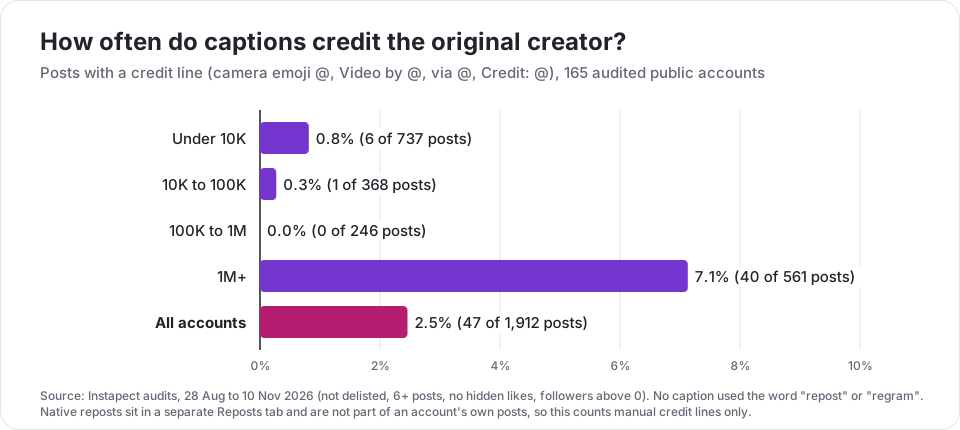
Instapect audits public Instagram profiles. We took the latest audit of every account that met our quality bar (not delisted, at least 6 recent posts, likes not hidden, followers above 0): 165 accounts and 1,912 recent posts, audited 28 Aug to 10 Nov 2026, queried 14 Nov 2026. We searched each caption for a credit line: a camera emoji, "Video by", "Photos by", "via", "Credit" or "cc" followed by an @account.
| Follower tier | Accounts | Posts | Posts with a credit line | Accounts using credit lines |
|---|---|---|---|---|
| Under 10K | 65 | 737 | 6 (0.8%) | 4 |
| 10K to 100K | 32 | 368 | 1 (0.3%) | 1 |
| 100K to 1M | 21 | 246 | 0 (0.0%) | 0 |
| 1M+ | 47 | 561 | 40 (7.1%) | 11 |
| All | 165 | 1,912 | 47 (2.5%) | 16 |
What stands out:
- Nobody writes "repost". Not one of 1,912 captions used "repost", "regram" or "reshare". Accounts that feature other people's work credit the maker instead.
- The camera emoji is the standard. 32 of the 47 credit lines start with an emoji (📸, 📷 or 🎥), 11 use "Video by" or "Photos by", 3 use "via" and 1 uses "Credit:".
- Curated accounts are built on it. @instagram credited a creator ("Video by @..." or "Photos by @...") in 10 of its 12 latest posts and @visit.dubai used "📸 @..." in 10 of 12. @natgeo and @taylorswift used credit lines for photographers.
- Reels lead. 25 of the 47 credited posts were Reels, 17 carousels and 5 single images.
- Credited posts did not underperform. The median credited post drew 1.24x its own account's median likes plus comments, and in all 16 accounts the credited posts sat above that account's median. With 47 posts this is a small sample, and many credits are for photographers hired by the account, so read it as "crediting costs nothing", not as proof that credit lines raise engagement.
Limits. These are accounts people chose to audit on Instapect, not a random sample, and big brands are over-represented. Native reposts live in the separate Reposts tab and are not part of an account's own posts, so this data counts manual credit lines only; Instapect does not see who reposted whom. You can run the same check on any public profile with the free Instagram profile analyzer, which shows the account's recent posts, captions and mentions.
Common mistakes when reposting on Instagram
- Expecting the repost on your grid. Reposts live in their own tab. If you want it in your grid, you need the creator's file and permission.
- Re-uploading without asking. A screenshot with "credit to the owner" is still a copy. Ask, and credit with the actual @handle.
- Writing "no copyright intended". It does not give you permission. Asking the creator and crediting them does.
- Using a repost app that wants your password. The Repost button and Add to story cover nearly every case without handing your login to a third party.
- Assuming every follower sees it. Instagram says followers "may" see reposts. Share to your Story too if you need people to notice today.
- Reposting a repost. You cannot. Open the original post through the creator's name and repost that.
- Forgetting comments go to your DMs. Check your messages after reposting, or you will miss replies.
- Leaving sharing on when you do not want it. If your work keeps getting reshared without context, switch off the toggles in Sharing and reuse.
Frequently asked questions
How do I repost on Instagram?
Open a public post or Reel in the Instagram app, tap the Repost button (two arrows in a loop), add an optional note by tapping the bubble next to your profile picture, then tap Save. It appears in the Reposts tab on your profile and may show in your followers' feeds.
Can you repost on Instagram?
Yes. Instagram added a native Repost button in August 2025 for public posts and Reels (Meta newsroom, 6 Aug 2025). Before that, people shared posts to their Story or re-uploaded them with credit, and both still work.
Can you repost a Reel on Instagram?
Yes. Tap Repost in the icon column on the right side of the Reel, add a note if you want and tap Save. You can also tap the paper plane and Add to story to share the Reel to your Story for 24 hours.
How do you repost an Instagram Story?
Stories have no Repost button. If you were mentioned, open the mention in your messages and tap Add to story. If not, tap Share on a public account's Story, then Add to story, Next and Share.
Why is there no Repost button on Instagram?
Four usual reasons: the creator's account is private, the creator switched off Reposts on posts and reels, you are looking at someone's repost rather than the original, or the feature has not reached your account yet (Instagram says it "may not be available to everyone"). Update the app, open the original post through the creator's profile and try again. If it is still missing, use Share > Add to story or ask the creator.
Why can't I share a post to my Story?
The creator must have a public account and must allow sharing to Stories. If Add to story does not appear in the Share menu, one of those is off. Instagram also notes that sharing posts from feed to Stories "isn't available to everyone".
How do I undo a repost on Instagram?
Open the post or Reel and tap Repost again. To remove several at once, go to Profile > Menu > Your activity > Reposts, select them and tap Delete.
Where do I find my reposts on Instagram?
On your profile, in the Reposts tab next to your posts, Reels and Tagged tabs. You can also see the full list in Menu > Your activity > Reposts.
Does Instagram notify someone when you repost their post?
Instagram's Help Center does not say whether the creator gets a notification for a repost. What it does say is that a repost is credited to them, and that for Story shares of a Reel the creator cannot see who reshared it. Assume the creator may see it and only repost what you are happy to be seen sharing.
Can I repost on Instagram from a computer?
No. The Repost feature "isn't available on computers", so use the app on iPhone, iPad or Android.
How do I stop people from reposting my Instagram posts?
Go to Profile > Menu > Sharing and reuse and switch off Reposts on posts and reels. Switch off Posts and reels to stories and set Stories to stories to Off to block Story sharing too. A private account blocks all of it.
I reposted something but my followers say they can't see it. What went wrong?
Probably nothing. Reposts appear in your Reposts tab for anyone who visits your profile, but showing them in followers' feeds is a recommendation Instagram may or may not make. If the post is gone from your tab, the creator deleted it, went private or turned off reposts. Share it to your Story as well if you need people to see it today.