To see who liked your post on Instagram, open the post and tap the line under it that says Liked by [name] and others or [number] likes. A list of every account that liked it opens, with a search bar at the top. On a Reel or video, tap the view count first, then the likes. To see posts you liked, go to Menu > Your activity > Interactions > Likes, which shows your 300 most recent likes.
That covers the common case. The rest (Stories, comments, someone else's likes, hidden counts, desktop) is below, followed by what a normal like count looks like across 160 public accounts Instapect audited.
Disclosure: Instapect publishes this guide and makes one of the tools mentioned below. Every step here is in the Instagram app or on instagram.com and works without it.
TL;DR: how to see likes on Instagram in 2026
| What you want to see | Where to tap | Who can see it | Source |
|---|---|---|---|
| Who liked your photo or carousel | Open the post > tap Liked by ... and others or [number] likes | You, and anyone who can see the post | Instagram Help Center, checked 5 Nov 2026 |
| Who liked your Reel or video | Open it > tap the view count > likes list | Same | Same page: "first tap the view count below the video" |
| Who liked your Story | Open your Story > swipe up > viewer list | Only you | Instagram Help Center: "Only the person who shared the story can see your like" |
| Who liked a comment | Tap the like count under the comment | Anyone who can see the comment | In-app, checked 5 Nov 2026 |
| Posts and Reels you liked | Menu > Your activity > Interactions > Likes | Only you | Instagram Help Center: "the 300 most recent posts you've liked" |
| What other people liked | Not available since October 2019 | Nobody | BuzzFeed News, Oct 2019 |
| A normal like count | Median post gets likes from 0.73% of followers; 3.16% under 10K followers | Instapect, 160 accounts, 28 Aug to 4 Nov 2026 |
- Your post, any format: the list is always one tap from the likes line, even when you hid the count. Hiding only hides the number from other people.
- Someone else's post: tap the likes line to open the list. If the owner hid the count, you see "Liked by [name] and others" and never the total.
- Your own likes: Your activity keeps the latest 300. Older likes are not listed there.
Where to see each kind of like at a glance
| Content | Where the likes live | Shows names? | Shows a total? |
|---|---|---|---|
| Photo or carousel post | Line under the post | Yes | Yes, unless hidden |
| Reel or feed video | Behind the view count | Yes | Yes, unless hidden |
| Story | Viewer list (swipe up), heart next to the name | Yes | No total on screen; count the hearts |
| Comment | Like count under the comment | Yes | Yes |
| Posts you liked | Your activity > Interactions > Likes | Shows the posts, not other likers | Latest 300 |
| Other people's likes | Nowhere | No | No |
How to see who liked your post on Instagram (photos and carousels)
On the Instagram app (iPhone and Android)
- Tap your profile picture in the bottom right to open your profile.
- Tap the post you want to check.
- Under the post, tap Liked by [name] and others, or [number] likes if the line shows a number.
- The Likes list opens. Scroll it, or type a username in the Search bar at the top to check one person.
Carousel likes count for the whole post. Liking slide 4 and liking slide 1 is the same single like, so there is no per-slide likes list.
On a computer (instagram.com)
- Go to instagram.com and log in.
- Click your profile picture in the left sidebar, then click the post.
- In the post window, click [number] likes or others in "Liked by [name] and others".
- A pop-up lists every account that liked the post.
The desktop list is the same list as in the app, so use whichever is closer to hand.
How to see who liked your Reel on Instagram
Reels hide the likes list one step deeper, which is why "how to see who liked your reel" gets 590 searches a month in the US (DataForSEO, Oct 2026).
- Open the Reel from your profile, not from the Reels tab.
- Tap the view count (the play icon with a number) below or on the Reel.
- The panel shows the like total and the list of accounts that liked it. Tap Likes if it opens on another tab.
Instagram's own wording: "To see a video's likes on Instagram, first tap the view count below the video. From there, you can see the number of likes a video has and who's liked it" (Help Center, checked 5 Nov 2026).
How to see who liked your Instagram Story
- Open your active Story (tap your profile picture with the coloured ring).
- Swipe up, or tap the profile pictures in the bottom left.
- The viewer list opens. Viewers who liked the Story have a red heart next to their name.
Story likes are private. Instagram's Help Center says, "Only the person who shared the story can see your like" (source). You can see the viewer list for up to 48 hours after posting; after the first 24 hours, open the Story from your Archive (Help Center). The Story viewer list is only in the app, not on a computer.
How to see who liked a comment on Instagram
- Open the post and tap the comment icon.
- Under the comment, find the like count (for example 12 likes) next to Reply.
- Tap the like count, not the heart. The heart likes the comment; the count opens the list.
This works on your comments and on anyone else's, as long as you can see the comment.
How to see posts you liked on Instagram
On the app
- Go to your profile and tap the Menu icon (three lines) in the top right.
- Tap Your activity.
- Tap Interactions, then Likes.
- Use Sort & filter at the top to sort by newest or oldest, filter by author, or set a date range.
On a computer
- Click More (three lines) in the bottom left of instagram.com.
- Click Your activity, then Interactions, then Likes.
- Click any post to open it.
Instagram lists "the 300 most recent posts you've liked" (Help Center, checked 5 Nov 2026). For anything older, request a copy of your data under Accounts Center > Your information and permissions > Download your information; the export includes your likes.
You can also unlike in bulk from this screen: tap Select, pick posts, then Unlike.
Can you see what other people liked on Instagram?
No. Instagram removed the Following activity tab, the feature that showed what the people you follow were liking, in October 2019 (BuzzFeed News). There is no setting, app or website that brings it back through official access.
What you can still see:
- A friend's name under a post in your feed, when someone you follow liked it. Instagram's Help Center says your followers "may also see your username below a photo you've liked" (source).
- The likes list on a public post, where you can search for a username to check whether one person liked it.
People can limit even that. Under Menu > Likes you've made, anyone can choose Allow everyone, Allow people you follow, Allow close friends or Don't allow anyone to see their likes. The account that posted still sees the like either way (Help Center).
Apps that promise to show "everything someone liked" cannot get that list from Instagram, which stopped publishing it in 2019. Many of them ask for an Instagram login, which puts the account at risk.
Can you see likes when the like count is hidden?
It depends on whose post it is.
| Situation | What you see |
|---|---|
| Your own post, count hidden | The full count and the full list. Hiding only affects other people. |
| Someone else's post, count hidden | "Liked by [name] and others". Tapping it can still open names (Manychat), but only the owner sees the total. |
| You turned on Hide like & share counts for your feed | No counts on anyone's posts, including from accounts you follow. Turn it off under Menu > Like and share counts. |
The full steps for hiding and unhiding are in our guide on how to hide likes on Instagram, which also has data on how often accounts hide them.
Which path should you use? A quick decision tree
- "I want to know if one specific person liked my post" → open the likes list and type their username in Search. Faster than scrolling.
- "I want to know who liked my Reel" → tap the view count first. The likes line is not where it is on photos.
- "I liked something last week and can't find it" → Your activity > Interactions > Likes, filter by author.
- "I liked something last year" → the list stops at 300, so use Download your information.
- "I want the total likes across all my posts" → Instagram has no running total. Professional accounts can read per-post interactions in Instagram Insights; for a sample of recent public posts, a public-profile audit adds them up.
- "I want to see what my friend liked" → not possible since 2019, unless their name appears under a post in your own feed.
How to know which account type you have: go to Menu > Account type and tools. If you see Switch to professional account, you have a personal account and Insights is not available yet.
How many likes is normal on Instagram? What 160 audits show
Seeing the list is easy. Knowing whether the number is good is the harder part, so we checked the public like counts in Instapect's own audit data.
Method. 160 public Instagram accounts audited by Instapect between 28 August and 4 November 2026, 1,851 recent posts with visible like counts. Quality bar: account not delisted, at least 6 usable posts, no posts with hidden likes in the sample, followers above zero. For each account we took the median post, not the average, because one viral post can drag an average far from what a typical post gets. Then we took the median account in each follower tier. Like rate = likes on a post ÷ followers × 100.
Limits. These accounts were audited because someone chose to look them up, so they are not a random sample of Instagram. Tiers are small (22 to 61 accounts). Treat the numbers as a reference range, not a rule.
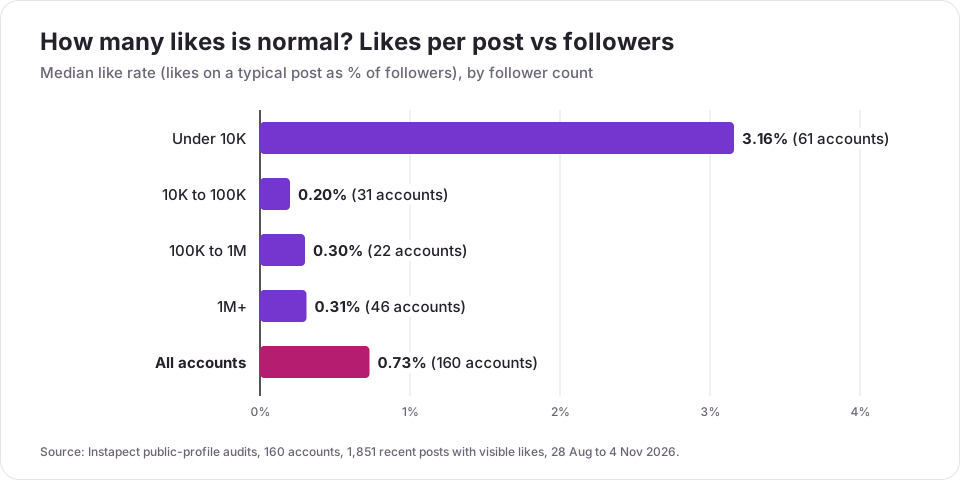
| Followers | Accounts | Median likes per post | Median like rate | Middle half of accounts | Likes per comment |
|---|---|---|---|---|---|
| Under 10K | 61 | 31 | 3.16% | 1.10% to 11.20% | 13 |
| 10K to 100K | 31 | 46 | 0.20% | 0.08% to 0.95% | 17 |
| 100K to 1M | 22 | 604 | 0.30% | 0.06% to 1.02% | 23 |
| 1M+ | 46 | 151,140 | 0.31% | 0.06% to 1.09% | 99 |
| All | 160 | 117 | 0.73% | 0.13% to 2.88% | 29 |
Source: Instapect public-profile audits, 28 Aug to 4 Nov 2026. Medians of per-account medians.
Finding 1: small accounts get likes from a far bigger share of followers
An account under 10K followers typically gets likes from 3.16% of its followers per post. Above 10K, the median drops to 0.20% to 0.31%. The average under 10K is 7.99%, more than double the median, which shows how a few very engaged small accounts pull the average up.
What to do with it: compare your like count with accounts in your own tier, never with a bigger or smaller one. 300 likes means something very different at 5,000 followers (6%) than at 500,000 (0.06%).
Finding 2: one post can get 5x a normal post, another a third of it
Inside the same account, the best recent post got a median 5.4x the likes of that account's typical post, and the weakest got 0.29x. @sosofly.illustration, an illustration account with 23.9K followers (public report), shows the swing: a typical post gets 557 likes, the best got 26,368 (47x), the weakest 163. At the top end, @mrbeast (public report) had a median of 1.18 million likes on 89.2 million followers (1.32%), with a best post 17x that.
What to do with it: judge a post against your own median, not your last post. A drop from one post to the next is normal noise.
Finding 3: Reels get about 2 to 3 likes per 100 plays
Across 135 accounts and 1,013 Reels with public play counts, a typical Reel got 2.35 likes per 100 plays (2.77 under 10K, 1.78 at 10K to 100K, 2.10 at 100K to 1M, 2.92 at 1M+).
What to do with it: if your Reel has 10,000 plays and 50 likes (0.5 per 100), the hook is getting watched but the Reel is not landing. If it has 400 likes, it is doing better than most.
Finding 4: likes outnumber comments about 29 to 1
The median account got 29 likes for every comment. Under 10K it is 13 to 1; at 1M+ it is 99 to 1. Big accounts collect likes from casual viewers who never comment.
To check any public account against these numbers, run it through the Instagram engagement rate calculator, which shows median and average likes per post side by side. For what counts as good overall (likes plus comments), see what a good engagement rate on Instagram is, which also has a like rate benchmark on the average formula by follower tier.
How to check the likes list worked
You know you are in the right place when:
- The screen title says "Likes" and shows a search bar at the top. If it says "Comments" or "Views", go back and tap the other line.
- The list length matches the count. A post with 37 likes shows 37 accounts. Small gaps are normal: accounts that were deactivated or deleted after liking usually drop out of the list.
- A search works. Type the username of someone you know liked the post. If they appear, the list is complete enough to trust.
If the list is empty but the count is above zero, close the app fully, reopen it and try again. If it is still empty after an update, check on instagram.com; the desktop list loads separately.
Mistakes to avoid when checking likes
- Tapping the heart instead of the count. On posts and comments, the heart likes or unlikes. You want the text next to it.
- Looking for Reel likes under the caption. Reels put them behind the view count.
- Expecting Your activity to go back forever. It stops at 300 likes. Use Download your information for older ones.
- Using third-party "who liked" or "likes viewer" apps that ask for your password. Instagram's official tools already show you every like on your own posts. Giving your login to another app risks the account.
- Judging a post by its raw like count. Divide by followers first. 0.73% is the median across 160 accounts; the right benchmark depends on your tier.
- Comparing a hidden-count post with a visible one. On someone else's post with hidden likes, "Liked by [name] and others" tells you nothing about the total.
Frequently asked questions
How do I see who liked my post on Instagram?
Open the post from your profile and tap Liked by [name] and others or [number] likes under it. The full list of accounts opens, with a search bar to find one person. On a Reel, tap the view count first.
How do I see likes on Instagram?
For your own posts, tap the likes line under the post or the view count on a Reel. For posts you liked, go to Menu > Your activity > Interactions > Likes. For other people's posts, the like count shows under the post unless the owner hid it.
How do I see posts I liked on Instagram?
Go to your profile, tap the Menu icon, then Your activity > Interactions > Likes. Instagram shows the 300 most recent posts and Reels you liked, and you can sort and filter by date or author.
Can I see who liked someone else's post on Instagram?
Usually, yes. Tap the likes line under their post to open the list and search it for a name. If the owner hid the count, you see "Liked by [name] and others" and no total; tapping it may still show names, but only the owner sees the number.
Can you see what someone else liked on Instagram?
No. Instagram removed the Following activity tab in October 2019, so there is no list of another person's likes. You may still see a friend's name under a post in your feed if they liked it and their Likes you've made setting allows it.
How do I see who liked my Instagram Story?
Open your Story, swipe up and look for the red heart next to names in the viewer list. Only you can see Story likes.
Why can't I see who liked my Instagram post?
The likes line only appears once someone likes the post, so check that the count is above zero. On a Reel, the list is behind the view count. If the list still will not open, update the app, force-close it, or check the same post on instagram.com.
The like count says 50 but the list shows 47. What's wrong?
Nothing. Accounts that liked the post and were later deactivated or deleted usually drop out of the list before the total catches up. A small gap is normal; check again later or on instagram.com.
Why did my liked posts disappear from Your activity?
Your activity keeps only your 300 most recent likes, so older ones drop off the list. You may also have unliked them, or the post was deleted or archived by its owner. Use Download your information in Accounts Center to get a full record.
Does Instagram tell people when you look at who liked their post?
No. Opening a likes list sends no notification and leaves no record the post owner can see. Instagram only notifies the owner when you like, comment or share.
How many likes is good on Instagram?
Divide your typical post's likes by your followers. Across 160 public accounts Instapect audited in 2026, the median post got likes from 0.73% of followers: 3.16% for accounts under 10K and 0.20% to 0.31% for larger ones. Above your tier's median is a good result.
Sources
- Instagram Help Center, See a post's likes on Instagram, retrieved 5 Nov 2026.
- Instagram Help Center, See recent photos and videos you've liked on Instagram, retrieved 5 Nov 2026.
- Instagram Help Center, Manage who can see your likes on content, retrieved 5 Nov 2026.
- Instagram Help Center, Who can see when you've liked a photo, retrieved 5 Nov 2026.
- Instagram Help Center, How to tell who's seen your Instagram story, retrieved 5 Nov 2026.
- Instagram Help Center, Like a story on Instagram, retrieved 5 Nov 2026.
- BuzzFeed News, Instagram's Following Activity Tab Is Going Away, October 2019.
- Search demand: DataForSEO, United States, October 2026 (how to see who liked your post on instagram 4,400/month; how to see likes on instagram 3,600; how to see liked posts on instagram 1,900).
- Instapect public-profile audits: 160 accounts, 1,851 posts, 28 Aug to 4 Nov 2026.