To do a collab post on Instagram, create a post or Reel as usual, and on the final screen tap Tag people, then Invite collaborators, pick up to 5 accounts and tap Share. Each person gets the invite in their messages; once they accept, the post shows on their profile too, goes to their followers, and lists both names in the header. Collabs only work in the Instagram app on a phone or tablet, not on a computer (Instagram Help Center, checked 13 Nov 2026).
Below are the steps for feed posts and Reels, how to add a collaborator after posting, how to accept or leave one, the private-account rules, fixes when the option is missing, and what 165 public profiles audited by Instapect show about how often accounts credit each other.

Disclosure: Instapect publishes this guide and makes one of the tools mentioned below. Every step here happens in the Instagram app and works without it.
TL;DR: how to do a collab post on Instagram in 2026
| What you want to do | What to tap | Limit or rule | Source |
|---|---|---|---|
| Invite a collaborator to a new post or Reel | + > pick media > Next > Tag people > Invite collaborators > choose account > Done > Share | Up to 5 collaborators | Instagram Help Center, checked 13 Nov 2026 |
| Add a collaborator after posting | Open the post > ... > Edit > Tag people > Invite collaborators > Done | The original author can add or remove collaborators at any time | About collab posts |
| Accept an invite | Open the invite in your messages > Review > Accept | Post joins your grid only after you accept | Help Center |
| Leave a collab | Open the post > ... > remove yourself as collaborator | The post stays on the original author's profile | Help Center |
| Collab on a Story | Not possible. Mention the account instead | Help Center: "You can't add collaborators to your stories" | |
| Share someone else's post without a collab | Use the Repost button or Add to story (how to repost on Instagram) | Public posts only, creator must allow it | Help Center |
| Collab from a computer | Not possible | App only (iPhone, iPad, Android) | Help Center |
| Who credits others most? | 40% of posts from 1M+ accounts mention another @account in the caption, vs 10% under 10K | Instapect, 165 accounts, 28 Aug to 10 Nov 2026 |
- Invite before you share. The post appears on your profile right away, but on your partner's only after they accept.
- One shared count. Accepted collaborators see all likes and comments on the post, and the post is shared with every collaborator's followers.
- The creator stays in charge. If the original author deletes the post or deactivates their account, it disappears from every collaborator's profile too.
Instagram collab posts at a glance
| Question | Answer |
|---|---|
| How many collaborators can you add? | Up to 5 per post, so a post can sit on up to 6 profiles |
| Which formats work? | Feed photos, carousels and Reels. Not Stories |
| Where do invites arrive? | In the invited account's messages. If they do not follow you, check Message requests |
| Who owns the post? | The original author. Their privacy setting decides who sees it |
| Can a private account start a collab? | Yes, but it can only invite accounts that follow it |
| Can a public account invite a private one? | Yes |
| Does tagging do the same thing? | No. A tag or @mention does not share the post with the tagged account's followers and does not list them as an author |
| Can you do it on a computer? | No |
How to do a collab post on Instagram (iPhone and Android)
The steps are the same on iPhone, iPad and Android. Instagram's own summary: "tap Tag people and then Invite collaborator before publishing your post" (Instagram Help Center, checked 13 Nov 2026).
- Open Instagram and tap + at the bottom (or swipe right from the feed).
- Choose Post or Reel, select your photo, carousel or video, and tap Next.
- Edit as usual, add audio or filters, then tap Next again.
- On the final screen, write your caption.
- Tap Tag people.
- Tap Invite collaborators (on some versions it reads Invite collaborator).
- Search for the account, tap it, and repeat for up to 5 accounts.
- Tap Done, then Share.
Check it worked: the post header on your profile shows your name first. The second name appears only after the invited account accepts. Until then, your partner sees a pending invite in their messages, not a post on their grid.
Collab on a Reel
The flow is the same. On the Reel share screen, tap Tag people > Invite collaborators. Instagram also has a separate guide for collaborating on Reels. If you are new to Reels, start with how to make a Reel on Instagram and add the collaborator on the last screen.
Collab on a carousel
Collaborators belong to the whole post, not to a single slide. Invite them from Tag people on the share screen. To tag people inside a specific photo instead, see how to tag someone on Instagram.
How to add a collaborator after posting
- Open the published post or Reel on your profile.
- Tap ... in the top right, then Edit.
- Tap Tag people, then Invite collaborators.
- Pick the account, tap Done, then save.
Instagram's Help Center confirms the original author "can add or remove a collaborator at any time" (About collab posts, checked 13 Nov 2026). If Invite collaborators does not appear in Edit on your version of the app, the workaround Shopify's guide gives is to archive the post and publish it again with the collaborator added before sharing (Shopify, retrieved 13 Nov 2026). Reposting resets likes and comments, so only do it for a fresh post.
How to accept, decline or leave a collab
| Action | Steps | What happens |
|---|---|---|
| Accept | Open the invite in your messages (check Requests if you do not follow the sender) > Review > Accept | Your name joins the header, the post appears on your profile and goes to your followers |
| Decline | Same path > Decline | Nothing changes on your profile; the post stays on the creator's |
| Leave later | Open the post > ... > remove yourself as a collaborator | The post leaves your profile; it stays on the original author's |
| Remove a collaborator (creator) | Open the post > ... > Edit > Tag people > remove them | Their name and profile copy disappear |
Blocking ends a collaboration too: if either account blocks the other, the collab ends but the post stays on the original creator's profile (Help Center).
Collab posts with private accounts
These rules come straight from Instagram's Help Center (checked 13 Nov 2026):
- Public account inviting: can invite public or private accounts.
- Private account inviting: can invite public or private accounts, but only accounts that follow it. Instagram shows a one-time notice explaining who will see the post.
- Private creator plus public collaborator: if a public account accepts, the post is shared publicly through that public account.
- Private collaborator: their username shows on the post, but people still have to send a follow request to see their profile.
- Creator switches to private later: only the creator's followers can see the post.
If you are deciding whether to go private at all, keep in mind that a private account also cannot be audited by public-data tools like Instapect.
Collab post vs tag vs mention
| Collab post | Tag in photo | @mention in caption | |
|---|---|---|---|
| Shared with the other account's followers | Yes | No | No |
| Listed as an author | Yes | No | No |
| Appears on their profile | Yes, after they accept | In their Tagged tab (unless they approve tags manually) | No |
| Needs their approval | Yes | Only if they turned on manual tag approval | No |
| Works on Stories | No | No | Yes |
| Limit | 5 collaborators | About 20 per post (widely reported) | 20 per caption (Meta Graph API reference) |
Source for the first five rows: the "How are Collabs different from tagging or mentions?" section of the Instagram Help Center, checked 13 Nov 2026. The tag and mention limits are covered in our tagging guide.
What Instapect's audits show about crediting other accounts
Public profile data does not list a post's co-authors, so Instapect cannot count collab posts directly. What it can see is the caption, and a caption that names another @account is the closest public signal of a shared or credited post. Here is what 165 public profiles show.
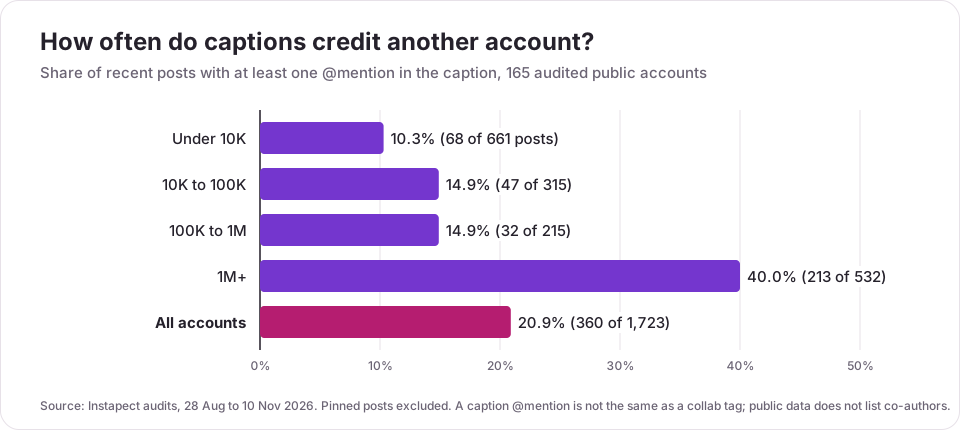
| Follower tier | Accounts | Recent posts | Posts with an @mention | Accounts that mentioned anyone | Median interactions, mention posts vs others (same account) |
|---|---|---|---|---|---|
| Under 10K | 65 | 661 | 10.3% | 24 of 65 (37%) | 1.24x (14 of 24 accounts higher) |
| 10K to 100K | 32 | 315 | 14.9% | 16 of 32 (50%) | 1.09x (8 of 15) |
| 100K to 1M | 21 | 215 | 14.9% | 11 of 21 (52%) | 2.78x (8 of 10) |
| 1M+ | 47 | 532 | 40.0% | 45 of 47 (96%) | 0.82x (17 of 43) |
| All | 165 | 1,723 | 20.9% | 96 of 165 (58%) | 1.06x (47 of 92) |
What this means:
- Big accounts credit others constantly; small ones rarely do. 45 of 47 accounts with 1M+ followers named another account in at least one recent caption, against 24 of 65 under 10K. @instagram mentioned someone in all 12 recent posts, @therock in 10 of 12 and @natgeo in 8 of 10 (see the public reports for @natgeo and @therock).
- A mention alone does not lift engagement. Across all 1,723 posts, a post with an @mention scored a median 1.00x the account's usual likes plus comments, the same as posts without one. The reach gain from a collab comes from the second audience, which a caption mention does not reach. That is the reason to use the collab invite, not just a mention.
- Sponsored posts usually name the brand. 11 of the 27 posts carrying a Paid partnership label (41%) also mentioned an account in the caption.
Method and limits. 165 public Instagram profiles audited by Instapect between 28 Aug and 10 Nov 2026, latest audit per account, recent non-pinned posts only. Quality filter: report not delisted, at least 6 posts in the sample, likes visible on every post, followers above 0. A mention is any caption text matching @ plus a username. Medians, not averages. The accounts were chosen by the people who ran the audits, the 100K to 1M tier is small (21 accounts), and Instapect sees public likes and comments only, never reach, impressions or which followers saw a post.
To compare two partners before you invite them, run both handles through Instapect's free audit or the engagement rate calculator and check that their audience still interacts.
Who to invite: a quick decision guide
| Your goal | Good collaborator | Why |
|---|---|---|
| Reach new followers | A creator or business your audience would also follow, at a similar size | Both feeds get the post; a partner far larger may not accept |
| Credit a brand on a sponsored post | The brand account, plus the Paid partnership label | Instagram's branded content rules still apply to collabs |
| Local business promotion | A nearby business or local creator | Shared local audience; pairs well with a location tag |
| A group project or event | Every participant, up to 5 | One post, one comment thread, every profile |
For more ways to grow with partners, see the collab section of how to get more followers on Instagram.
Mistakes to avoid
| Mistake | What goes wrong | Fix |
|---|---|---|
| Sharing first, inviting later | The post builds its early engagement on one profile only | Invite collaborators on the share screen |
| Mentioning instead of inviting | The partner's followers never see the post | Use Invite collaborators, not just @name in the caption |
| Inviting someone who does not follow you, without telling them | The invite sits in Message requests | Send a DM first so they know to look |
| Letting the less active account create the post | If the creator deletes or deactivates, the post vanishes everywhere | The account that will keep the post long term should create it |
| Running a sponsored collab without the label | Breaks branded content rules | Add the Paid partnership label before sharing |
| Using a collab on a Story | The option does not exist | Mention the account in the Story instead |
Frequently asked questions
How do I do a collab post on Instagram?
Create a post or Reel, and on the final screen tap Tag people, then Invite collaborators. Pick up to 5 accounts, tap Done, then Share. The post reaches each collaborator's profile and followers once they accept the invite in their messages.
How do collabs work on Instagram?
A collab post has more than one author. After the invited account accepts, the post appears on both profiles, goes to both sets of followers, lists both names in the header, and keeps one shared count of likes and comments. The original creator owns the post and can add or remove collaborators at any time.
How many collaborators can you add on Instagram?
Up to 5 per post or Reel, according to Instagram's Help Center (checked 13 Nov 2026). With the creator, that is up to 6 profiles for one post.
Can I add a collaborator after posting on Instagram?
Yes. Open the post, tap ... > Edit > Tag people > Invite collaborators, pick the account and save. If the option is missing on your app version, update Instagram; the fallback is to republish the post with the collaborator invited first.
Why can't I see the Invite collaborators option?
Common causes: the app is out of date, you are on a computer (collabs are app only), you are creating a Story (not supported), or your account has been restricted. Instagram says accounts that went against its guidelines "may not have access to Instagram Collabs." Update the app and check Settings > Account Status.
Why didn't my collab post show up on the other person's profile?
They have not accepted the invite yet. It arrives in their messages, and if they do not follow you it lands in Message requests. Ask them to open it, tap Review, then Accept.
Can a private account do a collab post on Instagram?
Yes, but a private account can only invite accounts that follow it. If a public account accepts, the post is shared publicly through that account. A public account can invite a private one freely.
Do collab posts get more engagement?
The likes and comments pool into one count, so the post can only gain interactions from the second audience. Meta publishes no figure for the lift. In Instapect's audits, a plain caption @mention made no difference (median 1.00x the account's usual interactions), which is consistent with reach coming from the collab's second audience rather than from naming someone.
Can you do a collab on an Instagram Story?
No. Instagram's Help Center states that you can mention other accounts in Stories but cannot add collaborators to them. To keep a Story on your profile, add it to a Highlight.
How do I remove myself from a collab post?
Open the post, tap ... and choose the option to remove yourself as a collaborator. The post leaves your profile and your name leaves the header, but it stays on the original creator's profile.
What happens if the creator deletes the collab post?
It is removed from every collaborator's profile too. Only the original creator can delete the post. If the creator deactivates their account, the post disappears everywhere and returns if they reactivate.
Is a collab post the same as tagging someone?
No. Tagging puts the photo in the other account's Tagged tab but does not share it with their followers or list them as an author. A collab does both, and needs their approval.