To post on Instagram from your phone, tap Create (the +) at the top of the app or swipe right anywhere in Feed, tap POST, pick a photo from your library or tap Take photo, tap Next, tap Next again, add a caption or location and tap Share. On a computer, click Create on the left, then Post > Select from computer, choose a size, click Next, edit, click Next, write the caption and click Share (Instagram Help Center, checked 17 Nov 2026).
That covers a single photo. Below are the steps for every kind of post (carousel, Reel, Story, scheduled post) on phone and computer, the limits that trip people up, and what 165 public accounts audited by Instapect actually post: 57% of a typical account's recent posts are Reels, and caption length made almost no difference to engagement.
Disclosure: Instapect publishes this guide and makes one of the tools mentioned below. Instapect cannot post, schedule or edit anything on Instagram. Every step here happens in the Instagram app or on instagram.com and works without Instapect.
TL;DR: how to post on Instagram
| Question | Answer | Source |
|---|---|---|
| Phone path (photo) | Create (+) or swipe right in Feed > POST > pick or take a photo > Next > Next > caption, location > Share | Help Center, checked 17 Nov 2026 |
| Computer path (photo) | Create > Post > Select from computer > pick size > Next > Filters or Adjustments > Next > caption > Share | Help Center, checked 17 Nov 2026 |
| File types on a computer | JPG, PNG and HEIC/HEIF | Same page |
| Photos per post | Up to 20 photos and videos in one carousel | Help Center: multiple photos, checked 17 Nov 2026 |
| Photo size that is not cropped | Width 320 to 1080 px, aspect ratio between 1.91:1 and 3:4 | Help Center: image resolution, checked 17 Nov 2026 |
| Scheduling in the app | Public accounts only, up to 25 posts a day, up to 30 days ahead | Help Center: scheduled posts, checked 17 Nov 2026 |
| Story vs post | A Story disappears after 24 hours unless you add it to Highlights; a post stays on your profile | Help Center: Stories, checked 17 Nov 2026 |
| What accounts post most | Reels: 57% of a typical account's recent posts, carousels 27%, single images 16% | Instapect, 165 public accounts, 1,912 posts, 28 Aug to 10 Nov 2026 |
| Does caption length matter? | Barely: every length band landed within 2% of the account's own median engagement | Instapect, same sample |
Ways to post on Instagram at a glance
Pick the row that matches what you want to share, then jump to its section.
| What you want to share | Where it shows | Phone | Computer | Lasts |
|---|---|---|---|---|
| One photo | Feed and profile grid | Yes | Yes | Until you delete or archive it |
| Up to 20 photos and videos (carousel) | Feed and profile grid, swipeable | Yes | Yes | Until you delete or archive it |
| A video (Reel) | Reels tab, Feed, profile | Yes | Yes (uploads publish as Reels) | Until you delete or archive it |
| A Story | Top of followers' Feed, your profile ring | Yes | No (app only) | 24 hours, unless added to Highlights |
| A scheduled post or Reel | Goes live at the time you set | Yes (public accounts) | Through Meta Business Suite | Until you delete or archive it |
How to post a photo on Instagram from iPhone or Android
These are the current app steps from the Instagram Help Center (iPhone app, checked 17 Nov 2026). Android uses the same labels.
- Open Instagram and tap Create (the +) at the top, or swipe right anywhere in your Feed.
- Tap POST at the bottom of the screen.
- Choose the photo:
- To upload one from your phone, tap it in the library.
- To take a new one, tap Take photo. Rotate camera switches between the front and rear cameras; Flash sets the flash.
- Drag the photo to adjust the crop, then tap Next.
- Add a filter or edit brightness and contrast if you want, then tap Next again.
- Write a caption, add a location, tag people or add music.
- Tap Share.
The post appears at the top of your profile grid within a few seconds. If you are posting for the first time, the app may ask for permission to use your photos and camera; allow it in your phone's settings if you tapped "Don't allow" earlier.
Before you tap Share, check two things: the crop (anything outside the frame is cut off) and the caption. Instagram's limit is 2,200 characters and 5 hashtags; the caption limit guide explains where the "more" cut falls.
How to post on Instagram from a computer
You can post from any browser at instagram.com, on Windows or Mac. The Help Center lists these steps (Computer help, checked 17 Nov 2026):
- Go to instagram.com and log in.
- Click Create in the left menu.
- Click Post, then Select from computer, or drag a file into the window. Supported photo formats are JPG, PNG and HEIC/HEIF.
- Choose the size (original, square, portrait or landscape), then click Next in the top right.
- Click Filters or Adjustments to edit, then click Next.
- On the final screen you can:
- write a caption,
- add a location,
- click Accessibility to write alt text for screen readers,
- click Advanced settings to turn off comments.
- Click Share.
A video uploaded the same way publishes as a Reel. Stories cannot be posted from a desktop browser; use the phone app for those. To schedule from a computer, Meta Business Suite (Meta's free tool for Facebook and Instagram) has a scheduler for accounts you connect.
How to post multiple photos in one post (carousel)
A carousel holds up to 20 photos and videos in one swipeable post (Help Center, checked 17 Nov 2026).
- Tap Create > POST.
- Tap the multiple selection icon (two stacked squares), then tap each photo or video in the order you want. Numbers show the order.
- Tap Next. Choose one orientation for the whole post: square, portrait or landscape apply to every slide, not slide by slide.
- Apply one filter to all, or tap a single slide to edit it alone.
- Write one caption and one location for the whole post. You can tag different people on each slide.
- Tap Share.
After posting, you can reorder slides, remove slides and edit the caption, location and tags from the ... menu > Edit. You cannot add new photos to a carousel that is already live; you would have to delete it and post again. Videos inside a carousel do not count as Reels and do not appear in the Reels tab.
When a carousel is the better choice, and the slide count that performs, are covered in the Instagram carousel guide.
How to post a Reel on Instagram
- Tap Create > REEL.
- Hold the capture button to record, or tap the gallery icon to upload clips or photos.
- Tap the arrow to edit: trim, add music, text, stickers and effects.
- Tap Next, write a caption, choose a cover and tap Share.
A Reel can run up to 20 minutes, but Instagram only recommends Reels of 3 minutes or less to people who don't follow you (Help Center). The full walkthrough, including Reels from photos, templates and desktop uploads, is in how to make a Reel on Instagram.
If you have to stop halfway, tap Next twice and Save draft. Drafts are stored on your phone only: they don't sync to another device, and uninstalling the app deletes them (Help Center: Reel drafts, checked 17 Nov 2026).
How to post an Instagram Story
Steps from the Help Center (iPhone app, checked 17 Nov 2026):
- Tap Create at the top, or swipe right anywhere in Feed.
- Scroll to STORY at the bottom.
- Tap Record to take a photo, or tap and hold to record a video. To use something from your camera roll, swipe up anywhere on the screen.
- Tap Draw, Text or Sticker to add them. To remove one, drag it onto the trash icon.
- Tap Your Story in the bottom left.
A Story disappears from your profile, Feed and inbox after 24 hours unless you add it to a Highlight. A video up to 60 seconds plays as one clip; longer videos are split into several clips.
Post or Story? Use a post for anything you want people to find on your profile later (work, products, announcements). Use a Story for quick, behind-the-scenes or time-limited updates. You can do both: share the post, then share it to your Story from the paper airplane icon.
How to schedule a post on Instagram
The Instagram app can schedule photos, carousels and Reels if your account is public. Limits: 25 scheduled posts a day, up to 30 days in advance (Help Center, checked 17 Nov 2026).
- Tap Create, then Post or Reel.
- Select a photo or video and tap Next.
- Add a caption, effects or filters.
- Tap More options.
- Turn on Schedule this post (or Schedule this reel) and choose the date and time.
- Tap Done, then Back.
- Tap Schedule.
To change or cancel one, go to your profile > Menu > Scheduled content, tap Options and pick Delete, Edit post, Reschedule or Share now. Product tags, collab posts, sponsored posts and fundraisers can't be scheduled yet, so post those live. If you are deciding on the time itself, the best time to post guide has hour-by-hour data.
What do accounts actually post? Data from 165 public profiles
Knowing the buttons is half of it; the other half is deciding what to post. Instapect audited 165 public Instagram accounts between 28 August and 10 November 2026 and looked at their 1,912 most recent posts.
Method: accounts were included if Instagram showed at least 6 recent posts, like counts were visible (not hidden) and the follower count was above zero. Format shares are averaged per account so very active accounts don't dominate. Engagement comparisons use each post's likes plus comments against the same account's own median post, which removes the effect of account size. Limits: these are accounts people chose to audit on Instapect, not a random sample; the 100K to 1M tier has only 21 accounts; Instapect reads public signals only, so reach, saves, shares and Story data are not included.
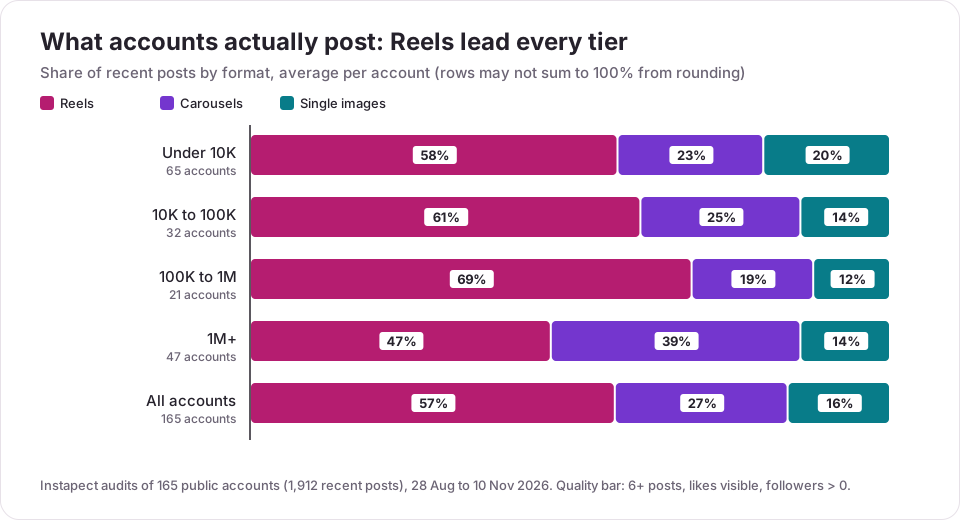
| Followers | Accounts | Reels | Carousels | Single images | Median posts per week |
|---|---|---|---|---|---|
| Under 10K | 65 | 58% | 23% | 20% | 1.7 |
| 10K to 100K | 32 | 61% | 25% | 14% | 4.2 |
| 100K to 1M | 21 | 69% | 19% | 12% | 2.9 |
| 1M+ | 47 | 47% | 39% | 14% | 2.2 |
| All | 165 | 57% | 27% | 16% | 2.5 |
Finding 1: Reels are the default, but almost nobody posts only Reels
157 of the 165 accounts posted at least one Reel in their recent posts, 117 posted a carousel and 94 posted a single image. Accounts above 1 million followers lean hardest on carousels (39% of posts). If you are starting out, mixing formats is normal; the Reel vs carousel comparison shows which format wins at each account size.
Finding 2: caption length did not move engagement
Compared with the same account's median post, captions of every length scored within 2% of normal:
| Caption length | Posts | Accounts | Engagement vs account's median post |
|---|---|---|---|
| No caption | 103 | 32 | 0.99x |
| 1 to 50 characters | 332 | 74 | 1.01x |
| 51 to 150 characters | 462 | 119 | 1.02x |
| 151 to 500 characters | 617 | 121 | 1.00x |
| Over 500 characters | 382 | 91 | 1.00x |
The median caption was 175 characters (about two short sentences plus a line break). Write as much as the post needs and spend the saved time on the photo or the first second of the video.
Finding 3: half of posts carry a hashtag, and the count barely matters
51% of posts had at least one hashtag (62% of Reels, 38% of carousels and 38% of single images); the median post used 1. Posts with no hashtags, 1 to 3 and 4 to 10 all scored exactly 1.00x of the account's median. Posts with 11 or more scored 1.07x, but that was only 34 posts from 13 accounts, mostly published before Instagram capped posts at 5 hashtags, so it is not something you can copy now. The hashtag guide covers the 5-hashtag limit and which tags still help.
Finding 4: one in five posts mentions another account
21% of captions included an @mention (25% of carousels). Tagging a brand, collaborator or location partner is common practice; if you made the post together, a collab post shows it on both profiles instead.
To see these numbers for any public account, including your own, enter the handle in the Instagram profile analyzer. It reports format mix, posting cadence, engagement by format and hashtag use from public data.
Mistakes to avoid when posting on Instagram
- Posting a photo in the wrong shape. Anything outside 1.91:1 to 3:4 is cropped. Portrait 4:5 (1080 x 1350) uses the most feed space; see the post size guide.
- Mixing orientations in a carousel. The first slide's shape applies to every slide, so a landscape photo in a portrait carousel gets cut. Crop them all the same before uploading.
- Expecting to add slides later. You can remove and reorder carousel slides after posting, not add new ones.
- Scheduling from a private account. The in-app scheduler needs a public account. Switch, or post live.
- Scheduling a collab or product-tag post. Those features aren't compatible with scheduling yet; the post goes out without them or can't be scheduled.
- Counting on drafts across devices. Reel drafts live on the phone you made them on and vanish if you uninstall the app.
- Posting a Story when you wanted a post. Stories expire in 24 hours. Add important ones to a Highlight, or post to the feed.
- Skipping alt text. On a computer, Accessibility lets you describe the image for screen readers; it takes ten seconds.
- Editing the photo after posting. You can't swap the image in a live post. Delete it and post again, or pin the corrected version.
How to check your post went up correctly
- Open your profile: the new post should be the first tile (after any pinned posts).
- Tap it and check the crop, the caption's first line and any tags or location.
- For a carousel, swipe through every slide.
- Open it from a second account or ask a friend: if your account is private, only approved followers see it.
- After a day, compare its likes and comments with your usual post. A free audit at Instapect shows that comparison from public data.
Frequently asked questions
How do you post on Instagram step by step?
Open the app, tap Create (the +) or swipe right in Feed, tap POST, choose a photo or tap Take photo, tap Next, apply an optional filter, tap Next again, write a caption and tap Share. The post shows up first on your profile grid. These are the Help Center steps as of 17 Nov 2026.
Can I post on Instagram from my computer?
Yes. On instagram.com, click Create > Post > Select from computer, choose the size, click Next, edit, click Next, add your caption and click Share. Photos must be JPG, PNG or HEIC/HEIF. Stories still need the phone app.
How do I post multiple photos in one Instagram post?
Tap Create > POST, tap the multiple-selection icon and pick up to 20 photos and videos in order, then tap Next. All slides share one orientation, one caption and one location. After it is live you can remove or reorder slides but not add new ones.
How do I post a Reel instead of a photo?
Tap Create and choose REEL instead of POST, record or upload a video, tap the arrow to edit, then Next, add a caption and cover, and Share. On a computer, any video you upload through Create > Post publishes as a Reel.
What's the difference between posting to my Story and posting to my feed?
A feed post stays on your profile grid until you delete or archive it. A Story sits at the top of followers' Feeds for 24 hours, then disappears unless you save it to a Highlight. Stories are app-only; feed posts work on phone and computer.
Can you schedule posts on Instagram?
Yes, if your account is public. When you create a post or Reel, tap More options, turn on Schedule this post, pick a date and time, then tap Schedule. The limits are 25 scheduled posts a day and 30 days ahead. Manage them from profile > Menu > Scheduled content.
Why can't I post on Instagram?
Check, in order: your internet connection (videos and multi-video carousels need a stable one), that the app is updated, the file type (JPG, PNG or HEIC/HEIF for photos on a computer) and storage space on your phone. Then force-close and reopen the app. If a specific feature is missing, such as scheduling, it may need a public account.
My post is stuck on "Posting" or failed. What should I do?
Don't tap Share again, or you may get a duplicate. Switch to a stronger Wi-Fi or mobile connection and wait a minute. If it fails, tap Retry on the failed upload at the top of your Feed. If that fails too, restart the app and post again; for a Reel, save a draft first so the edit isn't lost.
Why does Instagram crop or blur my photo?
Instagram keeps a photo at full quality only between 320 and 1080 pixels wide and between 1.91:1 and 3:4 in shape. Anything outside that ratio gets cropped; anything wider than 1080 pixels is scaled down, and anything under 320 is enlarged, which looks soft. Export at 1080 x 1350 (4:5) for portrait posts.
Can I edit an Instagram post after posting it?
Partly. From the ... menu > Edit you can change the caption, location and tags, and reorder or remove carousel slides. You can't replace the photo or video, add carousel slides or change a Reel's video; for those, delete the post and share it again.
How often should I post on Instagram?
The median account in Instapect's 165-account sample posted 2.5 times a week, from 1.7 under 10K followers to 4.2 at 10K to 100K. Consistency matters more than volume; the posting frequency guide has the full breakdown.
Sources
- Instagram Help Center: Post a photo on Instagram (iPhone and Computer versions), checked 17 Nov 2026.
- Instagram Help Center: Share a post with multiple photos or videos, checked 17 Nov 2026.
- Instagram Help Center: Image resolution of photos you share, checked 17 Nov 2026.
- Instagram Help Center: Create and manage scheduled posts and Reels, checked 17 Nov 2026.
- Instagram Help Center: Share a photo or video to your Instagram story, checked 17 Nov 2026.
- Instagram Help Center: Save and edit drafts of your reel, checked 17 Nov 2026.
- Instagram Help Center: Reels length and recommendations, checked 11 Nov 2026.
- Instapect first-party data: 165 public Instagram accounts and 1,912 recent posts audited 28 Aug to 10 Nov 2026 (quality bar: 6+ posts, likes visible, followers above zero).
Post it, then check how it did
Posting takes under a minute once you know where Create is. The harder part is knowing whether your posts work. Run a free audit of your public profile on Instapect to see your format mix, posting cadence and engagement next to accounts your size, then use the carousel and Reel guides to plan the next one.