The best time to post on Instagram in 2026 is a weekday afternoon, Monday to Thursday, in your audience's local time. Sprout Social's analysis of nearly 2 billion engagements puts the peak at Wednesday 12 p.m. to 9 p.m., and Buffer's study of 9.6 million posts names Thursday 9 a.m. and Wednesday 12 p.m. as the top slots. Weekends, especially Saturday, rank lowest in both.
The bigger finding sits underneath those headlines. Across 1,474 recent posts from 140 accounts audited by Instapect, the share of posts that beat the account's own typical post moved by only 7.9 percentage points between the best and worst day. Format moved it by 21.3 points. Timing helps at the margin; what you post matters more.
Disclosure: Instapect publishes this guide and makes one of the tools mentioned below. Every method here works without it, including Instagram's own free Insights.
Key takeaways
| Question | Short answer (October 2026) |
|---|---|
| Best time to post on Instagram | Weekday afternoons, roughly 12 p.m. to 6 p.m. local time, Monday to Thursday |
| Best single day | Wednesday (Sprout Social, Buffer); Tuesday in Dash Social's data |
| Worst day | Saturday (Sprout Social, Dash Social); Friday and Saturday (Buffer) |
| Best time to post Reels | Same midweek afternoon windows (Sprout Social); evenings, 6 p.m. to 11 p.m. (Buffer) |
| Weekdays or weekends? | Weekdays in every large study. In Instapect's audits, weekend posts performed the same as weekday posts relative to each account's own median |
| What matters more than timing | Format. Carousels beat their account's median 59.4% of the time, single images 38.1% (Instapect, 140 accounts) |
| How to find your own best time | Instagram app: Profile > menu (☰) > Insights > Total followers > Most active times |
What is the best time to post on Instagram?
Weekday afternoons in your followers' local time are the safest default. Four large studies published or updated in 2026 agree on weekdays, and three of the four point at the middle of the day or the afternoon. They disagree on the exact hour, which is a useful warning in itself.
| Study (date) | Sample | Best times | Best days | Worst day |
|---|---|---|---|---|
| Sprout Social (updated March 2026) | Nearly 2 billion engagements, 307,000 profiles, Nov 27, 2025 to Feb 27, 2026 | Mon 2 to 4 p.m.; Tue 1 to 7 p.m.; Wed 12 to 9 p.m. and 11 p.m.; Thu 12 to 2 p.m. | Monday to Thursday | Weekends, Saturday lowest |
| Buffer (published Sep 23, 2026) | 9.6 million Instagram posts, Jan 2024 to Dec 2025 | Thu 9 a.m.; Wed 12 p.m.; Wed 6 p.m. | Wednesday | Friday and Saturday |
| Hootsuite (updated Oct 2026) | More than 1 million social posts | Mon 3 to 9 p.m.; Tue 5 to 8 a.m. and 3 to 7 p.m.; Wed 5 p.m.; Thu 4 to 5 p.m. | Monday, Tuesday, Thursday (for reach) | Not stated |
| Dash Social (Sep 2026) | 751,460 posts from 1,549 brands, Jul 1, 2025 to Jun 30, 2026 | 12 a.m. local time overall | Tuesday at 12 a.m. | Saturday at 4 p.m. lowest |
Sprout Social and Buffer both present their times in local time, so "Wednesday at noon" means noon wherever your audience lives. Dash Social is the outlier: its brand accounts did best at midnight, which it attributes to lower competition and overnight traction. That result comes from large brands with established audiences, and it is a good reason to test rather than copy any single table.
If you only want one rule: post Monday to Thursday between noon and 6 p.m. in the time zone where most of your followers live, then check your own numbers after a month.
When should I post Reels on Instagram?
Post Reels in the same midweek windows as other posts, then test one evening slot. Sprout Social says the best times for Reels mirror its overall windows: Monday 2 to 4 p.m., Tuesday 1 to 7 p.m., Wednesday 12 to 9 p.m. and Thursday 12 to 2 p.m. Buffer recommends evenings, 6 p.m. to 11 p.m., with Wednesday and Thursday strongest, but notes its numbers cover all post types together rather than Reels alone. Dash Social's Reels-only sample (323,437 Reels) again peaked at 12 a.m. local time, led by Tuesdays and Mondays.
Instapect's audits back the "no magic hour" reading. Of 766 Reels with public play counts, 47.0% beat their account's median plays overall. By UTC block, the share ranged from 45.4% to 51.2% in every block except 00:00 to 04:00 UTC (38.0%, only 50 Reels). Weekday Reels beat the median 47.6% of the time and weekend Reels 45.0%. Those gaps are small enough to be noise at this sample size.
| Reels source | Recommended window | Note |
|---|---|---|
| Sprout Social, 2026 | Mon 2 to 4 p.m., Tue 1 to 7 p.m., Wed 12 to 9 p.m., Thu 12 to 2 p.m. | Same as all formats |
| Buffer, 2026 | 6 p.m. to 11 p.m., Wed and Thu | All post types combined |
| Dash Social, 2026 | 12 a.m., Tue and Mon | 323,437 Reels from 1,532 brands |
| Instapect audits | No hour block clearly ahead | 766 Reels, plays vs the account's own median, UTC |
Is it better to post on weekdays or weekends?
Weekdays, if you follow the big studies; it barely matters, if you look at each account against itself. Sprout Social, Buffer and Dash Social all put Saturday at or near the bottom of the week. Buffer's one weekend suggestion is Sunday evening, 8 p.m. to 10 p.m.
Instapect's data adds a twist. Audited accounts post less on weekends (22.9% of posts went out on Saturday or Sunday, UTC), but those posts did just as well against each account's own median: 48.2% beat it, against 47.5% for weekday posts. Sunday had the highest share of any day at 52.1%. One reading: fewer accounts post at the weekend, so the posts that do go out face less competition. Another: 165 Sunday posts is a small sample. Both can be true, which is why a test on your own account beats either.
If you are searching for the best time to post on Instagram on Sunday specifically, Buffer's data points to 8 p.m. to 10 p.m. local time and Hootsuite's to 12 p.m. to 3 p.m.
What Instapect's audit data shows about posting days and hours
This is the part no other guide has: posting time against engagement for the same accounts, measured from public data. Instapect records when each post went live (its takenAt timestamp, in UTC), the visible likes and comments, and the format. The weekday and hour charts in every report come from those timestamps.
Method. 140 public Instagram accounts audited between August 28 and October 7, 2026, kept only if the audit captured at least 6 usable posts and no post had hidden likes. That left 1,474 posts after dropping pinned posts (pinned posts are often years old). 94% were published in 2026. For each account Instapect took the median likes plus comments per post, then asked of every post: did it beat its own account's median? Comparing each post with its own account removes the size effect, so a 10,000-follower creator and a 100-million-follower celebrity are judged on the same scale. If posting time made no difference, every day and hour would land near the overall rate of 47.7% (slightly under 50% because the median post itself does not count as beating the median).
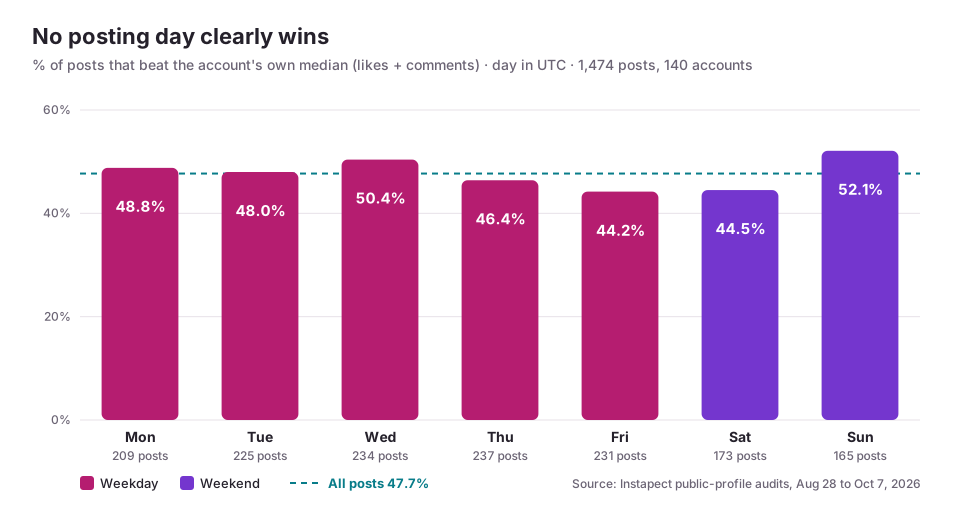
| Day (UTC) | Posts | Accounts posting | Share of all posts | Beat own median |
|---|---|---|---|---|
| Monday | 209 | 106 | 14.2% | 48.8% |
| Tuesday | 225 | 111 | 15.3% | 48.0% |
| Wednesday | 234 | 103 | 15.9% | 50.4% |
| Thursday | 237 | 106 | 16.1% | 46.4% |
| Friday | 231 | 109 | 15.7% | 44.2% |
| Saturday | 173 | 89 | 11.7% | 44.5% |
| Sunday | 165 | 83 | 11.2% | 52.1% |
Three things stand out:
- The day spread is narrow. The best day (Sunday, 52.1%) and worst (Friday, 44.2%) are 7.9 points apart. With roughly 200 posts per day, random variation alone moves a day's figure by about 3.5 points either way, and the best and worst days sit only 4.4 and 3.5 points from the 47.7% baseline.
- Wednesday leads the weekdays (50.4%) and Friday trails (44.2%), which matches Buffer's ranking of Wednesday first and Friday among the weakest.
- Post-to-post swings dwarf day-to-day swings. Within a typical audited account, the best recent post earned 13.5 times the likes and comments of the worst (median across 135 accounts, about 11 posts each). No posting slot comes close to that.
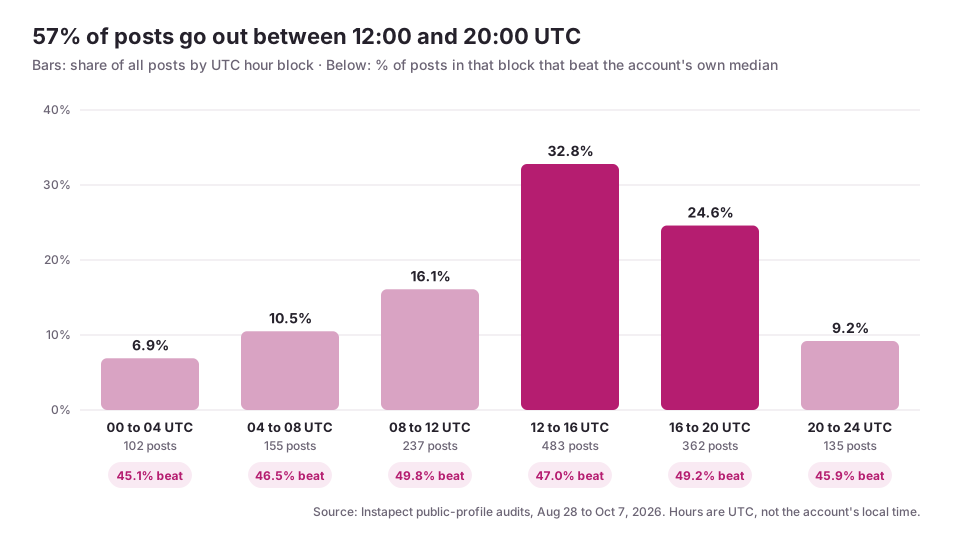
| Hour block (UTC) | Posts | Share of all posts | Beat own median |
|---|---|---|---|
| 00:00 to 03:59 | 102 | 6.9% | 45.1% |
| 04:00 to 07:59 | 155 | 10.5% | 46.5% |
| 08:00 to 11:59 | 237 | 16.1% | 49.8% |
| 12:00 to 15:59 | 483 | 32.8% | 47.0% |
| 16:00 to 19:59 | 362 | 24.6% | 49.2% |
| 20:00 to 23:59 | 135 | 9.2% | 45.9% |
Most posting is concentrated: 57.3% of posts went out between 12:00 and 20:00 UTC. Performance is not: every block sits between 45.1% and 49.8%. The two late-night blocks are slightly weaker, the morning and early-evening blocks slightly stronger, and none is far from the 47.7% baseline.
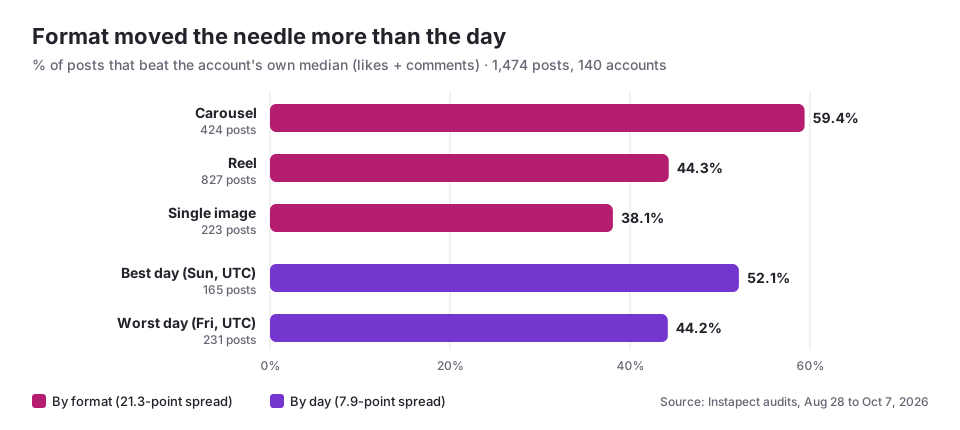
Format is where the real spread is. Carousels beat their account's median 59.4% of the time (424 posts), Reels 44.3% (827) and single images 38.1% (223). One caveat: this compares likes plus comments, and Reels also earn plays that this measure leaves out. Even so, the 21.3-point gap between formats is almost three times the gap between days.
Limits, stated plainly. These are 140 accounts whose handles someone chose to audit on Instapect, weighted toward public figures, brands and active creators, not a random sample of Instagram. Instapect sees public signals only: likes, comments, plays and timestamps. It cannot see reach, impressions, saves, shares or when your followers are online, and it does not know an account's time zone. A 14:00 UTC post is mid-afternoon in London and 7:30 p.m. in Mumbai, so UTC hour patterns mix audiences from many places. Treat the hour data as "when public accounts post", not "the best local hour".
To see the same day and hour breakdown for one account, open any public report, such as Leo Messi's or Nike's, and scroll to the posting cadence charts. The most-followed Instagram accounts ranking uses the same audits.
Best time to post on Instagram in your time zone
Instapect's post times are recorded in UTC (Coordinated Universal Time). The table converts the busiest posting window in the audits, 12:00 to 20:00 UTC, into local time for common audience locations. The study recommendations above (Sprout Social, Buffer) are already in local time and need no conversion.
| Audience location | UTC offset | 12:00 to 20:00 UTC in local time |
|---|---|---|
| New York, Toronto | UTC-4 (EDT, Mar to early Nov); UTC-5 (EST) | 8 a.m. to 4 p.m. (EDT); 7 a.m. to 3 p.m. (EST) |
| Los Angeles, Vancouver | UTC-7 (PDT); UTC-8 (PST) | 5 a.m. to 1 p.m. (PDT); 4 a.m. to 12 p.m. (PST) |
| São Paulo | UTC-3 | 9 a.m. to 5 p.m. |
| London, Dublin | UTC+1 (BST, Mar to late Oct); UTC+0 (GMT) | 1 p.m. to 9 p.m. (BST); 12 p.m. to 8 p.m. (GMT) |
| Paris, Berlin, Madrid | UTC+2 (summer); UTC+1 (winter) | 2 p.m. to 10 p.m. (summer); 1 p.m. to 9 p.m. (winter) |
| Mumbai, Delhi | UTC+5:30 | 5:30 p.m. to 1:30 a.m. |
| Dhaka | UTC+6 | 6 p.m. to 2 a.m. |
| Sydney | UTC+11 (AEDT, Oct to Apr); UTC+10 (AEST) | 11 p.m. to 7 a.m. (AEDT); 10 p.m. to 6 a.m. (AEST) |
Two practical notes. First, this window shows when audited accounts post, not when your followers scroll; for a US audience it lines up with the study recommendations, while for Sydney it falls overnight and is a poor fit. Second, daylight saving time shifts every row by an hour twice a year (the US changes on November 1, 2026, the UK and EU on October 25, 2026), so a scheduled post at a fixed UTC time moves in local time. Schedule in local time where your tool allows it.
If your audience spans time zones: use Instagram's Insights to find the city or country where most followers live (Insights > Total followers > Top locations) and schedule for that place. If the split is close, the US Eastern afternoon (around 12 p.m. to 3 p.m. EDT) overlaps the UK and European evening.
How to find your own best time to post on Instagram
Benchmarks are a starting point. Your own followers decide the answer, and you can check it for free. Pick the path that fits your account.
Which path are you on?
- Professional account (Business or Creator): use Path 1. To check, open your profile: if you see a Professional dashboard button, you qualify. Switching is free under Settings and activity > Account type and tools.
- Personal account, or a small account where Insights shows little: use Path 2.
- Researching a competitor or a creator you might hire: use Path 3, since you cannot see someone else's Insights.
Path 1: Instagram Insights (free, most accurate)
- Open Instagram and tap your profile picture (bottom right).
- Tap the menu icon (☰) at the top right.
- Under For professionals, tap Insights.
- Tap Total followers.
- Scroll to the bottom to Most active times. Switch between Hours and Days to see when your followers are on Instagram.
- Note the two or three busiest hours on your busiest days. Schedule posts to go live at or just before those hours.
Instagram calculates these times from your followers' activity and shows them in your phone's time zone, so no UTC conversion is needed. Instagram's Help Center describes the equivalent chart on Threads as covering the last 30 days and following your current time zone. Very new or small accounts may not see this chart until they have more followers.
Path 2: A four-week posting test (free, works for any account)
- Pick two candidate slots, for example Wednesday 12 p.m. and Sunday 8 p.m. local time (one from Sprout Social's window, one from Buffer's weekend suggestion).
- For four weeks, alternate the same format in each slot. Keep format fixed, because format moves engagement more than timing.
- After each post has been live for 48 hours, write down its likes and comments in a spreadsheet.
- Work out your median likes plus comments across all test posts. The engagement rate guide shows the formula and a ready-made spreadsheet layout.
- For each slot, count how many of its posts beat that median.
Path 3: Public audit tools (for any public account)
- Instapect reads a public account's recent posts and shows posting days and hours (UTC) next to engagement, with no login. It cannot show follower activity times, reach or impressions, because those are private to the account owner.
- Scheduling tools such as Buffer, Sprout Social, Hootsuite and Later suggest posting times for accounts you connect and own, based on your own history. Meta Business Suite, Meta's free tool, also schedules Instagram posts.
How to tell if a new posting time is working
Judge a slot against your own account, not against another brand's benchmark.
| Check | How | What "working" looks like |
|---|---|---|
| Beat-the-median rate | Share of a slot's posts with more likes plus comments than your overall median | Clearly above 50% across at least 8 posts. Instapect's baseline across 140 accounts was 47.7%, and the best day reached 52.1% |
| Engagement rate by slot | (likes + comments) ÷ followers × 100, averaged per slot | Consistently higher in one slot over four weeks, not just one viral post |
| Early comments | Comments in the first hour, read in the app | More replies when the post is fresh, which means followers were online |
What failure looks like: one slot wins one week and loses the next. That usually means timing is not your bottleneck. Move your effort to format, hooks and captions, and keep posting at whatever time fits your workflow.
Common mistakes when choosing a posting time
- Using your own time zone instead of your audience's. A London creator with a mostly US audience should be posting in the US afternoon, which is the UK evening.
- Copying a study's hour without its time zone rules. Sprout Social and Buffer publish local times; UTC data like Instapect's needs converting.
- Judging a slot on one post. Within a typical audited account the best post earned 13.5 times the worst post's interactions. One post tells you almost nothing.
- Changing format and time together. If you switch from single images to carousels and from Monday to Wednesday at the same time, you will not know which change worked.
- Expecting time to rescue weak content. Every hour block in Instapect's data sat between 45.1% and 49.8%. No slot turns an ordinary post into a great one.
- Forgetting daylight saving. A post scheduled for a fixed UTC time moves by an hour in local time when the clocks change.
Frequently asked questions
What is the best time to post on Instagram in 2026?
Weekday afternoons, Monday to Thursday, in your audience's local time. Sprout Social's 2026 data puts Wednesday 12 p.m. to 9 p.m. at the top, and Buffer's study of 9.6 million posts ranks Thursday 9 a.m. and Wednesday 12 p.m. highest. Check Insights > Total followers > Most active times to confirm for your own followers.
What is the best day to post on Instagram?
Wednesday, according to both Sprout Social and Buffer. Dash Social's brand data favours Tuesday. In Instapect's audits of 140 accounts, Wednesday was the strongest weekday (50.4% of posts beat the account's median) and Sunday the strongest day overall (52.1%), though the spread between days was only 7.9 points.
When should I post Reels on Instagram?
Start with midweek afternoons (Sprout Social's Monday to Thursday windows) and test an evening slot between 6 p.m. and 11 p.m. (Buffer). Instapect's data on 766 Reels found no hour block clearly ahead when plays were compared with each account's own median.
Is it bad to post on Instagram on weekends?
Not necessarily. Large studies rank Saturday lowest, but in Instapect's audits weekend posts beat their account's median 48.2% of the time against 47.5% for weekday posts. If your audience is active at weekends, Buffer suggests Sunday 8 p.m. to 10 p.m. local time.
What is the best time to post on Instagram on Sunday?
Buffer's data points to 8 p.m. to 10 p.m. local time, and Hootsuite's to 12 p.m. to 3 p.m. Sunday posts made up only 11.2% of posts in Instapect's audits but had the highest beat-the-median rate of any day.
Does posting time affect Instagram reach?
It can affect early engagement, which is why tools measure it, but the effect is small next to content. In Instapect's audits the spread between the best and worst day was 7.9 points, while the spread between carousels and single images was 21.3 points. Reach itself is private: only the account owner can see it in Insights.
Why does every website give a different best time to post on Instagram?
Each study uses different accounts, dates, metrics and time zone rules. Sprout Social measured engagements across 307,000 profiles over three months, Buffer used 9.6 million posts over two years, and Dash Social studied 1,549 brands. Their audiences scroll at different times, so the peaks differ.
I don't see "Most active times" in my Insights. What's wrong?
You probably have a personal account, or a professional account that is too new or small for Instagram to show the chart. Switch to a professional account under Settings and activity > Account type and tools, keep posting, and check again later. Until then, run the four-week posting test above.
I posted at the "best time" and got fewer likes than usual. Did I pick the wrong time?
Probably not. Engagement varies a lot from post to post: the best recent post in a typical audited account earned 13.5 times the interactions of the worst. Judge a time slot on at least 8 posts and compare it with your own median, not with one result.
Instapect shows my posts in UTC. How do I convert that to my time?
Add or subtract your offset from UTC. New York is UTC-4 in summer and UTC-5 in winter, London is UTC+1 in summer and UTC+0 in winter, and Mumbai is UTC+5:30 all year. A post at 14:00 UTC went live at 10 a.m. in New York (summer) and 7:30 p.m. in Mumbai. The time zone table above covers more locations.
Sources
- Sprout Social, "Best times to post on Instagram in 2026", updated March 2026: nearly 2 billion engagements across about 307,000 profiles, November 27, 2025 to February 27, 2026.
- Buffer, "Best Time to Post on Instagram in 2026: Data from 9.6 Million Posts", published September 23, 2026, and Buffer's video summary (March 6, 2026).
- Hootsuite, "The best time to post on Instagram [2026 data]", updated October 2, 2026.
- Dash Social, "Best Times To Post on Instagram (2.2M Posts Analyzed)", September 2026: July 1, 2025 to June 30, 2026.
- Instagram Help Center, "View insights on Threads", for how Meta calculates "Most active times".
- Instapect public-profile audits, August 28 to October 7, 2026: 140 accounts, 1,474 non-pinned posts, quality bar of at least 6 usable posts and no hidden likes. Post times in UTC.