To block someone on Instagram, open their profile, tap the three dots (Options) at the top right, tap Block, choose whether to block only that account or also the other accounts they have or may create, then tap Block again. It takes about 10 seconds, and Instagram does not notify the person (Instagram Help Center, checked 23 Nov 2026). You can also block from a chat, from instagram.com on a computer, and you can review or undo every block under Settings > Blocked.
Below: the steps for each place you can block, what the blocked person sees, how to unblock, and when Restrict or Remove follower is the better tool. The original part is a count from 1,907 recent posts on 165 public profiles audited by Instapect, showing how much of a post's public likes and comments one blocked follower takes with them. On an account under 1K followers, it is a median 11% of a typical post's interactions.
Disclosure: Instapect publishes this guide and makes one of the tools mentioned below. Every step here happens inside Instagram and works without it. Instapect reads public profile data only: it cannot block anyone, see your blocked list, or tell you who blocked you.
TL;DR: blocking someone on Instagram
| Question | Short answer | Source |
|---|---|---|
| Fastest way (app) | Their profile > three dots > Block > choose scope > Block | Instagram Help Center, 23 Nov 2026 |
| From a DM | Open the chat > tap their name (or Information on desktop) > Block | Instagram Help Center |
| On a computer | Profile > ... next to the username > Block, or Messages > chat > Information > Block | Instagram Help Center |
| Does the person get a notification? | No | Instagram Help Center |
| Stop their new accounts too? | Yes, pick the option that also blocks other accounts they have or create (app only) | Instagram Help Center |
| What happens to their likes and comments? | Removed from your posts, and not restored if you unblock | Instagram Help Center |
| Can they still message you? | No. Their messages are not delivered, now or after an unblock | Instagram Help Center |
| How to unblock | Settings > Blocked > Unblock > Unblock | Instagram Help Center |
| Softer options | Restrict, Remove follower, block from commenting, Limit interactions | Instagram Help Center |
Every way to block, restrict or quiet someone at a glance
| Tool | They can see your profile? | They can message you? | Their comments | They are told? | Best for |
|---|---|---|---|---|---|
| Block | No (can't find your profile, posts or Story) | No | Old likes and comments removed | No | Harassment, an ex, spam accounts, anyone you want gone |
| Block + new accounts | No, on current and future accounts | No | Removed | No | Someone who keeps making new accounts |
| Restrict | Yes | Yes, but chats go to Message Requests and they can't see when you read them | New comments visible only to them unless you approve | No | Someone you can't openly block (classmate, coworker, relative) |
| Remove follower | Only if your account is public | Yes | Unchanged | No | Trimming followers on a private account |
| Block from commenting | Yes | Yes | New comments visible only to them | No | One person who only causes trouble in comments |
| Limit interactions | Yes | Limited for chosen groups | Hidden unless approved | No | A sudden pile-on from many accounts |
Sources: Block or unblock someone, What happens when you block someone, Restrict or unrestrict someone, Block someone from commenting, Limit interactions, all checked 20 to 23 Nov 2026.
How to block someone on Instagram from their profile
This is the path most people use, and the only one that offers to block the person's other accounts as well.
iPhone and Android app
- Open their profile: tap their username on a post, Story or comment, or tap Search and type the username.
- Tap the three dots (Options) in the top right.
- Tap Block.
- Choose the scope: block only this account, or block this account plus other existing accounts they may have and any new accounts they may create.
- Tap Block to confirm.
The profile now shows a blocked state for you, and the person drops out of your followers and following lists.
Instagram.com on a computer
- Go to their profile at instagram.com/username.
- Click the ... (three dots) next to their username.
- Click Block, then confirm.
If you would rather watch it, the 36-second video embedded on this page shows the app steps on a phone.
How to block someone from a DM
Use this when the problem started in your inbox and you don't want to open their profile.
App: tap Messages, open the chat with the person, tap their name at the top of the chat, then tap Block and confirm. On some versions the option sits behind Options in the top right of that screen.
Computer: click Messages on the left, open the chat, click Information at the top, then click Block and click again to confirm (Instagram Help Center).
Your old message thread stays in your inbox after the block, but you can't send anything into it and nothing they send reaches you (What happens when you block someone).
How to block someone's new and other accounts
When you block from the Instagram app, Instagram asks whether to block just this profile or this profile plus "other existing profiles they may have or profiles they may create" (Help Center). Pick the second option for anyone who has already come back on a second account.
Two catches from the same page:
- Accounts you already follow are not covered. If you follow a second account owned by the same person, block that one separately.
- Facebook is separate unless both sit in one Meta Account. If your Facebook profile is not set up in a Meta Account, the person can still message or call your Facebook profile until you block them there too.
How to see who you blocked and unblock someone
App: tap your profile picture, tap Menu (three lines) in the top right, and under Who can see your content tap Blocked. Tap Unblock next to the account and confirm.
Computer: click More in the bottom left, click Settings, then Blocked below Who can see your content. Click Unblock next to the profile, then Unblock again (See who you've blocked, checked 23 Nov 2026).
You can also unblock from their profile: open it, tap Unblock, confirm.
What does not come back after an unblock:
- Their old likes and comments on your posts stay deleted (Help Center).
- Messages they sent while blocked are never delivered.
- The follow. Blocking breaks the follow in both directions, and unblocking does not restore it. Either of you has to follow again (and on a private account, you approve the request).
Unblock only when you mean it: everything above is gone for good.
What happens when you block someone on Instagram
From the Instagram Help Center pages on blocking and what happens after (both checked 23 Nov 2026):
- No notification. The person isn't told.
- Your profile disappears for them. They can't find your profile, posts or Story while logged in to the blocked account.
- Their likes and comments on your posts are removed. Your visible counts drop by their share.
- No tags or mentions. They can't tag you or mention your username.
- No DMs. The thread stays in your inbox; you can't message them and their messages never arrive.
- Group chats are the exception. If you share a group, Instagram asks whether to stay or leave. If you stay, you can both see each other's messages in that group.
- Rooms. They can't join a room you create while logged in.
- Your activity elsewhere can still show. They can still see your likes and comments on posts from public accounts or accounts they follow.
What blocking does not do: it does not hide a public account from someone who is logged out or on an account you have not blocked. If your account is public, your posts are public. To keep strangers out, make your Instagram private as well.
Block vs Restrict vs Remove follower: which one should you use?
Pick the lightest tool that solves the problem.
- They harass, threaten or impersonate you → Block, choose the option that covers new accounts, then report the account from its profile (three dots > Report).
- You need quiet but blocking would cause drama → Restrict. Their new comments are visible only to them unless you approve them, their chats move to Message Requests, and they can't see when you're online or when you've read their messages (Restrict). Path: their profile > three dots > Restrict, or Menu > Restricted under How others can interact with you.
- You just don't want them in your follower list → Remove follower. Open your followers list, tap Remove next to their name. On a private account they then lose access to your posts. People call this a "soft block" when it is done by blocking and unblocking in a row.
- They only cause trouble in your comments → block them from commenting under Menu > Comments > Block comments from. See how to turn off comments on Instagram for that and the other comment controls.
- Many accounts at once → there is no bulk-block button for followers. Turn on Limit interactions to hide comments and message requests from groups such as recent followers or accounts that don't follow you, for up to four weeks at a time (Limit interactions).
Action: ask yourself whether you need the person to stop seeing you (Block) or only stop reaching you (Restrict, comment block, Limits).
What one blocked follower takes from your public numbers: data from 165 profiles
The Help Center says a block removes the person's likes and comments from your posts. That shows up in the public counts anyone can see on your profile. To size it, we used Instapect's audit data.
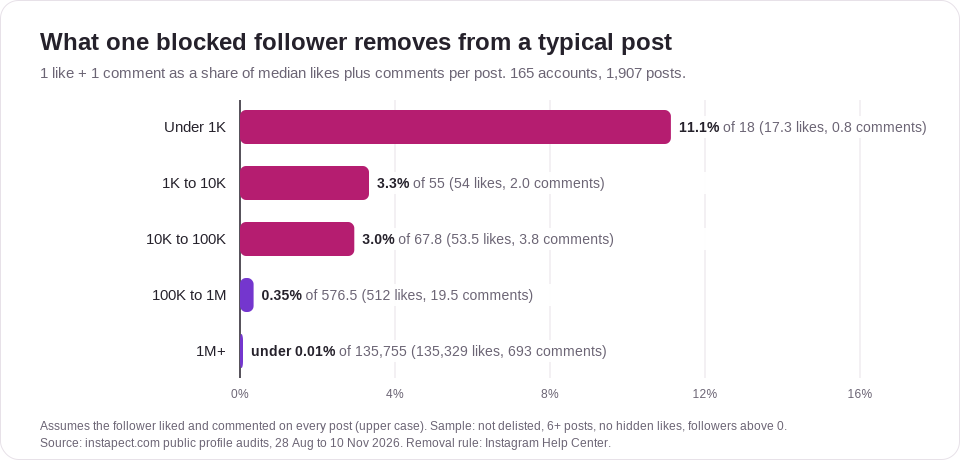
Method. 165 public Instagram accounts audited by Instapect between 28 August and 10 November 2026, with their 1,907 most recent posts. Quality filter: report not delisted, at least 6 recent posts, no hidden like counts, followers above zero. For each account we took the median likes, median comments and median interactions (likes plus comments) per post, then the median of those per follower tier. The last two columns show what one follower who liked and commented on every post would represent on a typical post.
| Follower tier | Accounts | Posts | Median likes per post | Median comments per post | 1 like as share of likes | 1 like + 1 comment as share of interactions | Accounts with a median of 0 comments |
|---|---|---|---|---|---|---|---|
| Under 1K | 32 | 361 | 17.3 | 0.8 | 5.7% | 11.1% | 15 |
| 1K to 10K | 33 | 373 | 54 | 2.0 | 1.8% | 3.3% | 11 |
| 10K to 100K | 32 | 366 | 53.5 | 3.8 | 1.9% | 3.0% | 6 |
| 100K to 1M | 21 | 246 | 512 | 19.5 | 0.2% | 0.35% | 1 |
| 1M+ | 47 | 561 | 135,329 | 693 | under 0.01% | under 0.01% | 1 |
| All | 165 | 1,907 | 112 | 5 | 0.8% | 1.7% | 34 |
What the numbers say:
- On a small account, one person is a visible slice. Under 1K followers, the median post had about 17 likes and less than one comment, so one regular liker and commenter is about 11% of a typical post's interactions. Block them and every past post they touched loses that like and comment for good.
- Comments move more than likes. 34 of the 165 accounts had a median of zero comments per post, 26 of them under 10K followers. On those accounts, one regular commenter can be the whole comment section.
- Past 100K followers, a single block doesn't register. One like is 0.2% of a typical post at 100K to 1M and under 0.01% at 1M+. Large accounts can block freely without any effect on their public numbers.
- Don't let the numbers stop a block you need. A 5% to 11% dip on a small account is a reason to expect it, not a reason to keep someone who is harassing you. For anyone harmless, Restrict keeps their likes in place.
Limitations. The figures assume a follower who liked and commented on every recent post, which is the upper case; most followers interact with only some posts. Instapect can't see who liked a post, so we can't measure real blocks, only what one interaction is worth. The accounts were chosen by the people who ran audits, not sampled at random, and the 1M+ tier leans toward celebrities and brands.
What this means for your metrics. Engagement rate is likes plus comments divided by followers, so a block lowers both sides a little: one fewer follower and one fewer like and comment per post. On a small account the like loss is larger, so the rate usually dips slightly. If you track it in the engagement rate calculator, note the date you blocked someone so the dip isn't misread as a weak post.
How to tell if someone blocked you on Instagram
Instagram doesn't send a notice and has no list of who blocked you, so any app or site that promises one can't deliver it. Instapect can't either. You can only read the signs:
- Their profile won't load or shows no posts when you search for it, even though you remember it being active.
- Old DMs show the thread but you can't open their profile from it.
- Their likes and comments vanished from your posts, and your follow on them is gone.
Each of those also happens when someone deactivates or deletes the account or changes the username. The cleaner test: ask a friend to search the exact username. If it shows up for them and not for you, a block is the likely reason. If it shows up for nobody, the account is gone or renamed.
Mistakes to avoid when blocking someone
- Blocking only the current account when the person already runs a backup account. Choose the option that covers other and new accounts.
- Unblocking to "check" on someone. Their old likes, comments and messages don't come back, and the follow is gone.
- Staying in a shared group chat and assuming the block covers it. Leave the group if you don't want to see each other.
- Forgetting Facebook. If your accounts aren't in one Meta Account, block them on Facebook too.
- Relying on a block to hide a public account. Logged-out visitors and other accounts can still see public posts. Go private if that matters.
- Blocking when Restrict would do. Blocking a relative or coworker can start the conflict you wanted to avoid; Restrict is invisible to them.
Frequently asked questions
How do I block someone on Instagram?
Open their profile, tap the three dots (Options) in the top right, tap Block, choose whether to include their other and future accounts, and tap Block again. On a computer, click the ... next to their username and click Block.
Does Instagram notify someone when you block them?
No. Instagram says people aren't notified when you block them (Help Center). They may notice later that they can't find your profile or that their likes on your posts are gone.
How do I block someone on Instagram without them knowing?
A normal block is already silent. If you want them to keep seeing your profile but stop bothering you, use Restrict: their comments are visible only to them, their DMs go to Message Requests, and they can't see when you're online or have read their messages.
What happens to messages when you block someone?
The thread stays in your inbox, but you can't message them, and anything they send is never delivered, not even after you unblock. In a shared group chat, you choose to stay or leave; if you stay, you can both see each other's group messages.
How do I unblock someone on Instagram?
Go to Menu (three lines) > Blocked under Who can see your content, tap Unblock next to the account and confirm. On a computer it's More > Settings > Blocked. You can also open their profile and tap Unblock.
If I unblock someone, will they follow me again?
No. The block removed the follow in both directions, and an unblock doesn't restore it. Their old likes and comments on your posts don't come back either.
What is the difference between blocking and restricting on Instagram?
Block cuts the person off: no profile, no DMs, no tags, and their likes and comments are removed. Restrict keeps everything visible to them but quietly hides their new comments from others and moves their messages to Message Requests. Neither sends a notification.
What is a soft block on Instagram?
A soft block removes someone from your followers without a lasting block. You either tap Remove next to them in your followers list, or block and then unblock them. On a private account they then need to request to follow you again.
I can't find the Block button. What's wrong?
Update the Instagram app first; Instagram says the newest blocking options need the latest version (Help Center). The button lives behind the three dots at the top right of their profile, not on the profile itself. In Instagram Lite or a mobile browser, the menu looks different, so try the full app or instagram.com.
I blocked someone, but they can still see my posts. Why?
Three common reasons: your account is public and they're viewing while logged out or from another account; they have a second account you didn't include in the block; or you share a group chat you chose to stay in. Block their other accounts, leave the group, or make your account private.
I blocked an account and it came back with a new username. What now?
A username change doesn't undo a block, so a "new" account is a different account. Block it from its profile and choose the option that also blocks other existing and future accounts. Then report it from three dots > Report if it is harassment or impersonation.
Can I see who blocked me on Instagram?
No. Instagram doesn't show it, and no third-party tool can read it. The only sign is that a profile you know exists won't load for you while it loads for a friend.
Sources
- Instagram Help Center: Block or unblock someone on Instagram, read 23 Nov 2026.
- Instagram Help Center: What happens when you block someone on Instagram, read 23 Nov 2026.
- Instagram Help Center: See who you've blocked on Instagram and unblock them, read 23 Nov 2026.
- Instagram Help Center: Restrict or unrestrict someone on Instagram, read 23 Nov 2026.
- Instagram Help Center: Block someone from commenting and Limit interactions, checked 20 Nov 2026.
- Outfy, How to Block Someone on Instagram (Takes Just 10 Seconds) (YouTube, 25 Mar 2026, 0:36).
- Search demand: DataForSEO, United States, November 2026 (how to block someone on instagram 9,900 a month; how to unblock someone on instagram 5,400; what happens when you block someone on instagram 2,400).
- Instapect public profile audits: 165 accounts, 1,907 posts, 28 Aug to 10 Nov 2026.
See what your public numbers look like
Blocking changes what visitors see on your posts. Run any public handle through the Instapect audit to see recent posts, public likes and comments, posting cadence and engagement rate in one report, or browse public creator reports to compare accounts in your niche. To check who interacts with a post, see how to see likes on Instagram.