An Instagram shadowban is the informal name for Instagram showing your posts to fewer people who do not follow you, in Explore, Reels, Feed recommendations, Search and Suggested accounts, without removing them or telling you in a notification. Instagram does not use the word. It calls this "not eligible to be recommended", and you can check it in Account Status: tap your profile, tap Menu (three lines), then under More info and support tap Account Status (Instagram Help Center, checked 21 Nov 2026). If something is flagged, edit or delete it and request a review. If everything shows as eligible, your drop has another cause.
Below: the exact check, what triggers a restriction according to Instagram's own Recommendations Guidelines, how to fix it, and how long it lasts. The original part is a test on 133 public profiles audited by Instapect: 18.8% of accounts saw their last 3 posts fall to under half of their usual engagement, so a sudden dip on its own proves very little.
Disclosure: Instapect publishes this guide and makes one of the tools mentioned below. Every check and fix here happens inside Instagram and works without it. Instapect reads public profile data only. It is not a shadowban checker: it cannot see your Account Status, your reach or whether Instagram recommends your posts.
TL;DR: Instagram shadowbans in 2026
| Question | Short answer | Source |
|---|---|---|
| Is a shadowban real? | Instagram says hiding content is "not our intention", but it does stop recommending some posts and accounts to non-followers | Adam Mosseri, Instagram Ranking Explained, 31 May 2023 |
| How do I check? | Profile > Menu > More info and support > Account Status | Instagram Help Center, 21 Nov 2026 |
| Who sees the recommendation check? | Professional (Creator or Business) accounts | Instagram Help Center |
| Do my followers still see my posts? | Yes. Eligibility only affects people who do not follow you | Instagram Help Center |
| What causes it? | Content Instagram will not recommend (violence, sexually suggestive, regulated products, unoriginal or misleading posts) or an account that recently broke the rules or bought likes | Recommendations on Instagram, Help Center |
| How do I fix it? | Edit or delete the flagged post or profile detail, then tap Request a review in Account Status | Instagram Help Center |
| How long does it last? | Instagram only says "a period of time". No official day count exists | Instagram for Creators, updated 25 Apr 2023 |
| Is a big drop proof? | No. 18.8% of 133 public accounts had a 50%+ dip in their last 3 posts and 20.3% had a 50%+ jump | Instapect audits, 28 Aug to 10 Nov 2026 |
Shadowban vs what Instagram actually does
People use "shadowban" for five different things. Account Status separates them, so name the right one before you try to fix it.
| What happened | What it means | Where you see it | Followers still see posts? | Fix |
|---|---|---|---|---|
| Content removed | A post broke the Community Standards and was taken down | Account Status > Removed content | No, the post is gone | Request a review if you think it was a mistake |
| Content not eligible for recommendation | One post breaks the Recommendations Guidelines | Account Status, recommendation section (professional accounts) | Yes | Edit or delete it, or request a review |
| Account not eligible for recommendation | Recent or repeated problems; none of your posts are recommended for a while | Account Status | Yes | Fix the flagged items, request a review, wait |
| Not shown in Search or Suggested accounts | Your profile (name, photo, bio) or recent behaviour breaks the guidelines | Account Status | Yes | Edit the profile item, request a review |
| Feature restricted | You cannot use features such as Live for a time | Account Status > Features you can't use | Yes | Appeal from that screen |
| Normal dip | Posts got less attention than usual; no restriction | Account Status shows everything eligible | Yes | Change the content, not the settings |
Sources: Account Status on Instagram, Recommendation eligibility on Instagram, Instagram Ranking Explained, checked 21 Nov 2026.
Action: open Account Status first. It takes 20 seconds and tells you which row you are in.
What is a shadowban on Instagram?
A shadowban is a limit on who can discover your content, applied without a warning in your feed. On Instagram that limit has an official name: recommendation eligibility.
Instagram recommends posts from public accounts to people who do not follow them, in Explore, Reels, Feed recommendations, Search and Suggested accounts. The Recommendations Guidelines decide what qualifies, and Meta says they are "designed to maintain a higher standard than our Community Standards, because recommended content and connections are from accounts you haven't chosen to follow." So a post can be allowed on Instagram and still not be recommended.
Adam Mosseri, head of Instagram, addressed the term directly in Instagram Ranking Explained (31 May 2023). He wrote that hiding people's content is "not our intention" and "we don't suppress content to encourage people to buy ads." He also wrote: "If anything makes your content less visible, you should know about it and be able to appeal." That is why Account Status exists. Since December 2022 it shows professional accounts whether their content can be recommended (TechCrunch, 7 Dec 2022), and since April 2023 whether the account can appear in Search and Suggested accounts (Instagram for Creators).
Two limits on that answer. Eligibility "doesn't guarantee that your content will be recommended" (Help Center), so an eligible account can still have weak reach. And the recommendation check is shown to professional accounts; a personal account sees removed content and feature limits but not the recommendation section.
How to check if you are shadowbanned on Instagram
Method 1: Account Status (the only official check)
On iPhone or Android (Instagram Help Center, checked 21 Nov 2026):
- Tap Profile or your profile picture in the bottom right.
- Tap Menu (three lines) in the top right.
- Scroll to More info and support and tap Account Status.
On a computer at instagram.com:
- Click More in the bottom left, then click Settings.
- Click Account Status below More info and support.
What each screen tells you:
- Removed content: posts, stories or comments taken down for breaking the Community Standards.
- Recommendation eligibility (professional accounts): whether your content can be shown to non-followers in Explore, Reels, Feed recommendations, Search and Suggested accounts, with a sample of the post or profile detail that breaks the guidelines and the guideline it breaks.
- Features you can't use: features such as Live that are blocked for a time, with the option to appeal.
Success looks like: every section shows a green or "eligible" state. Failure looks like: a flagged post, a flagged profile photo or bio, or "your account can't be recommended right now".
If you use a personal account and want the recommendation check, switch to a Creator or Business account: Menu > Account type and tools > Switch to professional account. It is free and reversible, and only public accounts can be recommended at all (Instagram for Creators).
Method 2: Insights, non-follower views over time
Account Status tells you whether you are eligible. Insights tells you whether recommendations are actually happening. Open a post's insights and compare the share of views from non-followers on your last 5 posts with the 5 before. The Instagram Insights guide shows where the follower and non-follower split sits.
- Non-follower share collapses to near zero on every recent post and Account Status flags something: a recommendation restriction.
- Non-follower share drops but Account Status is clear: the posts were recommended less because people engaged less with them. That is a content problem.
- Both follower and non-follower views fall together: your followers are seeing the posts and not reacting. Again, content or timing.
Method 3: The hashtag and search test (weak, use last)
Ask a friend who does not follow you to search your username and to open a hashtag you used. If your profile does not appear in search for your exact username, check Account Status for a Search eligibility problem. Do not read much into the hashtag page: it shows a small selection of posts, not every post, so missing from it is normal. Instagram now allows up to 5 hashtags per post, and hashtags work as labels, not reach boosters.
Never give your password to a "shadowban checker" website. Outside tools cannot see your Account Status, and handing over a login breaks Instagram's terms and risks your account.
What causes a shadowban on Instagram?
Instagram lists the causes in Recommendations on Instagram (checked 21 Nov 2026). Content that is allowed on the platform "may not be eligible for recommendations" if it falls in these groups:
| Category | Examples Meta gives |
|---|---|
| Safety-sensitive content | Self-harm, suicide or eating disorder discussion; content depicting violence, such as people fighting |
| Sexually explicit or suggestive | Pictures of people in see-through clothing |
| Regulated products | Tobacco or vaping, adult products and services, pharmaceutical drugs, weight loss products, cosmetic surgery |
| Low-quality publishing | Unoriginal content repurposed with only minor edits; long captions unrelated to the content; coordinated comment networks built to drive engagement |
| False or misleading | Posts rated false by independent fact-checkers |
Instagram also tries not to recommend accounts that:
- recently broke the Community Guidelines,
- repeatedly put non-recommendable content in the name, username, profile photo or bio,
- "repeatedly engaged in misleading practices to build followings, such as purchasing 'likes'",
- have been banned from running ads,
- repeatedly posted content rated false or altered by fact-checkers,
- repeatedly shared photorealistic AI-generated people without the AI label.
For Reels, Meta adds file quality: watermarks from other apps, low resolution, muted audio, borders and mostly-text videos are less likely to be shown widely. The Instagram algorithm guide covers those ranking factors in detail.
Action: if you bought likes or followers, used an engagement pod built on comment networks, or reposted other people's videos with a watermark, stop first. Those are the causes Meta names that you control.
How to fix a shadowban on Instagram
Follow these in order. Steps 1 to 4 resolve most flagged cases.
- Open Account Status (Profile > Menu > More info and support > Account Status) and note every flagged post, profile item and guideline.
- Edit or delete the flagged post. Account Status links to the sample post. Instagram lets you "edit or remove content that goes against our Recommendations Guidelines" from there (Help Center).
- Fix the profile if it is flagged. Change the profile photo, name or bio item named in Account Status. A flagged profile blocks the whole account from Search and Suggested accounts.
- Request a review if you think Instagram got it wrong. Account Status has a Request a review option for removed content and recommendation decisions.
- Remove the cause. Stop bought engagement, cancel any third-party app that likes, follows or comments for you and change your password if you ever gave it your login, and leave engagement pods.
- Make sure the account is public. Private accounts are never recommended to non-followers. If you made it private, the private account guide shows the switch back.
- Keep posting original work. Meta's creator guidance asks for original content, Reels of 3 minutes or less, 9:16 vertical video and no watermarks from other apps.
Verify it worked: reopen Account Status after a few days. The flag should be gone or the review decision shown. Then watch non-follower views on your next 3 to 5 posts in Insights. A return of non-follower views to your usual range is the confirmation; Account Status alone only confirms eligibility.
Who does not need any of this: if Account Status shows you are eligible and nothing is removed, there is no restriction to lift. Deleting posts or pausing for two weeks will not help. Work on the posts instead.
How long does an Instagram shadowban last?
Instagram does not publish a duration. Its creator guidance says that after recent or repeated violations "none of your content will be recommended for a period of time" (Instagram for Creators), and Mosseri's 2023 post uses the same phrase. Claims of "14 days" or "30 days" on other sites have no Meta source.
What shortens it, by Meta's own description: removing or editing the flagged content, a successful review, and no new violations. A single flagged post affects that post; an account-level restriction is the one that lasts.
Is it a shadowban or a normal dip? What 133 public profiles show
Most people who search "am I shadowbanned" have seen a few posts do worse than usual. We checked how often that happens across public accounts, where nobody is claiming a ban.
Method. 133 public Instagram accounts audited by Instapect between 28 August and 10 November 2026, with 1,278 posts that were at least 3 days old at audit time (so recent posts had time to collect likes). Pinned posts excluded. Quality filter: report not delisted, at least 6 recent posts, no hidden like counts, followers above zero. For each account we compared the median likes plus comments of its last 3 posts with the median of its earlier posts in the sample.
| Follower tier | Accounts | Posts | Median ratio, last 3 vs earlier | Last 3 fell 30%+ | Last 3 fell to under half | Last 3 rose 50%+ | Posts under half the account's own median |
|---|---|---|---|---|---|---|---|
| Under 10K | 55 | 523 | 1.02 | 25.5% | 14.5% | 25.5% | 12.6% |
| 10K to 100K | 26 | 228 | 0.92 | 26.9% | 23.1% | 11.5% | 14.2% |
| 100K to 1M | 16 | 151 | 0.87 | 37.5% | 25.0% | 12.5% | 13.4% |
| 1M+ | 36 | 376 | 0.97 | 30.6% | 19.4% | 22.2% | 17.6% |
| All | 133 | 1,278 | 0.94 | 28.6% | 18.8% | 20.3% | 14.4% |
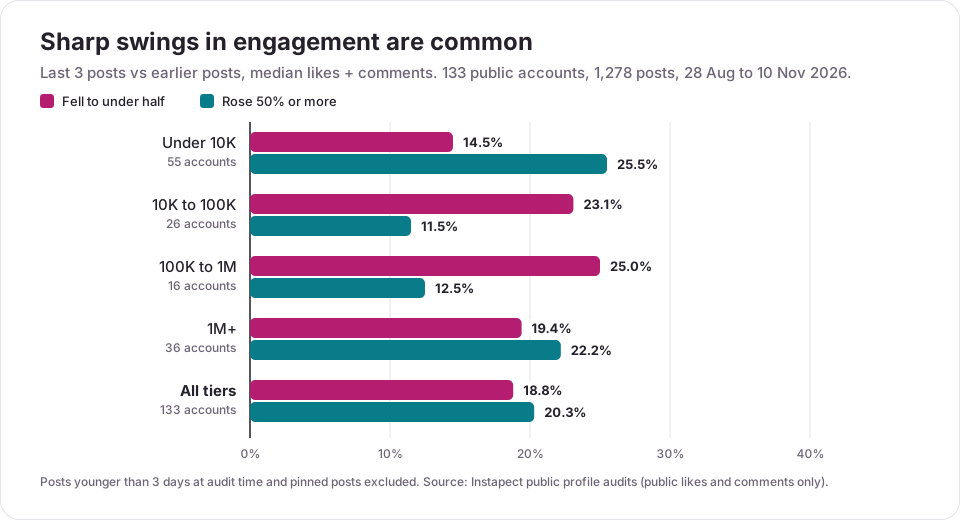
What the numbers say:
- Big swings are routine. Nearly 1 in 5 accounts had their last 3 posts fall to under half their usual engagement, and about the same share saw a 50%+ jump. Engagement moves in both directions all the time.
- Single flops are common too. 14.4% of all posts drew under half their own account's median. One weak post is not evidence of anything.
- Mid-size accounts swing down most often. A quarter of 100K to 1M accounts had a 50%+ dip in the last 3 posts, against 14.5% under 10K.
The same data gives a baseline for Reels, since they are the format most shaped by recommendations. Across 859 Reels from 139 accounts (same filter and dates), median public plays per follower were 1.99 under 10K followers, 0.28 at 10K to 100K, 0.23 at 100K to 1M and 0.11 at 1M+. Small accounts get most of their Reel plays from people who do not follow them, so they feel a recommendation change the most. If your Reels sit far below your tier's range for weeks and Account Status flags something, that is the pattern of a restriction. If Account Status is clear, it is the pattern of Reels that did not hold viewers.
Hashtags showed no penalty in the same sample: posts with 1 to 5 hashtags and posts with none both had a median of 1.00x their account's usual engagement. Posts with 16 or more tags were too rare to test (11 posts at 4 accounts), since Instagram now caps posts at 5.
Limitations. Instapect sees public likes, comments and Reel plays only. It cannot see Account Status, reach or non-follower views, so some accounts in the sample may have had a real restriction; the table shows how often dips happen, not why. The accounts were chosen by the people who ran audits, not sampled at random, and the 100K to 1M tier is small (16 accounts).
To compare your own recent posts with your earlier ones, run your public handle through the Instagram profile analyzer. It shows likes, comments and engagement post by post, which is enough to see whether a dip is one post or a pattern.
Mistakes to avoid when you think you are shadowbanned
- Using a "shadowban checker" that asks for your login. No outside tool can read Account Status. Giving a password to one is a real account risk.
- Deleting old posts in bulk. Unless Account Status names a post, deleting it changes nothing about eligibility and loses the post's history.
- Buying likes or followers to "restart" reach. Meta names purchased likes as a reason it stops recommending an account.
- Switching to private to "reset" things. Private accounts are not recommended to non-followers at all.
- Reposting other creators' Reels with their watermark. Unoriginal and watermarked content is on Meta's low-quality list.
- Stuffing more hashtags. Instagram caps posts at 5, and tags do not lift reach.
- Reading one bad post as a ban. In our data 14.4% of posts get under half their account's usual engagement.
Frequently asked questions
Does Instagram shadowban accounts?
Instagram does not use the word, and Adam Mosseri wrote in 2023 that suppressing content is "not our intention". It does stop recommending posts or whole accounts to non-followers when they break the Recommendations Guidelines, and it shows that in Account Status. That limit is what most people mean by a shadowban.
How do I know if I am shadowbanned on Instagram?
Open Account Status: Profile > Menu > More info and support > Account Status. Professional accounts see whether their content and profile can be recommended in Explore, Reels, Feed, Search and Suggested accounts. If it shows everything eligible, you are not restricted.
What happens if you get shadowbanned on Instagram?
Your followers still see your posts in their feed and Stories. People who do not follow you stop seeing them in Explore, Reels, Feed recommendations, Search or Suggested accounts. For accounts that rely on Reels reaching new people, that can cut views sharply.
How long does an Instagram shadowban last?
Instagram only says "a period of time" and publishes no day count. A flagged post stops being an issue once you edit or delete it or win a review. An account-level restriction lasts longer and ends sooner if no new violations happen.
Can a shadowban be removed?
Yes. Edit or delete the post or profile detail flagged in Account Status, or tap Request a review there if you disagree. Remove the cause too, such as bought likes or third-party automation apps.
What triggers a shadowban on Instagram?
Content Instagram will not recommend (violence, sexually suggestive images, regulated products like vaping or weight loss products, unoriginal reposts, fact-checked false posts) and account behaviour such as recent Community Guidelines violations or buying likes. The full list is in Instagram's Recommendations Guidelines.
Account Status says I am eligible but my views dropped. Am I shadowbanned?
No. Eligible means Instagram may recommend you; it does not promise it will. A drop with a clear Account Status means recent posts held attention less well, or your topic changed. In Instapect's data, 18.8% of public accounts had a 50%+ dip in their last 3 posts.
I can't find Account Status in my settings. What's wrong?
Update the app first. Then go to Profile > Menu (three lines) and scroll to More info and support; Account Status sits there, not under Account. On a computer it is under More > Settings > More info and support. If you use a personal account you will see removed content but not the recommendation section, which is only for professional accounts.
My Reel got zero views. Is my account shadowbanned?
Usually not. Zero views for hours is often a processing delay or a Reel Instagram treats as low quality (watermark, borders, muted audio, mostly text). Check Account Status for a flag on that Reel, then compare it with your usual plays. The Reel guide covers the file settings that avoid it.
Do hashtags get you shadowbanned on Instagram?
Hashtag count is not on Instagram's list of reasons for limiting recommendations; the content of the post is. One tag-related risk is real: Instagram can make a hashtag unsearchable when content under it keeps breaking its rules (Help Center), so search an unfamiliar tag before using it. Instagram now allows up to 5 hashtags per post. In Instapect's audits, posts with 1 to 5 hashtags performed the same as posts without any.
Can someone check if another account is shadowbanned?
No. Account Status is visible only to the account owner. Public data can show that an account's recent posts dropped against its earlier ones, but not the reason, so any site claiming to detect another account's shadowban is guessing.
Sources
- Instagram Help Center: Check your Account Status on Instagram, checked 21 Nov 2026 (iPhone, Android and computer steps).
- Instagram Help Center: Recommendation eligibility on Instagram, checked 21 Nov 2026.
- Instagram Help Center: Recommendations on Instagram (Recommendations Guidelines), checked 21 Nov 2026.
- Adam Mosseri: Instagram Ranking Explained, 31 May 2023, retrieved 21 Nov 2026.
- Instagram for Creators: What Creators Need To Know About Instagram Recommendations, 30 Aug 2022, updated 25 Apr 2023, retrieved 21 Nov 2026.
- Instagram: Helping You Understand What's Going On with Your Account, 11 Oct 2021 with updates to Oct 2025, retrieved 21 Nov 2026.
- TechCrunch: Instagram's new transparency tools will tell you if your content is ineligible to be recommended, 7 Dec 2022.
- Instapect public profile audits: 133 accounts and 1,278 posts (dip test), 139 accounts and 859 Reels (plays per follower), 28 Aug to 10 Nov 2026.
See whether a dip is one post or a pattern
A shadowban question usually starts with a few weak posts. Run any public handle through the Instapect audit to see likes, comments and engagement rate post by post, then compare the last few posts with the account's usual range before deciding anything is wrong. For the full picture of how ranking works, read the Instagram algorithm guide.