Instagram has no "Recently deleted" folder for messages, so there is no button that restores a chat you deleted. You still have four real ways to get messages back: ask the other person (deleting a chat only removes your copy), check Message requests, Hidden requests and the General tab (many "deleted" chats are just moved), request a Download your information file with Messages selected in Accounts Center, and look in email or Android notification history for previews. Messages you unsent are gone for everyone and, according to Instagram's Help Center, are not included in the download file (checked 19 Nov 2026).
Below is a table of what each kind of deletion leaves behind, the exact steps for every recovery path on iPhone, Android and desktop, how to read the download file once it arrives, and what 165 public profiles audited by Instapect show about how many accounts run their business through DMs.
Disclosure: Instapect publishes this guide and makes one of the tools mentioned below. Instapect never reads anyone's messages, and every method here works without it.
TL;DR: recovering deleted Instagram messages in 2026
| What happened to the message | Can you get it back? | Best path |
|---|---|---|
| You deleted the whole chat from your inbox | Often, yes | Ask the other person to forward or screenshot it; try Download your information |
| You removed one message "for you" | Often, yes | The other person still has it; the download file may still list it |
| You or they unsent the message | No | Removed for everyone; the Help Center says the download file leaves unsent messages out |
| The chat seems to be missing, not deleted | Yes | Check Message requests, Hidden requests, the General tab and Search |
| A disappearing photo, vanish mode or timed message | No | Built to disappear; only a screenshot taken at the time survives |
| An end-to-end encrypted chat you didn't save before 8 May 2026 | Probably not | Meta ended encrypted Instagram chats after 8 May 2026 and asked users to download them first |
| The other person deleted their account | Rarely | Your side of the chat may stay, shown as "Instagram user"; download it now |
- Do this first: ask the other person. Deleting a chat is one-sided, so their copy is the fastest full recovery.
- Do this second: request a Download your information file with only Messages selected. It is free, takes minutes to set up and arrives by email.
- Never do this: pay for a "recovery app" or give anyone your Instagram password. No outside app can pull deleted DMs from Instagram's servers.
Deleted Instagram messages at a glance
| Question | Short answer |
|---|---|
| Does Instagram have a Recently deleted folder for DMs? | No. Recently deleted covers posts, Reels and Stories, not chats |
| Does deleting a chat delete it for the other person? | No. It removes the conversation from your inbox only |
| Does unsending delete it for the other person? | Yes. It disappears for everyone in the chat |
| Can Instagram support restore deleted DMs? | No restore option exists in the app or Help Center |
| Can the download file include old messages? | Yes, for chats still stored on your account; not for unsent messages |
| How long does the download take? | Usually minutes to a couple of days for Messages only |
| Do recovery apps work? | No. They can't reach Instagram's servers and many are scams |
Why deleted Instagram messages are hard to get back
Think of an Instagram chat as two notebooks with the same pages: one on your side, one on theirs. Delete chat tears the pages out of your notebook only. Unsend reaches into both notebooks and removes that one page. Instagram keeps no spare copy for you to restore, and it offers no undo for either action.
That is why the other person matters more than any setting. If they kept the chat, every message you deleted on your side still exists, word for word, with the photos and voice messages.
Two changes in 2026 make this more urgent:
- Encrypted chats are over. Meta said "End-to-end encrypted messaging on Instagram will no longer be supported after May 8, 2026" and showed users of affected chats how to download what they wanted to keep (Help Net Security, 16 Mar 2026; Instagram Help Center, checked 19 Nov 2026). If you skipped that prompt, those encrypted threads may not come back.
- Edit replaced some deletes. Since March 2024 you can edit a sent DM for up to 15 minutes (Social Media Today, 4 Mar 2024), so fixing a typo no longer means unsending.
Which recovery method fits your situation? A quick decision guide
- You deleted the chat yourself and the other person is reachable → Method 1 (ask them). Fastest and complete.
- The chat vanished and you don't remember deleting it → Method 2 (check Requests, Hidden requests, General and Search). It was probably moved, not deleted.
- The other person is gone or won't help → Method 3 (Download your information), then Method 4 (notifications).
- The message was unsent, disappearing or in vanish mode → skip to what's gone for good. No method restores these.
Action: to tell an unsent message from a deleted chat, open the conversation. If the chat is still there but one message is missing, it was unsent. If the whole conversation is missing from your inbox, it was deleted, archived into requests, or the other account was removed.
Method 1: Ask the other person to send the messages back
This is the only method that reliably returns everything, including photos, videos and voice messages.
- Message the person (or comment, email or text them if you no longer have the chat).
- Ask them to open your conversation, long-press each message you need and tap Forward, or take screenshots of the thread.
- For a long chat, ask them to run their own Download your information file with Messages selected (Method 3) and send you the part with your conversation.
It works because deleting a chat, or removing a single message on your side, never touches their copy. It fails only if they deleted the chat too, if either of you unsent the messages, or if the messages were disappearing.
Method 2: Check whether the chat is just hidden
Before you assume a chat is deleted, look in the four places Instagram moves conversations without telling you.
- Message requests. Open your inbox and tap Requests at the top. Chats from people you don't follow land here, and so can old threads after the other person changes accounts.
- Hidden requests. Inside Requests, scroll to the bottom and tap Hidden requests. Instagram filters messages it thinks are offensive or spammy into this folder.
- Primary and General. On a creator or business account, the inbox has Primary and General tabs. A chat moved to General can look missing from Primary.
- Search. Tap the search bar at the top of the inbox and type the person's username or display name. If they changed their username, search the old one too.
If the chat shows up, open it and move it back: tap the person's name, then Move to Primary (professional accounts), or Accept the request.
Method 3: Download your information (Accounts Center)
Instagram's data download is the only official way to see your message history outside the app. It contains the chats still stored on your account. Instagram does not promise it will include a chat you deleted from your inbox, so treat it as a strong maybe, and it will not include unsent messages (Instagram Help Center, Unsend a message, checked 19 Nov 2026).
On iPhone or Android
- Open your profile and tap the menu (three lines) at the top right.
- Tap Accounts Center > Your information and permissions > Download your information.
- Tap Download or transfer information, pick your Instagram account, then tap Next.
- Choose Some of your information, tick Messages only, and tap Next.
- Choose Download to device, set Date range to All time, Format to HTML (easiest to read) or JSON, and pick the media quality.
- Tap Create files. Instagram emails you when the file is ready.
On a computer
- Go to instagram.com, click More at the bottom left, then Settings > Accounts Center.
- Follow steps 2 to 6 above. The menus are the same.
How to read the file
- Open the email from Instagram and download the ZIP from Accounts Center > Download your information, then log in again when asked. The file is only available for a few days, so download it the day it arrives.
- Unzip it and open the folder your_instagram_activity > messages > inbox (older exports use messages > inbox).
- Each chat has its own folder named after the other person's username plus a number. Open message_1.html in a browser. Long chats split into message_2, message_3 and so on.
- Use your browser's Find (Ctrl+F or Cmd+F) for a word you remember from the lost message.
Photos and videos sent in the chat sit in the photos and videos subfolders of the same chat folder.
Method 4: Look for notification previews
Notifications can hold the text of messages you received, even if they were later deleted or unsent. This only works for messages that arrived after the setting was on.
If Instagram email notifications for messages were on, search your inbox for "Instagram" plus the sender's name. The email shows a short preview, not the full thread. To keep it on for the future, check the email options in Settings and activity > Notifications.
Android notification history
- Open the phone's Settings > Notifications > Notification history (Android 11 and later; on Samsung it sits under Settings > Notifications > Advanced settings).
- Turn it on if it is off. It only stores notifications from the last 24 hours, and only from after you turned it on.
- Look for Instagram entries. Each shows the sender and the message preview.
iPhones have no notification history, so there is nothing to recover there once a banner is cleared.
What Instagram messages are gone for good?
| Message type | Why it can't come back | Source |
|---|---|---|
| Unsent messages | Unsending removes the message for everyone in the chat and keeps it out of the download file | Instagram Help Center, checked 19 Nov 2026 |
| Disappearing photos and videos (View once, Allow replay) | They expire by design after being viewed | Instagram Help Center |
| Vanish mode messages | They disappear when you leave the chat | Instagram Help Center |
| Timed disappearing messages | They delete themselves after the timer | Instagram Help Center |
| Encrypted chats not saved before 8 May 2026 | Meta ended end-to-end encrypted Instagram chats and asked users to download them first | Help Net Security, 16 Mar 2026 |
| Chats both people deleted | No copy is left on either side | Instagram offers no restore option |
For the disappearing formats, the only copy that can exist is a screenshot, and Instagram tells the sender about those (see does Instagram notify when you screenshot).
How many accounts run their business in DMs? Data from 165 public profiles
Losing a chat hurts most when the inbox is where orders, bookings and brand deals happen. Instapect cannot see anyone's messages, but it can see when an account publicly asks people to message it. We checked the bio and recent captions of every account in our audit sample for phrases like "DM", "DM us", "message us", "send me a message" and "inbox".
Method: 165 public Instagram accounts audited by Instapect between 28 Aug and 10 Nov 2026 (quality bar: not delisted, at least 6 recent posts, likes visible, followers above zero), 1,912 recent posts, 1,809 with a caption. Queried 19 Nov 2026.
| Follower tier | Accounts | Ask for DMs in bio | Ask for DMs in a recent caption | Ask in either |
|---|---|---|---|---|
| Under 10K | 65 | 3 | 14 | 15 (23%) |
| 10K to 100K | 32 | 3 | 3 | 6 (19%) |
| 100K to 1M | 21 | 2 | 3 | 4 (19%) |
| 1M and up | 47 | 0 | 2 | 2 (4%) |
| All | 165 | 8 | 22 | 27 (16%) |
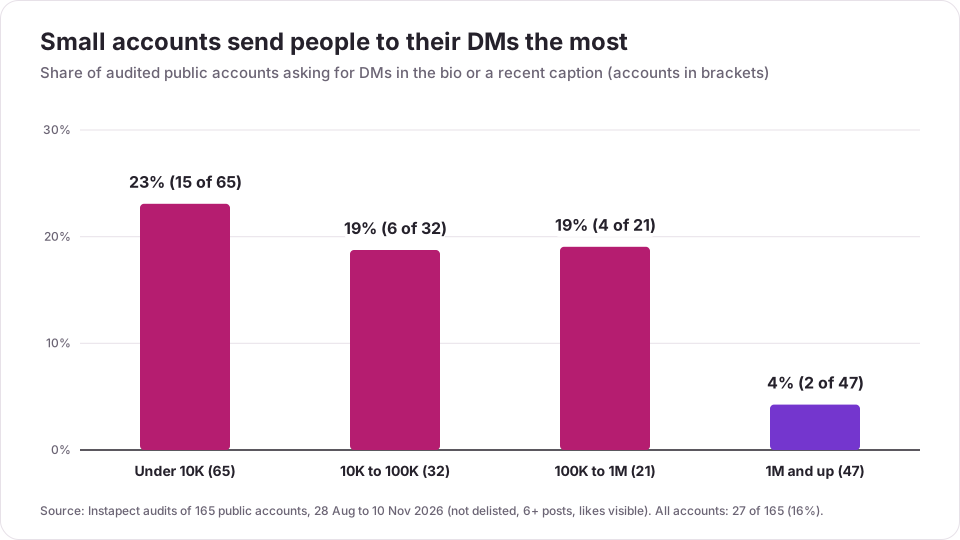
What this shows:
- Small accounts lean on DMs the most. Almost a quarter of accounts under 10K followers sent people to their inbox, often for prices and orders. For a small shop, a deleted chat can be a lost order with no other record.
- Big accounts mostly don't. Only 2 of 47 accounts with 1M+ followers asked for DMs, which fits how they use other channels (email, link in bio, managers).
- Captions carry the ask, not bios. 22 accounts asked in a caption against 8 in the bio, and 65 of 1,809 captions (3.6%) contained a DM request.
Limits: these are accounts people chose to audit with Instapect, not a random sample of Instagram, and the tiers above 10K are small. A caption asking for DMs says nothing about how many messages the account actually gets.
If your captions send people to your DMs, schedule a monthly Messages-only download so a deleted chat never takes an order with it. You can see your own caption and posting patterns next to accounts your size with the free Instagram profile analyzer.
Mistakes to avoid when trying to recover Instagram messages
- Paying for a recovery app. Phone recovery tools can only scan files on your device, and Instagram keeps chats on its servers, not in a folder you can undelete. Apps that promise "deleted DM recovery" usually want your password or a payment.
- Giving your login to a website. Anyone with your password can read every chat you still have and lock you out. Instagram's own download is free.
- Deleting more while you search. Don't clear the app's data or reinstall it hoping old chats reappear. It won't help and can log you out of accounts you can't get back into.
- Waiting. If the other person is still around, ask them today, before they clean their inbox too.
- Selecting everything in the download. A full export can take much longer. Tick only Messages if chats are what you need.
- Using unsend to "fix" a message. Within 15 minutes you can edit instead, which keeps the conversation intact.
How to check whether a recovery worked
- Forwarded messages: they appear in your chat with a "Forwarded" label. Check that dates and photos came through, not only text.
- Download file: open message_1.html for the right person and use Find for a word from the lost message. If the folder exists but the message isn't there, it was unsent or deleted before Instagram stored it in your account.
- Moved chats: after Accept or Move to Primary, close and reopen the app; the chat should sit in your main inbox list.
If none of these show the message, it is not recoverable from Instagram. The last option is any copy outside Instagram: screenshots, email notifications, or a cloud backup of your phone's photos for media you saved.
How to keep it from happening again
- Download Messages once a month if your inbox holds orders, bookings or deals.
- Screenshot or forward key details (prices, addresses, agreements) to email the day you receive them.
- Remove messages sparingly and never unsend a message you might need as proof.
- Keep business conversations in a tool you control. Professional accounts can read Instagram DMs in Meta Business Suite; see the Instagram auto reply guide for that setup and for automations that answer the common questions for you.
Frequently asked questions
Can you recover deleted messages on Instagram?
Sometimes. A chat you deleted is still on the other person's side, so they can forward it back, and Instagram's Download your information file may still include it. Unsent messages, disappearing photos and vanish mode messages cannot be recovered.
How do I see deleted messages on Instagram without the app?
Request a Download your information file from Accounts Center with Messages selected, unzip it and open message_1.html in the folder for that person. That is the only official way to read your chat history outside the app.
Does deleting a chat on Instagram delete it for the other person?
No. Deleting a conversation removes it from your inbox only. The other person keeps every message unless they delete the chat themselves or the messages were unsent.
Can the other person see a message after I unsend it?
No. Unsending removes the message from the chat for everyone. They may have read it already, or seen it in a notification preview, before you unsent it.
Does Download your information include deleted messages?
It includes messages still stored on your account. Instagram's Help Center says it does not include unsent messages, and it doesn't promise chats you deleted from your inbox. Requesting it is free, so try it.
My Download your information file has no messages folder. What went wrong?
You probably didn't tick Messages, or you chose a short date range. Request a new file with Some of your information > Messages and Date range: All time.
A chat disappeared and I didn't delete it. Where did it go?
Check Message requests, Hidden requests and the General tab, then search the username. If the other person deleted or deactivated their account, the chat may show as "Instagram user" or vanish from search.
The download link says it expired. What do I do?
Request a new file. Instagram keeps a finished download available for only a few days, so download the ZIP as soon as the email arrives.
Can Instagram support recover my deleted DMs?
No. Instagram's Help Center offers no restore option for deleted or unsent messages, and support can't send you a copy of a chat you deleted.
Do Instagram message recovery apps work?
No. They can't access Instagram's servers. At best they scan your phone for cached images; at worst they steal your login or charge for nothing.
Can I recover Instagram messages from years ago?
Yes, if the chat is still in your account. Set the download's date range to All time. Chats deleted by both people, unsent messages and expired disappearing messages won't appear at any age.
What happened to my encrypted Instagram chats?
Meta stopped supporting end-to-end encrypted Instagram chats after 8 May 2026 and asked people to download those threads first. If you didn't, the encrypted messages may no longer be available; your regular chats were not affected.
Sources
- Instagram Help Center: Unsend a message, Delete a chat, Remove a message, What happens to content you delete, End-to-end encryption on Instagram, Export a copy of your information, checked 19 Nov 2026 (the Help Center renders in the browser, so some wording is checked against the page summaries).
- Help Net Security: Meta ditches end-to-end encrypted messaging on Instagram, 16 Mar 2026; TechRepublic: Instagram users urged to save encrypted DMs.
- Social Media Today: Instagram launches new DM updates including message editing, 4 Mar 2024.
- Instapect first-party data: 165 public Instagram accounts audited 28 Aug to 10 Nov 2026, 1,912 recent posts (quality bar: not delisted, 6+ posts, likes visible, followers above zero), queried 19 Nov 2026.
Ask first, download second
Most lost Instagram chats come back from the person on the other side, and the rest are usually hiding in Requests or the download file. Ask them today, request a Messages-only download, and set a monthly reminder if your DMs carry orders. For the public side of your account, run your handle through the free Instagram profile analyzer, and read how to reply to comments on Instagram for the conversations that happen in the open.