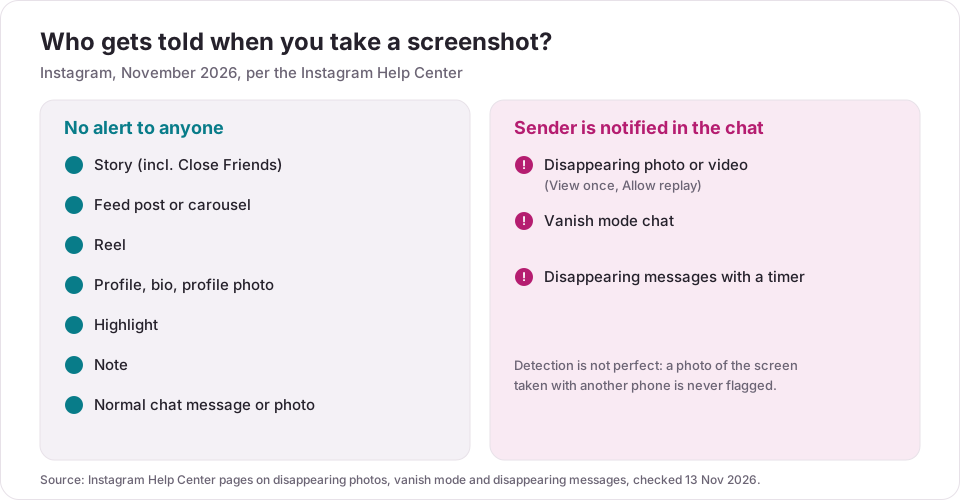
No. Instagram does not notify anyone when you screenshot or screen record their Story, feed post, Reel, profile, Highlight or a normal chat message. It does notify the sender in three places, all inside chats: disappearing photos and videos (View once or Allow replay), vanish mode, and disappearing messages with a timer. Instagram's Help Center says the sender sees it "if we detect someone took a screenshot" (checked 13 Nov 2026).
So the rule of thumb is short: anything posted to a profile or a Story can be saved quietly, and anything built to disappear in a chat can tell on you. Below are the details per surface, how to check whether someone screenshotted what you sent, the 2018 Story test that started the rumor, and what 190 public profiles audited by Instapect show about what strangers can already save from a profile without any alert.
Disclosure: Instapect publishes this guide and makes one of the tools mentioned below. Every answer here comes from Instagram's own Help Center and works without Instapect.
TL;DR: Instagram screenshot notifications in 2026
| What you screenshot | Does the other person get notified? | Source |
|---|---|---|
| Someone's Story (public or Close Friends) | No | Instagram tested Story alerts Feb to Jun 2018, then ended the test (TechCrunch, Engadget) |
| A feed post, carousel or Reel | No | No alert is documented in the Help Center (checked 13 Nov 2026) |
| A profile, bio, Highlight or profile photo | No | Instagram also does not tell people who viewed their profile |
| A normal chat message, photo or shared post | No | Help Center describes screenshot alerts only for disappearing content |
| A disappearing photo or video (View once, Allow replay) | Yes | Help Center: you can see "if we detect someone took a screenshot" |
| A message in vanish mode | Yes | Help Center: "Instagram notifies you of screenshots" |
| A disappearing message with a timer | Yes | Help Center: "you will be notified if a screenshot is detected" |
- The alert goes to the sender, inside the chat. It is not a push to the whole internet, and it does not appear on posts or Stories.
- No alert does not mean no record. Instagram itself says people "can still capture content using other devices", so a second phone defeats every alert.
- Insights do not count screenshots. Neither personal, Creator nor Business accounts get a screenshot number anywhere in Instagram Insights.
Instagram screenshot notifications at a glance
| Question | Short answer |
|---|---|
| Does Instagram notify when you screenshot a Story? | No |
| Does Instagram notify when you screenshot a post or Reel? | No |
| Does Instagram notify when you screen record? | No for Stories, posts and Reels; disappearing chat content can still flag it |
| Does Instagram notify when you screenshot a DM? | Only for disappearing photos and videos, vanish mode and timed disappearing messages |
| Can you tell who screenshotted your Story? | No. Your viewer list shows who watched, not who saved it |
| Where does the alert show? | In the chat, under the item, for the person who sent it |
| Does it work in group chats? | Disappearing messages are for one-to-one chats only (Help Center) |
| Can someone avoid the alert? | Yes, by photographing the screen with another device |
Does Instagram notify when you screenshot a Story?
No. You can screenshot or screen record anyone's Story, including a Close Friends Story, and the person who posted it gets no notification. Their viewer list shows that you watched the Story, because watching is what the list records, but nothing marks that you saved it.
The rumor comes from a real test. In February 2018 Instagram showed a small group of users a star-shaped icon next to people who had screenshotted their Story (TechCrunch, 11 Feb 2018). Instagram ended that test in June 2018 (Engadget, 15 Jun 2018) and has not turned it back on. Videos that claim a "new 2026 update" lets you see Story screenshots are not backed by any Help Center page as of 13 Nov 2026.
What can tip people off instead is resharing. A reshare to your own Story carries their name and counts as a share, while a screenshot leaves no trace at all.
Does Instagram notify when you screenshot a post or Reel?
No. Feed photos, carousels, feed videos and Reels can be screenshotted or screen recorded without any alert. The same holds for posts you open from Explore, from search, from a hashtag page or from your Saved collection.
Two things that look like alerts but are not:
- Sending the post in a chat shows up as a share in the creator's share count (if they check it), but it is still not a screenshot alert.
- Saving the post with the bookmark icon adds to the creator's private save count in Insights. It does not name you.
Does Instagram notify when you screenshot a profile, bio or Highlight?
No. Profile pages, bios, profile photos, Highlights and Highlight covers can all be screenshotted without a notification. Instagram also has no "who viewed my profile" feature, so looking at a profile and saving it leaves no visible trace for the owner.
Notes (the short text bubbles above the chat list) follow the same rule: you can screenshot a Note without an alert.
Does Instagram notify when you screenshot a DM?
It depends on what kind of message it is. Normal chats do not notify. The three disappearing formats do.
Normal messages, photos and shared posts: no alert
Text, voice messages, normal photos and videos you send from your camera roll with Keep in chat, and posts or Reels shared into a chat can be screenshotted without the sender being told. The Help Center pages on chats describe screenshot detection only for disappearing content (checked 13 Nov 2026). If a chat later goes missing, see how to recover deleted Instagram messages for what can still be brought back.
Disappearing photos and videos: the sender sees it
When someone sends a photo or video with View once or Allow replay (Instagram calls it "View twice"), the sender can see "if they were seen or if we detect someone took a screenshot" (Send disappearing photos or videos, checked 13 Nov 2026). The status sits under the item in the chat.
Vanish mode: the sender is notified
Vanish mode makes messages, photos and videos disappear from the chat once you leave it or turn the mode off. Content "cannot be copied or forwarded, and while Instagram notifies you of screenshots, users can still capture content using other devices" (Send messages in vanish mode, checked 13 Nov 2026).
Disappearing messages with a timer: the sender is notified
Disappearing messages delete themselves after a set time and are only for one-to-one chats, not group chats or Messenger accounts. Instagram says "users can still take screenshots or photos of them, and you will be notified if a screenshot is detected" (About disappearing messages, checked 13 Nov 2026).
Does Instagram notify when you screen record?
Not for Stories, posts, Reels or profiles. For disappearing chat content, treat a screen recording the same as a screenshot: the Help Center's vanish mode guidance talks about capturing content in general, and independent tests such as PostLink's guide (updated 28 Aug 2026) report that recording disappearing media also triggers the alert. Instagram does not publish exactly how it detects either one, so "probably flagged" is the safe assumption.
How to see if someone screenshotted the photo you sent
This works only for disappearing photos and videos and for vanish mode or timed messages.
- Open Instagram and tap Messages.
- Open the conversation where you sent the disappearing photo or video.
- Look under the item. The status shows whether it was opened, replayed, or screenshotted (Help Center, checked 13 Nov 2026).
For vanish mode and timed disappearing messages, the screenshot notice appears in the chat thread itself.
How to send something that alerts you if it is screenshotted
| You want | What to do | What the other person can still do |
|---|---|---|
| A photo or video they can open once | In the chat, tap the camera, take or pick the photo, tap the icon at the bottom left and choose View once | Photograph the screen with another device |
| A photo they can replay one time | Same steps, choose Allow replay | Same |
| A whole chat that clears when you leave | Swipe up in the chat to turn on vanish mode | Same |
| Messages that delete after a set time | Swipe up in a one-to-one chat and set the disappearing messages timer | Same |
All four only work in the Instagram app on a phone or tablet, not on a computer, and disappearing photos can only go to people who follow you or have accepted your messages (Help Center, checked 13 Nov 2026).
What can anyone save from your profile without an alert?
Because a profile can be screenshotted silently, the useful question is what a public profile already shows. Instapect reads only public profile signals, so its audit data answers that directly.
Method. 190 public Instagram accounts audited by Instapect between 28 Aug and 10 Nov 2026, latest audit per account. Quality bar: not delisted, at least 6 recent posts read, more than 0 followers. "Contact detail in bio" means the bio text contains an email address, a phone-number-like string of 10 or more digits, or a WhatsApp, Telegram, Snapchat or TikTok reference. Limits: these are accounts people chose to audit, the 100K to 1M tier is small (26 accounts), and the phone pattern can catch some long numbers that are not phone numbers. Queried 13 Nov 2026.
| Followers | Accounts | Bio filled in | Link in bio | Contact detail written in bio |
|---|---|---|---|---|
| Under 10K | 78 | 93.6% (73) | 56.4% (44) | 20.5% (16) |
| 10K to 100K | 38 | 94.7% (36) | 73.7% (28) | 28.9% (11) |
| 100K to 1M | 26 | 96.2% (25) | 57.7% (15) | 30.8% (8) |
| 1M+ | 48 | 87.5% (42) | 75.0% (36) | 8.3% (4) |
| All | 190 | 92.6% (176) | 64.7% (123) | 20.5% (39) |
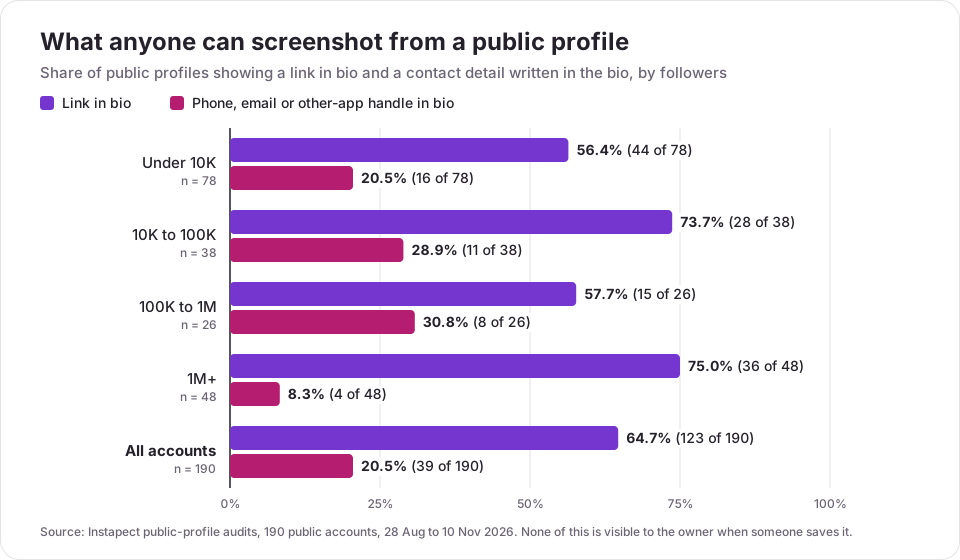
Finding 1: about 1 in 5 public profiles puts a phone number, email or other-app handle in the bio. That text can be screenshotted by anyone, with no alert, and copied out of a screenshot in seconds. Mid-sized accounts (10K to 1M) do it most, 19 of 64. The biggest accounts mostly do not (4 of 48); they route contact through a link or a management email instead.
Finding 2: two thirds of profiles carry a link in bio. 123 of 190 profiles show a clickable link, so a screenshot of a profile usually captures a path to the person's other sites as well. If you want fewer details floating around in screenshots, the bio is the first place to trim; see what to put in an Instagram bio.
Finding 3: you cannot detect any of this from the profile side. No field in the public data, and nothing in Insights, records a screenshot. Instapect does not and cannot either: it reads the same public posts and profile fields any visitor sees, and nothing about who viewed or saved them. To check what your own public profile shows to a stranger, you can run it through the Instagram profile analyzer, or simply open your profile from a logged-out browser.
Mistakes to avoid
- Trusting "screenshot detector" apps. No third-party app can see screenshots of your Stories or posts, because Instagram does not record them. Apps that promise this, or that ask for your password, are a security risk.
- Treating a Close Friends Story as private. Close Friends limits who sees it, not who saves it.
- Assuming no alert means nobody saved it. Instagram itself says people can capture disappearing content "using other devices".
- Assuming a normal DM photo is protected. Only View once, Allow replay, vanish mode and timed messages carry an alert. A photo sent with Keep in chat does not.
- Posting contact details you would not want copied. A phone number in a public bio can be screenshotted by anyone with no record at all.
- Believing old screenshots of the 2018 star icon. That test ended in June 2018.
Frequently asked questions
Does Instagram notify when you screenshot a Story?
No. Instagram does not notify anyone when you screenshot or screen record their Story, including Close Friends Stories. It tested Story screenshot alerts with a small group in February 2018 and ended the test in June 2018.
Does Instagram notify when you screenshot a post?
No. Feed photos, carousels, feed videos and Reels can be screenshotted without any notification to the person who posted them.
Does Instagram notify when you screenshot a DM?
Only for disappearing content: photos and videos sent as View once or Allow replay, messages in vanish mode, and timed disappearing messages. Normal text, normal photos and shared posts in a chat do not trigger an alert.
Does Instagram notify when you screen record?
Not for Stories, posts, Reels or profiles. For disappearing photos, vanish mode and timed messages, assume a screen recording is flagged the same way a screenshot is; Instagram does not publish how it detects either.
Can you see who screenshotted your Instagram Story?
No. Your Story viewer list shows who watched the Story, not who saved it, and no setting or account type adds screenshot data.
Does Instagram notify when you screenshot a profile picture or Highlight?
No. Profile photos, bios, Highlights and Highlight covers can be screenshotted without a notification.
Does Instagram notify when you screenshot a Note?
No. Notes behave like the rest of the profile: no screenshot alert is sent.
Do Business or Creator accounts get screenshot data in Insights?
No. Insights show views, reach, likes, comments, shares and saves, but no screenshot count for any account type.
Someone seems to know I screenshotted their Story. How?
Instagram did not tell them. The likely explanations are that they saw you in their viewer list, that you shared or forwarded the Story, or that the screenshot was passed on and reached them.
I saw a screenshot notice in a normal chat. Why?
Check whether the message was sent with vanish mode, a disappearing messages timer, or as a View once or Allow replay photo; those are the formats that carry alerts. Some users have reported seeing screenshot notices in normal chats on r/Instagram, but as of 13 Nov 2026 Instagram's Help Center documents alerts only for disappearing content, so treat those reports as unconfirmed tests.
I sent a View once photo and it shows no screenshot status, but I know they saved it. What went wrong?
Instagram only shows the status when it detects a screenshot. A photo taken of the screen with a second phone cannot be detected, and Instagram says so in its vanish mode guidance.
Can I turn off screenshot notifications on Instagram?
No. There is no setting for it. If you do not want the sender to be told, the only way is not to screenshot disappearing content.
Sources
- Instagram Help Center: Send disappearing photos or videos in chats, checked 13 Nov 2026
- Instagram Help Center: See the status of a disappearing photo or video you've sent, checked 13 Nov 2026
- Instagram Help Center: Send messages in vanish mode, checked 13 Nov 2026
- Instagram Help Center: About disappearing messages in Instagram chats, checked 13 Nov 2026
- TechCrunch: Instagram is testing screenshot alerts for stories, 11 Feb 2018
- Engadget: Instagram ends Story screenshot notification test, 15 Jun 2018
- PostLink: Does Instagram notify screenshots in 2026?, updated 28 Aug 2026
- Instapect public-profile audits: 190 public accounts, 28 Aug to 10 Nov 2026, queried 13 Nov 2026