To hide likes on one of your Instagram posts, open the post, tap the three dots at the top and tap Hide like count. To hide it before you share, turn on Hide like and view counts on this post on the last screen. To stop seeing like counts on everyone else's posts, go to Menu > Like and share counts and turn on Hide like & share counts. You still see your own totals, and Instagram has let everyone hide like counts since 26 May 2021.
There is also a fourth thing people mean by "hide likes": hiding the posts you liked. That is a different setting, Likes you've made, covered below.
Disclosure: Instapect publishes this guide and makes one of the tools mentioned below. Every setting here is in the Instagram app and works without it.
TL;DR: hiding likes on Instagram in 2026
| What you want to hide | Where the setting is | Who it affects | Source |
|---|---|---|---|
| Like count on a post you already shared | Post > three dots > Hide like count | Everyone but you | Meta announcement, 26 May 2021 |
| Like count on a post you are about to share | Last screen > More options (or Advanced settings) > Hide like and view counts on this post | Everyone but you | Instagram Help Center, checked 2 Nov 2026 |
| Like counts on other people's posts in your feed | Menu > What you see > Like and share counts > Hide like & share counts | Only what you see | Same Help Center page |
| Which posts and Reels you liked | Menu > Likes you've made > choose who can see | Your followers and friends | Instagram Help Center, checked 2 Nov 2026 |
| Likes on Threads | Threads Settings > Content preferences > Hide like and share counts | Threads only | Instagram Help Center |
| How common it is | 50 of 220 audited accounts (22.7%) hid likes on at least one recent post; only 5 (2.3%) hid them on every post | Instapect, 28 Aug to 2 Nov 2026 | |
| Does it cost views? | Hidden-like posts got 1.00x the plays of the same account's typical post | Instapect, 45 accounts, 520 posts |
- Want to stop comparing your numbers with others? Turn on the feed setting. It changes nothing for anyone else.
- Want followers to stop judging your posts by likes? Hide the count post by post. There is no single switch for all your old posts.
- Want your likes to stay private? Use Likes you've made and pick Don't allow anyone. The person who posted still sees that you liked it.
The four ways to hide likes at a glance
| Setting | Hides | Can you still see the number? | Reversible? |
|---|---|---|---|
| Hide like count (existing post) | Likes and views on that one post | Yes, on your own post | Yes: three dots > Unhide like count |
| Hide like and view counts (new post) | Likes and views on the post you are sharing | Yes | Yes, same menu after posting |
| Hide like & share counts (feed) | Like and share counts on posts you scroll past | No, for others' posts; yes, for your own | Yes, toggle off |
| Likes you've made | Your likes on other people's posts and Reels | You always see your own likes in Your activity | Yes, change the option |
How to hide likes on your own Instagram posts
Hide likes on a post you already shared
- Open your profile and tap the post or Reel.
- Tap the three dots (⋯) above a photo post, or in the bottom corner of a Reel.
- Tap Hide like count.
The count disappears for everyone else straight away. Meta's 2021 announcement describes it this way: "You'll also have the option to hide like counts on your own posts, so others can't see how many likes your posts get." To bring it back, repeat the steps and tap Unhide like count.
Hide likes before you share a new post
- Create the post or Reel and go through to the last screen, where you write the caption.
- Tap More options at the bottom. On desktop, and on some app versions, this is labelled Advanced settings.
- Turn on Hide like and view counts on this post, then share.
The Help Center notes that "You'll still be able to see the total number of likes on your own posts." The setting also hides the view count, which matters for Reels.
Can you hide likes on all your posts at once?
No, not for your own posts. The Help Center lists two controls for posts you share: the toggle before sharing and the menu on an existing post. Both work on one post at a time. The "all posts" switch you see in many videos is the feed setting below, and it only changes what you see on other accounts.
That matches what accounts actually do. In Instapect's audits only 5 of 220 accounts hid likes on every recent post; most who hide do it on a few posts (see the data section).
How to hide like counts on everyone else's posts
If the goal is to stop seeing numbers while you scroll:
In the app: Profile > Menu (three lines, top right) > under What you see, tap Like and share counts > turn on Hide like & share counts.
On a computer: instagram.com > More (bottom left) > Settings > Like and share counts > turn on Hide like & share counts.
This applies to every post in your feed. It does not hide anything from other people, and it does not hide the counts on your own posts.
How to hide the posts you liked on Instagram
This is the setting behind searches like "hide what I liked on Instagram" and "hide my likes on Reels from friends".
- Open your profile and tap Menu (three lines).
- Tap Likes you've made.
- Pick one: Allow everyone, Allow people you follow, Allow close friends, or Don't allow anyone to see likes.
The Help Center is clear about the limit: "Regardless of your setting choice, the account that posted the content you liked can see that you liked their post or reel." Some app versions show the same control as Activity in Friends tab, where Reels you liked or commented on can appear for friends; picking No one there removes your likes from that tab (user reports on Reddit's r/Instagram, August 2025).
To remove likes rather than hide them, use Your activity > Interactions > Likes, where you can select several posts and unlike them together (Help Center).
How to unhide likes on Instagram
| To unhide | Do this |
|---|---|
| One of your posts | Post > three dots > Unhide like count |
| A post you hid before sharing | Same: three dots > Unhide like count |
| Counts on other people's posts | Menu > Like and share counts > turn off Hide like & share counts |
| Your own likes | Menu > Likes you've made > Allow everyone |
Can you see hidden likes on Instagram?
Not the number. When an account hides the like count, the total is gone for everyone except the owner, and no setting, app or website can show it. The Help Center describes seeing likes only on posts where the count is shown: "you can find a post's likes below it on Instagram."
What you can still see on a hidden post:
- Comments and the comment count. Hiding likes does not hide comments.
- Some names. Manychat's guide notes that hiding the count does not remove the likes: people can still tap and see accounts that liked it, without the total (Manychat).
- "Liked by [name] and others". You see people you follow who liked it, but not how many others.
Any site promising the exact hidden total is guessing or asking for your login. Instapect does not show hidden like counts either: its audits mark those posts as "hidden" and leave them out of like-based numbers.
What Instapect's audit data shows about hidden likes
We checked every recent post in Instapect's public-profile audits for Instagram's hidden-count flag to answer three questions: how many accounts hide likes, whether they hide them everywhere, and whether hiding costs a post any views.
Method. 220 public accounts audited between 28 August and 2 November 2026, with 2,543 recent posts. Quality filter: report not delisted, at least 6 recent posts returned, followers above zero. Unlike our other studies, accounts with hidden likes are kept in, because they are the subject. "Hides likes" means at least one recent post had its like and view counts hidden by the owner. For the views comparison we used the 45 accounts that hid some but not all posts (520 posts) and divided each post's plays and comments by the same account's median post, so 1.00x is a typical post for that account.
Finding 1: about 1 in 5 accounts hides likes on at least one post
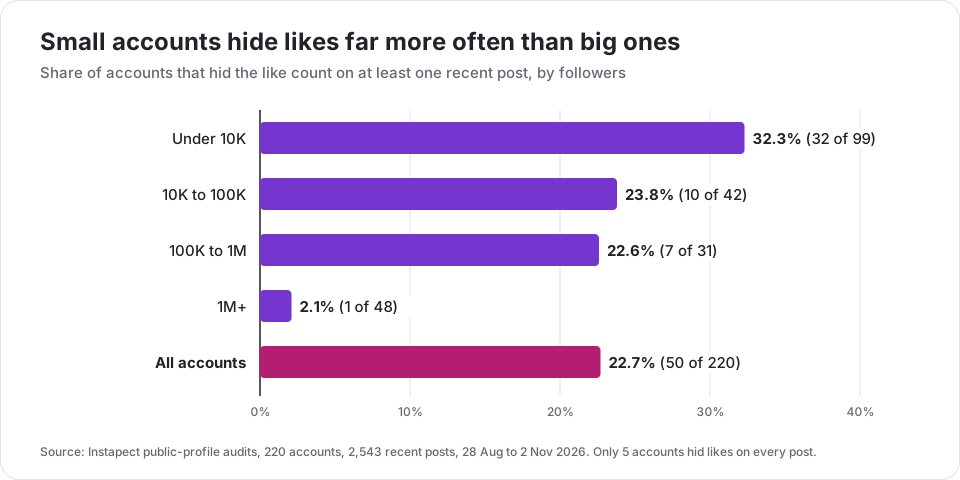
| Followers | Accounts | Hid likes on 1+ recent post | Hid on every post | Share of all recent posts hidden |
|---|---|---|---|---|
| Under 10K | 99 | 32 (32.3%) | 4 | 13.6% (153 of 1,125) |
| 10K to 100K | 42 | 10 (23.8%) | 0 | 8.7% (42 of 485) |
| 100K to 1M | 31 | 7 (22.6%) | 0 | 7.5% (27 of 359) |
| 1M+ | 48 | 1 (2.1%) | 1 | 2.1% (12 of 574) |
| All | 220 | 50 (22.7%) | 5 (2.3%) | 9.2% (234 of 2,543) |
Hiding likes is mostly a small-account habit. A third of accounts under 10K followers hid at least one recent post, against 1 of 48 accounts with a million or more. Big accounts tend to want the social proof that a large like count gives.
Finding 2: almost nobody hides likes on everything
Of the 50 accounts that hid likes, 25 hid them on a quarter of their recent posts or fewer, 20 hid between a quarter and all, and only 5 hid every post. The median hider hid 29% of recent posts. People use the toggle selectively, on posts they expect to underperform or prefer not to be judged on, rather than as an account-wide policy.
Finding 3: hiding likes did not cost views
| Inside the same 45 accounts | Posts | Median plays vs own typical post | Median comments vs own typical post | Reels | Carousels |
|---|---|---|---|---|---|
| Likes visible | 341 | 1.00x (173 with plays) | 1.00x | 51.0% | 33.7% |
| Likes hidden | 179 | 1.00x (82 with plays) | 0.89x | 45.8% | 38.0% |
Posts with hidden likes got the same plays as the account's other posts. Comments were about 11% lower, which fits people hiding likes on posts they already expect to be quieter. Instagram has not published anything saying the setting affects ranking, and this data gives no sign that it does. It is a correlation inside a small sample, not proof.
Limitations. These accounts were chosen by the people who ran audits, not sampled at random; the 1M+ tier is mostly celebrities and brands; and plays were only recorded where Instagram returned them (255 of 520 posts).
Should you hide likes on Instagram?
| Your situation | Hide likes? | Why |
|---|---|---|
| Personal account, likes make you anxious | Yes, both feed and own posts | Instagram built it for this: the 2021 test was to see if hiding counts would "depressurize people's experience" |
| Creator testing new formats | On test posts only | A quiet test post will not drag down how your profile looks |
| Creator seeking brand deals | Mostly no | Brands check likes and engagement rate on the public profile; hidden counts mean they ask for Insights screenshots instead |
| Brand account | Rarely | Visible likes act as social proof; only 1 of 48 accounts over 1M in our audits hid any |
| Private account | Optional | Only approved followers see counts anyway |
If you hide likes and still pitch brands, keep Instagram Insights screenshots ready, because the people vetting you lose the number they use first. The influencer vetting guide explains what brands check instead.
How hidden likes change engagement rate
Engagement rate by followers is (average likes + average comments) / followers x 100 (full formula). When likes are hidden, nobody outside the account can calculate it for those posts. Tools handle this in different ways:
- Count hidden posts as zero likes. This makes the account look far worse than it is.
- Use comments only. This also understates engagement, since likes are usually most of it.
- Leave hidden posts out of like-based numbers. Instapect does this: the posts still count for posting cadence, format, captions and comments, and the report says how many were excluded.
So if you compare an account against engagement benchmarks by follower count, check first whether any of its posts hide likes. The engagement rate calculator shows the number of hidden-like posts in each report; the NASA sample report shows how a full report reads.
Mistakes to avoid when hiding likes
- Turning on the feed setting and expecting your posts to be hidden. Hide like & share counts only changes what you see.
- Assuming hidden means private. Your likes on other posts are controlled separately in Likes you've made, and the poster always sees them.
- Hiding the count to hide who liked. People can still see some of the accounts that liked a post; only the total goes.
- Forgetting it also hides views. On Reels, hiding likes hides the play count from others too, which matters if a brand asked for public view proof.
- Using "see hidden likes" apps. None can read a hidden count, and many ask for your password.
- Mixing Instagram and Threads settings. Threads has its own toggle under Content preferences.
Frequently asked questions
How do I hide likes on Instagram?
Open the post, tap the three dots and tap Hide like count. For a new post, turn on Hide like and view counts on this post under More options before you share. To stop seeing counts on other accounts, go to Menu > Like and share counts and turn on Hide like & share counts.
How do I hide likes on all my Instagram posts at once?
You can't for your own posts. Instagram hides counts on your posts one at a time, either before sharing or from the post's menu. The global switch, Hide like & share counts, only hides counts on other people's posts in your feed.
How do I hide what I liked on Instagram?
Go to your profile > Menu > Likes you've made and choose Don't allow anyone to see likes, or limit it to people you follow or close friends. The account that posted still sees your like.
If I hide likes on Instagram, can I still see them?
Yes. You always see the total likes on your own posts, and you can see the posts you liked in Your activity. Only other people lose the number.
Can you see hidden likes on someone else's Instagram post?
No. The total is visible only to the account that posted. You may still see names of people you follow who liked it, and you can see every comment, but no app or website can show the hidden count.
Does hiding likes on Instagram affect reach?
Instagram has not said it does. In Instapect's audits, posts with hidden likes got 1.00x the plays of the same account's other posts (45 accounts, 520 posts), so there was no sign of a reach penalty.
I can't find the "Hide like count" option. What's wrong?
Update the app first; the menu labels move between versions. On a Reel, the three dots are at the bottom right, not the top. Before sharing, look under More options or Advanced settings on the caption screen. If it is still missing, try the setting on instagram.com, which has the same toggle.
I turned on "Hide like & share counts" but people can still see my likes. Why?
That setting only hides counts on posts you see. To hide the count on your own posts, open each post and tap Hide like count.
How do I unhide likes on Instagram?
Open the post, tap the three dots and tap Unhide like count. For the feed, turn off Hide like & share counts in Menu > Like and share counts.
Why does Instagram let you hide likes?
Instagram tested hidden counts to see if it "might depressurize people's experience". Meta said the results were mixed, "beneficial for some, and annoying to others", so on 26 May 2021 it made hiding optional for everyone on Instagram and Facebook.
Do brands care if an influencer hides likes?
Often, yes. Brands use likes to estimate engagement before they ask for data. If you hide them, expect to send Insights screenshots with reach and engagement for recent posts.
Sources
- Instagram Help Center, Hide or unhide like counts on Instagram posts and reels, retrieved 2 November 2026.
- Instagram Help Center, Manage who can see your likes on content on Instagram, retrieved 2 November 2026.
- Instagram Help Center, See a post's likes on Instagram, retrieved 2 November 2026.
- Instagram Help Center, Hide the like and share counts of a post on Threads and Remove your likes from multiple Instagram posts, retrieved 2 November 2026.
- Instagram, Giving People More Control on Instagram and Facebook, 26 May 2021.
- Manychat, Can You Hide Your Likes on Instagram?, retrieved 2 November 2026.
- Instapect audit data: 220 public accounts, 2,543 recent posts, audited 28 August to 2 November 2026; quality bar: not delisted, at least 6 recent posts, followers above zero.