To add music to Instagram, start a post, Reel or Story as usual and tap the music note (or Add music on a feed post) before you share. Search a song, drag the waveform to pick the part that plays, tap Done, then share. A photo post can carry a clip of 5 to 90 seconds, a photo Story up to 15 seconds, and a song on your profile plays a 30-second preview (Later, MacRumors, checked 18 Nov 2026).
Two rules catch most people out. A carousel that mixes photos and video cannot take music (Instagram Help Center), and business accounts see a smaller library of royalty-free tracks instead of the full licensed catalog. Below are the steps for each format, how to change the song after posting, fixes for a missing music button, and what 1,059 Reels from public profiles audited by Instapect show about clip length: the median Reel runs 30 seconds, so one chorus covers half of all Reels.
Disclosure: Instapect publishes this guide. Instapect reads public profile data only and has no access to Instagram's music library or your audio settings. Every step here happens in the Instagram app and works without Instapect.
Updated on 18 November 2026.
TL;DR: adding music to Instagram in 2026
| Where | Where the music button is | Clip length | Can you change it after posting? |
|---|---|---|---|
| Feed photo or single video | Add music on the edit screen before the caption | 5 to 90 seconds | Yes, Edit > Replace Audio (rolling out since July 2026) |
| Photo carousel | Add music before sharing, one track for all slides | Same slider as a post | Yes, Replace Audio |
| Carousel with any video | No music option | Not available | No |
| Reel | Music note in the Reels editor | Follows your Reel; Reels can run up to 3 minutes | Only to swap a track Instagram muted |
| Story | Music note at the top, or the Music sticker | Up to 15 seconds on a photo | No: delete and post again |
| Profile | Edit profile > Add music to your profile | 30-second preview | Yes, any time from Edit profile |
| Note | Music note while writing the note | Up to 30 seconds | Post a new note |
Quickest fix when the button is missing: update the app, then check your account type. A business account shows a smaller royalty-free library, and some countries have no licensed music at all.
How do you add music to an Instagram post?
This works for a single photo, a single video and a photo carousel.
- Tap + at the bottom of the app (or swipe right from the feed) and choose Post.
- Select your photo or video and tap Next.
- Apply a filter if you want, then tap Next again. On recent app versions the Add music button sits on this edit screen; on some it appears on the final screen under the caption.
- Search a song or browse For you, Trending and Saved. Tap a track to preview it.
- Drag the waveform to choose the part that plays and set the length. Feed posts allow a clip of 5 to 90 seconds (Later, updated 22 Aug 2025).
- Tap Done, write your caption and tap Share. The song title and artist show under your username, and viewers can mute it.
For the full posting flow, including the desktop path that has no music library, see how to post on Instagram.
How do you add music to an Instagram carousel?
Follow the post steps above, but tap the stacked squares icon first and select up to 20 photos. One track plays across every slide.
The limit that matters: music cannot be added to carousels with videos (Instagram Help Center, checked 18 Nov 2026). If one slide is a video, the Add music option disappears and the video keeps its own sound. Your choices are a photo-only carousel, or editing the song into the video in another app before you upload. Carousels are common in the audit data: 27% of the 1,912 posts sampled were carousels, rising to 42% for accounts above 10M followers. Instagram carousel covers sizes and the 20-slide limit.
How do you add music to an Instagram Reel?
- Tap + and choose Reel, then record or tap the gallery icon to upload clips.
- Tap the music note (on some versions, the Audio button in the editor).
- Search or browse, tap a track to preview it, then tap it to add.
- Drag the waveform to the part you want. Use the volume controls to balance the song against your own sound: turn the music down if you are talking.
- Tap Done, then Next, add a caption and cover, and tap Share.
To reuse a sound from someone else's Reel, tap the audio name at the bottom of that Reel, then Use audio. Reels can be up to 3 minutes long since January 2025 (RouteNote, 20 Jan 2025). Which tracks you may use depends on licensing, and Instagram can mute a track later if its agreements change (What audio you can use in your reel). The full editing flow, templates and the Edits app are in how to make a Reel on Instagram.
How do you add music to an Instagram Story?
- Swipe right from the feed or tap your profile photo with the + to open the Story camera. Take a photo or video, or swipe up to pick one from your gallery.
- Tap the music note at the top, or tap the sticker icon and choose Music.
- Search or browse, preview, and tap a song.
- Drag the slider to pick the section. On a photo Story the clip can run up to 15 seconds (Later); on a video Story the song plays for the length of the video (SlashGear).
- Pick a display style (lyrics, album cover, or none), tap Done, place the sticker and tap Your story.
The Music sticker sits in the same tray as the link, poll, question and Cutouts stickers; see how to add stickers on Instagram Stories for what each one does.
To hide the sticker but keep the sound, pick the style with no visible card, or shrink it and drag it to the edge of the frame. Sharing a song from Spotify or Apple Music to your Story adds a card that links to the track; it does not play the song as a soundtrack in the same way (Later).
How do you add a song to your Instagram profile?
- Go to your profile and tap Edit profile.
- Tap Add music to your profile.
- Search the same licensed library used for Reels and posts, pick a song and choose a 30-second section (MacRumors, 23 Aug 2024).
- Tap Done, then Save.
The song shows under your bio. It does not autoplay: visitors tap play. To change or remove it, go back to Edit profile and tap the song.
How do you add music to an Instagram Note?
Open Messages, tap your profile picture at the top to start a note, type your text, tap the music note and pick up to 30 seconds of a song (SlashGear). Notes are visible to followers you follow back or your Close Friends. You can also link Spotify so the note shows what you are playing. Instagram Notes has the full steps.
Can you change the music after posting?
On feed posts and photo carousels, yes. Instagram launched Replace Audio on 21 July 2026: open the post, tap the three dots, tap Edit, then choose the option to replace the audio and pick a new track. The post keeps its likes, comments and shares (TechCrunch, 21 Jul 2026). It reached accounts in phases, so if you do not see it, update the app and check again later.
On Reels, you can only swap a track that Instagram has muted for licensing reasons. On Stories, you cannot edit the music: delete the Story and post it again. Your profile song can be changed any time from Edit profile.
How long should the music clip be? What 1,059 audited Reels show
Instapect audits public Instagram profiles. For this guide, we measured the length of every Reel in the stored sample to see how much song a typical Reel actually needs.
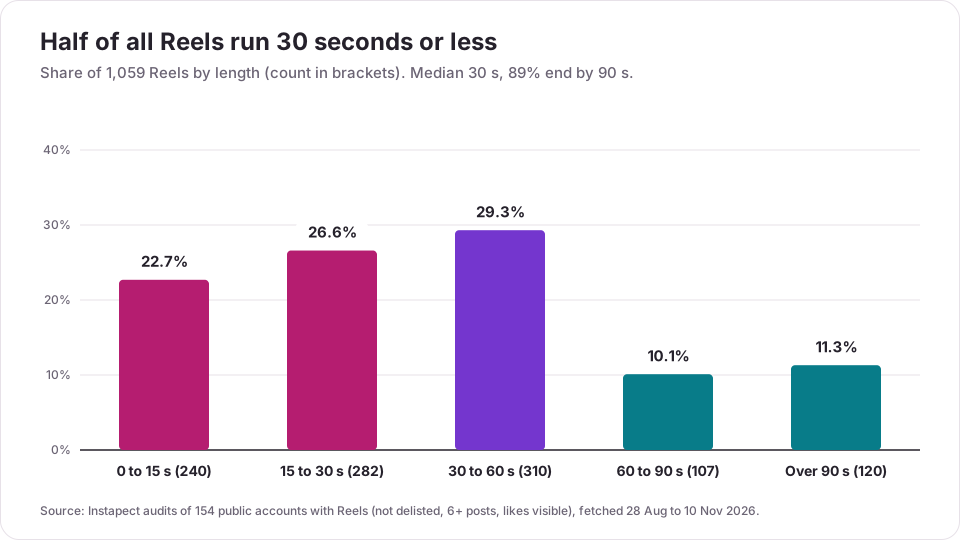
| Reel length | Reels | Share | Cumulative | Median engagement rate (likes + comments / followers) |
|---|---|---|---|---|
| 0 to 15 seconds | 240 | 22.7% | 22.7% | 0.57% |
| 15 to 30 seconds | 282 | 26.6% | 49.3% | 0.74% |
| 30 to 60 seconds | 310 | 29.3% | 78.6% | 1.17% |
| 60 to 90 seconds | 107 | 10.1% | 88.7% | 1.15% |
| Over 90 seconds | 120 | 11.3% | 100% | 1.73% |
What this means when you pick a clip:
- Half of all Reels end by 30 seconds (median 30.0 seconds; middle half 15 to 57 seconds; mean 44.9 seconds). A single verse or chorus usually covers the whole video.
- 89% of Reels end by 90 seconds, the same ceiling as a feed post clip. Only about one Reel in nine runs longer.
- Reels are the default format. 57% of the 1,912 posts sampled were Reels, 27% carousels and 16% single images. Mid-size accounts lean hardest on Reels: 69% of posts from accounts with 100K to 1M followers.
- Longer Reels did not show weaker engagement in this sample: the median rate for 30 to 60 second Reels (1.17%) was about twice that of Reels under 15 seconds (0.57%). Different accounts post different lengths, though, so treat this as a hint, not a rule.
- Few captions mention the song. Only 56 of 1,912 captions (2.9%) used words like song, music, audio or sound. The track label under the username does that job.
Method and limits. 154 public accounts with at least one Reel, from Instapect audits fetched 28 Aug to 10 Nov 2026 (not delisted, 6 or more posts in the sample, likes visible, followers above zero); 1,059 Reels with a reported duration, 993 of them posted since November 2025 (median also 30.0 seconds). Engagement rate is likes plus comments divided by followers. The accounts are the ones people chose to audit, so large and famous profiles are over-represented. Public data shows length, likes and comments; it does not show which song a Reel used, reach or watch time.
Why can't I add music on Instagram? Fixes
| Problem | Likely cause | Fix |
|---|---|---|
| No music button at all | Outdated app | Update Instagram from the App Store or Google Play, then restart the app |
| Only a short list of generic tracks | Business account, which gets Meta's royalty-free Sound Collection instead of the licensed catalog (Soundstripe) | Switch to a creator account in Settings > Account type and tools if you do not need business features |
| A specific song is missing | Licensing differs by country and by song | Try a different version of the track, or pick a similar song |
| Add music vanished on a carousel | One of the slides is a video | Remove the video or add the song to the video in another app first |
| Music worked yesterday, now muted | The rights holder's agreement changed | On a feed post, use Replace Audio; on a Reel, swap only if Instagram offers it |
| Spotify song in a Story has no sound | A shared Spotify card is a link, not a soundtrack | Use the Music sticker inside Instagram instead |
| No Replace Audio option | Phased rollout, or the post is a Reel or Story | Update the app; Stories need to be deleted and reposted |
Mistakes to avoid
- Mixing a video into a carousel you want music on. The option disappears without a warning. Decide on music first.
- Letting the song drown your voice on a Reel. Lower the music in the volume controls before you share.
- Picking the intro of a song. Many tracks start slowly; drag to the hook so the first seconds land.
- Uploading a video with a commercial song baked in. Instagram can still detect and mute it, and business accounts risk takedowns. Use the in-app library or royalty-free audio.
- Expecting a profile song to autoplay. It does not. Mention it in your bio or a Story if it matters to you.
- Waiting for a Story edit option. There is none. Delete and repost within minutes if the song is wrong.
Can you use your own music on Instagram?
Instagram has no button to upload an audio file into its music library. Musicians get their tracks into the library through a music distributor that delivers to Meta (DistroKid, TuneCore, CD Baby and similar services). Everyone else can edit their own track into the video before uploading, which posts it as original audio. If the track is yours, keep proof of ownership in case Instagram flags it.
Frequently asked questions
How do I add music to an Instagram post after I have already posted it?
Open the post, tap the three dots, tap Edit, then use Replace Audio to pick a track. It works on feed posts and photo carousels and keeps your likes and comments. Instagram launched it on 21 July 2026 and rolled it out in phases.
Why is there no music option on my Instagram?
Usually an old app version, a business account (smaller royalty-free library), or a country where licensed music is not available. Update the app first, then check your account type in Settings > Account type and tools.
Why can't I add music to my carousel?
Because one of the slides is a video. Instagram only allows music on carousels made entirely of photos. Remove the video or add the song to it in an editing app before uploading.
How long can music be on an Instagram post?
A feed post clip can run from 5 to 90 seconds. Photo Stories take up to 15 seconds, profile songs and Notes play up to 30 seconds, and on a Reel the music follows the length of your video.
Can you add music to an Instagram post from a computer?
No. Instagram on desktop has no music library for posts or Reels. Add the music in a video editor before uploading, or post from the phone app.
Why do business accounts have fewer songs on Instagram?
Business accounts signal commercial use, and Instagram's licensing agreements do not cover the full catalog for that, so they see Meta's Sound Collection of royalty-free tracks. A creator account gets the wider licensed library while keeping insights.
How do I add a song to my Instagram profile?
Go to Edit profile > Add music to your profile, pick a song, choose a 30-second section and save. Visitors see it under your bio and tap to play.
Can I change the song on my Instagram Story?
No. Stories cannot be edited after you share them. Delete the Story and post it again with the right song.
My Reel's music was muted. What happened?
The rights holder's agreement with Instagram changed or the track was flagged. The Reel stays up without the sound. If Instagram offers it, swap in a new track from the Reel's menu; otherwise repost with a different song.
Can I use music from Spotify on Instagram?
You can share a Spotify song to your Story as a card that links to the track, and link Spotify to Notes. To have the song play as the soundtrack of a post, Reel or Story, choose it from Instagram's own music library.
Does adding music help an Instagram post get more views?
Instagram does not publish a rule that music boosts reach. In our audit sample, Reels were 57% of all posts, and the track label gives viewers one more way to find your post through the song's audio page. Measure your own results by comparing posts with and without music.
Sources
- Instagram Help Center, article on adding audio to carousel posts ("Music cannot be added to carousels with videos"), retrieved 18 Nov 2026.
- Instagram Help Center, What audio you can use in your reel on Instagram, retrieved 11 Nov 2026.
- Later, How to add music to Instagram posts (feed clip 5 to 90 seconds, Story clip up to 15 seconds, business library limits), updated 22 Aug 2025, retrieved 18 Nov 2026.
- SlashGear, How to add music to an Instagram Story, post or Note (Note music up to 30 seconds), 12 May 2024, retrieved 18 Nov 2026.
- MacRumors, Instagram gains Myspace-style Song on Profile feature (30-second profile song, no autoplay), 23 Aug 2024.
- TechCrunch, Instagram now lets you swap out the music in your old posts, 21 Jul 2026.
- RouteNote, Instagram expands Reels limit to 3 minutes, 20 Jan 2025.
- Soundstripe, Instagram Music Library: what's in it, what's missing (business accounts get the Sound Collection), retrieved 18 Nov 2026.
- Instapect public-profile audits: 154 accounts, 1,059 Reels and 1,912 posts, fetched 28 Aug to 10 Nov 2026.
Want to see how any public account mixes Reels, carousels and photos? Run a free public profile audit or try the Instagram analytics tool.