Restricting someone on Instagram quietly limits them without blocking them. Their new comments on your posts become visible only to them unless you approve each one, their messages move to Message Requests, they can't see when you're online or when you've read their messages, and you stop getting notifications for their comments (Instagram Help Center, read 24 Nov 2026). Instagram does not tell them. They can still follow you and see your posts.
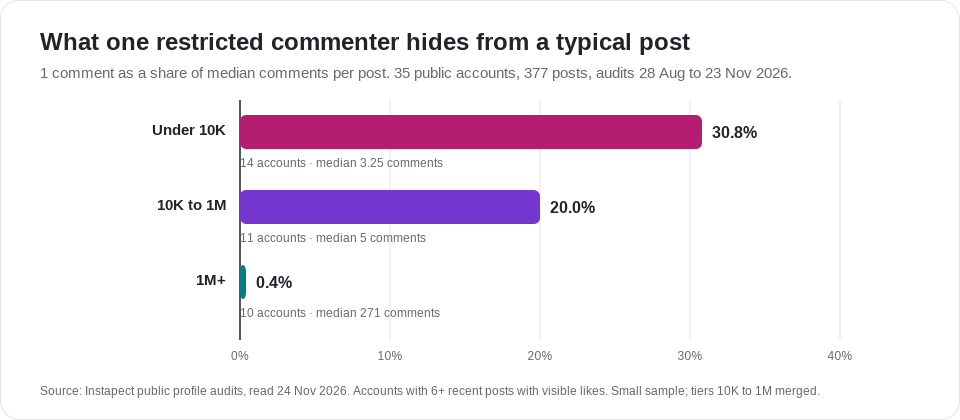
On a small account that matters more than it sounds. Across 35 public profiles audited by Instapect, a typical post on an account under 10K followers gets a median of 3.25 comments, so one restricted person who comments on every post accounts for about 31% of the visible conversation. Below: what changes for both of you, how to restrict and unrestrict from four places, how to tell if you have been restricted, and when Block, Mute or Limits fit better.
Disclosure: Instapect publishes this guide and makes one of the tools mentioned below. Every step here happens inside Instagram and works without it. Instapect reads public profile data only: it cannot restrict anyone, see your restricted list, or tell you whether someone restricted you.
TL;DR: what restricting someone on Instagram does
| Question | Short answer | Source |
|---|---|---|
| Their new comments on your posts | Visible only to them; you can tap See comment, then Approve or Delete | Instagram Help Center, 24 Nov 2026 |
| Their messages | Chat moves to Message Requests; future messages land there too | Instagram Help Center |
| Read receipts | You can read their messages without them seeing Seen | Instagram Help Center |
| Activity status | They can't see when you're online | Instagram Help Center |
| Comment notifications | You stop getting them for that person | Instagram Help Center |
| Tags, mentions, remixes | They can't tag or mention you or remix your content | About Instagram, 22 Nov 2024 |
| Are they told? | No | About Instagram |
| Can they still see your profile and posts? | Yes, and they can keep following you | Instagram Help Center |
| Fastest way | Their profile > Options (three dots) > Restrict | Instagram Help Center |
| Undo it | Menu > Restricted (under How others can interact with you) > Unrestrict | Instagram Help Center |
Restrict vs Block vs Mute at a glance
| What changes | Restrict | Block | Mute |
|---|---|---|---|
| They can see your profile and posts | Yes | No | Yes |
| Their comments on your posts | New ones hidden from everyone else unless you approve | Old likes and comments removed | Unchanged |
| Their DMs | Go to Message Requests, no read receipts | Not delivered | You can mute message notifications |
| They see your activity status | No | No | Unchanged |
| They can tag or mention you | No | No | Yes |
| You still see their posts and Stories | Yes | No | No (you hide them from your feed) |
| They are notified | No | No | No |
| Best for | Someone you can't openly block: a classmate, coworker, relative or persistent commenter | Anyone you want gone, including their new accounts | Someone whose posts you don't want to see but don't want to unfollow |
Sources: Restrict or unrestrict someone (Instagram Help Center, read 24 Nov 2026), Block, Mute, Restrict, Report: what's the difference? (About Instagram, 22 Nov 2024), What happens when you block someone (Help Center). Full block steps are in our guide on how to block someone on Instagram.
What happens when you restrict someone on Instagram?
Think of Restrict as a one-way glass wall around your comment section and inbox. The restricted person keeps acting normally and sees their own comments posted, but nobody else sees those comments until you let them through. Here is each change, in the words Instagram uses.
What happens to their comments
Their new comments on your posts are visible only to them. Under the comment you see a placeholder with See comment. Tap it to read it, then:
- Approve (and Approve again to confirm) to make it visible to everyone,
- Delete to remove it, or
- ignore it, and it stays visible only to them.
You won't get notifications for future comments from that person. The Help Center wording covers new comments; comments they left before you restricted them are not described, so check older posts and delete anything you don't want public.
What happens to their messages
Your chat with them moves from your main inbox to Message Requests, and anything they send later goes there automatically. You can open and read their messages without them seeing that you did. From there you can delete the message, unrestrict them or block them. If you share a group chat, Instagram warns you that you will see a restricted account's messages, and you can stay or leave the group.
What they can no longer see or do
They can't see when you're online or whether you've read their messages. According to Instagram's own guide, they also can't tag or mention you or remix your content.
What stays the same
They can still find your profile, follow you (or stay following you), see your posts and Stories if your account settings allow it, and like your posts. You can still see their posts and Stories. Nothing in your follower count changes.
How to restrict someone on Instagram
Instagram offers four routes. Pick the one that matches where you are when the problem shows up.
- They're commenting right now → restrict from the comment (Method 2).
- They're messaging you → restrict from the chat (Method 3).
- You want to restrict several people or review the list → use settings (Method 4).
- Anything else → their profile (Method 1), the one route that works in every app, including Instagram Lite.
Method 1: from their profile (iPhone, Android, Lite and web)
- Tap their username on a post, Story or comment, or tap Search and type their username.
- Tap Options (the three dots) in the top right of their profile.
- Tap Restrict.
Instagram's Help Center lists the profile route for the Instagram app, Instagram Lite and instagram.com on a computer. On the web, the ... menu sits next to the username.
Method 2: from a comment (Instagram app)
- Open your post and tap Comments.
- Tap and hold the person's comment.
- Tap Restrict account.
Instagram also lets you restrict several people at once from your comments, which helps when a few accounts pile onto one post.
Method 3: from a chat (Instagram app for iPhone and Android)
- Tap Messages at the bottom of the app.
- Open the chat with the person.
- Tap their name at the top of the chat.
- Tap Options in the top right, then Restrict.
- Tap Restrict again to confirm.
Method 4: from settings (iPhone and Android)
- Tap Profile or your profile picture in the bottom right.
- Tap Menu (three lines) in the top right.
- Under How others can interact with you, tap Restricted.
- Tap Next.
- Search for the account and tap Restrict next to their username.
Prefer a video? Tech is Easy walks through restricting and unrestricting in 72 seconds: How To Restrict Someone On Instagram (YouTube, 19 Apr 2026).
How to unrestrict someone on Instagram
Use whichever is quicker:
- Settings: Profile > Menu > Restricted (under How others can interact with you) > Unrestrict next to their name.
- Their profile: Options (three dots) > Unrestrict.
- A comment: tap and hold their comment > Unrestrict account.
- A chat: open the chat in Message Requests, tap their name > Unrestrict.
They are not notified when you unrestrict them either. Comments they wrote while restricted are not described as becoming public automatically, so approve any you want others to see.
How to check that Restrict worked
- Look at your list. Profile > Menu > Restricted should show their username with an Unrestrict button next to it. That is the only certain check.
- Check a comment. Their next comment on your post should show the See comment placeholder instead of the text.
- Check your inbox. Their chat should be gone from your main inbox and sit in Message Requests.
- Ask a friend. If the person comments, a friend viewing the same post should not see that comment. If the friend can see it, either you approved it or the restriction is on a different account (people often have a second account).
What one restricted commenter means for your posts: data from 35 public profiles
Restrict only touches comments others can see, so how much it changes your page depends on how many comments your posts get in the first place. To put a number on that, Instapect looked at public audit reports.
Method. 35 public Instagram accounts from Instapect's public report directory, each with at least 6 recent posts with visible like counts and more than 0 followers, 377 recent posts in total (370 with visible likes). Audits ran from 28 Aug to 23 Nov 2026 and were read on 24 Nov 2026. For each account we took the median comments per post from its report, then the median of those medians within each follower tier. "Share of the conversation" means one comment out of a typical post's comments (1 divided by the tier median).
| Follower tier | Accounts | Median comments per typical post | One restricted commenter's share of a typical post's comments | Comments per 100 likes (median) | Accounts where a typical post gets 2 or fewer comments |
|---|---|---|---|---|---|
| Under 10K | 14 | 3.25 | 30.8% | 6.68 | 7 of 14 (4 get none) |
| 10K to 1M | 11 | 5 | 20.0% | 2.27 | 3 of 11 |
| 1M+ | 10 | 271 | 0.4% | 0.85 | 0 of 10 |
| All | 35 | 7 | 14.3% | 10 of 35 |
What this tells you:
- On small accounts, one person can be a third of the conversation. Half of the under-10K accounts (7 of 14) get 2 or fewer comments on a typical post. If one of those commenters is the problem, Restrict changes what every visitor sees, not a footnote.
- On big accounts, Restrict is a precision tool. At 1M+ followers a typical post gets 271 comments, so one restricted account is 0.4% of the thread. That is why large accounts lean on Limits and hidden words for pile-ons and use Restrict for repeat individuals.
- Comments arrive in bursts. In 20 of 35 accounts the average comments per post was at least 1.5 times the median, meaning a few posts pull most of the comments. Example: on @mowj.collection the median post got 6 comments while one post got 1,275. Bursts are where unwanted comments cluster, so check your top posts first after restricting someone.
- Smaller accounts talk more per like. Under 10K, posts get 6.68 comments per 100 likes against 0.85 at 1M+. Comments are a bigger part of how small accounts look to visitors and brands, which is the reason to clean them up rather than ignore them.
Limits. 35 accounts is a small sample, and the accounts are ones people chose to audit on Instapect, not a random cut of Instagram. Tiers between 10K and 1M are merged because there were only 5 accounts from 10K to 100K. Public comment counts can include comments the owner has hidden, and we could not confirm from Instagram's documentation whether a restricted person's unapproved comments are counted in the public total. Instapect sees public counts only; it never sees who is restricted.
How to know if someone restricted you on Instagram
Instagram doesn't notify you and doesn't show a "restricted" label anywhere, so there is no certain way to tell. These signs together point to it:
| Sign | What you see | How reliable |
|---|---|---|
| Your comments get no reaction | Your comment shows normally to you, but nobody likes or replies to it | Weak on its own |
| A friend can't see your comment | Ask someone to open the same post; your comment is missing for them | Strongest sign |
| No Seen on your messages | Your DMs never show as read, even when the person is clearly active | Medium (they may have read receipts off) |
| No activity status | You stopped seeing "Active now" or "Active 5m ago" for them | Weak (they may have turned activity status off for everyone) |
| You can't tag or mention them | Their username doesn't come up, or the tag fails | Medium |
If the friend test shows your comment missing while you can still see their profile and posts, restriction is the likely explanation. If you can't find their profile at all, you are probably blocked, not restricted.
Mistakes to avoid when restricting someone
- Expecting Restrict to stop them seeing you. It doesn't. They can still view your profile, posts and Stories. If you need them out of sight, block them or make your account private.
- Forgetting older comments. Restrict covers new comments. Delete old ones you don't want public.
- Missing their messages entirely. Their chats move to Message Requests, which many people never open. Check it if you still need to hear from them (a coworker, for example).
- Restricting one account of a person with two. Restrict applies to the account you picked. Block offers to cover their other and future accounts; Restrict does not.
- Approving a comment by accident. Approve makes it public immediately. Use See comment to read first.
- Using Restrict for threats or harassment. Restrict hides the problem from others but doesn't stop it. For anything serious, block, report and save evidence.
Frequently asked questions
What does restricting someone on Instagram do?
It hides their new comments on your posts from everyone except them (unless you approve each one), moves their messages to Message Requests, lets you read their messages without a read receipt, hides your activity status from them, stops comment notifications from them, and stops them tagging or mentioning you. They can still follow you and see your posts.
Does Instagram notify someone when you restrict them?
No. Instagram does not send a notification when you restrict or unrestrict someone, and the restricted person keeps seeing their own comments as normal.
Can a restricted account see my Story?
Yes, if your settings let them. Restrict does not hide your Stories or posts. To hide your Story from one person, use Hide story and live from in your Story settings, or block them.
Can a restricted person still message me?
Yes. Their messages arrive in Message Requests instead of your main inbox, you get no notification, and they can't see when you've read them.
What is the difference between restricting and blocking on Instagram?
Block cuts the person off: they can't find your profile, can't message you, and their old likes and comments are removed. Restrict keeps everything visible to them but quietly hides their new comments from others and moves their chats to requests. Neither one notifies the person.
Is restricting better than blocking?
It depends on what you need. Restrict is better when blocking would cause drama (a relative, a classmate, a coworker) or when you still want to read what they send. Block is better when you want the person gone, including any new accounts they create.
How do I unrestrict someone on Instagram?
Go to Profile > Menu > Restricted and tap Unrestrict next to their name, or open their profile, tap Options (three dots) and tap Unrestrict. They are not notified.
How do I see who I restricted on Instagram?
Tap Profile > Menu, then Restricted under How others can interact with you. Every restricted account is listed there.
I restricted someone but their comment is still visible. Why?
The comment was probably posted before you restricted them, or you tapped Approve on it. Restrict hides new comments only. Delete the comment, or check that you restricted the right account if the person has more than one.
I can't find the Restrict option. What's wrong?
Update the Instagram app first. On Instagram Lite, restricting only works from the person's profile (Options > Restrict). In settings, the list is under How others can interact with you > Restricted, not under Privacy.
Their messages disappeared from my inbox after I restricted them. Are they deleted?
No. Restricting moves the chat to Message Requests. Open Messages, tap Requests, and the conversation is there.
Can a restricted person see my comments on other people's posts?
Restrict controls your posts and your inbox. Your comments on other people's posts follow those posts' own settings, so a restricted person can generally still see them. Block them if that is a problem.
Sources
- Instagram Help Center: Restrict or unrestrict someone on Instagram, read 24 Nov 2026.
- About Instagram: Block, Mute, Restrict, Report: what's the difference?, 22 Nov 2024, read 24 Nov 2026.
- Instagram Help Center: What happens when you block someone on Instagram and Temporarily limit people from interacting with you, checked 23 Nov 2026.
- Tech is Easy, How To Restrict Someone On Instagram (YouTube, 19 Apr 2026, 1:12).
- Search demand: DataForSEO, United States, November 2026 (what does restricting someone on instagram do 9,900 a month; what happens when you restrict someone on instagram 6,600; what does restrict do on instagram 4,400; how to know if someone restricted you on instagram 1,600; how to restrict someone on instagram 880).
- Instapect public profile audits: 35 accounts, 377 recent posts, audits 28 Aug to 23 Nov 2026, read 24 Nov 2026.
See what your public comments look like
Restricting someone changes what visitors see under your posts. Run any public handle through the Instapect audit to see recent posts, public likes and comments, comments per 100 likes and engagement rate in one report, or read what a good engagement rate on Instagram is to put your numbers in context.